
Reviews



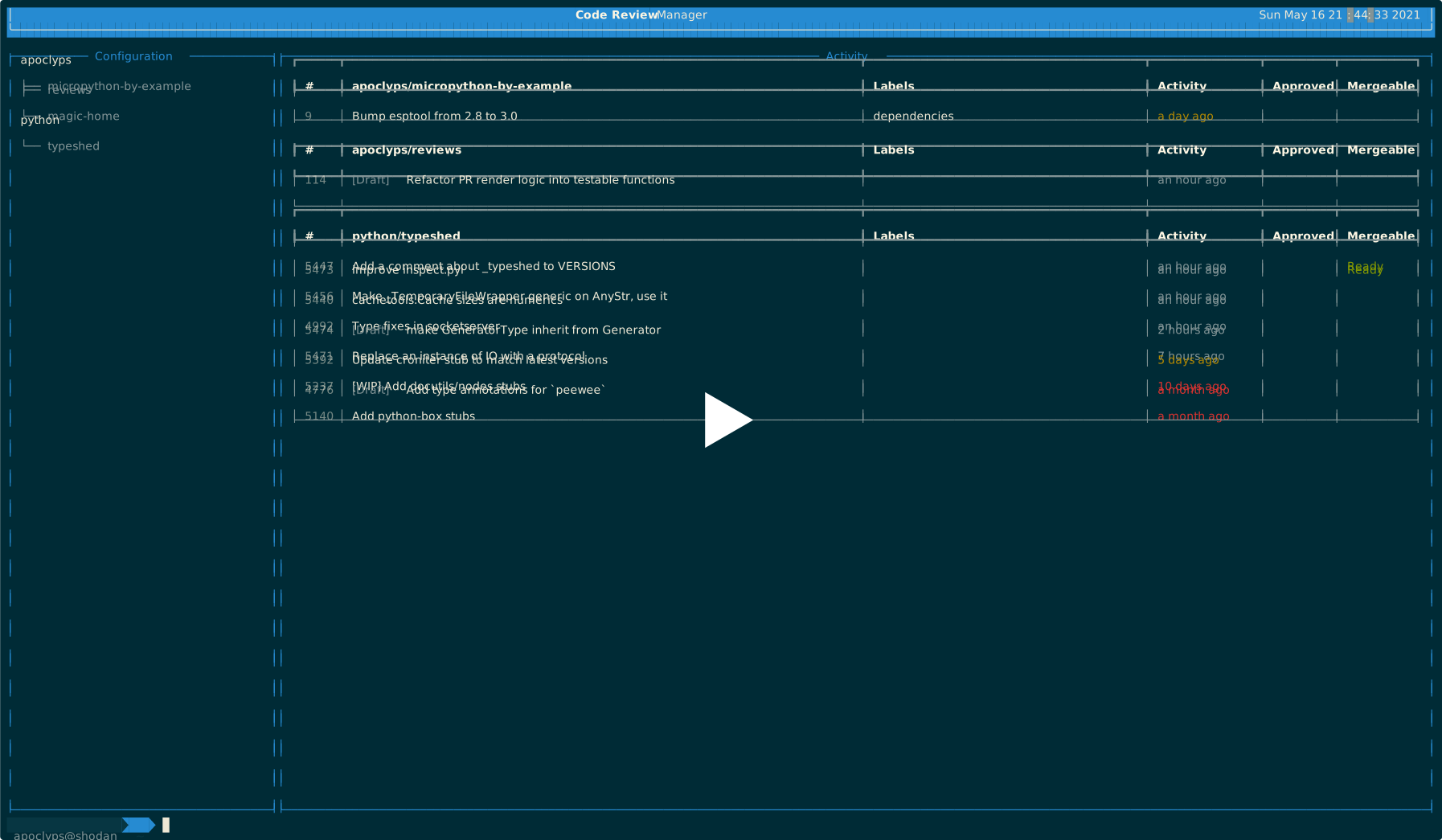
Simplify requests for code review with an all-in-one TUI dashboard providing an overview of open PRs requiring review!
Quick Start
If you want to get up and running with Reviews immediately, run:
export GITHUB_USER="your-github-username"
export GITHUB_TOKEN="your personal GitHub token used for interacting with the API"
export REVIEWS_GITHUB_REPOSITORY_CONFIGURATION="apoclyps/reviews"

pip install --upgrade reviews

reviews config --show

reviews dashboard
Additional Support
View Configuration
If you wish to view the configuration used by reviews at any time, you can use the following command to show all configuration (with secrets hidden or shown):
reviews config --hide

reviews config --show
Gitlab
If you wish to use reviews with Gitlab, you will need to specify the configuration like so: product id:project name/repository and use the --provider=gitlab flag when running reviews:
export GITLAB_USER=user
export GITLAB_TOKEN=token
export REVIEWS_GITLAB_REPOSITORY_CONFIGURATION="27629846:apoclyps/reviews"

reviews dashboard --provider=gitlab
Getting started with local development
To build and run the CLI on your host, you will need Python 3.9, pip, and virtualenv to build and run review.
If you wish to publish a PR with your changes, first create a fork on Github and clone that code.
$ gh repo clone apoclyps/reviews
$ cd reviews
$ python3 -m venv env
$ source env/bin/activate
(env)$ pip install -r requirements_dev.txt
(env)$ pip install -r requirements.txt
(env)$ python -m reviews dashboard
If you wish to keep a copy of Reviews on your host system, you can install and run it using:
$ export REVIEWS_GITHUB_REPOSITORY_CONFIGURATION="apoclyps/reviews"
$ python -m venv env
$ source env/bin/activate
$ python -m pip install -e .
$ reviews -h
You can run the Reviews within Docker:
docker-compose build cli && docker-compose run --rm cli python -m reviews dashboard
To build an image and run that image with all of the necessary dependencies using the following commands:
$ docker-compose build cli
$ docker-compose run --rm cli python -m reviews dashboard
For instructions on setting up a development environment outside of Docker, check out the wiki.
Configuration
Reviews supports both .ini and .env files. Reviews always searches for configuration in this order:
- Environment variables;
- Repository: ini or .env file;
- Configuration Path
- Review Defaults
The following steps are used to provide the configuration using a .env or .ini file. The configuration can be read from within the module/repository (default location set by decouple) using the .env file or via a location specified by an environmental variable that points to a .ini file located in the root of the project or in a location specified by PATH_TO_CONFIG.
Using an .env file within the repository
cd /home/<your-user>/workspace/apoclyps/reviews
touch .env

echo "REVIEWS_REPOSITORY_CONFIGURATION=apoclyps/micropython-by-example" >> .env
python -m reviews config
Using an .ini file within the repository
cd /home/<your-user>/workspace/apoclyps/reviews
touch settings.ini
echo "[settings]\nREVIEWS_REPOSITORY_CONFIGURATION=apoclyps/micropython-by-example" >> settings.ini

python -m reviews config
Providing a configuration path
If you wish to set the configuration path to use an ini or .env file when running the application, you can use the configuration of a specific file by supplying the path to the configuration like so:
cd /home/apoclyps/
touch settings.ini
echo "[settings]\nREVIEWS_REPOSITORY_CONFIGURATION=apoclyps/micropython-by-example" >> settings.ini

cd /home/<your-user>/workspace/apoclyps/reviews
export REVIEWS_PATH_TO_CONFIG=/home/<your-user>/

python -m reviews config
If at any time, you want to confirm your configuration reflects the file you have provided, you can use reviews config to view what current configuration of Reviews.
Testing
A test suite has been included to ensure Reviews functions correctly.
To run the entire test suite with verbose output, run the following:
$ pytest -vvv
Alternatively, to run a single set of tests.
$ pytest -vvv tests/test_config.py
All tests can be run within docker by using the following command:
$ docker-compose build pytest && docker-compose run --rm pytest
Linting
To run individual linting steps:
docker-compose build test
docker-compose run --rm --no-deps test isort .
docker-compose run --rm --no-deps test black --line-length 119 --check .
docker-compose run --rm --no-deps test mypy .
docker-compose run --rm --no-deps test flake8 .
docker-compose run --rm --no-deps test pylint --rcfile=.pylintrc reviews
docker-compose run --rm --no-deps test bandit reviews
docker-compose run --rm --no-deps test vulture --min-confidence 90 reviews
docker-compose run --rm --no-deps test codespell reviews
docker-compose run --rm --no-deps test find . -name '*.py' -exec pyupgrade {} +
You can also set up pre-commit to run the linting steps automatically during the commit phase,
the pre-commit pipeline can be set up by running the following command on the project root:
pre-commit install
Contributions
Please read CONTRIBUTING.md for details on our code of conduct, and the process for submitting pull requests to us.
1 maintainer

Metadata
1 maintainer
Release files for reviews 0.6.0
For a detailed explanation of source distributions (sdists) and built distributions (wheels), please see the package formats documentation.
Source distribution (sdist)
| File | Size | Uploaded | Provenance | |
|---|---|---|---|---|
| reviews-0.6.0.tar.gz | 15.7 kB | Without provenance | Details |
Built distribution (wheel)
| File | Interpreter | ABI | Platform | Reset |
|---|---|---|---|---|
| reviews-0.6.0-py3-none-any.whl | Python 3 | none | any | Details |
Total release size: 34.0 kB
Release files / reviews-0.6.0.tar.gz
| Download URL | reviews-0.6.0.tar.gz |
|---|---|
| Size | 15.7 kB |
| Tags | Source |
|
SHA-256 checksum How to use checksums |
5ebe84320f19dce0137c44025a71e63eb0c08512d351d9f5ce0e0de8ad15ac98
|
|
BLAKE2b-256 checksum How to use checksums |
e78f736054ab7a548e6dfab5f7b56b43ee38fff1d2880274f60d5071dfdcb634
|
| Upload date | |
|
Uploaded using Trusted Publishing? What is trusted publishing? |
No |
| Uploaded via |
twine/4.0.2 CPython/3.11.1
|
Release files / reviews-0.6.0-py3-none-any.whl
| Download URL | reviews-0.6.0-py3-none-any.whl |
|---|---|
| Size | 18.3 kB |
| Tags | Python 3 |
|
SHA-256 checksum How to use checksums |
04cdfc23c9a5ef18e7fece99570e3ffeab6d0e9899223ec64b06a8d0a477b808
|
|
BLAKE2b-256 checksum How to use checksums |
6830dac8027d73c7f9f363b3c8e0d840289485cbdd6fd5d32fa5cb12a8ab0375
|
| Upload date | |
|
Uploaded using Trusted Publishing? What is trusted publishing? |
No |
| Uploaded via |
twine/4.0.2 CPython/3.11.1
|
Security for reviews 0.6.0
Provenance
Provenance describes where a file came from. On PyPI, provenance is shared via attestations, which provide a verifiable record of the build or publishing details. View details, limitations and caveats.
No provenance found
None of the files in this release were uploaded with provenance metadata.
A note on package security
PyPI is a repository for distributing packages, not a service for auditing them. While third-party security researchers and our staff do their best to detect and remove malicious packages, PyPI cannot guarantee the quality, security or suitability of any given package.
To learn more about protecting yourself from malicious actors, visit our package security documentation.














