
ridgeplot-py




This is a simple module for plotting ridgeplot with the scipy ecosystem.
Ridgeplot is a great data visualization technique to compare distributions from multiple groups at the same time, and was first introduced in 2017 as joy plot:
I hereby propose that we call these "joy plots" #rstats https://t.co/uuLGpQLAwY
— Jenny Bryan (@JennyBryan) April 25, 2017
ridgeplot-py provides a simple API to produce matplotlib-compatible ridgeplots, as well as a handy ColorEncoder class with scikit-learn syntax for manipulating color annotations in a consistent way [through out manuscripts or presentations].
Install
git clone git@github.com:wckdouglas/ridgeplot-py.git
cd ridgeplot-py
python setup.py install
or via conda:
conda install -c conda-forge ridgeplot-py
or via pypi:
pip install ridgeplot-py
Usage
from ridgeplot import ridgeplot
from ridgeplot.colors import ColorEncoder, ColorPalette
import numpy as np
import matplotlib.pyplot as plt

# mocking some data
# the input data should be a dict of
# - keys: group names for the distributions
# - values: list of values
data = {}
for i in range(8):
    data['data_{}'.format(i)] = np.random.randn(100) * (i+1)

# make the plot
fig = plt.figure()
ax = fig.add_subplot(111)
ridgeplot(
    ax,
    data,
    xlim=(-20,20),
    label_size=15
)
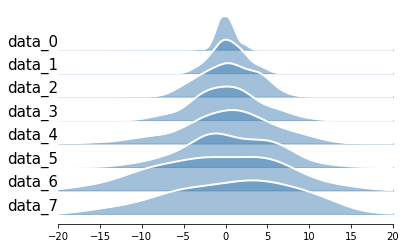
Example
A notebook showing quick howto is included in this repo!
Build on Apple silicon
scipy may cause error and may be able to solved by the this stackoverflow answer:
brew install openblas
export OPENBLAS="$(brew --prefix openblas)"
poetry install
1 maintainer

Release files for ridgeplot-py 0.6.6
For a detailed explanation of source distributions (sdists) and built distributions (wheels), please see the package formats documentation.
Source distribution (sdist)
| File | Size | Uploaded | |
|---|---|---|---|
| ridgeplot_py-0.6.6.tar.gz | 260.0 kB | Details |
Built distribution (wheel)
| File | Interpreter | ABI | Platform | Reset |
|---|---|---|---|---|
| ridgeplot_py-0.6.6-py3-none-any.whl | Python 3 | none | any | Details |
Total release size: 272.5 kB
Release files / ridgeplot_py-0.6.6.tar.gz
| Download URL | ridgeplot_py-0.6.6.tar.gz |
|---|---|
| Size | 260.0 kB |
| Tags | Source |
|
SHA-256 checksum How to use checksums |
5a299fe609bce38f6051959fa40971eb2769201437c7da15d691a75966e76482
|
|
BLAKE2b-256 checksum How to use checksums |
82bce7a5bd58a43204205fd8fae208a5db24a31c3b976397f5d0a67d01767a5c
|
| Upload date | |
|
Uploaded using Trusted Publishing? What is trusted publishing? |
No |
| Uploaded via |
uv/0.10.11 {"installer":{"name":"uv","version":"0.10.11","subcommand":["publish"]},"python":null,"implementation":{"name":null,"version":null},"distro":{"name":"Ubuntu","version":"24.04","id":"noble","libc":null},"system":{"name":null,"release":null},"cpu":null,"openssl_version":null,"setuptools_version":null,"rustc_version":null,"ci":true}
|
Release files / ridgeplot_py-0.6.6-py3-none-any.whl
| Download URL | ridgeplot_py-0.6.6-py3-none-any.whl |
|---|---|
| Size | 12.5 kB |
| Tags | Python 3 |
|
SHA-256 checksum How to use checksums |
23b615e267945920ba86ea69c606a717768ecea5f119db47077251b7d2cbaedd
|
|
BLAKE2b-256 checksum How to use checksums |
454334cb537729f1be38e514a232de8ce6667c2663f04426ab9e9583ac20c8ea
|
| Upload date | |
|
Uploaded using Trusted Publishing? What is trusted publishing? |
No |
| Uploaded via |
uv/0.10.11 {"installer":{"name":"uv","version":"0.10.11","subcommand":["publish"]},"python":null,"implementation":{"name":null,"version":null},"distro":{"name":"Ubuntu","version":"24.04","id":"noble","libc":null},"system":{"name":null,"release":null},"cpu":null,"openssl_version":null,"setuptools_version":null,"rustc_version":null,"ci":true}
|














