
This release is a pre-release and may not be stable for production use.
rio-tiler-mosaic



A rio-tiler plugin for creating tiles from multiple observations.
Install
$ pip install rio-tiler-mosaic
Or
$ git clone http://github.com/cogeotiff/rio-tiler-mosaic
$ cd rio-tiler-mosaic
$ pip install -e .
Rio-tiler + Mosaic
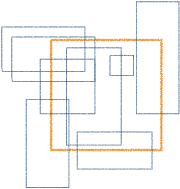
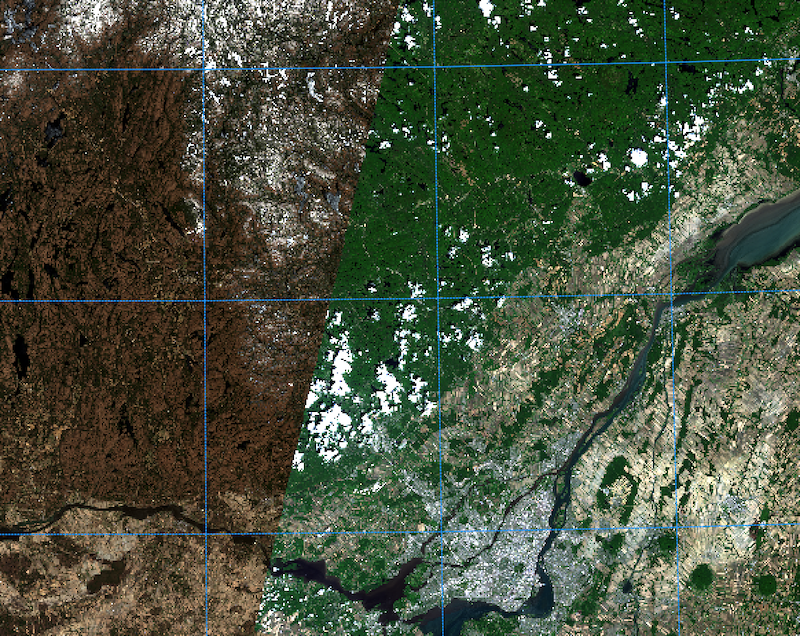
The goal of this rio-tiler plugin is to create tiles from multiple observations.
Because user might want to choose which pixel goes on top of the tile, this plugin comes with 5 differents pixel selection algorithms:
- First: takes the first pixel received
- Highest: loop though all the assets and return the highest value
- Lowest: loop though all the assets and return the lowest value
- Mean: compute the mean value of the whole stack
- Median: compute the median value of the whole stack
API
mosaic_tiler(assets, tile_x, tile_y, tile_z, tiler, pixel_selection=None, chunk_size=5, kwargs)
Inputs:
- assets : list, tuple of rio-tiler compatible assets (url or sceneid)
- tile_x : Mercator tile X index.
- tile_y : Mercator tile Y index.
- tile_z : Mercator tile ZOOM level.
- tiler: Rio-tiler's tiler function (e.g rio_tiler.landsat8.tile)
- pixel_selection : optional pixel selection algorithm (default: "first").
- chunk_size: optional, control the number of asset to process per loop.
- kwargs: Rio-tiler tiler module specific otions.
Returns:
- tile, mask : tuple of ndarray Return tile and mask data.
Examples
from rio_tiler.io import COGReader
from rio_tiler_mosaic.mosaic import mosaic_tiler
from rio_tiler_mosaic.methods import defaults


def tiler(src_path: str, *args, **kwargs) -> Tuple[numpy.ndarray, numpy.ndarray]:
    with COGReader(src_path) as cog:
        return cog.tile(*args, **kwargs)

assets = ["mytif1.tif", "mytif2.tif", "mytif3.tif"]
tile = (1000, 1000, 9)
x, y, z = tile

# Use Default First value method
mosaic_tiler(assets, x, y, z, tiler)

# Use Highest value: defaults.HighestMethod()
mosaic_tiler(
    assets,
    x,
    y,
    z,
    tiler,
    pixel_selection=defaults.HighestMethod()
)

# Use Lowest value: defaults.LowestMethod()
mosaic_tiler(
    assets,
    x,
    y,
    z,
    tiler,
    pixel_selection=defaults.LowestMethod()
)
The MosaicMethod interface
the rio-tiler-mosaic.methods.base.MosaicMethodBase class defines an abstract
interface for all pixel selection methods allowed by rio-tiler-mosaic. its methods and properties are:
is_done: property, returns a boolean indicating if the process is done filling the tiledata: property, returns the output tile and mask numpy arraysfeed(tile: numpy.ma.ndarray): method, update the tile
The MosaicMethodBase class is not intended to be used directly but as an abstract base class, a template for concrete implementations.
Writing your own Pixel Selection method
The rules for writing your own pixel selection algorithm class are as follows:
- Must inherit from MosaicMethodBase
- Must provide concrete implementations of all the above methods.
See rio_tiler_mosaic.methods.defaults classes for examples.
Smart Multi-Threading
When dealing with an important number of image, you might not want to process the whole stack, especially if the pixel selection method stops when the tile is filled. To allow better optimization, rio-tiler-mosaic is fetching the tiles in parallel (threads) but to limit the number of files we also embeded the fetching in a loop (creating 2 level of processing):
assets = ["1.tif", "2.tif", "3.tif", "4.tif", "5.tif", "6.tif"]

# 1st level loop - Creates chuncks of assets
for chunks in _chunks(assets, chunk_size):
    # 2nd level loop - Uses threads for process each `chunck`
    with futures.ThreadPoolExecutor(max_workers=max_threads) as executor:
        future_tasks = [executor.submit(_tiler, asset) for asset in chunks]
By default the chunck_size is equal to the number or threads (or the number of assets if no threads=0)
More on threading
The number of threads used can be set in the function call with the threads= options. By default it will be equal to multiprocessing.cpu_count() * 5 or to the MAX_THREADS environment variable.
In some case, threading can slow down your application. You can set threads to 0 to run the tiler in a loop without using a ThreadPool.
Example
See /example
Contribution & Development
Issues and pull requests are more than welcome.
dev install
$ git clone https://github.com/cogeotiff/rio-tiler-mosaic.git
$ cd rio-tiler-mosaic
$ pip install -e .[dev]
Python3.6 only
This repo is set to use pre-commit to run flake8, pydocstring and black ("uncompromising Python code formatter") when commiting new code.
$ pre-commit install
Implementation
1 maintainer

Metadata
1 maintainer
Release files for rio-tiler-mosaic 0.0.1.dev5
For a detailed explanation of source distributions (sdists) and built distributions (wheels), please see the package formats documentation.
Source distribution (sdist)
| File | Size | Uploaded | |
|---|---|---|---|
| rio-tiler-mosaic-0.0.1.dev5.tar.gz | 6.1 kB | Details |
Release files / rio-tiler-mosaic-0.0.1.dev5.tar.gz
| Download URL | rio-tiler-mosaic-0.0.1.dev5.tar.gz |
|---|---|
| Size | 6.1 kB |
| Tags | Source |
|
SHA-256 checksum How to use checksums |
243134df7193ec414de403dd3e9daa254f2d542c097d160ba2b021cf9c6a5799
|
|
BLAKE2b-256 checksum How to use checksums |
333d4341a2fac768655a0c35b0233aa57410c5e4a00a2c63588c714d71414c63
|
| Upload date | |
|
Uploaded using Trusted Publishing? What is trusted publishing? |
No |
| Uploaded via |
twine/3.2.0 pkginfo/1.5.0.1 requests/2.24.0 setuptools/40.8.0 requests-toolbelt/0.9.1 tqdm/4.48.0 CPython/3.7.2
|














