

rm-protection
A safe alternative for rm with minimum difference.
What is this?
rm-protection is a safe alternative for removing file. It works exactly the same as rm (in fact it passes arguments to rm). The only difference is that it refuses to procceed if a .*.rm-protection file is found and you failed to answer a question.
Quick Start
pip install rm-protection
Install from PyPi and make an alias for rm-p.
Protect your files using protect. If you want to protect everything inside, protect -R.
Happy rm-ing!
How does it work?
It consists of two utilities: rm-p and protect. The latter one is to help you protect files.
For example, you have a file called important_file and it is protected by .important_file.rm-protection. rm-p will recognise that important_file is protected and prompt to ask you a question stored in .important_file.rm-protection. rm-p will only proceed if you get the answer right.
See it in action:
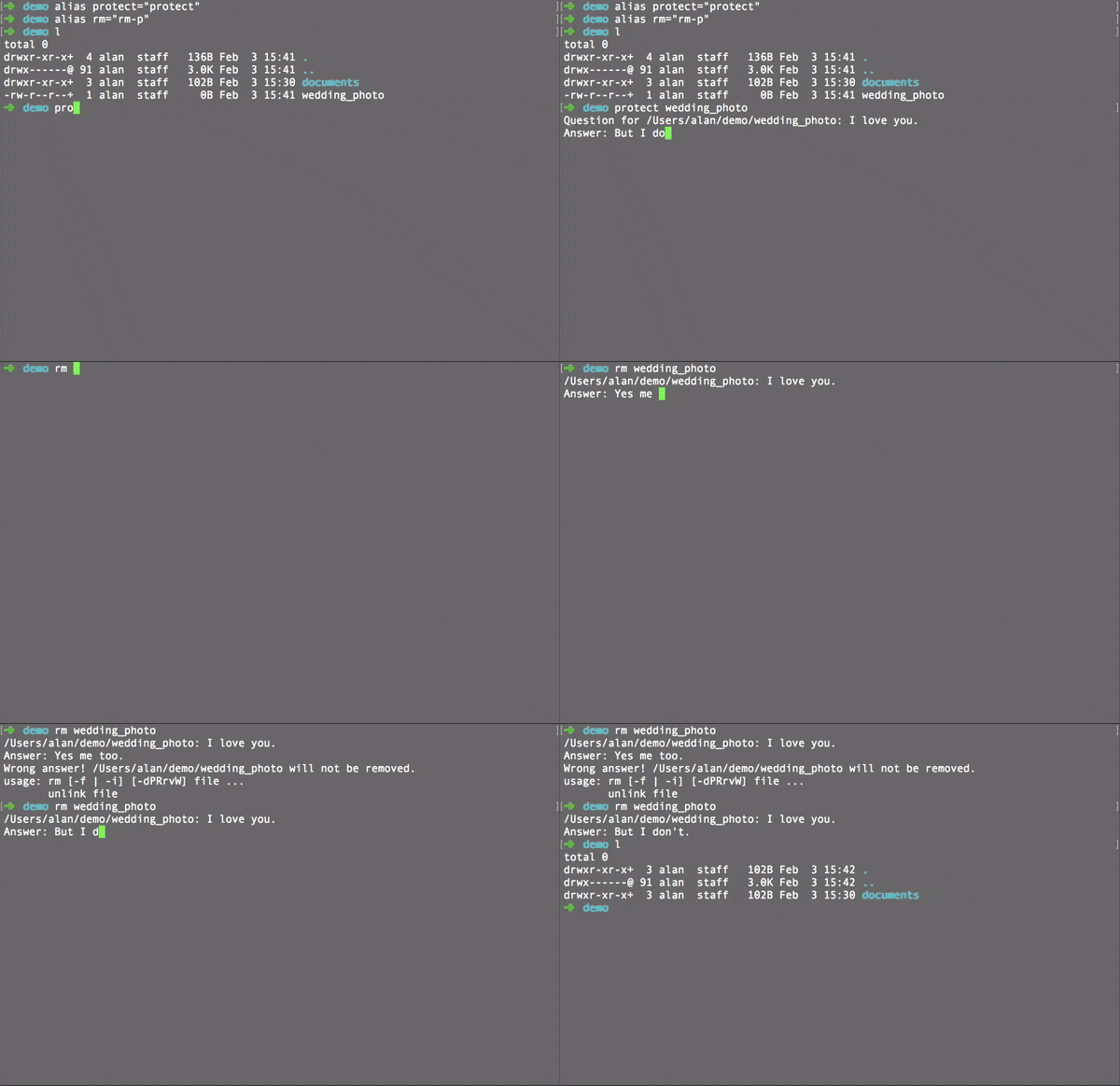
Basic usage
It will also prevent you from deleting a directory with protected file(s) inside.

Recursive protection
Requirements
Python 2 or 3
Linux, unix and macOS
find
Known issues
Currently does not support protecting files whose name starts with “-“.
Comparison with alternative methods
Methods |
Can be uesd as “rm”? |
Protect Specific Files |
Flexibi lity |
Additional Files |
|---|---|---|---|---|
Yes |
Somehow |
High |
Centralised Config |
|
rm -i |
Yes |
No or Somehow |
High |
|
Yes |
Yes |
Low |
Centralised Config |
|
rm-protection |
Yes |
Yes |
High |
One for each |
rm-protection aims at providing maximum protection and flexibility while making minimum impact on daily operation.
rm -i can be very annoying, trash-cli is a bit complex (imagine you have a habit of emptying the trash without a second thought, or imagine you are trying to free up spaces on a budget vm). Safe-rm is inconvenient when you really need to delete something (you have to edit the configuration file).
Instead, rm-protection asks you a question set by you. You are fully covered when removing files (you won’t accidentally empty the trash with trash-cli or | yes with rm -i), and you can quickly remove files (without editing any configuration files).
How to contribute?
Pull requests and issues are all welcome! Or tell others about this, so you can even protect the files you send to others!
1 maintainer

Download files
Download the file for your platform. If you're not sure which to choose, learn more about installing packages.
Source Distributions
Built Distribution
Filter files by name, interpreter, ABI, and platform.
If you're not sure about the file name format, learn more about wheel file names.
Copy a direct link to the current filters
File details
Details for the file rm_protection-0.1.3-py2.py3-none-any.whl.
File metadata
- Download URL: rm_protection-0.1.3-py2.py3-none-any.whl
- Upload date:
- Size: 9.6 kB
- Tags: Python 2, Python 3
- Uploaded using Trusted Publishing? No
File hashes
| Algorithm | Hash digest | |
|---|---|---|
| SHA256 |
047414045bacfcaf0930cb47359fe76c39fbf147285dc55bfd202ef551250dbf
|
|
| MD5 |
3c8fec5c5c7e68f6f40740337e988974
|
|
| BLAKE2b-256 |
40093cfd36832681293859bd95c8cb2c4d7cf8f1ec36382135289a568d266379
|














