
Rectangular Micro QR Code (rMQR Code) Generator

The rMQR Code is a rectangular two-dimensional barcode. This is easy to print in narrow space compared to conventional QR Code. This package can generate an rMQR Code image. This is implemented based on ISO/IEC 23941: Rectangular Micro QR Code (rMQR) bar code symbology specification.




🎮 Online Demo Site
You can try this online: https://rmqr.oudon.xyz .
📌 Notice
- To read rMQR code, we can use QRQR app. However many other QR code readers may have not been supported yet.
- Please verify an image generated by this software whether it can decode correctly before use.
🚀 Installation
pip install rmqrcode
📕 Basic Usage
CLI
Generate an rMQR Code image from your command line, use rmqr command:
rmqr "Text data" "my_qr.png"
See the help to list the options:
➜ rmqr -h
usage: rmqr [-h] [--ecc {M,H}] [--version VERSION] [--fit-strategy {min_width,min_height,balanced}]
            DATA OUTPUT

positional arguments:
  DATA                  Data to encode.
  OUTPUT                Output file path

optional arguments:
  -h, --help            show this help message and exit
  --ecc {M,H}           Error correction level. (default: M)
  --version VERSION     rMQR Code version like 'R11x139'.
  --fit-strategy {min_width,min_height,balanced}
                        Strategy how to determine rMQR Code size.
Generate rMQR Code in scripts
Alternatively, you can also use in python scripts:
from rmqrcode import rMQR
import rmqrcode

data = "https://oudon.xyz"
qr = rMQR.fit(
    data,
    ecc=rmqrcode.ErrorCorrectionLevel.M,
    fit_strategy=rmqrcode.FitStrategy.MINIMIZE_WIDTH
)
The ecc parameter is an enum value of rmqrcode.ErrorCorrectionLevel to select error correction level. The following values are available:
ErrorCorrectionLevel.M: Approx. 15% Recovery Capacity.ErrorCorrectionLevel.H: Approx. 30% Recovery Capacity.
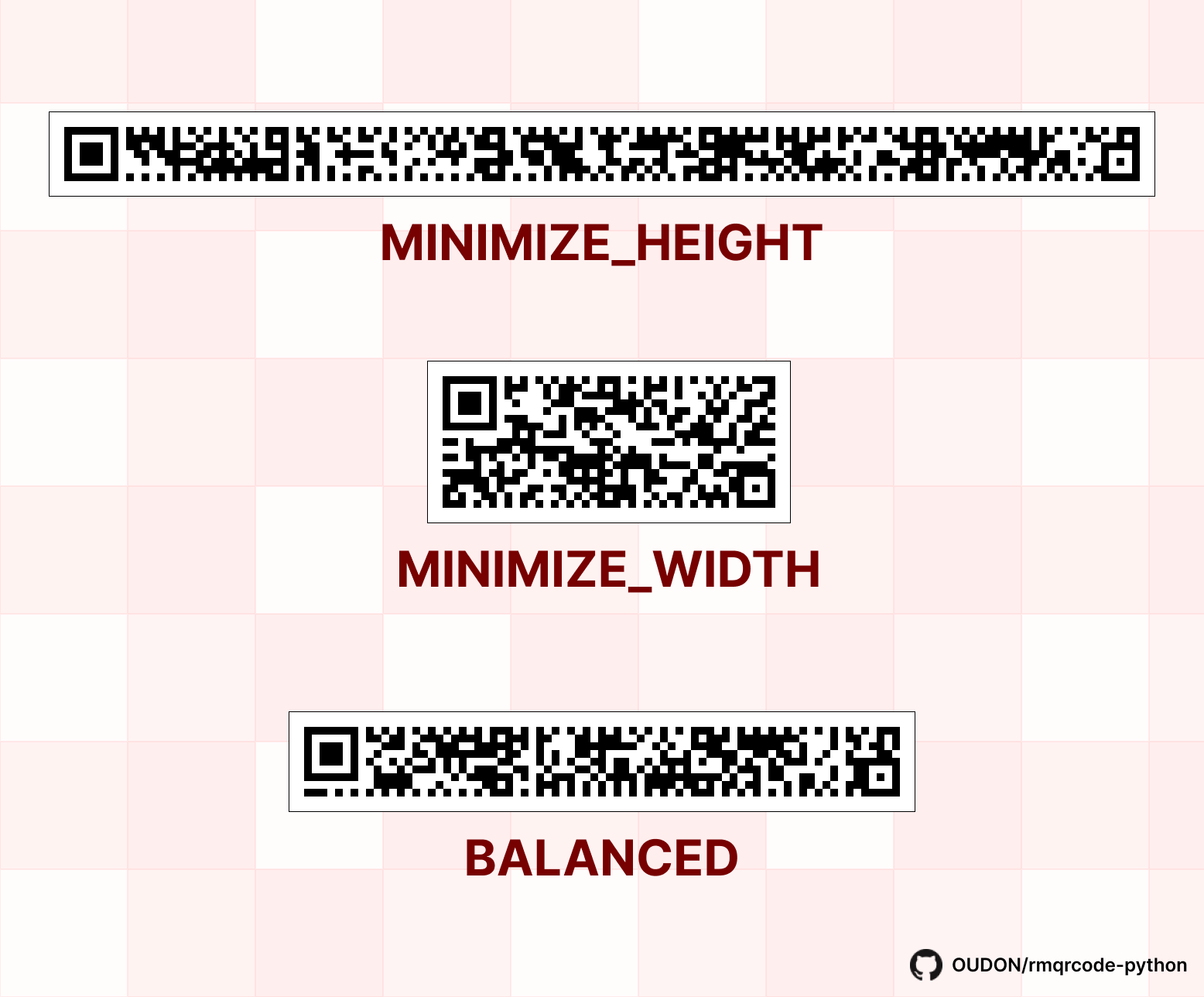
The fit_strategy parameter is enum value of rmqrcode.FitStrategy to specify how to determine size of rMQR Code. The following values are available:
FitStrategy.MINIMIZE_WIDTH: Try to minimize width.FitStrategy.MINIMIZE_HEIGHT: Try to minimize height.FitStrategy.BALANCED: Try to keep balance of width and height.
Here is an example of images generated by each fit strategies for data Test test test:
Save as image
from rmqrcode import QRImage

image = QRImage(qr, module_size=8)
image.show()
image.save("my_qr.png")
📙 Advanced Usage
Select rMQR Code size manually
To select rMQR Code size manually, use rMQR() constructor.
from rmqrcode import rMQR, ErrorCorrectionLevel
qr = rMQR('R11x139', ErrorCorrectionLevel.H)
R11x139 means 11 rows and 139 columns. The following table shows available combinations.
| 27 | 43 | 59 | 77 | 99 | 139 | |
|---|---|---|---|---|---|---|
| R7 | ❌ | ✅ | ✅ | ✅ | ✅ | ✅ |
| R9 | ❌ | ✅ | ✅ | ✅ | ✅ | ✅ |
| R11 | ✅ | ✅ | ✅ | ✅ | ✅ | ✅ |
| R13 | ✅ | ✅ | ✅ | ✅ | ✅ | ✅ |
| R15 | ❌ | ✅ | ✅ | ✅ | ✅ | ✅ |
| R17 | ❌ | ✅ | ✅ | ✅ | ✅ | ✅ |
Encoding Modes and Segments
The rMQR Code has the four encoding modes Numeric, Alphanumeric, Byte and Kanji to convert data efficiently. We can select encoding mode for each data segment separately.
The following example shows how to encode data "123Abc". The first segment is for "123" in the Numeric mode. The second segment is for "Abc" in the Byte mode.
We can select an encoding mode by passing the encoder_class argument to the rMQR#add_segment method. In this example, the length of bits after encoding is 47 in the case combined with the Numeric mode and the Byte mode, which is shorter than 56 in the Byte mode only.
from rmqrcode import rMQR, ErrorCorrectionLevel, encoder
qr = rMQR('R7x43', ErrorCorrectionLevel.M)
qr.add_segment("123", encoder_class=encoder.NumericEncoder)
qr.add_segment("Abc", encoder_class=encoder.ByteEncoder)
qr.make()
The value for encoder_class is listed in the below table.
| Mode | Value of encoder_class | Characters |
|---|---|---|
| Numeric | NumericEncoder | 0-9 |
| Alphanumeric | AlphanumericEncoder | 0-9 A-Z \s $ % * + - . / : |
| Byte | ByteEncoder | Any |
| Kanji | KanjiEncoder | from 0x8140 to 0x9FFC, from 0xE040 to 0xEBBF in Shift JIS value |
Optimal Segmentation
The rMQR.fit method mentioned above computes the optimal segmentation.
For example, the data "123Abc" is divided into the following two segments.
| Segment No. | Data | Encoding Mode |
|---|---|---|
| Segment1 | 123 | Numeric |
| Segment2 | Abc | Byte |
In the case of other segmentation like "123A bc", the length of the bit string after encoding will be longer than the above optimal case.
🤝 Contributing
Any suggestions are welcome! If you are interesting in contributing, please read CONTRIBUTING.
📚 References
- Rectangular Micro QR Code (rMQR) bar code symbology specification: ISO/IEC 23941
- rMQR Code | QRcode.com | DENSO WAVE
- Creating a QR Code step by step
The word "QR Code" is registered trademark of DENSO WAVE Incorporated.
http://www.denso-wave.com/qrcode/faqpatent-e.html
1 maintainer

Metadata
1 maintainer
Release files for rmqrcode 0.3.2
For a detailed explanation of source distributions (sdists) and built distributions (wheels), please see the package formats documentation.
Source distribution (sdist)
| File | Size | Uploaded | Provenance | Actions |
|---|---|---|---|---|
| rmqrcode-0.3.2.tar.gz | 22.4 kB | Without provenance | Details for rmqrcode-0.3.2.tar.gz |
Built distribution (wheel)
| File | Interpreter | ABI | Platform | Actions Reset |
|---|---|---|---|---|
| rmqrcode-0.3.2-py3-none-any.whl | Python 3 | none | any | Details for rmqrcode-0.3.2-py3-none-any.whl |
Total release size: 47.7 kB
Release files / rmqrcode-0.3.2.tar.gz
| Download URL | rmqrcode-0.3.2.tar.gz |
|---|---|
| Size | 22.4 kB |
| Tags | Source |
|
SHA-256 checksum How to use checksums |
8f53567b9df96b5a61fd20f68823613544e7a74bcbe360a3783808c6ccd9eda9
|
|
BLAKE2b-256 checksum How to use checksums |
afec8a91bac8bba6cf811b43a016fa82dc552a94900617ecea38b90d90e3bb4c
|
| Upload date | |
|
Uploaded using Trusted Publishing? What is trusted publishing? |
No |
| Uploaded via |
twine/4.0.2 CPython/3.9.18
|
Release files / rmqrcode-0.3.2-py3-none-any.whl
| Download URL | rmqrcode-0.3.2-py3-none-any.whl |
|---|---|
| Size | 25.3 kB |
| Tags | Python 3 |
|
SHA-256 checksum How to use checksums |
b4a8cb79b7da7362626dec06a6abe0781d989a548f0983d68bc2f572397b83d8
|
|
BLAKE2b-256 checksum How to use checksums |
71154835d219a5bdd56122f72321ef06f5e7d177f7a62dac789e4680dde78c11
|
| Upload date | |
|
Uploaded using Trusted Publishing? What is trusted publishing? |
No |
| Uploaded via |
twine/4.0.2 CPython/3.9.18
|
Security for rmqrcode 0.3.2
Provenance
Provenance describes where a file came from. On PyPI, provenance is shared via attestations, which provide a verifiable record of the build or publishing details. View details, limitations and caveats.
No provenance found
None of the files in this release were uploaded with provenance metadata.
A note on package security
PyPI is a repository for distributing packages, not a service for auditing them. While third-party security researchers and our staff do their best to detect and remove malicious packages, PyPI cannot guarantee the quality, security or suitability of any given package.
To learn more about protecting yourself from malicious actors, visit our package security documentation.














