
A Python framework for modeling mobile agents.
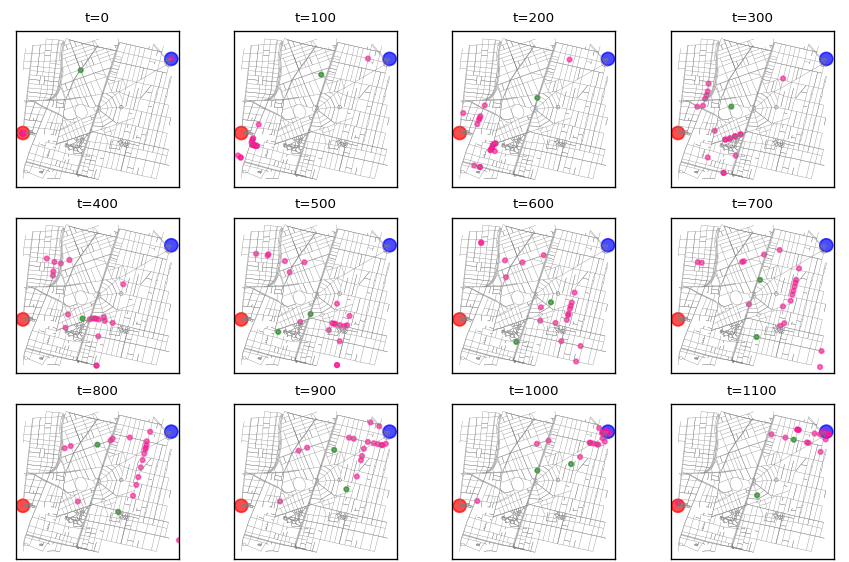
Create simulations of mobile agents, to be run on real-world maps. Like the game of tag described in the docs, some of whose frames are shown below.
- The Road Agent framework is distributed with two router alternatives:
NXRouter, wich uses shortest paths computed with the NetworkX library.
BRouter wich uses a BRouter server to query routes.
NXRouter is simpler but easier to run. BRouter is very robust but it requires the installation and running of the BRouter server which is a java program and maybe a long download, but routes are more realistic.
Read the full documentation.


Short example simulation
This is a veery short stub just to show the main feature of the agent class, which is to navigate a map, in this case using routes computed using NetworkX’s shortest_path.
To create a simulation one must extend the Agent class with the behaviours under study. This example just does an empty extension.
A more interesting simulation is included in this Jupyter Notebook.
Maybe this binder will work:

from LatLon import LatLon
from road_agent import Agent
from road_agent.router import NXRouter
import osmnx as ox

G = ox.graph_from_point((19.3838,-99.1758), distance=1000)
router = NXRouter(G)
r = router.get_route(points=points, speed=3)

# extend Agent class to code behaviours specific to your mobile agent
class Bike(Agent):
    pass

point = LatLon(19.3881769, -99.1794493)
dest = LatLon(19.3858363, -99.1767216)

# create bike instance
b = Bike(point=point, dest=dest)

# create route using NetworkX
b.update_route()

# traverse agent's route, step by step
for t in range(len(b.route)):
    b.step()
Installation
Install library using pip:
$ pip install road-agent
Install optional dependency: BRouter
Agents may use BRouter for routing, which can use several different profiles for routing and is specially good creating routes for riding bikes. It is a java program, which runs in a web server. Here’s how to install a local server.
BRouters needs data files for its routing algorithm. Download data files (rd5) into segments4 dir. You may copy-paste these steps to download them all, but beware: it’s about 5.2 gigabytes:
mkdir -p ~/opt/brouter/segments4
cd ~/opt/brouter/segments4
wget https://gitlab.com/rgarcia-herrera/road-agent/raw/master/get_segments.sh
wget https://gitlab.com/rgarcia-herrera/road-agent/raw/master/segments.txt
chmod +x get_segments.sh
./get_segments.sh
Download and unzip BRouter (replace ~/opt/ with your preferred install dir and 1_4_11 with latest version):
cd ~/opt/brouter
wget http://brouter.de/brouter_bin/brouter_1_4_11.zip
unzip brouter_1_4_11.zip
chmod +x ./standalone/server.sh
Run server.sh to start BRouter server.
1 maintainer

Release files for road-agent 1.0.1
For a detailed explanation of source distributions (sdists) and built distributions (wheels), please see the package formats documentation.
Source distribution (sdist)
| File | Size | Uploaded | |
|---|---|---|---|
| road_agent-1.0.1.tar.gz | 6.4 kB | Details |
Built distribution (wheel)
| File | Interpreter | ABI | Platform | Reset |
|---|---|---|---|---|
| road_agent-1.0.1-py2-none-any.whl | Python 2 | none | any | Details |
Total release size: 25.3 kB
Release files / road_agent-1.0.1.tar.gz
| Download URL | road_agent-1.0.1.tar.gz |
|---|---|
| Size | 6.4 kB |
| Tags | Source |
|
SHA-256 checksum How to use checksums |
c8c023a4edb3fa5a53503cf825fd402c444cb16d15ab4406098d301a51a46007
|
|
BLAKE2b-256 checksum How to use checksums |
1b19a219df760a7de48262bf1383b8fc2cbe67d0c982e408c51d7622b380a5c6
|
| Upload date | |
|
Uploaded using Trusted Publishing? What is trusted publishing? |
No |
| Uploaded via |
twine/1.13.0 pkginfo/1.5.0.1 requests/2.21.0 setuptools/41.0.0 requests-toolbelt/0.9.1 tqdm/4.31.1 CPython/2.7.13
|
Release files / road_agent-1.0.1-py2-none-any.whl
| Download URL | road_agent-1.0.1-py2-none-any.whl |
|---|---|
| Size | 19.0 kB |
| Tags | Python 2 |
|
SHA-256 checksum How to use checksums |
730f23209ffa8a202df24d0908bd61bf407e64aaee6046a94d2758bdb63188a8
|
|
BLAKE2b-256 checksum How to use checksums |
ba14c6fa416cac4706530611af62f230f31f73f422bb1a17a37c72a90d22bb14
|
| Upload date | |
|
Uploaded using Trusted Publishing? What is trusted publishing? |
No |
| Uploaded via |
twine/1.13.0 pkginfo/1.5.0.1 requests/2.21.0 setuptools/41.0.0 requests-toolbelt/0.9.1 tqdm/4.31.1 CPython/2.7.13
|














