
Roboflow Python Library

Website • Docs • Blog • Twitter • Linkedin • Universe
Roboflow makes managing, preprocessing, augmenting, and versioning datasets for computer vision seamless. This is the official Roboflow python package that interfaces with the Roboflow API. Key features of Roboflow:
- Import and Export image datasets into any supported formats
- Preprocess and augment data using Roboflow's dataset management tools
- Train computer vision models using Roboflow Train and deploy to production
- Use community curated projects to start building your own vision-powered products
Installation:
To install this package, please use Python 3.6 or higher. We provide three different ways to install the Roboflow
package to use within your own projects.
Install from PyPi (Recommended):
pip install roboflow
Install from Source:
git clone https://github.com/roboflow-ai/roboflow-python.git
cd roboflow-python
python3 -m venv env
source env/bin/activate
pip3 install -r requirements.txt
Quickstart
import roboflow

# Instantiate Roboflow object with your API key
rf = roboflow.Roboflow(api_key=YOUR_API_KEY_HERE)

# List all projects for your workspace
workspace = rf.workspace()

# Load a certain project, workspace url is optional
project = rf.project("PROJECT_ID")

# List all versions of a specific project
project.versions()

# Upload image to dataset
project.upload("UPLOAD_IMAGE.jpg")

# Retrieve the model of a specific project
project.version("1").model

# predict on a local image
prediction = model.predict("YOUR_IMAGE.jpg")

# Predict on a hosted image
prediction = model.predict("YOUR_IMAGE.jpg", hosted=True)

# Plot the prediction
prediction.plot()

# Convert predictions to JSON
prediction.json()

# Save the prediction as an image
prediction.save(output_path='predictions.jpg')
Using this package for a specifc project
If you have a specific project from your workspace you'd like to run in a notebook follow along on this tutorial Downloading Datasets from Roboflow for Training (Python)
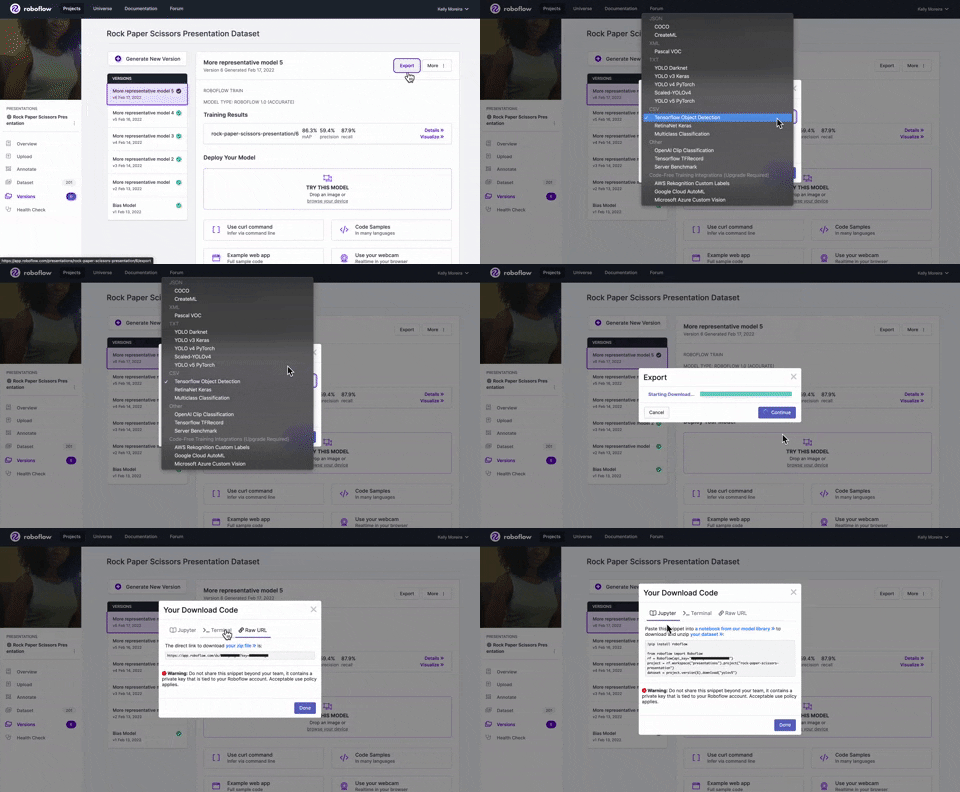
Selecting the format you'd like your project to be exported as while choosing the show download code option will display code snippets you can use in either Jupyter or your terminal. These code snippets will include your api_key, project, and workspace names.
Deving locally
- clone repo
- create a virtual env:
virtualenv local_dev - activate virtual env:
source local_dev/bin/activate - install packages from repo:
pip3 install -e ".[dev]" - create script on top level of
ROBOFLOW-PYTHONand reference localroboflowdirectory:from roboflow import Roboflow - when done, uptick the pip package minor version number in
setup.py - manually add any new dependencies to the
requirements.txtand list of dependencies insetup.py(careful not to overwrite any packages that might screw up backwards dependencies for object detection, etc.)
Code Quality
We provide a Makefile to format and ensure code quality. Be sure to run them before creating a PR.
# format your code with `black` and `isort` run
make style
# check code with flake8
make check_code_quality
Tests
You need to have the following env variables,
ROBOFLOW_API_KEY="<YOUR_ROBOFLOW_API>"
PROJECT_NAME="<YOUR_PROJECT_NAME>"
PROJECT_VERSION="" # by default "1"
Then, assuming you have installed the dev packages (pip install -e ".[dev]), you can run the tests
python -m unittest
4 maintainers


Metadata
4 maintainers
Release files for roboflow 0.2.14
For a detailed explanation of source distributions (sdists) and built distributions (wheels), please see the package formats documentation.
Source distribution (sdist)
| File | Size | Uploaded | Provenance | Actions |
|---|---|---|---|---|
| roboflow-0.2.14.tar.gz | 18.6 kB | Without provenance | Details for roboflow-0.2.14.tar.gz |
Built distribution (wheel)
| File | Interpreter | ABI | Platform | Actions Reset |
|---|---|---|---|---|
| roboflow-0.2.14-py2-none-any.whl | Python 2 | none | any | Details for roboflow-0.2.14-py2-none-any.whl |
Total release size: 47.4 kB
Release files / roboflow-0.2.14.tar.gz
| Download URL | roboflow-0.2.14.tar.gz |
|---|---|
| Size | 18.6 kB |
| Tags | Source |
|
SHA-256 checksum How to use checksums |
04991a2ce7e34408e10434ee56e9407ce9789107778e52b40b282c986a465b73
|
|
BLAKE2b-256 checksum How to use checksums |
c6a1d87be2cec2fd4938ba894d76f5fa83759bdbe7b82110ec62240eac9fd70e
|
| Upload date | |
|
Uploaded using Trusted Publishing? What is trusted publishing? |
No |
| Uploaded via |
twine/3.4.2 importlib_metadata/4.8.1 pkginfo/1.7.1 requests/2.25.1 requests-toolbelt/0.9.1 tqdm/4.62.3 CPython/3.9.4
|
Release files / roboflow-0.2.14-py2-none-any.whl
| Download URL | roboflow-0.2.14-py2-none-any.whl |
|---|---|
| Size | 28.9 kB |
| Tags | Python 2 |
|
SHA-256 checksum How to use checksums |
32fceb5eb670a98a5a3349e2677d291984db30be10e91bd6b9f76c5d4f05ecca
|
|
BLAKE2b-256 checksum How to use checksums |
74b8618ad35af11c6bcc44504ce4fc8a43800ccf5f57bcec63cf01418e59ad15
|
| Upload date | |
|
Uploaded using Trusted Publishing? What is trusted publishing? |
No |
| Uploaded via |
twine/3.4.2 importlib_metadata/4.8.1 pkginfo/1.7.1 requests/2.25.1 requests-toolbelt/0.9.1 tqdm/4.62.3 CPython/3.9.4
|
Security for roboflow 0.2.14
Provenance
Provenance describes where a file came from. On PyPI, provenance is shared via attestations, which provide a verifiable record of the build or publishing details. View details, limitations and caveats.
No provenance found
None of the files in this release were uploaded with provenance metadata.
A note on package security
PyPI is a repository for distributing packages, not a service for auditing them. While third-party security researchers and our staff do their best to detect and remove malicious packages, PyPI cannot guarantee the quality, security or suitability of any given package.
To learn more about protecting yourself from malicious actors, visit our package security documentation.














