
Description
Application to run the Robot Framework Test From the File System with following features.
Group Robot Test Cases from different Folders and Group them in batch.
Search Test using Robot Tags
Run/Track the batch execution status in real time.
Bookmarks your frequently used test sets to create batch easily.
Run Robot Batch in multiple threads to seed up the execution.
Designed to suite Mobile and Web test Automation in mind.
This application is written in Python 3.7. Not tested for Python 3.8
Can be integrated with Microfocus ALM Authentication.
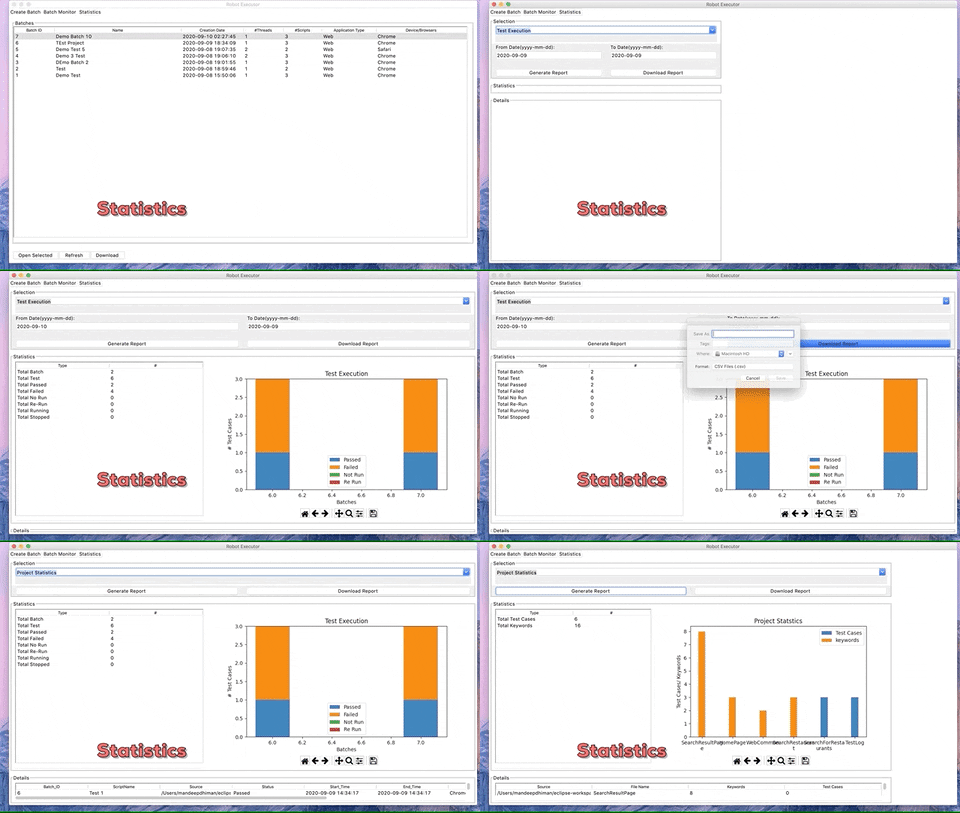
Download the Historical data in csv format.
Dashboard for Historical Data (e.g. Test Executions)
Installation Requirements
Python 3
Tkinter
Installation
Using pip
The recommended installation method is using pip
pip install robot-executor
- To run the Application, Run following in Terminal/Command
roboapp
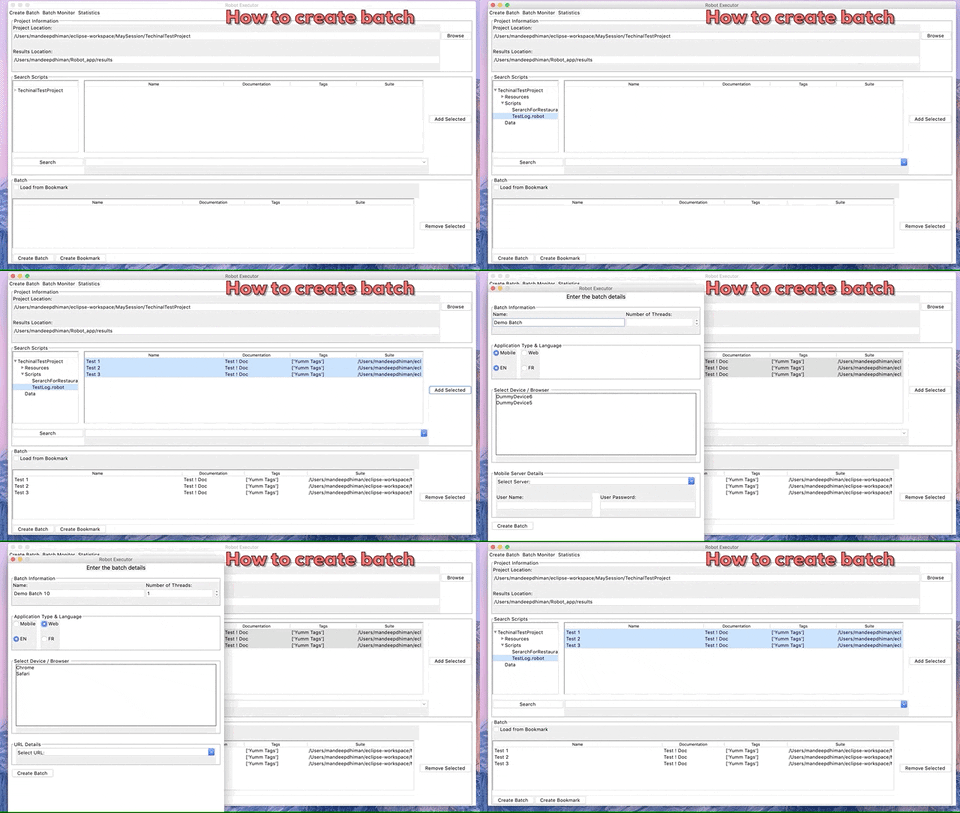
How to Create a Batch
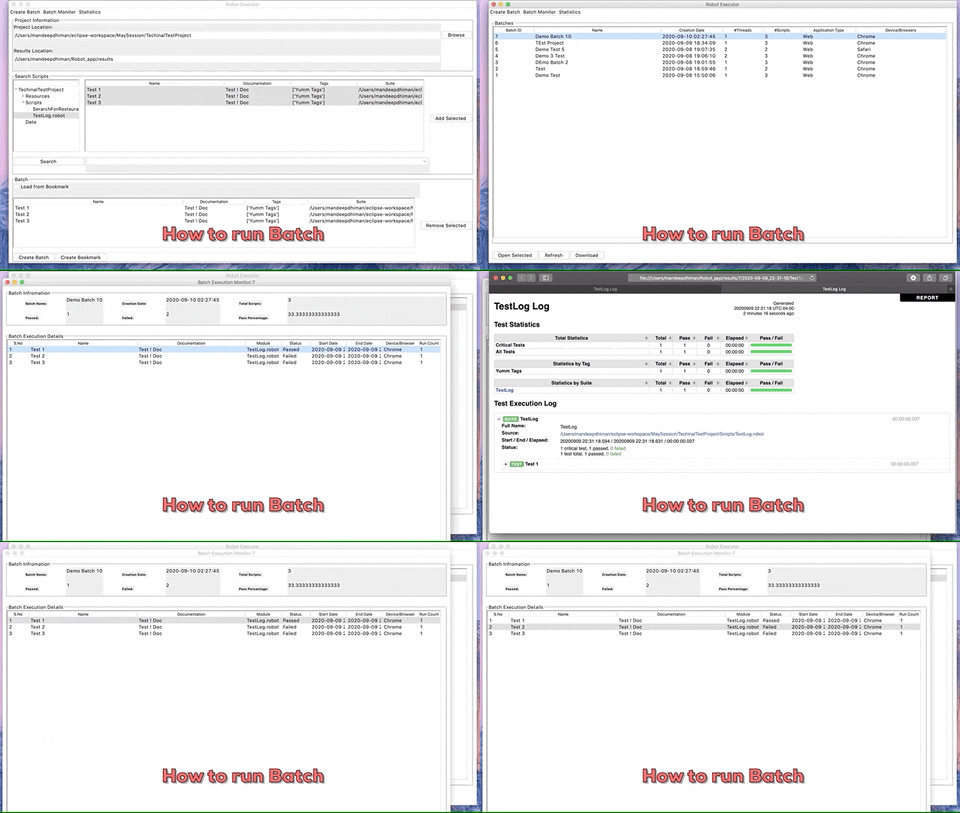
How to Run a Batch
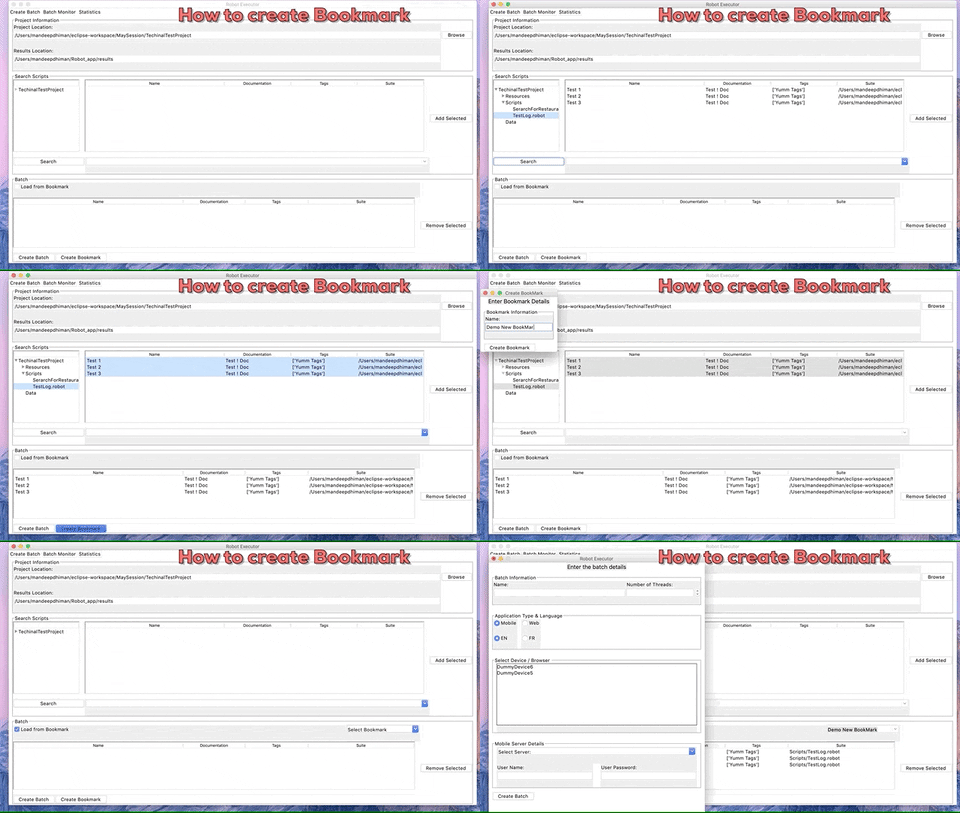
How to Create a BookMark
Statistics
ALM Authentication Configuration
This Application comes with ALM Authentication. By Default this is feature is disabled. To enable this feature, Select ‘Options->Use ALM’ from the Options Menu. Note: In order it to work, Make sure you are setting ALM URL from ‘Options->Preferences’ Menu.
Usage
Browse to base Robot Framework Project Location Folder.
Search the Test Cases by Browsing to different Folder.
You can also Search Test by Tags.
From the Search Results Add the Test cases to the Batch.
Click on Create Batch.
Fill in the Required Batch Details Create a Batch
Once Batch is Created, Go to Batch Monitor.
Right Click the batch and Click Start to Start the Test Execution.
Application do not allow to overwrite existing bookmark.
If you really want to updated exiting bookmark, then use admin password (Pr1y@)
Note:
Information Provided on Create batch form is exposed as Command line variables to robot Test. So values in these fields can be used in the Robot Test as Variables. Read Setting variables in command line
Here is the Mapping of fields to variable names.
Language => ENV_LANGUAGE
Test Plan Path => ALMTestPlanPath
Test Lab Path => ALMTestLabPath
Test Set Name => ALMTestSetName
Mobile Specific Mapping:
Select Device / Browser => ENV_DEVICE_UDID
Select Server=> ENV_MC_SERVER
User Name => ENV_MC_USER_NAME
User Password => ENV_MC_USER_PASS
Browser Specific Mapping:
Select Device / Browser => ENV_Browser
Select URL => ENV_URL
If you are using Microfocus’s ALM Login Form then following variable will be exposed:
AlmUrl
Name => almuserid
Password => almuserpswd
Domain => almdomain
Project => almproject
Project Contributors
Know Bugs
Sorting in Scripts Table
Robot Framework Version Support
robo-executor Version |
robotframwork Version Supported |
|---|---|
v 0.1.1 |
v <= 3.1.2 |
TDB |
v 3.2.2 |
History
Version |
Features/enhancements |
|---|---|
0.1.1 - 0.1.2 |
Minor Documentation fixes. Requirements updated. |
0.1.0 |
Added Options Menu, Bug Fixes |
0.0.9 |
Clone Batch Feature, Fixed Broken RST |
0.0.8 |
Added Mac Compatibility, Sorting For Batch Execution Monitor |
1 maintainer

Download files
Download the file for your platform. If you're not sure which to choose, learn more about installing packages.
Source Distributions
Built Distribution
Filter files by name, interpreter, ABI, and platform.
If you're not sure about the file name format, learn more about wheel file names.
Copy a direct link to the current filters
File details
Details for the file robot_executor-0.1.2-py3-none-any.whl.
File metadata
- Download URL: robot_executor-0.1.2-py3-none-any.whl
- Upload date:
- Size: 43.8 kB
- Tags: Python 3
- Uploaded using Trusted Publishing? No
- Uploaded via:
twine/3.1.1 pkginfo/1.5.0.1 requests/2.22.0 setuptools/42.0.2 requests-toolbelt/0.9.1 tqdm/4.42.0 CPython/3.7.0
File hashes
| Algorithm | Hash digest | |
|---|---|---|
| SHA256 |
9828b94bf38289dc67a2a830b10dda036a7d1914dc92120440031677b86df325
|
|
| MD5 |
66824cdf69db80dc15c2dfa1ee862a06
|
|
| BLAKE2b-256 |
76bd1f5a59d3d87c9d4f62118211d81c4639be0425e0f4be5a7bd0b1ece8f78f
|














