
RobotNotifications
Send notifications to Slack or Mattermost using Robot Framework. Can be used both as library or listener.
Installation
The recommended installation method is pip:
pip install robotframework-notifications
Running this command installs also the latest version of Requests
Use as listener
robot --listener "RobotNotifications;https://webhook_url;end_test;summary" test.robot
Listeners are taken into use from the command line with the --listener option.
- The first argument is the name of the library.
- The second argument is the webhook url.
- Based on your preferences pick the next argument(s) from the table
Seperate the arguments with a semicolon ;
Optional Arguments
| Argument | Description | Example |
|---|---|---|
| end_suite | Post suite results | 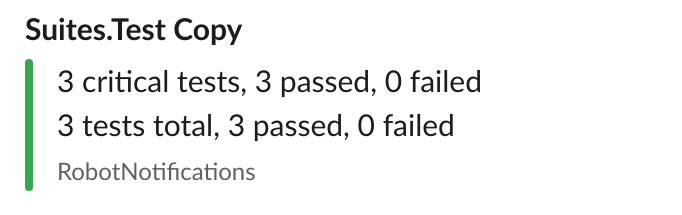 |
| summary | Post a report summary | 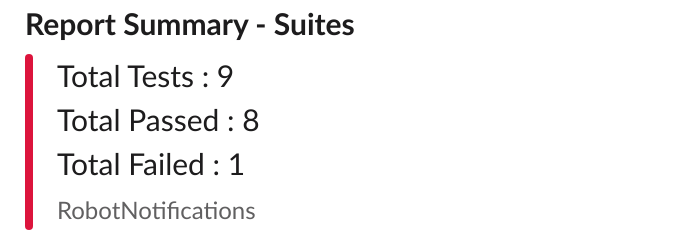 |
| end_test | Post failing tests | 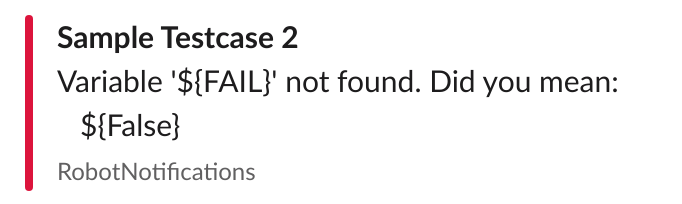 |
| end_test_all | Post all tests |  |
Use as library
Besides the listener functionality this library allows you to post a custom message with the use of the keyword "Post Message To Channel"
To use RobotNotifications in Robot Framework, the library needs to be imported using the Library setting as any other library. The library needs the webhook url from Slack or Mattermost as an argument.
Example:
*** Settings ***
Library         RobotNotifications   https://hooks.slack.com/services/--your-webhook--
You can retrieve this webhook url in Slack or Mattermost.
Example 2:
*** Settings ***
Library         RobotNotifications   https://hooks.slack.com/services/--your-webhook--
...             end_suite   end_test
Write a custom message
After importing the library you have access to the keyword Post Message To Channel
This keyword has one mandatory argument which is the message to post to the channel, and several optional arguments.
| Argument | Description | Required |
|---|---|---|
| text | Markdown-formatted message to display in the post. | YES |
| channel | Overrides the channel the message posts in. Use the channel’s name and not the display name. Defaults to the channel set during webhook creation. | NO |
| username | Overrides the username the message posts as. Defaults to the username set during webhook creation or the webhook creator’s username if the former was not set. | NO |
| icon_url | Overrides the profile picture the message posts with. Defaults to the URL set during webhook creation or the webhook creator’s profile picture if the former was not set. | NO |
| icon_emoji | Overrides the profile picture and icon_url parameter. Defaults to none and is not set during webhook creation. |
NO |
| props | Sets the post props, a JSON property bag for storing extra or meta data on the post. |
NO |
Example:
*** Settings ***
Library         RobotNotifications   https://hooks.slack.com/services/--your-webhook--

*** Test Cases ***
Example Test
    Post Message To Channel      This is a custom message!    icon_emoji=robot_face    username=Robot
    ...                          channel=robot-notifications
The above example shows how the Post Message To Channel can be used in Robot Framework.
Retrieve webhook
Slack
https://slack.com/intl/en-lv/help/articles/115005265063-incoming-webhooks-for-slack
Mattermost
https://docs.mattermost.com/developer/webhooks-incoming.html#simple-incoming-webhook
1 maintainer

Metadata
1 maintainer
Release files for robotframework-notifications 1.2.0
For a detailed explanation of source distributions (sdists) and built distributions (wheels), please see the package formats documentation.
Source distribution (sdist)
| File | Size | Uploaded | Provenance | Actions |
|---|---|---|---|---|
| robotframework-notifications-1.2.0.tar.gz | 4.1 kB | Without provenance | Details for robotframework-notifications-1.2.0.tar.gz |
Built distribution (wheel)
| File | Interpreter | ABI | Platform | Actions Reset |
|---|---|---|---|---|
| robotframework_notifications-1.2.0-py3-none-any.whl | Python 3 | none | any | Details for robotframework_notifications-1.2.0-py3-none-any.whl |
Total release size: 8.3 kB
Release files / robotframework-notifications-1.2.0.tar.gz
| Download URL | robotframework-notifications-1.2.0.tar.gz |
|---|---|
| Size | 4.1 kB |
| Tags | Source |
|
SHA-256 checksum How to use checksums |
954be09efd013d027c09854834ca5d11681ffeb164813271474227bcc9993bbe
|
|
BLAKE2b-256 checksum How to use checksums |
86b892110915a598b412f8502aaae10cb083b37f488c536d4bd7af9a540aaf9d
|
| Upload date | |
|
Uploaded using Trusted Publishing? What is trusted publishing? |
No |
| Uploaded via |
twine/3.4.1 importlib_metadata/4.5.0 pkginfo/1.7.0 requests/2.22.0 requests-toolbelt/0.9.1 tqdm/4.61.1 CPython/3.7.5
|
Release files / robotframework_notifications-1.2.0-py3-none-any.whl
| Download URL | robotframework_notifications-1.2.0-py3-none-any.whl |
|---|---|
| Size | 4.3 kB |
| Tags | Python 3 |
|
SHA-256 checksum How to use checksums |
d843f63b63faa92d5c30d6d36eb0857b617da1f70190d04802f0accdded9caff
|
|
BLAKE2b-256 checksum How to use checksums |
9d079ae00d15f0093865d372bde9837ffd16a16ec1c6bd6788c9830559ef5751
|
| Upload date | |
|
Uploaded using Trusted Publishing? What is trusted publishing? |
No |
| Uploaded via |
twine/3.4.1 importlib_metadata/4.5.0 pkginfo/1.7.0 requests/2.22.0 requests-toolbelt/0.9.1 tqdm/4.61.1 CPython/3.7.5
|
Security for robotframework-notifications 1.2.0
Provenance
Provenance describes where a file came from. On PyPI, provenance is shared via attestations, which provide a verifiable record of the build or publishing details. View details, limitations and caveats.
No provenance found
None of the files in this release were uploaded with provenance metadata.
A note on package security
PyPI is a repository for distributing packages, not a service for auditing them. While third-party security researchers and our staff do their best to detect and remove malicious packages, PyPI cannot guarantee the quality, security or suitability of any given package.
To learn more about protecting yourself from malicious actors, visit our package security documentation.














