
Use S3 as a scheduler mechanism using Lambda

Project description
Basic Usage
Installation
pip install s3-scheduler
Setting up a recurring flow
The library uses AWS builtin capability to run every 1 minute. The configuration depends on your framework. For example for Zappa use
s3_events.py
scheduler = Scheduler(...)
def check_scheduled_events():
    scheduler.handle()
zappa_settings.json
{
  "production": {
    "events": [
      {
        "function": "utils.s3_events.check_scheduled_events",
        "expression": "rate(1 minute)"
      }
    ]
  }
}
Scheduling
import boto3
from s3_scheduler.scheduler import Scheduler
from s3_scheduler.utils import nowut
s3_resource = boto3.resource("s3")
s3_client = boto3.client("s3")
scheduler = Scheduler("bucket", "/path", s3_resource, s3_client)
time = nowut() + timedelta(minutes=10)
upload_to = scheduler.schedule(time, "s3-bucket", "s3_files-important", "content")
During initialization the scheduler requires the bucket and folder in which to keep the actual scheduling details. Remember, each event is a separate file, therefore there is a need to save them somewhere. When to schedule is a simple datetime object.
Stopping
scheduler = Scheduler("bucket", "/path", s3_resource, s3_client)
time = nowut() + timedelta(minutes=10)
key = scheduler.schedule(time, "s3-bucket", "s3_files-important", "content")
scheduler.stop(key)
In case you want to cancel the schedule event before it occurs
Using S3 as a scheduler
S3 is a powerful tool and it can be used for more than elastic persistent layer. You can read more about it on hackernoon.com
In the following post I’m going to demonstrate how to use S3 as a scheduling mechanism to execute various tasks.
Overview
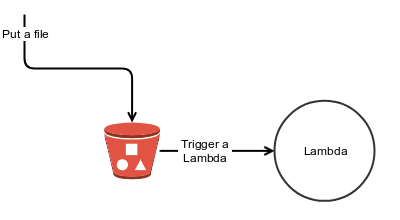
S3 alongside a Lambda function creates a simple event base flow, e.g. attach a Lambda to S3 PUT event, create a new file and the Lambda function is called. In order to create a schedule event all you have to do is to write the file you want to act upon on the designated time, however AWS only enables you to create recurring events using cron or rate expression, what happens when you want to schedule a one time event? You are stuck.
The S3-Scheduler library enables you to do just that, it uses S3 as a scheduling mechanism that enables you to schedule one time event.
How it works
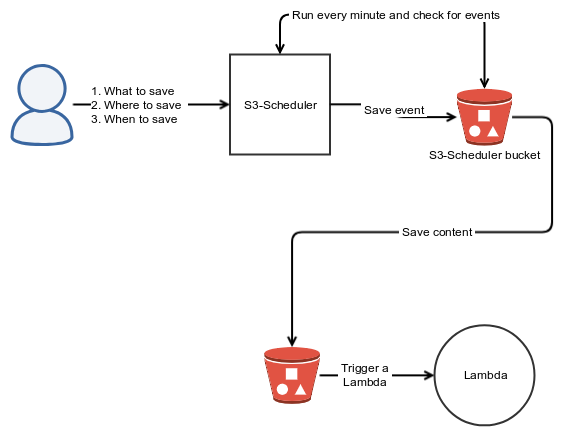
Each event is a separate file, behind the scenes the library uses the recurring mechanism to wake up every 1 minute, scan for the relevant files using S3’s filter capabilities and if the scheduled time had passed move the file to the relevant bucket + key.
The library, in order to function properly has to know the answer to three questions:
- The content to save.
- Where to save it (bucket + key) → will trigger the appropriate Lambda function.
- When to move it to the appropriate bucket.
Encoding details
The content to save is left unchanged, points 2 and 3 mentioned above are encoded in the key’s name and use | as a separator between the parts, for example to copy the relevant content on the 5th of August to a bucket called s3-bucket and a folder named s3_important_files the scheduler will produce the following file 2018–08–05|s3-bucket|s3_files-important . By keeping the meta data outside the actual content we achieve couple of benefits:
- Speed up the process, no need to read the entire content in order to decide when and where to copy.
- It allows the content to be binary, not only text based.
- By using S3 filter capabilities it reduces the cost to fetch the correct files.
- Easier debugging, just view the file name in order to understand when and where to copy.
Fin
Scheduling in the AWS serverless world is a bit tricky, right now AWS only provides CRON like capabilities, this post demonstrated a technique that can be used to create a more robust scheduling capability.
Release history Release notifications | RSS feed


Download files
Download the file for your platform. If you're not sure which to choose, learn more about installing packages.
Source Distribution
File details
Details for the file s3_scheduler-0.0.3.tar.gz.
File metadata
- Download URL: s3_scheduler-0.0.3.tar.gz
- Upload date:
- Size: 5.8 kB
- Tags: Source
- Uploaded using Trusted Publishing? No
- Uploaded via: twine/1.11.0 pkginfo/1.4.2 requests/2.19.1 setuptools/40.0.0 requests-toolbelt/0.8.0 tqdm/4.24.0 CPython/3.6.3
File hashes
| Algorithm | Hash digest | |
|---|---|---|
| SHA256 |
74a1b24b90703f8893df1e003e97006a0b16b9aaa0ad1a831657cda0c199d79d
|
|
| MD5 |
d45f26994eaebaea9cb81ecb01137fd2
|
|
| BLAKE2b-256 |
aa779b821e609c9a75bbcadf0a81a59e686db30c406656cfb7d43addfbcac9fb
|






