
samcell-napari


A napari plugin for cell segmentation using the Segment Anything Model (SAM) foundation model.
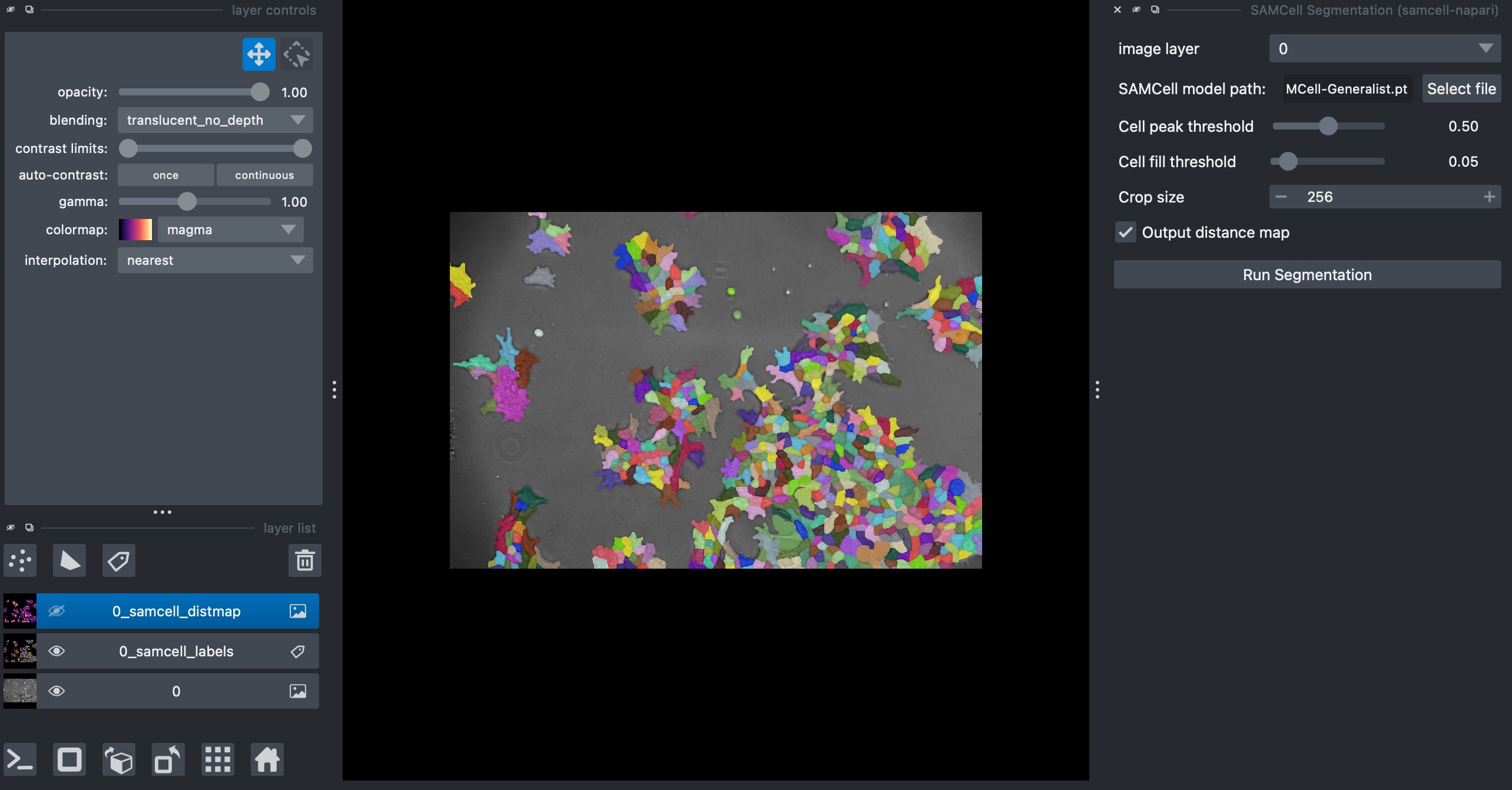
Description
SAMCell-napari provides an intuitive interface for segmenting cells in microscopy images using deep learning. It leverages the power of the Segment Anything Model (SAM) adapted specifically for biological cell segmentation, providing accurate results with minimal tuning.
Key Features:
- Simple, user-friendly interface within napari
- Compatible with SAMCell models in multiple formats (
.pt,.bin,.safetensors) - Support for both SAM-ViT-Base and SAM-ViT-Large model architectures
- Adjustable segmentation parameters for fine-tuning
- Real-time visualization of results
- Distance map visualization for analyzing cell proximity
- Full integration with napari's layer system
- Enhanced sliding window algorithm with advanced blending for seamless segmentation of large images
What's New in v1.0.0:
- Support for multiple model file formats (
.pt,.bin,.safetensors) - Improved sliding window algorithm with smooth blending between crops
- Better handling of small images and edge cases
- Enhanced error recovery and logging
- Multiple threshold testing capability
- Optimized default thresholds for better segmentation results
- Support for both SAM-ViT-Base and SAM-ViT-Large model variants
Installation
You can install samcell-napari via [pip]:
pip install samcell-napari
To install latest development version:
pip install git+https://github.com/saahilsanganeriya/samcell-napari.git
Usage
-
Start napari
napari
-
Load your image in napari
-
Open the SAMCell plugin:
Plugins > samcell-napari > SAMCell Segmentation -
Provide the path to your SAMCell model file (supports
.pt,.bin, or.safetensorsformats)- You can download pre-trained models from the official SAMCell release page
-
Adjust parameters if needed:
- Cell peak threshold: Higher values detect fewer cells (default: 0.47)
- Cell fill threshold: Lower values create larger cells (default: 0.09)
- Crop size: Size of image crops for processing (default: 256)
-
Click "Run Segmentation"
-
View the segmentation results in napari as a Labels layer
Requirements
- Python 3.8 or higher
- napari 0.4.14 or higher
- PyTorch 1.9 or higher
- transformers 4.20.0 or higher
- CUDA-capable GPU recommended for faster processing
Model Compatibility
The plugin is compatible with SAMCell model files in multiple formats:
- PyTorch model files (
.pt) - Binary model files (
.bin) - including the standardpytorch_model.bin - SafeTensors files (
.safetensors) - a safer alternative to PyTorch's pickle-based format
The plugin supports models based on:
- SAM-ViT-Base architecture - Primary model type
- SAM-ViT-Large architecture - Fallback if a model doesn't load with base architecture
Pre-trained models can be downloaded from the official SAMCell release page.
Recommended models include:
- SAMCell1.0-Cellpose-cyto: Trained on the Cellpose cytoplasm dataset
- SAMCell1.0-livecell: Trained on the LiveCELL dataset
These models are part of the release assets for the paper "SAMCell: Generalized Label-Free Biological Cell Segmentation with Segment Anything".
How It Works
SAMCell operates using an enhanced sliding window approach to process large images:
- The image is divided into overlapping crops with intelligent handling of image boundaries
- Each crop is processed through a SAM-based model
- A distance map is created, representing cell centers and boundaries
- The crops are stitched back together with smooth blending for seamless transitions
- The distance map is processed to extract individual cell masks using watershed segmentation
- Results are displayed in napari as labels
Technical Details
Model Type Detection
The plugin intelligently determines the appropriate SAM model architecture:
- First tries to load the model with SAM-ViT-Base architecture
- If that fails, automatically falls back to SAM-ViT-Large
- This ensures maximum compatibility with various pre-trained models
Sliding Window Algorithm
The plugin uses an advanced sliding window algorithm that:
- Handles images of any size, including those smaller than the crop size
- Creates appropriate overlaps between crops to ensure no cells are missed
- Uses a cosine-based blending mask to create smooth transitions between crops
- Fills any potential gaps using nearest neighbor interpolation
Multiple Threshold Testing
For researchers who want to optimize segmentation parameters, the plugin includes a batch processing capability to test multiple threshold combinations at once (available via the API).
Contributing
Contributions are very welcome! Please feel free to submit a Pull Request.
License
Distributed under the MIT License. See LICENSE for more information.
Citation
If you use this plugin in your research, please cite:
@article{samcell2023,
  title={SAMCell: Generalized Label-Free Biological Cell Segmentation with Segment Anything},
  author={...},
  journal={...},
  year={2023}
}
1 maintainer

Metadata
1 maintainer
Release files for samcell-napari 1.1.3
For a detailed explanation of source distributions (sdists) and built distributions (wheels), please see the package formats documentation.
Source distribution (sdist)
| File | Size | Uploaded | Provenance | Actions |
|---|---|---|---|---|
| samcell_napari-1.1.3.tar.gz | 34.4 kB | Without provenance | Details for samcell_napari-1.1.3.tar.gz |
Built distribution (wheel)
| File | Interpreter | ABI | Platform | Actions Reset |
|---|---|---|---|---|
| samcell_napari-1.1.3-py3-none-any.whl | Python 3 | none | any | Details for samcell_napari-1.1.3-py3-none-any.whl |
Total release size: 69.2 kB
Release files / samcell_napari-1.1.3.tar.gz
| Download URL | samcell_napari-1.1.3.tar.gz |
|---|---|
| Size | 34.4 kB |
| Tags | Source |
|
SHA-256 checksum How to use checksums |
ef840c54895ab210b8a4ca2d9219f1a4f7d4965727886fe7700115138ecc5e34
|
|
BLAKE2b-256 checksum How to use checksums |
04acfa75ff0ea2859e0cb125d02e25287853b127c456beb8e8fee07508d64ae9
|
| Upload date | |
|
Uploaded using Trusted Publishing? What is trusted publishing? |
No |
| Uploaded via |
twine/6.1.0 CPython/3.11.6
|
Release files / samcell_napari-1.1.3-py3-none-any.whl
| Download URL | samcell_napari-1.1.3-py3-none-any.whl |
|---|---|
| Size | 34.8 kB |
| Tags | Python 3 |
|
SHA-256 checksum How to use checksums |
75d244fcc77d7addbe4c333c3b85d2181851e1c6ac961fdbb12856cf1de68240
|
|
BLAKE2b-256 checksum How to use checksums |
9886e1c0eb2ea232af389bd21417c0a72e7f8557305ba8430abd6de3b6311d1f
|
| Upload date | |
|
Uploaded using Trusted Publishing? What is trusted publishing? |
No |
| Uploaded via |
twine/6.1.0 CPython/3.11.6
|
Security for samcell-napari 1.1.3
Provenance
Provenance describes where a file came from. On PyPI, provenance is shared via attestations, which provide a verifiable record of the build or publishing details. View details, limitations and caveats.
No provenance found
None of the files in this release were uploaded with provenance metadata.
A note on package security
PyPI is a repository for distributing packages, not a service for auditing them. While third-party security researchers and our staff do their best to detect and remove malicious packages, PyPI cannot guarantee the quality, security or suitability of any given package.
To learn more about protecting yourself from malicious actors, visit our package security documentation.














