
sartorius
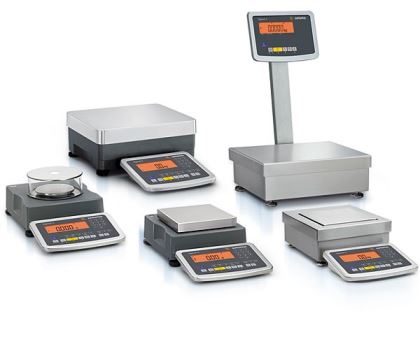
Asynchronous python ethernet interface and command-line tool for Sartorius and Minebea Intec scales.
Compatibility
This driver should work for any ethernet scale that uses the standardized communications protocol of the Scale Manufacturers Association. However, it has only been tested on the following models:
- Minebea Intec Signum
- Sartorius Entris
- Sartorius Miras
Installation
uv install sartorius
Scale Setup
For Minebea scale setup, navigate to SETUP - UNICOM - DATAPROT - ETHER.
- Make sure
SRC.IPis set to a valid LAN address - Ensure
MODE-SBI-SRV-6.1.1is set (manual says this should be default but it is not) - All other defaults are good
This driver is intended to be stable to disconnects, so operators should be able to unplug and reposition the device without affecting any long polling.
Command Line
$ sartorius scale-ip.local
{
    "mass": 0.0,
    "units": "kg",
    "stable": true,
    "info": {
        "model": "SIWADCP-1-",
        "serial": "37454321",
        "software": "00-37-09"
    }
}
If using a port other than the default of 49155 e.g. for a MODBUS gateway, use --port
or a colon between the IP address and port.
sartorius 192.168.1.1 --port 10000 or sartorius 192.168.1.1:12345
You can tare and zero with --zero and remove the info field with --no-info.
See sartorius --help for more.
To use in shell scripts, parse the json output with something like
jq. For example,
sartorius scale-ip.local | jq .mass will return the mass.
Python
If you'd like to link this to more complex behavior, consider using a Python script. This driver exclusively supports asynchronous Python ≥3.7.
import asyncio
import sartorius

async def get():
    async with sartorius.Scale('scale-ip.local') as scale:
        await scale.zero()             # Zero and tare the scale
        print(await scale.get())       # Get mass, units, stability
        print(await scale.get_info())  # Get model, serial, software version

asyncio.run(get())
4 maintainers


Metadata
4 maintainers
Release files for sartorius 0.7.1
For a detailed explanation of source distributions (sdists) and built distributions (wheels), please see the package formats documentation.
Source distribution (sdist)
| File | Size | Uploaded | |
|---|---|---|---|
| sartorius-0.7.1.tar.gz | 16.2 kB | Details |
Built distribution (wheel)
| File | Interpreter | ABI | Platform | Reset |
|---|---|---|---|---|
| sartorius-0.7.1-py3-none-any.whl | Python 3 | none | any | Details |
Total release size: 31.6 kB
Release files / sartorius-0.7.1.tar.gz
| Download URL | sartorius-0.7.1.tar.gz |
|---|---|
| Size | 16.2 kB |
| Tags | Source |
|
SHA-256 checksum How to use checksums |
a20c34c149291775c187d760e9064102bbcf0410b7a5f8e2d39fe89a15aadb10
|
|
BLAKE2b-256 checksum How to use checksums |
3a1f90198d01630ef71577a11866e5e87fa360073ece2f8e2112fa2435e75e59
|
| Upload date | |
|
Uploaded using Trusted Publishing? What is trusted publishing? |
No |
| Uploaded via |
twine/5.0.0 CPython/3.12.3
|
Release files / sartorius-0.7.1-py3-none-any.whl
| Download URL | sartorius-0.7.1-py3-none-any.whl |
|---|---|
| Size | 15.4 kB |
| Tags | Python 3 |
|
SHA-256 checksum How to use checksums |
0d030ac1e18fdb821dfd9fcad3e9ce459b34545233f25d68ac21704bb4bf0f11
|
|
BLAKE2b-256 checksum How to use checksums |
a5e833662be6bfab22284334866363137f3404aa8d74b71712b715bbb0c991f7
|
| Upload date | |
|
Uploaded using Trusted Publishing? What is trusted publishing? |
No |
| Uploaded via |
twine/5.0.0 CPython/3.12.3
|














