
sbi4onnx
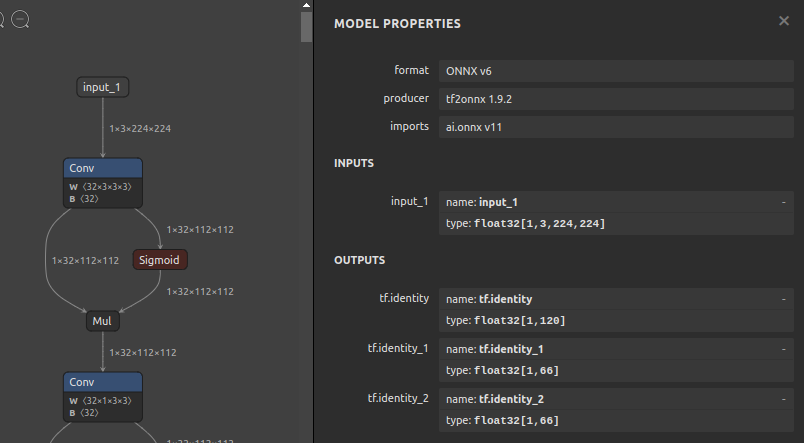
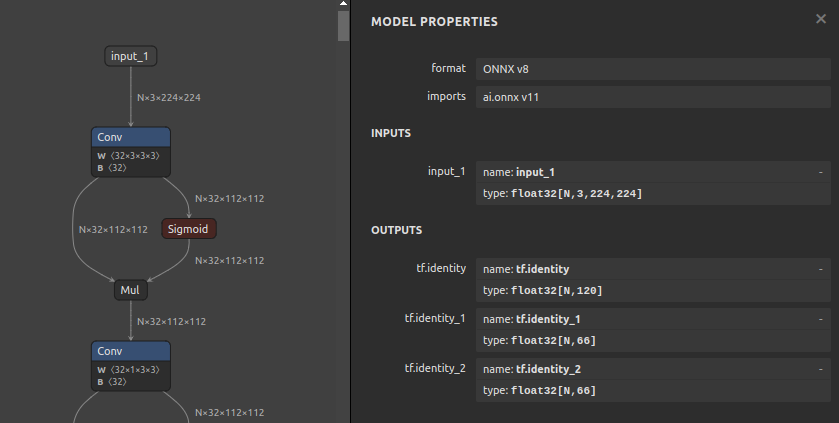
A very simple script that only initializes the batch size of ONNX. Simple Batchsize Initialization for ONNX.
https://github.com/PINTO0309/simple-onnx-processing-tools




Key concept
- Initializes the ONNX batch size with the specified characters.
- This tool is not a panacea and may fail to initialize models with very complex structures. For example, there is an ONNX that contains a
Reshapethat involves a batch size, or aGemmthat contains a batch output other than 1 in the output result. - A
Reshapein a graph cannot contain more than two undefined shapes, such as-1orNorNoneorunk_*. Therefore, before initializing the batch size with this tool, make sure that theReshapedoes not already contain one or more-1dimensions. If it already contains undefined dimensions, it may be possible to successfully initialize the batch size by pre-writing the undefined dimensions of the relevantReshapeto static values using sam4onnx.
1. Setup
1-1. HostPC
### option
$ echo export PATH="~/.local/bin:$PATH" >> ~/.bashrc \
&& source ~/.bashrc

### run
$ pip install -U onnx \
&& python3 -m pip install -U onnx_graphsurgeon --index-url https://pypi.ngc.nvidia.com \
&& pip install --no-deps -U onnx-simplifier \
&& pip install -U sbi4onnx
1-2. Docker
https://github.com/PINTO0309/simple-onnx-processing-tools#docker
2. CLI Usage
$ sbi4onnx -h

usage:
  sbi4onnx [-h]
  -if INPUT_ONNX_FILE_PATH
  -of OUTPUT_ONNX_FILE_PATH
  -ics INITIALIZATION_CHARACTER_STRING
  [-dos]
  [-n]

optional arguments:
  -h, --help
      show this help message and exit.

  -if INPUT_ONNX_FILE_PATH, --input_onnx_file_path INPUT_ONNX_FILE_PATH
      Input onnx file path.

  -of OUTPUT_ONNX_FILE_PATH, --output_onnx_file_path OUTPUT_ONNX_FILE_PATH
      Output onnx file path.

  -ics INITIALIZATION_CHARACTER_STRING, --initialization_character_string INITIALIZATION_CHARACTER_STRING
      String to initialize batch size. "-1" or "N" or "xxx", etc...
      Default: '-1'

  -dos, --disable_onnxsim
      Suppress the execution of onnxsim on the backend and dare to leave redundant processing.

  -n, --non_verbose
      Do not show all information logs. Only error logs are displayed.
3. In-script Usage
>>> from sbi4onnx import initialize
>>> help(initialize)

Help on function initialize in module sbi4onnx.onnx_batchsize_initialize:

initialize(
  input_onnx_file_path: Union[str, NoneType] = '',
  onnx_graph: Union[onnx.onnx_ml_pb2.ModelProto, NoneType] = None,
  output_onnx_file_path: Union[str, NoneType] = '',
  initialization_character_string: Union[str, NoneType] = '-1',
  non_verbose: Union[bool, NoneType] = False,
  disable_onnxsim: Union[bool, NoneType] = False,
) -> onnx.onnx_ml_pb2.ModelProto

    Parameters
    ----------
    input_onnx_file_path: Optional[str]
        Input onnx file path.
        Either input_onnx_file_path or onnx_graph must be specified.
        Default: ''

    onnx_graph: Optional[onnx.ModelProto]
        onnx.ModelProto.
        Either input_onnx_file_path or onnx_graph must be specified.
        onnx_graph If specified, ignore input_onnx_file_path and process onnx_graph.

    output_onnx_file_path: Optional[str]
        Output onnx file path. If not specified, no ONNX file is output.
        Default: ''

    initialization_character_string: Optional[str]
        String to initialize batch size. "-1" or "N" or "xxx", etc...
        Default: '-1'

    disable_onnxsim: Optional[bool]
        Suppress the execution of onnxsim on the backend and dare to leave redundant processing.
        Default: False

    non_verbose: Optional[bool]
        Do not show all information logs. Only error logs are displayed.
        Default: False

    Returns
    -------
    changed_graph: onnx.ModelProto
        Changed onnx ModelProto.
4. CLI Execution
$ sbi4onnx \
--input_onnx_file_path whenet_224x224.onnx \
--output_onnx_file_path whenet_Nx224x224.onnx \
--initialization_character_string N

$ sbi4onnx \
--input_onnx_file_path whenet_224x224.onnx \
--output_onnx_file_path whenet_Nx224x224.onnx \
--initialization_character_string -1

$ sbi4onnx \
--input_onnx_file_path whenet_224x224.onnx \
--output_onnx_file_path whenet_Nx224x224.onnx \
--initialization_character_string abcdefg
5. In-script Execution
from sbi4onnx import initialize

onnx_graph = initialize(
  input_onnx_file_path="whenet_224x224.onnx",
  output_onnx_file_path="whenet_Nx224x224.onnx",
  initialization_character_string="abcdefg",
)

# or

onnx_graph = initialize(
  onnx_graph=graph,
  initialization_character_string="abcdefg",
)
6. Sample
Before
After
7. Reference
- https://github.com/onnx/onnx/blob/main/docs/Operators.md
- https://docs.nvidia.com/deeplearning/tensorrt/onnx-graphsurgeon/docs/index.html
- https://github.com/NVIDIA/TensorRT/tree/main/tools/onnx-graphsurgeon
- https://github.com/PINTO0309/simple-onnx-processing-tools
- https://github.com/PINTO0309/PINTO_model_zoo
8. Issues
https://github.com/PINTO0309/simple-onnx-processing-tools/issues
1 maintainer

Release files for sbi4onnx 1.0.7
For a detailed explanation of source distributions (sdists) and built distributions (wheels), please see the package formats documentation.
Source distribution (sdist)
| File | Size | Uploaded | |
|---|---|---|---|
| sbi4onnx-1.0.7.tar.gz | 6.0 kB | Details |
Built distribution (wheel)
| File | Interpreter | ABI | Platform | Reset |
|---|---|---|---|---|
| sbi4onnx-1.0.7-py3-none-any.whl | Python 3 | none | any | Details |
Total release size: 13.0 kB
Release files / sbi4onnx-1.0.7.tar.gz
| Download URL | sbi4onnx-1.0.7.tar.gz |
|---|---|
| Size | 6.0 kB |
| Tags | Source |
|
SHA-256 checksum How to use checksums |
1e1a4255ff749e497c6f1e2488eb8b5042d47f698583049207aae59a1117d124
|
|
BLAKE2b-256 checksum How to use checksums |
4d84c560b4ecdc548d72d2d2293db14d80868bad00a957e0b8d954cf2aaffc35
|
| Upload date | |
|
Uploaded using Trusted Publishing? What is trusted publishing? |
No |
| Uploaded via |
twine/5.1.0 CPython/3.9.19
|
Release files / sbi4onnx-1.0.7-py3-none-any.whl
| Download URL | sbi4onnx-1.0.7-py3-none-any.whl |
|---|---|
| Size | 6.9 kB |
| Tags | Python 3 |
|
SHA-256 checksum How to use checksums |
44845074b09d466a8b004fd98c601ac1f0cd36635167c6b1991397a276eb08d6
|
|
BLAKE2b-256 checksum How to use checksums |
cc75daa32d109a94c169ec1b49a16cf7ed3473a029bf6ebaaa8255ca10d1e4f1
|
| Upload date | |
|
Uploaded using Trusted Publishing? What is trusted publishing? |
No |
| Uploaded via |
twine/5.1.0 CPython/3.9.19
|














