
Scapy Manager (scapy-man)





Step CA Manager using Python
Documenation: scapy.nikz.in
Setup
git clone https://github.com/nikhiljohn10/scapy
cd scapy
pip install poetry
poetry update
Demo
poetry run bash examples/deploy.sh
You will be asked to provide a Cloudflare Token to upload the worker. The worker will be uploaded to your Cloudflare Account and deployed to Cloudflare Edge Network.
If successully deployed, you will find a url where the demo CA Root certificate and hosted. Install this certificate in systems to access stepca.nikz.in.
Python Package
pip install scapy-man
Completion
scapy --completion
This command will install the shell completion. To activate the shell completion in currently working shell, run . ~/.bash_completion or source ~/.bash_completion.
Troubleshooting
- If
scapynot found:export PATH=$PATH:$(realpath ~/.local/bin) - If
pipnot found:sudo apt install python3-pip -y - If
python3-pipnot found:sudo apt update
Usage with Step CA
INSTALLATION_PATHS=$(scapy get step all -p)
sudo dpkg -i $INSTALLATION_PATHS
scapy gen passwords
scapy gen worker

export CA_NAME="Scapy CA"
export CA_DNS="$(hostname).local,localhost"
step ca init \
--name "$CA_NAME" \
--deployment-type standalone \
--dns "$CA_DNS" \
--address ":443" \
--provisioner admin \
--password-file $(scapy path password root) \
--provisioner-password-file $(scapy path password provisioner)

step crypto change-pass $(scapy path key intermediate) -f \
--password-file $(scapy path password root) \
--new-password-file $(scapy path password intermediate)

export FINGERPRINT=$(step certificate fingerprint $(scapy path cert root))
scapy deploy --worker scapy --js worker.js

sudo setcap CAP_NET_BIND_SERVICE=+eip $(which step-ca)
step-ca $(scapy path config ca) --password-file $(scapy path password intermediate)
In the above commands,
- Generate a password and store in step path
- Generate a basic worker file
- Export
CA_NAMEvariable with CA Name - Generate PKI using Step CA
- Export
FINGERPRINTvariable with fingerprint of Root Certificate - Deploy worker
scapywithworker.jsas script file.
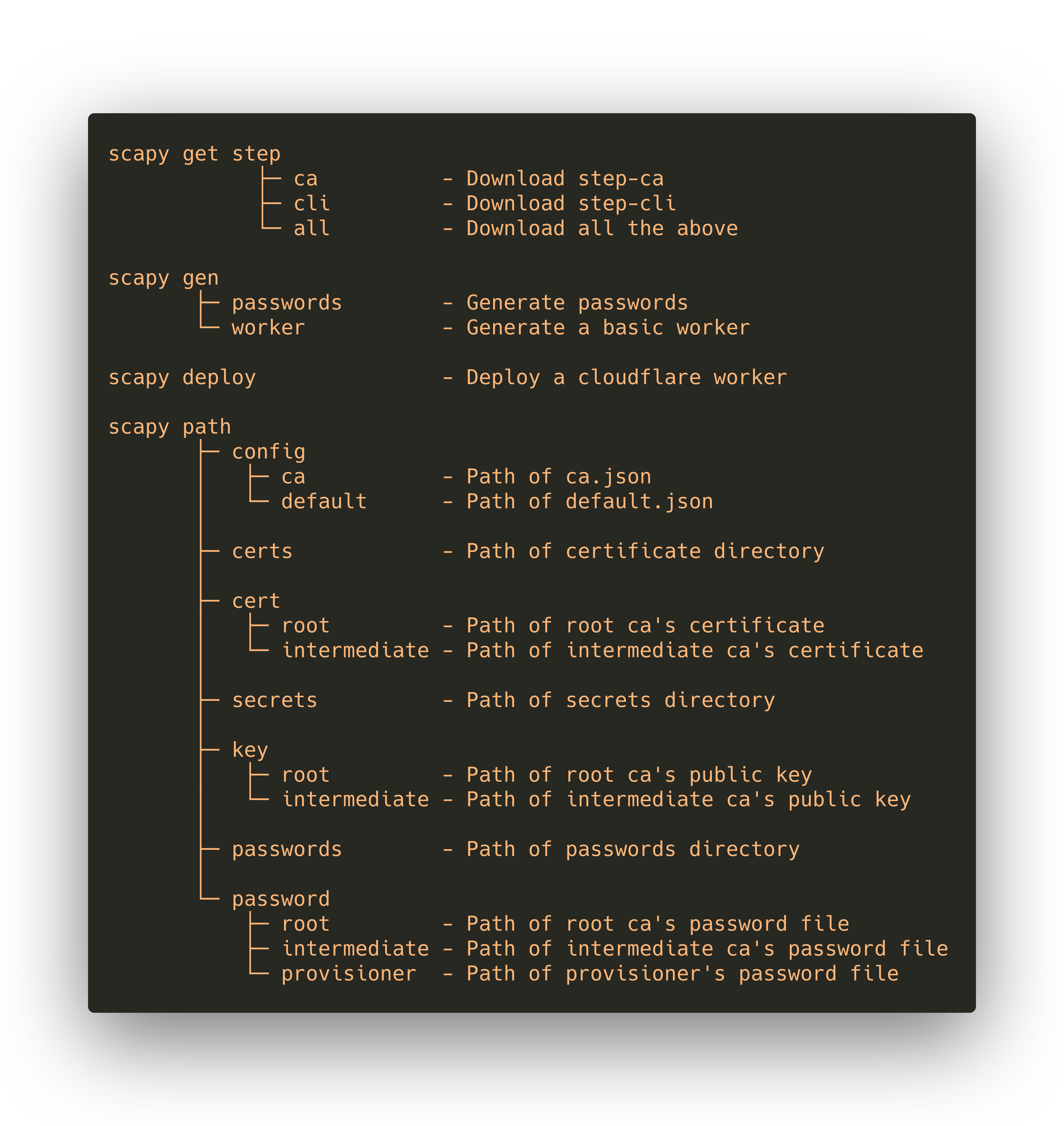
Commandline Interface
1 maintainer

Metadata
1 maintainer
Release files for scapy-man 0.3.3
For a detailed explanation of source distributions (sdists) and built distributions (wheels), please see the package formats documentation.
Source distribution (sdist)
| File | Size | Uploaded | |
|---|---|---|---|
| scapy-man-0.3.3.tar.gz | 15.0 kB | Details |
Built distribution (wheel)
| File | Interpreter | ABI | Platform | Reset |
|---|---|---|---|---|
| scapy_man-0.3.3-py3-none-any.whl | Python 3 | none | any | Details |
Total release size: 32.2 kB
Release files / scapy-man-0.3.3.tar.gz
| Download URL | scapy-man-0.3.3.tar.gz |
|---|---|
| Size | 15.0 kB |
| Tags | Source |
|
SHA-256 checksum How to use checksums |
4cd3e05e3132db511d12c21c58fe1bb9157ecb7a59635f160e56414c3d79e092
|
|
BLAKE2b-256 checksum How to use checksums |
723df2bd7129db2290bc9f53abe8aa24fe889f18ff6cfda2618d9b472fff9b20
|
| Upload date | |
|
Uploaded using Trusted Publishing? What is trusted publishing? |
No |
| Uploaded via |
twine/3.4.2 importlib_metadata/4.8.1 pkginfo/1.7.1 requests/2.26.0 requests-toolbelt/0.9.1 tqdm/4.62.3 CPython/3.9.6
|
Release files / scapy_man-0.3.3-py3-none-any.whl
| Download URL | scapy_man-0.3.3-py3-none-any.whl |
|---|---|
| Size | 17.2 kB |
| Tags | Python 3 |
|
SHA-256 checksum How to use checksums |
224bb46bd855f52a2791f36efe3be21ff2e17b7755fe25c5978488b453f23c28
|
|
BLAKE2b-256 checksum How to use checksums |
362536313d2b1ac6cf6349930524612e65b29c66345831a4c8acf4b1bd587b96
|
| Upload date | |
|
Uploaded using Trusted Publishing? What is trusted publishing? |
No |
| Uploaded via |
twine/3.4.2 importlib_metadata/4.8.1 pkginfo/1.7.1 requests/2.26.0 requests-toolbelt/0.9.1 tqdm/4.62.3 CPython/3.9.6
|














