
Generate educational videos from markdown slides with AI voice synthesis
Verified details
These details have been verified by PyPIProject links
GitHub Statistics
Maintainers

Project description



Automated instructional video generation from markdown.
Scholium (Greek: σχόλιον) — An explanatory note or commentary. Your digital scholium for the modern classroom.
Convert markdown slides with embedded narration into professional videos. Perfect for flipped classroom content, lecture recordings, and maintaining course libraries.
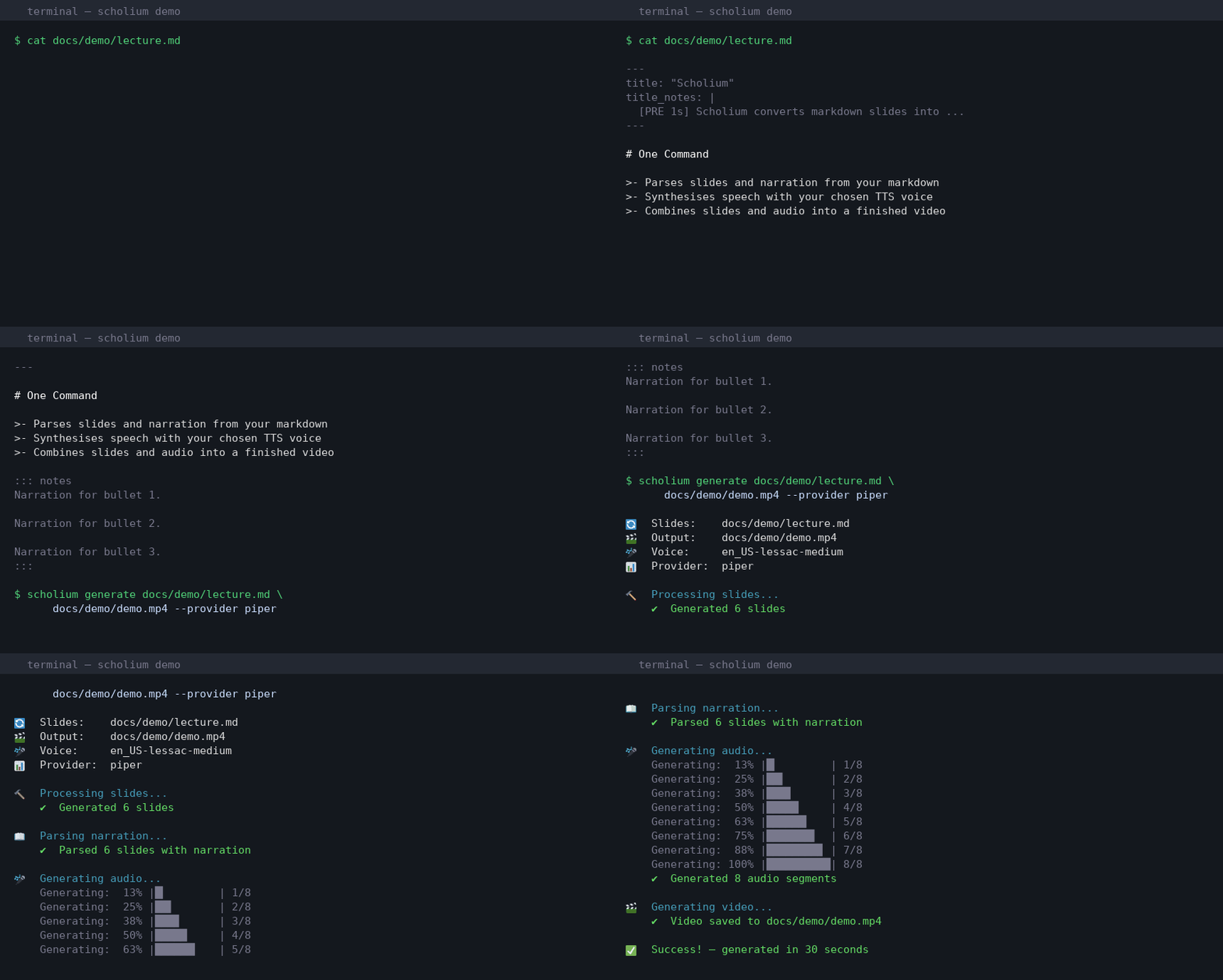
Quick Start
# 1. Install (requires Python 3.11+, pandoc, ffmpeg)
pip install scholium[piper]

# 2. Create a markdown file with embedded narration
cat > lecture.md << 'EOF'
---
title: "Newton's Laws"
author: "Physics 101"
title_notes: |
  Welcome to today's lecture on Newton's Laws of Motion.
---

# What Are Newton's Laws?

Three fundamental principles governing motion.

::: notes
Newton's three laws form the foundation of classical mechanics.
Every object in the universe obeys these rules.
:::

# The First Law

An object in motion stays in motion unless acted upon by a force.

::: notes
This is the law of inertia.
Objects resist any change to their state of motion.
:::
EOF

# 3. Generate video
scholium generate lecture.md lecture.mp4

# 4. That's it! Your video is ready.
Key Features
- 📝 Unified Markdown Format: Slides and narration in one file with
::: notes :::blocks - 🎯 Pandoc Integration: Full Beamer support with
slide-levelfor section-based lectures - 🎤 Multiple TTS Providers: Piper (local), ElevenLabs (cloud), Coqui, F5-TTS, StyleTTS2, Tortoise (local voice cloning), OpenAI, Bark
- ⏱️ Flexible Timing: Control pauses, slide duration, and pacing with simple directives
- 🔧 Production Ready: Batch processing, validation, verbose output
- 🎨 Professional Output: 1080p video with synchronized audio and slides
Installation
System Requirements
# Ubuntu/Debian
sudo apt-get install pandoc texlive-latex-base texlive-latex-extra ffmpeg

# macOS
brew install pandoc mactex ffmpeg

# Windows
choco install pandoc miktex ffmpeg
Install Scholium
# Recommended: Piper (fast, local, no API key needed)
pip install scholium[piper]

# Or other providers:
pip install scholium[elevenlabs]  # High quality cloud API
pip install scholium[coqui]       # Local voice cloning
pip install scholium[openai]      # OpenAI TTS
pip install scholium[bark]        # Highest quality, slowest
pip install scholium[f5tts]       # Fast local voice cloning (zero-shot)
pip install scholium[styletts2]   # Expressive local voice cloning
pip install scholium[tortoise]    # Very high quality local voice cloning

# All providers:
pip install scholium[all]
Usage
Basic Command
scholium generate slides.md output.mp4 [options]
Common Options
--voice NAME: Voice ID to use (e.g.,en_US-lessac-mediumfor Piper, an ElevenLabs voice ID, or a registered local voice name)--provider NAME: TTS provider (piper,elevenlabs,coqui,openai,bark,f5tts,styletts2,tortoise)--section-duration SECONDS: Duration for silent section/TOC slides (default: 3.0)--verbose: Show detailed progress--keep-temp: Keep temporary files for debugging
Example
# With Piper (local)
scholium generate lecture.md lecture.mp4 \
    --provider piper \
    --voice en_US-lessac-medium \
    --section-duration 2.0 \
    --verbose

# With ElevenLabs (cloud)
export ELEVENLABS_API_KEY="your_key"
scholium generate lecture.md lecture.mp4 \
    --provider elevenlabs \
    --voice Xb7hH8MSUJpSbSDYk0k2  # Alice - Clear, Engaging Educator
Markdown Format
Structure
Scholium uses standard Pandoc markdown with embedded ::: notes ::: blocks for narration:
---
title: "My Lecture"
author: "Your Name"
slide-level: 2  # Use ## for slides, # for sections
---

# Section Title

<!-- This creates a table-of-contents slide (no narration needed) -->

## First Slide

Your slide content here.

::: notes
This narration will be spoken over the slide.
You can use multiple paragraphs.
:::

## Second Slide

More content.

::: notes
:: Reference: See textbook page 47
:: Author note: Double-check this calculation

This narration will be spoken.
Lines starting with :: are metadata - not narrated.
<!-- HTML comments are also ignored -->

More spoken narration here.
:::

# Another Section

## Third Slide

Content continues.

::: notes
And so does the narration.
:::
Notes blocks can contain:
- Narration text: Regular text is converted to speech
- Metadata (
:: prefix): Author notes, references, reminders - not narrated - HTML comments (
<!-- -->): Also ignored during narration - Timing directives:
[MIN 10s],[PRE 2s], etc. - control timing, not spoken
Slide Levels (Pandoc Integration)
Use the slide-level in YAML frontmatter to control slide structure:
slide-level: 1 (default): Each # heading creates a slide
---
slide-level: 1
---

# Slide One
Content

::: notes
Narration
:::

# Slide Two
Content

## Just a subheading within Slide Two

::: notes
More narration
:::
slide-level: 2 (for section-based lectures): # creates sections with TOC slides, ## creates content slides
---
slide-level: 2
---

# Section Title
<!-- Auto-generates TOC slide, no narration needed -->

## Actual Slide One
Content

::: notes
Narration for slide one
:::

## Actual Slide Two
Content

::: notes
Narration for slide two
:::
Timing Control
Add timing directives inside ::: notes ::: blocks:
## Complex Diagram

[Large diagram image]

::: notes
:: Reference: Figure adapted from Smith et al. (2023)
:: TODO: Update with latest data next semester

[MIN 15s] [PRE 2s] [POST 3s]

Take a moment to examine this diagram.
[PAUSE 2s]
Notice the three main components...
:::
Available directives:
[MIN 10s]- Minimum slide duration (even if narration is shorter)[PRE 2s]- Pause 2 seconds before speaking[POST 3s]- Pause 3 seconds after speaking[PAUSE 2s]- 2-second mid-narration pause[DUR 5s]- Fixed duration (overrides everything)
Metadata in notes (prefixed with ::):
- Not converted to speech
- Useful for references, author notes, TODOs
- Helps maintain context when editing lectures
Incremental Bullets
Use >- for incremental bullet reveals (Pandoc/Beamer syntax):
## Key Points

>- First point appears
>- Then second point
>- Finally third point

::: notes
Let's look at three key points.

First, we have the foundation concept.

Second, the application of that concept.

And third, the implications for our work.
:::
Each bullet creates a new slide page. Split your narration into paragraphs (separated by blank lines) to match.
TTS Providers
| Provider | Type | Quality | Speed | Voice Cloning | API Key | Cost | [all] |
|---|---|---|---|---|---|---|---|
| Piper | Local | ⭐⭐⭐⭐ | Fast | ❌ | ❌ | Free | ✅ |
| ElevenLabs | Cloud | ⭐⭐⭐⭐⭐ | Fast | ✅ | ✅ | Paid | ✅ |
| Coqui | Local | ⭐⭐⭐⭐ | Medium | ✅ | ❌ | Free | ❌ |
| OpenAI | Cloud | ⭐⭐⭐⭐ | Fast | ❌ | ✅ | Paid | ✅ |
| Bark | Local | ⭐⭐⭐⭐⭐ | Slow | ⚠️ | ❌ | Free | ❌ |
| F5-TTS | Local | ⭐⭐⭐⭐⭐ | Fast | ✅ | ❌ | Free | ✅ |
| StyleTTS2 | Local | ⭐⭐⭐⭐⭐ | Medium | ✅ | ❌ | Free | ❌ |
| Tortoise | Local | ⭐⭐⭐⭐⭐ | Slow | ✅ | ❌ | Free | ❌ |
pip install scholium[all]installs only the four ✅ providers (Piper, ElevenLabs, OpenAI, F5-TTS). Coqui, Bark, StyleTTS2, and Tortoise have transitive dependency conflicts on Python 3.11+ — install individually.
Piper (Recommended)
pip install scholium[piper]
scholium generate lecture.md output.mp4 --provider piper
Available voices: en_US-lessac-medium, en_US-amy-medium, en_GB-alan-medium, etc.
ElevenLabs (Highest Quality)
ElevenLabs voices are identified by a Voice ID, not their display name. Use list-voices to find the ID for the voice you want:
pip install scholium[elevenlabs]
export ELEVENLABS_API_KEY="your_key"

# List voices — shows Name and Voice ID side by side
scholium list-voices --provider elevenlabs

# Use the Voice ID with --voice (not the display name)
scholium generate lecture.md output.mp4 --provider elevenlabs --voice Xb7hH8MSUJpSbSDYk0k2
Coqui (Local Voice Cloning)
pip install scholium[coqui]
scholium train-voice --name my_voice --provider coqui --sample recording.wav
scholium generate lecture.md output.mp4 --provider coqui --voice my_voice
F5-TTS (Fast Local Voice Cloning)
Zero-shot cloning from a 5-15 second reference clip — no training step required.
pip install scholium[f5tts]

# Option A: register a voice in the library
scholium train-voice --name my_voice --provider f5tts --sample recording.wav
scholium generate lecture.md output.mp4 --provider f5tts --voice my_voice

# Option B: point directly to a reference file in config.yaml
# f5tts:
#   model_path: "f5tts/my_voice/sample.wav"   # relative to voices_dir
#   ref_text: "Words spoken in the recording."
StyleTTS2 (Expressive Local Voice Cloning)
pip install scholium[styletts2]
scholium train-voice --name my_voice --provider styletts2 --sample recording.wav
scholium generate lecture.md output.mp4 --provider styletts2 --voice my_voice
Or set styletts2.model_path in config.yaml to skip voice registration.
Tortoise TTS (Highest-Quality Local Cloning)
pip install scholium[tortoise]
scholium train-voice --name my_voice --provider tortoise --sample recording.wav
# Add extra clips for better quality:
cp clip2.wav ~/.local/share/scholium/voices/tortoise/my_voice/sample_2.wav
scholium generate lecture.md output.mp4 --provider tortoise --voice my_voice
Or set tortoise.model_path in config.yaml to skip voice registration.
Configuration
Create config.yaml in your project:
# Slide settings
pandoc_template: beamer

# TTS settings
tts_provider: piper
voice: en_US-lessac-medium

# Timing defaults
timing:
  default_pre_delay: 0.5      # Pause before speaking
  default_post_delay: 1.0     # Pause after speaking
  min_slide_duration: 3.0     # Minimum for any slide
  silent_slide_duration: 2.0  # Duration for TOC/section slides

# Video settings
resolution: [1920, 1080]
fps: 30

# Paths
voices_dir: ~/.local/share/scholium/voices
temp_dir: ./temp
keep_temp_files: false
verbose: true

# Provider-specific settings
piper:
  quality: medium

elevenlabs:
  model: eleven_multilingual_v2

coqui:
  model: tts_models/multilingual/multi-dataset/xtts_v2

# Zero-shot local providers: set model_path to use a reference audio file
# directly without registering a voice via scholium train-voice.
# Paths are relative to voices_dir (or absolute).
f5tts:
  model: "F5-TTS"
  # model_path: "f5tts/my_voice/sample.wav"
  # ref_text: "Exact words spoken in the reference clip."

styletts2:
  alpha: 0.3
  beta: 0.7
  diffusion_steps: 5
  # model_path: "styletts2/my_voice/sample.wav"

tortoise:
  preset: "fast"
  # model_path: "tortoise/my_voice/sample.wav"
Voice Management
List Voices
# Local voice library (Coqui, F5-TTS, StyleTTS2, Tortoise)
scholium list-voices

# ElevenLabs cloud voices — shows Name and Voice ID
scholium list-voices --provider elevenlabs
Register a Voice
All zero-shot local providers (Coqui, F5-TTS, StyleTTS2, Tortoise) use the same command:
scholium train-voice \
    --name my_lecture_voice \
    --provider f5tts \          # or coqui, styletts2, tortoise
    --sample my_recording.wav \
    --description "My natural teaching voice"
Skip Registration with model_path
For F5-TTS, StyleTTS2, and Tortoise, you can point directly to a reference file in config.yaml without registering a voice:
f5tts:
  model_path: "f5tts/my_voice/sample.wav"   # relative to voices_dir, or absolute
  ref_text: "The words spoken in the clip."  # optional but improves accuracy
Regenerate Embeddings (Coqui)
# Pre-compute speaker embeddings to speed up Coqui generation
scholium regenerate-embeddings --voice my_lecture_voice
Batch Processing
Process multiple lectures with a simple script:
#!/bin/bash
for lecture in lectures/*.md; do
    output="${lecture%.md}.mp4"
    scholium generate "$lecture" "$output" --verbose
done
Or use Python:
from pathlib import Path
import subprocess

for lecture in Path("lectures").glob("*.md"):
    output = lecture.with_suffix(".mp4")
    subprocess.run([
        "scholium", "generate",
        str(lecture), str(output),
        "--verbose"
    ])
Examples
See the examples/ directory for:
- Basic lecture with sections (
example_level2.md) - Incremental bullets and timing
- Voice cloning workflow
- Batch processing scripts
Performance
Generation time (per 10-minute lecture):
- NVIDIA GPU: 5-10 minutes
- Apple Silicon: 10-15 minutes
- Modern CPU: 30-60 minutes
First run: Models download automatically (~500MB-1.5GB), cached for future use.
Troubleshooting
"Pandoc not found": Install pandoc and LaTeX (see Installation)
"Narration bleeding over section slides": Make sure you have slide-level: 2 in your YAML frontmatter
"Slide count mismatch": Don't add ::: notes ::: after # section headings when using slide-level: 2
"Voice not found":
- Piper: Use voice name like
en_US-lessac-medium - ElevenLabs: Use voice ID (run the list command above)
- Coqui / F5-TTS / StyleTTS2 / Tortoise: Use a registered voice name from
scholium list-voices, or setmodel_pathunder the provider section inconfig.yaml
"Out of memory":
- Close other applications
- Use
export CUDA_VISIBLE_DEVICES=""to force CPU - Process one lecture at a time
Documentation
- Full docs: https://ccaprani.github.io/scholium
- Examples:
examples/directory in this repo - Issues: GitHub Issues
- API reference:
scholium --help
Project Philosophy
Simple tool, not a framework. Scholium does one thing well: converts markdown+narration into video. It integrates with your existing workflow rather than replacing it.
Text-first. Everything is plain text (markdown + YAML), so it's:
- Version controllable (Git)
- Searchable and editable
- Reproducible across systems
- Easy to maintain
Pandoc-native. Uses standard Beamer slide syntax, so your slides work in LaTeX/Beamer too.
License
MIT License - see LICENSE file
Contributing
Contributions welcome! Focus areas:
- New TTS provider integrations
- Performance improvements
- Documentation and examples
- Bug fixes
Scholium: Your digital scholium for the modern classroom. 📖
Project details
Verified details
These details have been verified by PyPIProject links
GitHub Statistics
Maintainers
Release history Release notifications | RSS feed


Download files
Download the file for your platform. If you're not sure which to choose, learn more about installing packages.
Source Distribution
Built Distribution
Filter files by name, interpreter, ABI, and platform.
If you're not sure about the file name format, learn more about wheel file names.
Copy a direct link to the current filters
File details
Details for the file scholium-2026.1.tar.gz.
File metadata
- Download URL: scholium-2026.1.tar.gz
- Upload date:
- Size: 65.8 kB
- Tags: Source
- Uploaded using Trusted Publishing? Yes
- Uploaded via: twine/6.1.0 CPython/3.13.7
File hashes
| Algorithm | Hash digest | |
|---|---|---|
| SHA256 |
0a49128cfb586265647c32461ab328a4b3c1c0e787f88e62d5bb4c13bb7e1b5d
|
|
| MD5 |
27a5816825c996314a5a9d7453d77d66
|
|
| BLAKE2b-256 |
d53776edb5e4f62cb9c9054604d2bb71908de8cfe313e1b6bdce8accb4e70bb7
|
Provenance
The following attestation bundles were made for scholium-2026.1.tar.gz:
Publisher:
publish.yml on ccaprani/scholium
-
Statement:
-
Statement type:
https://in-toto.io/Statement/v1 -
Predicate type:
https://docs.pypi.org/attestations/publish/v1 -
Subject name:
scholium-2026.1.tar.gz -
Subject digest:
0a49128cfb586265647c32461ab328a4b3c1c0e787f88e62d5bb4c13bb7e1b5d - Sigstore transparency entry: 1004791873
- Sigstore integration time:
-
Permalink:
ccaprani/scholium@4279d53e5037496acfa2bf5fe9aa19ab7eec0fd4 -
Branch / Tag:
refs/tags/v2026.1 - Owner: https://github.com/ccaprani
-
Access:
public
-
Token Issuer:
https://token.actions.githubusercontent.com -
Runner Environment:
github-hosted -
Publication workflow:
publish.yml@4279d53e5037496acfa2bf5fe9aa19ab7eec0fd4 -
Trigger Event:
release
-
Statement type:
File details
Details for the file scholium-2026.1-py3-none-any.whl.
File metadata
- Download URL: scholium-2026.1-py3-none-any.whl
- Upload date:
- Size: 57.0 kB
- Tags: Python 3
- Uploaded using Trusted Publishing? Yes
- Uploaded via: twine/6.1.0 CPython/3.13.7
File hashes
| Algorithm | Hash digest | |
|---|---|---|
| SHA256 |
18e9db6242a8d82c8b8e2b938161526bcc4dafbc3f957a5518a17df971230bf7
|
|
| MD5 |
5d963bb308fc1d7bae162594a289f2be
|
|
| BLAKE2b-256 |
894ab98dc62aa82d4c2f6c9ff64d2af91a3e7e3ca880fb2b3cd8683d96b149a0
|
Provenance
The following attestation bundles were made for scholium-2026.1-py3-none-any.whl:
Publisher:
publish.yml on ccaprani/scholium
-
Statement:
-
Statement type:
https://in-toto.io/Statement/v1 -
Predicate type:
https://docs.pypi.org/attestations/publish/v1 -
Subject name:
scholium-2026.1-py3-none-any.whl -
Subject digest:
18e9db6242a8d82c8b8e2b938161526bcc4dafbc3f957a5518a17df971230bf7 - Sigstore transparency entry: 1004791875
- Sigstore integration time:
-
Permalink:
ccaprani/scholium@4279d53e5037496acfa2bf5fe9aa19ab7eec0fd4 -
Branch / Tag:
refs/tags/v2026.1 - Owner: https://github.com/ccaprani
-
Access:
public
-
Token Issuer:
https://token.actions.githubusercontent.com -
Runner Environment:
github-hosted -
Publication workflow:
publish.yml@4279d53e5037496acfa2bf5fe9aa19ab7eec0fd4 -
Trigger Event:
release
-
Statement type:






