
scikit-eo: A Python package for Remote Sensing Data Analysis









Journal of Open Source Software
Citation
Please, to cite the scikit-eo package in publications, use this paper:
Tarazona, Y., Benitez-Paez, F., Nowosad, J., Drenkhan, F., and Timaná, M. (2024). scikit-eo: A Python package for Remote Sensing Data Analysis. Journal of Open Source Software, 9(99), 6692. DOI: 10.21105/joss.06692
🌍🛰️🚀 NEW: Deep Learning Segmentation
- Implementation of Deep Learning models (U-Net) for satellite image segmentation.
- Tools for training, validating, and predicting burned areas and other land cover features.
- Example Jupyter Notebooks for hands-on tutorials:
Introduction
Nowadays, remotely sensed data has increased dramatically. Microwaves and optical images with different spatial and temporal resolutions are available and are used to monitor a variety of environmental issues such as deforestation, land degradation, land use and land cover change, among others. Although there are efforts (i.e., Python packages, forums, communities, etc.) to make available line-of-code tools for pre-processing, processing and analysis of satellite imagery, there is still a gap that needs to be filled. In other words, too much time is still spent by many users developing Python lines of code. Algorithms for mapping land degradation through a linear trend of vegetation indices, fusion optical and radar images to classify vegetation cover, and calibration of machine learning algorithms, among others, are not available yet.
Therefore, scikit-eo is a Python package that provides tools for remote sensing. This package was developed to fill the gaps in remotely sensed data processing tools. Most of the tools are based on scientific publications, and others are useful algorithms that will allow processing to be done in a few lines of code. With these tools, the user will be able to invest time in analyzing the results of their data and not spend time on elaborating lines of code, which can sometimes be stressful.
Tools for Remote Sensing
| Name of functions/classes | Description |
|---|---|
mla |
Machine Learning (Random Forest, Support Vector Machine, Decition Tree, Naive Bayes, Neural Network, etc.) |
calmla |
Calibrating supervised classification in Remote Sensing (e.g., Monte Carlo Cross-Validation, Leave-One-Out Cross-Validation, etc.) |
confintervalML |
Information of confusion matrix by proportions of area, overall accuracy, user's accuracy with confidence interval and estimated area with confidence interval as well. |
rkmeans |
K-means classification. |
calkmeans |
This function allows to calibrate the kmeans algorithm. It is possible to obtain the best k value and the best embedded algorithm in kmeans. |
pca |
Principal Components Analysis. |
atmosCorr |
Atmospheric Correction of satellite imagery. |
deepLearning |
Deep Learning algorithms. |
linearTrend |
Linear trend is useful for mapping forest degradation or land degradation. |
fusionrs |
This algorithm allows to fuse images coming from different spectral sensors (e.g., optical-optical, optical and SAR or SAR-SAR). Among many of the qualities of this function, it is possible to obtain the contribution (%) of each variable in the fused image. |
sma |
Spectral Mixture Analysis - Classification sup-pixel. |
tassCap |
The Tasseled-Cap Transformation. |
You will find more algorithms!.
Dependencies used by scikit-eo
All dependencies used by scikit-eo are as follows:
numpy, pandas, matplotlib, rasterio, seaborn, statsmodels, scikit-learn, scipy, pytest, dbfread, fiona and geopandas. By installing scikit-eo all these packages will be installed!.
Installation
To use scikit-eo it is necessary to install it. There are two options:
1. From PyPI
scikit-eo is available on PyPI, so to install it, run this command in your terminal:
pip install scikeo
2. Installing from source
It is also possible to install the latest development version directly from the GitHub repository with:
pip install git+https://github.com/yotarazona/scikit-eo
containerizing scikit-eo
Note: It is a recommended practice to provide some instructions for isolating/containerizing scikit-eo. It would benefit their use and thus avoid that some dependencies are not compatible with others. For example, conda provides an easy solution.
conda create -n scikiteo python = 3.8
Then, activate the environment created
conda activate scikiteo
Then finally, scikit-eo can be install within this new environment using via PyPI or from the GitHub repository.
Example
1.0 Applying Machine Learning
Libraries to be used:
import rasterio
import numpy as np
from scikeo.mla import MLA
from scikeo.process import extract
import matplotlib.pyplot as plt
import matplotlib as mpl
import geopandas as gpd
from scikeo.plot import plotRGB
from scikeo.writeRaster import writeRaster
2.0 Optical image
Landsat-8 OLI (Operational Land Imager) will be used to obtain in order to classify using Random Forest (RF). This image, which is in surface reflectance with bands:
- Blue -> B2
- Green -> B3
- Red -> B4
- Nir -> B5
- Swir1 -> B6
- Swir2 -> B7
This image will be downloaded using the following codes:
import requests, zipfile
from io import BytesIO

# Defining the zip file URL
url = 'https://github.com/yotarazona/data/raw/main/data/01_machine_learning.zip'

# Split URL to get the file name
filename = url.split('/')[-1]

# Downloading the file by sending the request to the URL
req = requests.get(url)

# extracting the zip file contents
file = zipfile.ZipFile(BytesIO(req.content))
file.extractall()
3.0 Supervised Classification using Random Forest
Image and endmembers
data_dir = "01_machine_learning/"

# satellite image
path_raster = data_dir + "LC08_232066_20190727_SR.tif"
img = rasterio.open(path_raster)

# endmembers
path_endm = data_dir + "endmembers.shp"
endm = gpd.read_file(path_endm)
# endmembers
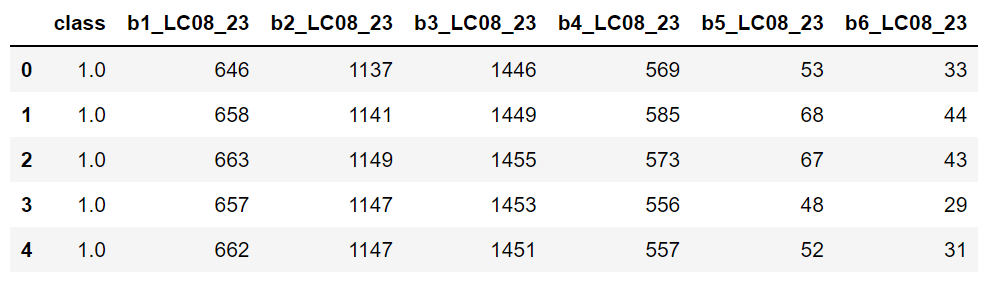
endm = extract(img, endm)
endm
Instance of mla():
inst = MLA(image = img, endmembers = endm)
Applying Random Forest:
svm_class = inst.SVM(training_split = 0.7)
4.0 Results
Dictionary of results
svm_class.keys()
Overall accuracy
svm_class.get('Overall_Accuracy')
Kappa index
svm_class.get('Kappa_Index')
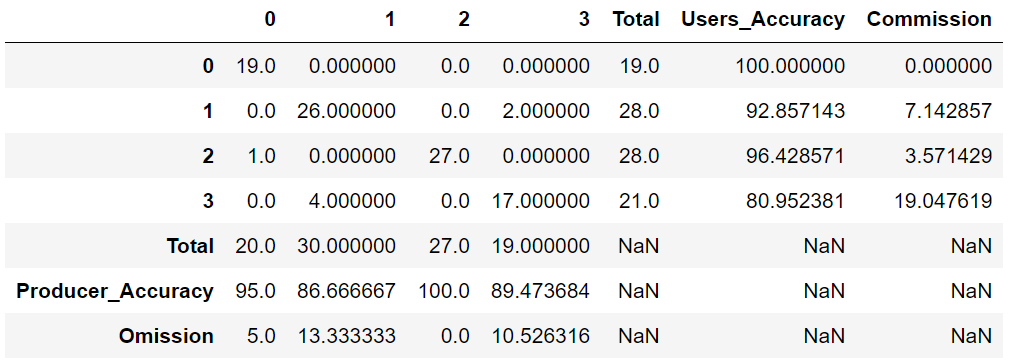
Confusion matrix or error matrix
svm_class.get('Confusion_Matrix')
Preparing the image before plotting
# Let's define the color palette
palette = mpl.colors.ListedColormap(["#2232F9","#F922AE","#229954","#7CED5E"])
Applying the plotRGB() algorithm is easy:
# Let´s plot
fig, axes = plt.subplots(nrows = 1, ncols = 2, figsize = (15, 9))

# satellite image
plotRGB(img, title = 'Image in Surface Reflectance', ax = axes[0])

# class results
axes[1].imshow(svm_class.get('Classification_Map'), cmap = palette)
axes[1].set_title("Classification map")
axes[1].grid(False)
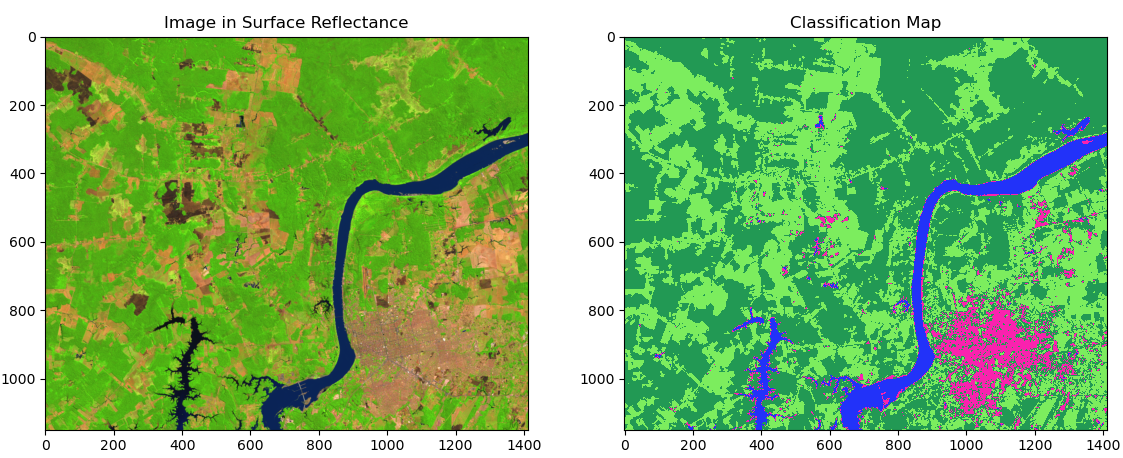
This result shows us how we can use the scikit-eo python package in order to obtaind a Land Cover map. Following this tutorial is it possible to use different algorithms such as Support Vector Machine, Decision Tree, Neural Networks, amont others.
- Free software: Apache Software License 2.0
- Documentation:
Acknowledgment
Special thanks to:
-
David Montero Loaiza for the idea of the package name scikit-eo.
-
Qiusheng Wu for the suggestions that helped to improve the package.
Credits
This package was created with Cookiecutter
Logo inspiration
The logo on the package is inspired by fog oasis known as "lomas".
3 maintainers


Metadata
3 maintainers
Release files for scikeo 0.2.47
For a detailed explanation of source distributions (sdists) and built distributions (wheels), please see the package formats documentation.
Source distribution (sdist)
| File | Size | Uploaded | |
|---|---|---|---|
| scikeo-0.2.47.tar.gz | 49.4 kB | Details |
Built distribution (wheel)
| File | Interpreter | ABI | Platform | Reset |
|---|---|---|---|---|
| scikeo-0.2.47-py2.py3-none-any.whl | Python 3, Python 2 | none | any | Details |
Total release size: 98.1 kB
Release files / scikeo-0.2.47.tar.gz
| Download URL | scikeo-0.2.47.tar.gz |
|---|---|
| Size | 49.4 kB |
| Tags | Source |
|
SHA-256 checksum How to use checksums |
18cbc4fbc14aad2f038b7fec3699ab01a16e49f8ff13a6c8cadd04779e201669
|
|
BLAKE2b-256 checksum How to use checksums |
4e28d6fad3355da3902bcb91fddf3fa9cc147634ab3f5b95ca10eba20b0fda38
|
| Upload date | |
|
Uploaded using Trusted Publishing? What is trusted publishing? |
Yes |
| Uploaded via |
twine/6.1.0 CPython/3.13.7
|
Provenance
Provenance describes where a file came from. On PyPI, provenance is shared via attestations, which provide a verifiable record of the build or publishing details. View details, limitations and caveats.


PyPI Publish Attestation
PyPI verified that this artifact, at this checksum, originated from the publisher listed below.
Signed by GitHub Actions, verified by PyPI on Jan 26, 2026.
Transparency logRelease files / scikeo-0.2.47-py2.py3-none-any.whl
| Download URL | scikeo-0.2.47-py2.py3-none-any.whl |
|---|---|
| Size | 48.7 kB |
| Tags | Python 2 Python 3 |
|
SHA-256 checksum How to use checksums |
c50f7d19401edfb1f44bcdd9e81d15c9615f8d0b539a32736026b6c53af44140
|
|
BLAKE2b-256 checksum How to use checksums |
d4c3082f6f8d382ba3fb93d1a627609672ca8c4addec7a5622ecea733326327f
|
| Upload date | |
|
Uploaded using Trusted Publishing? What is trusted publishing? |
Yes |
| Uploaded via |
twine/6.1.0 CPython/3.13.7
|
Provenance
Provenance describes where a file came from. On PyPI, provenance is shared via attestations, which provide a verifiable record of the build or publishing details. View details, limitations and caveats.
PyPI Publish Attestation
PyPI verified that this artifact, at this checksum, originated from the publisher listed below.
Signed by GitHub Actions, verified by PyPI on Jan 26, 2026.
Transparency log













