
Requires Python 3.6+
Scrapy UI
A simple, Qt-Webengine powered web browser with built in functionality for testing scrapy spider code.
Also includes an addon to enable a GUI for use with the scrapy shell.
Table of Contents
Installation
You can import the package from PyPi using
pip install scrapy_gui
Then you can import it to a shell using scrapy_ui
Standalone UI
The standlaone UI can be opened by using from scrapy_ui.open_browser() from a python shell. This consists of a web browser and a set of tools to analyse its contents.
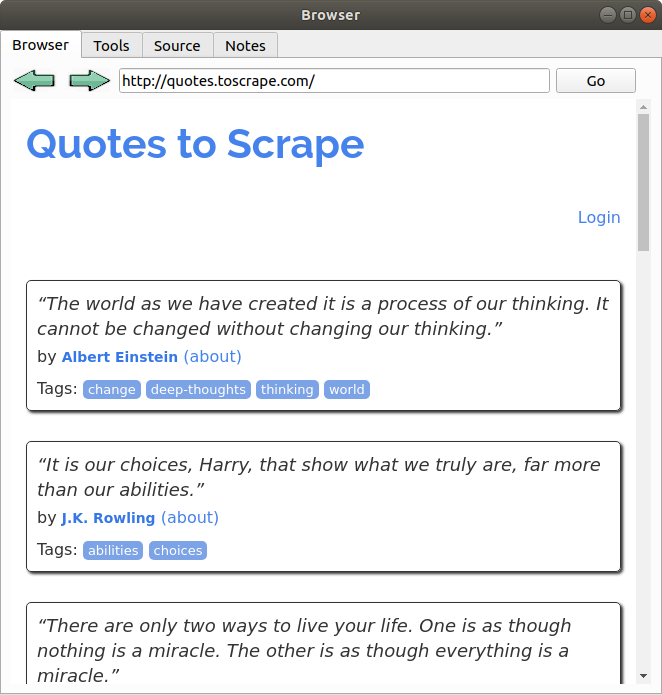
Browser Tab
Enter any url into search bar and hit return or press the Go button. When the loading animation finishes it will be ready to parse in the Tools tab.
Tools Tab
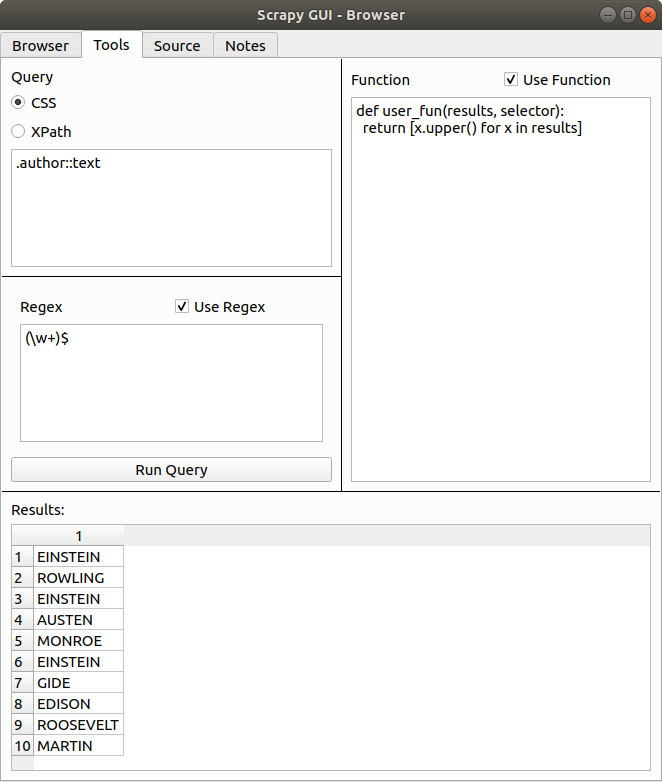
The tools tab contains various sections for parsing content of the page. The purpose of this tab is to make it easy to test queries and code for use in a scrapy spider.
NOTE: This will use the initial html response. If additional requests, javascript, etc alter the page later this will not be taken into account.
It will load the initial html with an additional request using the requests package. When running a query it will create a selector object using Selection from the parsel package.
Query Box
The query box lets you use parsel compatible CSS queries to extract data from the page.
It returns results as though selection.css('YOUR QUERY').getall() was called.
If there are no results or there is an error in the query a dialogue will pop up informing you of the issue.
Regex Box
This box lets you add a regular expression pattern to be used in addition to the previous css query.
It returns results as though selection.css('YOUR QUERY').re(r'YOUR REGEX')' was called. This means that if you use groups it will only return the content within parenthesis.
Function Box
This box lets you define additional python code that can run on the results of your query and regex. The code can be as long and complex as you want, including adding additional functions, classes, imports etc.
The only requirement is you must include a function called user_fun(results, selector) that returns a list.
Results Box
This table will list all the results, passed through the regex and function if defined.
Source Tab
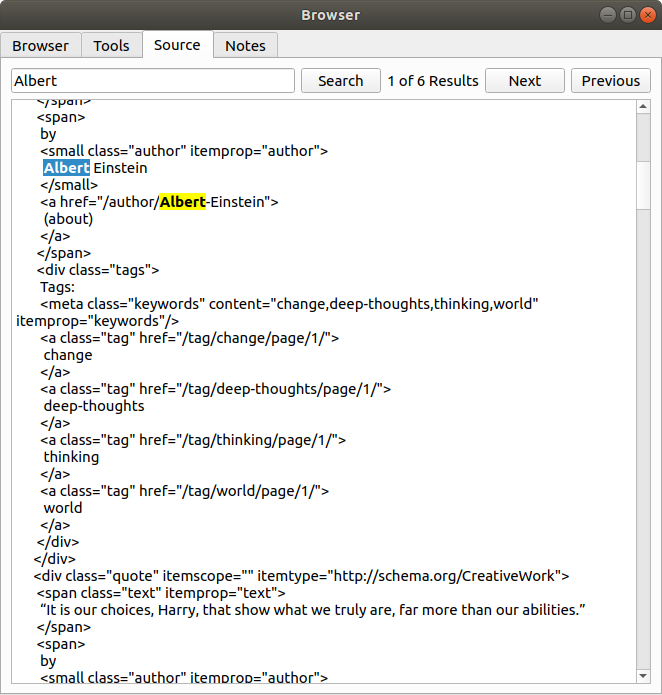
This tab contains the html source that is used in the Tools tab. You can use the text box to search for specific content. All searches are not case sensitive.
Notes Tab
This is just a plain text box. Content in here is not saved when you exit the app.
Integration with Scrapy Shell
It is possible to integrate this tool with the scrapy shell. This will allow you to use it on responses that have been passed through your middlewares, access more complex requests and more specific selectors.
Activation
To use it in your shell import the load_selector method using:
from scrapy_ui import load_selector
Then you can write load_selector(YOUR_SELECTOR) to open a window with your selector loaded into it.
For example
load_selector(response)will load your response into the UI.
When you run the code a window named Shell UI will open that contains the Tools, Source and Notes tabs from the standalone window mentioned above.
1 maintainer

Metadata
1 maintainer
Release files for scrapy-GUI 1.0.0
For a detailed explanation of source distributions (sdists) and built distributions (wheels), please see the package formats documentation.
Source distribution (sdist)
| File | Size | Uploaded | Provenance | Actions |
|---|---|---|---|---|
| scrapy-GUI-1.0.0.tar.gz | 71.7 kB | Without provenance | Details for scrapy-GUI-1.0.0.tar.gz |
Built distribution (wheel)
| File | Interpreter | ABI | Platform | Actions Reset |
|---|---|---|---|---|
| scrapy_GUI-1.0.0-py3-none-any.whl | Python 3 | none | any | Details for scrapy_GUI-1.0.0-py3-none-any.whl |
Total release size: 144.0 kB
Release files / scrapy-GUI-1.0.0.tar.gz
| Download URL | scrapy-GUI-1.0.0.tar.gz |
|---|---|
| Size | 71.7 kB |
| Tags | Source |
|
SHA-256 checksum How to use checksums |
a683180ae7d21d4369fe3701432517c9c65bd1dd4d942ee327f29d9f0dd77e06
|
|
BLAKE2b-256 checksum How to use checksums |
504ea5b8f0670661a60adfd737a9f2c36c133d8402b4b170f92f5a356ea7332e
|
| Upload date | |
|
Uploaded using Trusted Publishing? What is trusted publishing? |
No |
| Uploaded via |
twine/3.1.1 pkginfo/1.5.0.1 requests/2.22.0 setuptools/44.0.0 requests-toolbelt/0.9.1 tqdm/4.32.2 CPython/3.6.9
|
Release files / scrapy_GUI-1.0.0-py3-none-any.whl
| Download URL | scrapy_GUI-1.0.0-py3-none-any.whl |
|---|---|
| Size | 72.3 kB |
| Tags | Python 3 |
|
SHA-256 checksum How to use checksums |
8c3163d221ee5c43ce8741e9e714d74689bb00361c2315e7b7dec86a41789608
|
|
BLAKE2b-256 checksum How to use checksums |
87321dfd930a98d8eb7df60ee49f0d3fb78463863dcd2af44ccd8aecff4a970c
|
| Upload date | |
|
Uploaded using Trusted Publishing? What is trusted publishing? |
No |
| Uploaded via |
twine/3.1.1 pkginfo/1.5.0.1 requests/2.22.0 setuptools/44.0.0 requests-toolbelt/0.9.1 tqdm/4.32.2 CPython/3.6.9
|
Security for scrapy-GUI 1.0.0
Provenance
Provenance describes where a file came from. On PyPI, provenance is shared via attestations, which provide a verifiable record of the build or publishing details. View details, limitations and caveats.
No provenance found
None of the files in this release were uploaded with provenance metadata.
A note on package security
PyPI is a repository for distributing packages, not a service for auditing them. While third-party security researchers and our staff do their best to detect and remove malicious packages, PyPI cannot guarantee the quality, security or suitability of any given package.
To learn more about protecting yourself from malicious actors, visit our package security documentation.














