

17x7 pixels of single-colour, brightness-controlled, message scrolling goodness!
Installing
Full install (recommended):
We’ve created an easy installation script that will install all pre-requisites and get your Scroll pHAT HD up and running with minimal efforts. To run it, fire up Terminal which you’ll find in Menu -> Accessories -> Terminal on your Raspberry Pi desktop, as illustrated below:
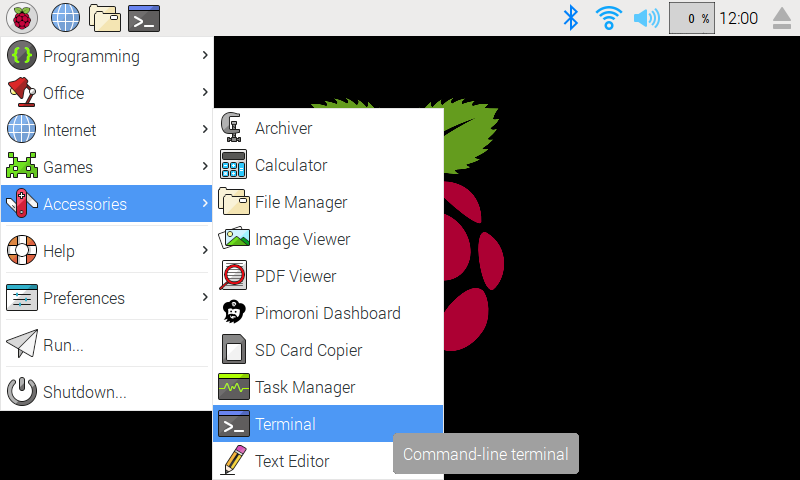
In the new terminal window type the command exactly as it appears below (check for typos) and follow the on-screen instructions:
curl https://get.pimoroni.com/scrollphathd | bashAlternatively, on Raspbian, you can download the pimoroni-dashboard and install your product by browsing to the relevant entry:
sudo apt-get install pimoroni(you will find the Dashboard under ‘Accessories’ too, in the Pi menu - or just run pimoroni-dashboard at the command line)
If you choose to download examples you’ll find them in /home/pi/Pimoroni/scrollphathd/.
Manual install:
Library install for Python 3:
on Raspbian:
sudo apt-get install python3-scrollphathdother environments:
sudo pip3 install scrollphathdLibrary install for Python 2:
on Raspbian:
sudo apt-get install python-scrollphathdother environments:
sudo pip2 install scrollphathdDevelopment:
If you want to contribute, or like living on the edge of your seat by having the latest code, you should clone this repository, cd to the library directory, and run:
sudo python3 setup.py install(or sudo python setup.py install whichever your primary Python environment may be)
In all cases you will have to enable the i2c bus.
Documentation & Support
Guides and tutorials - https://learn.pimoroni.com/scroll-phat-hd
Function reference - http://docs.pimoroni.com/scrollphathd/
GPIO Pinout - https://pinout.xyz/pinout/scroll_phat_hd
Get help - http://forums.pimoroni.com/c/support
Unofficial / Third-party libraries
Java library by Jim Darby - https://github.com/hackerjimbo/PiJava
Rust library by Tiziano Santoro - https://github.com/tiziano88/scroll-phat-hd-rs
Go library by Tom Mitchell - https://github.com/tomnz/scroll-phat-hd-go
1.3.0
Improvement: Default i2c library is now smbus2
Improvement: Significant restructure of library around generic is31fl3731 driver
Improvement: Allow for alternate i2c addresses
BugFix: Add missing get_buffer_shape
BugFix: Fix malformed chars in font5x7
New: Fonts, fonts, fonts, and a set_font method to use them
1.2.1
New: Exposed set_gamma method for user gamma correction
Improvement: Removed web API import to prevent hard dependency on Flask
Improvement: Many improvements to the HTTP API including autoscroll
Optimisation: write_string will calculate string size and grow buffer once to fit
Optimisation: set_graph will grow buffer to fit the graph
Bugfix: Fixed ASCII font to place accented characters at correct codepoints
1.2.0
New: Added set_font to set current font for all write_string calls
New: Added before_display argument to show to modify the display buffer
1.1.1
Bugfix: Removed Flask HTTP API entry_point to prevent bin file conflict between Python 2 and 3
1.1.0
New: Added Flask HTTP API
New: Init is deferred until the library is used
1.0.1
New: Added gamma correction
1.0.0
New: Added set_brightness to globally set maximum display brightness
New: Added get_buffer_shape to return internal buffer shape
New: Added get_shape to return display shape
New: Added set_clear_on_exit, pass True/False to set/clear
Improvement: draw_char no longer fills black pixels, which was incongruent with letter spacing
Improvement: ‘1’ in font3x5 is now 3 pixels wide
Improvement: Monospacing option for fonts
Improvement: Fonts can now be indexed by char in addition to ordinal
Improvement: Clear now resets scroll position
Improvement: Fill now grows buffer and fills in single operations
Improvement: scroll(0,0) no longer enforces a default scroll
Improvement: width/height now private, reimplemented as read-only properties
Improvement: initialization now detects disabled i2c or missing pHAT and emits a friendly error
Improvement: cleared display sooner to mitigate flash of lit pixels on startup
Bugfix: Corrected default scroll direction
Bugfix: 90 and 270 degree rotations are no longer cropped to 7 pixels wide
Bugfix: Fixed missing version_info
Bugfix: Graph catches IndexError and gracefully ignores missing values
0.0.1
Initial release
1 maintainer

Metadata
1 maintainer
Release files for scrollphathd 1.3.0
For a detailed explanation of source distributions (sdists) and built distributions (wheels), please see the package formats documentation.
Source distribution (sdist)
| File | Size | Uploaded | Provenance | Actions |
|---|---|---|---|---|
| scrollphathd-1.3.0.tar.gz | 29.5 kB | Without provenance | Details for scrollphathd-1.3.0.tar.gz |
Built distribution (wheel)
| File | Interpreter | ABI | Platform | Actions Reset |
|---|---|---|---|---|
| scrollphathd-1.3.0-py3-none-any.whl | Python 3 | none | any | Details for scrollphathd-1.3.0-py3-none-any.whl |
Total release size: 59.7 kB
Release files / scrollphathd-1.3.0.tar.gz
| Download URL | scrollphathd-1.3.0.tar.gz |
|---|---|
| Size | 29.5 kB |
| Tags | Source |
|
SHA-256 checksum How to use checksums |
55df045a559b3562646d60cffcbf7b44b3987e783e3b74e7238de9792f89232b
|
|
BLAKE2b-256 checksum How to use checksums |
7f5189b55fa1f7a9ac7a85d9f4351d19a05614c76a47b89e0ba3c1f545cdee2b
|
| Upload date | |
|
Uploaded using Trusted Publishing? What is trusted publishing? |
No |
| Uploaded via |
twine/3.4.1 importlib_metadata/4.0.1 pkginfo/1.7.0 requests/2.21.0 requests-toolbelt/0.9.1 tqdm/4.60.0 CPython/3.7.3
|
Release files / scrollphathd-1.3.0-py3-none-any.whl
| Download URL | scrollphathd-1.3.0-py3-none-any.whl |
|---|---|
| Size | 30.1 kB |
| Tags | Python 3 |
|
SHA-256 checksum How to use checksums |
bb450900024d4815246b310588c269a30bf26a7ad2b84e2ca5845bb2394b96f3
|
|
BLAKE2b-256 checksum How to use checksums |
b014d454de1589ab82f4e0079a86987bf7c41ec77a019e902d0b18fed74aabbd
|
| Upload date | |
|
Uploaded using Trusted Publishing? What is trusted publishing? |
No |
| Uploaded via |
twine/3.4.1 importlib_metadata/4.0.1 pkginfo/1.7.0 requests/2.21.0 requests-toolbelt/0.9.1 tqdm/4.60.0 CPython/3.7.3
|
Security for scrollphathd 1.3.0
Provenance
Provenance describes where a file came from. On PyPI, provenance is shared via attestations, which provide a verifiable record of the build or publishing details. View details, limitations and caveats.
No provenance found
None of the files in this release were uploaded with provenance metadata.
A note on package security
PyPI is a repository for distributing packages, not a service for auditing them. While third-party security researchers and our staff do their best to detect and remove malicious packages, PyPI cannot guarantee the quality, security or suitability of any given package.
To learn more about protecting yourself from malicious actors, visit our package security documentation.














