
Selfdocprint
Provides enhanced and configurable print() functionality that allows for easily printing values such that they are:
- self-documented
- formatted
- nicely laid out
Fully compatible with python's built-in print(). Supports all its keyword arguments, including file= and flush=.
The module comes with four layout classes. Below is an example of InlineLayout.
from selfdocprint import PrintFunc, InlineLayout

# instantiate a function
print = PrintFunc()  # this will now shadow python's built-in print function

# some data
formula = "Ultimate Question of Life,\nthe Universe, and Everything"
theta = 6.006
x = 7

# let's print it with our print function
print(formula, theta, x, x*theta, layout=InlineLayout())

The default value for the layout= keyword argument (normally None) can be configured so that subsequent calls require even less typing. In this case it would be good practice to not call the function 'print' to avoid confusion with the expected behaviour of python's built-in print().
prinline = PrintFunc(default_layout=InlineLayout())

prinline(formula, theta, x, x*theta)

A layout can be customised by overriding one or more of its fields (The fields are described in detail in the section: 'Style, format and layout specification'). Note that in the example below we override head= to suppress the empty line that is normally printed in front of the output when using the InlineLayout.
for i in range(0, 99, 21):
    print(i, i * theta, layout=InlineLayout(float_format="12.6f", pointer=" -> ", head=""))

Custom layouts can be created and referenced in subsequent calls. Note that in the example below we change the style= for the labels, which is specified as ANSI Select Graphic Rendition parameters.
my_layout = InlineLayout(style="92;3", int_format="4")

print(x, x * theta, layout=my_layout)

Built-in layouts
Next to the 'inline' layout three additional layouts are available. The example below demonstrates the 'dict' layout. In addition it shows the use of the beg= keyword argument which can be used to provide a heading to the output.
from selfdocprint import DictLayout

print(formula, theta, x, x*theta, layout=DictLayout(), beg="Using the 'dict' layout:\n")

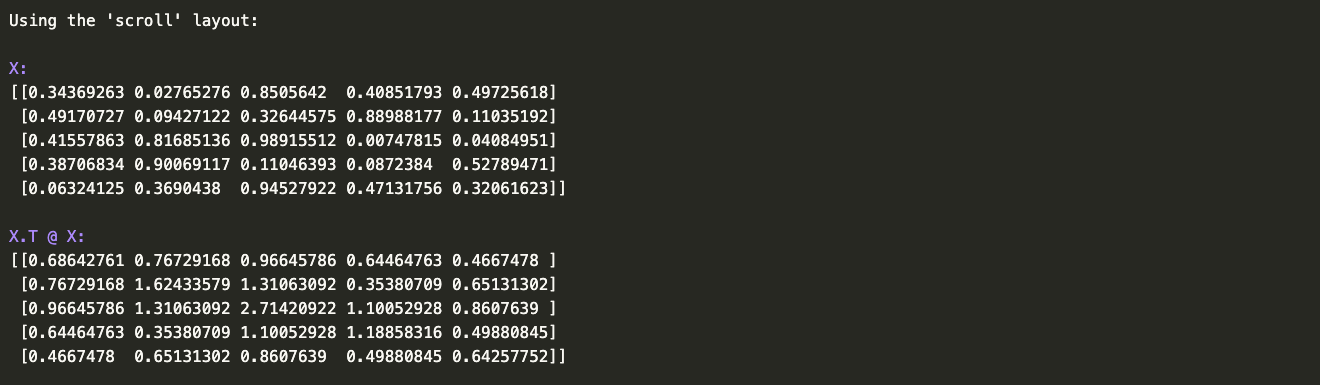
For values that take up a lot of horizontal space the 'scroll' layout is particularly useful.
from selfdocprint import ScrollLayout
import numpy as np

X = np.random.rand(5,5)

print(X, X.T @ X, layout=ScrollLayout(), beg="Using the 'scroll' layout:\n")
Use the 'minimal' layout if you only want to print labels in front of the values.
from selfdocprint import MinimalLayout

print(formula, theta, x, theta*x, layout=MinimalLayout(), beg="Using the 'minimal' layout:\n\n")

Style, format and layout specification
The selfdocprint.print_layout_specs() function prints the specification for every built-in layout and a rudimentary description of the layout algorithm.
import selfdocprint as sdp

sdp.print_layout_specs()
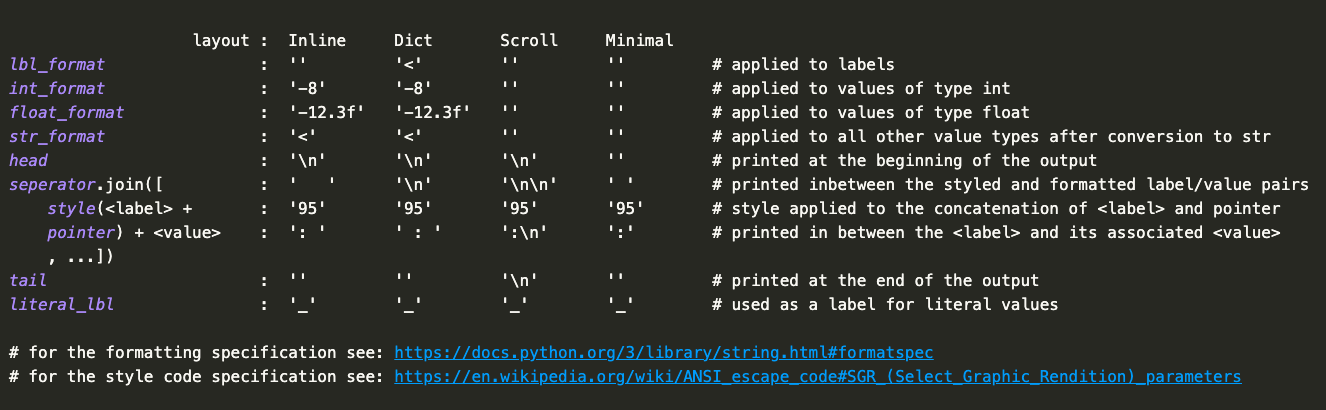
All parameters are of type str. The format parameters are specified according to python's Format Specification Mini-Language. If an alignment character (<, >, or ^) is specified without a fixed width in the lbl_format, then the alignment will be made relative to all other <labels>. For the str_format a missing width value will result in an alignment of all lines in the string representation of a value. The algorithm injects the width of the longest string of the <label> strings and the width of the longest line in a <value> string into lbl_format and str_format respectively.
The sty parameter is a string with zero or more ANSI Select Graphic Rendition parameters seperated by semicolons (;).
The layout algorithm globally works as follows: 1) adjust lbl_format and str_format where necessary; 2) style and format the concatenations of each <label> with pointer; 3) format the values; 4) layout each <label>/<value> pair in a 'pane'; 5) join these panes together with seperator; 6) print the panes: if seperator contains a newline ('\n') character then the panes are laid out from top to bottom, if not, they are laid out from left to right.
Limitations
- Selfdocprint cannot be used in the Repl nor with
eval(),exec()andcompile(). Selfdocprint uses theinspectmodule to discover the labels and this does not work in these situations. - Selfdocprint's print function cannot accept arguments that use the unpack operator, for example to unpack a tuple:
*my_tuple. This does not make sense anyway because there is nothing to label the individual values of the tuple with, so it's just as informative to just use the tuple variable as is.
1 maintainer

Metadata
1 maintainer
Release files for selfdocprint 0.2.2
For a detailed explanation of source distributions (sdists) and built distributions (wheels), please see the package formats documentation.
Source distribution (sdist)
| File | Size | Uploaded | |
|---|---|---|---|
| selfdocprint-0.2.2.tar.gz | 22.7 kB | Details |
Built distribution (wheel)
| File | Interpreter | ABI | Platform | Reset |
|---|---|---|---|---|
| selfdocprint-0.2.2-py3-none-any.whl | Python 3 | none | any | Details |
Total release size: 45.6 kB
Release files / selfdocprint-0.2.2.tar.gz
| Download URL | selfdocprint-0.2.2.tar.gz |
|---|---|
| Size | 22.7 kB |
| Tags | Source |
|
SHA-256 checksum How to use checksums |
ac20ed6498bd3c10d3fffe99c81b54947bd8226a62bc49b69aab6b8277b4a584
|
|
BLAKE2b-256 checksum How to use checksums |
b931f66e6293c3d37ae1c31a5810a7785de2541614e4f4a5eeeb5e0e8c2abaee
|
| Upload date | |
|
Uploaded using Trusted Publishing? What is trusted publishing? |
No |
| Uploaded via |
poetry/1.6.1 CPython/3.11.5 Darwin/22.6.0
|
Release files / selfdocprint-0.2.2-py3-none-any.whl
| Download URL | selfdocprint-0.2.2-py3-none-any.whl |
|---|---|
| Size | 22.9 kB |
| Tags | Python 3 |
|
SHA-256 checksum How to use checksums |
8b30a633627c0189840af9454d0fcb061c518c2932c094745c97034098810186
|
|
BLAKE2b-256 checksum How to use checksums |
6dee95e710fe907a8ad34122839328ba11a0bf375758e9398721d21f60fe16d5
|
| Upload date | |
|
Uploaded using Trusted Publishing? What is trusted publishing? |
No |
| Uploaded via |
poetry/1.6.1 CPython/3.11.5 Darwin/22.6.0
|














