
SelfHash
SelfHash is a Python package that allows you to hash your Python scripts and verify them. It's designed to provide an additional layer of security by ensuring that your script's code has not been tampered with. If the hash does not match the known good hash then the script will immediately exit and prevent further execution.
Installation
pip install selfhash
Installation From Source
You can also choose to install SelfHash from source with:
git clone https://github.com/ronaldstoner/selfhash-python.git
cd selfhash-python
pip install .
Integrating SelfHash Into Your Scripts
To use SelfHash in your scripts, you need to follow two steps:
-
Add the Hash Line: At the top of your script file, include the following special line of code:
# Hash: INSERT_HASH_HERE. This line serves as a placeholder for the hash of your script's code. -
Use the SelfHash Module: Import the SelfHash module in your script, create a new instance of the SelfHash class, and then call the
hashmethod on this instance, passing__file__as an argument. This will calculate the hash of your script and verify it against the stored hash.
Here's an example:
# Hash: INSERT_HASH_HERE
import selfhash

hasher = selfhash.SelfHash(bypass_salt=False) # Always prompt for salt when set to False
hasher.hash(__file__)
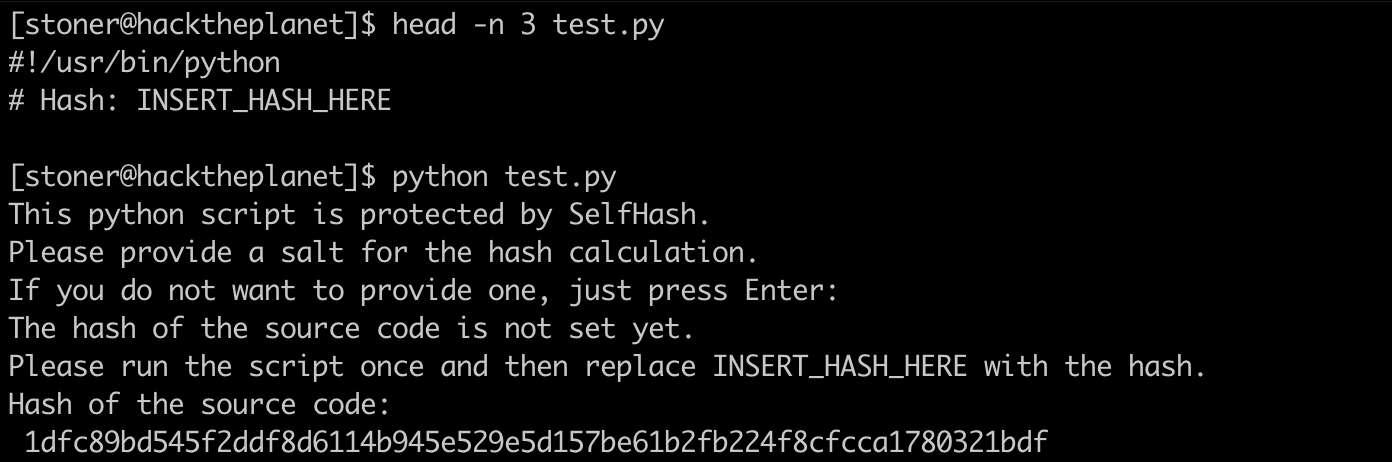
When you run a script that uses SelfHash for the first time, it will generate a hash of the script. You then need to insert this hash into the # Hash: comment (leave it commented) of the script's code. This hash is then used for verification in subsequent runs.
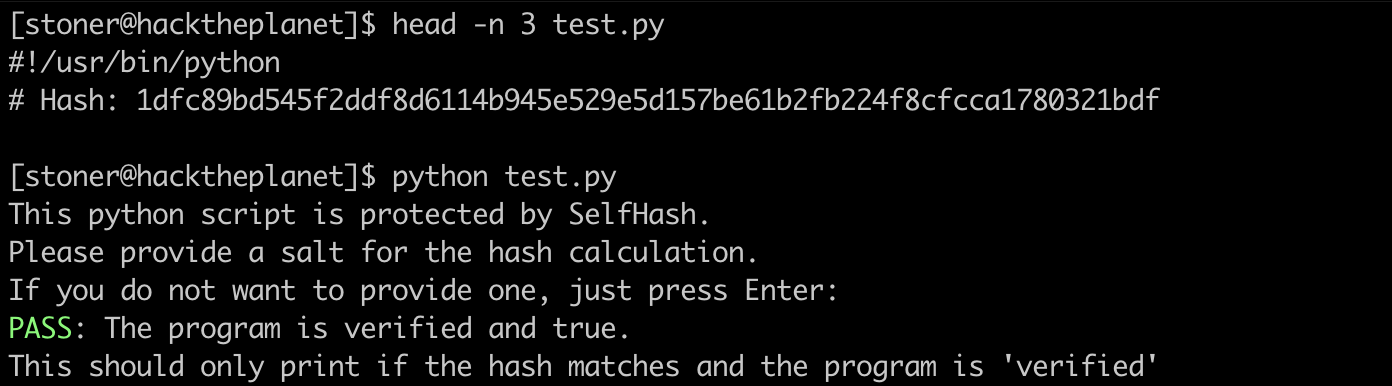
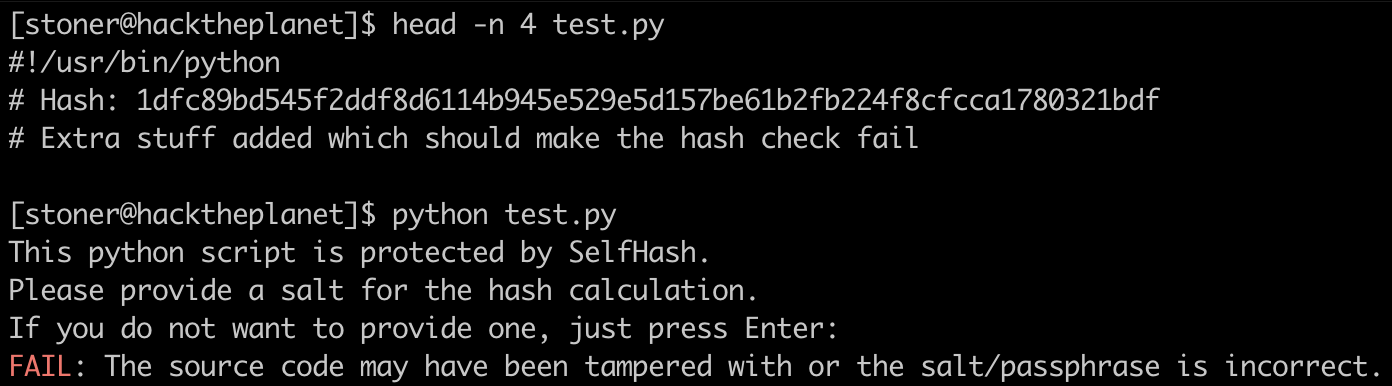
If the hash of the script matches the known good hash, the script will print PASS: The program is verified and true. and continue execution. If the hash does not match, the script will print FAIL: The source code may have been tampered with. and immediately exit.
Salt/Passphrase
When you run the hash method, it will prompt you to enter a salt/passphrase for the hash calculation. This is an optional step that you can use to add an extra layer of security to your hash.
If you choose to provide a salt/passphrase, it will be used in the calculation of the hash of your script. This means that even if someone else has the exact same script code, they won't be able to generate the same hash unless they also know your salt/passphrase.
If you choose not to provide a salt/passphrase, you can simply press Enter when prompted and the hash will be calculated based only on your script's code.
Remember - if you use a salt/passphrase you should use the same salt/passphrase every time you run the script, otherwise the hash will be different and the script will fail the verification. This salt/passphrase should be stored securely for future retrieval.
Bypass Salt/Passphrase
In some cases, you might want to bypass the salt/passphrase prompt. You can do this by setting the bypass_salt parameter to True when you create an instance of the SelfHash class.
Here's an example:
# Hash: INSERT_HASH_HERE
import selfhash

hasher = selfhash.SelfHash(bypass_salt=True)
hasher.hash(__file__)
When you set bypass_salt to True, the hash method will not prompt you for a salt/passphrase and will calculate the hash based only on your script's code. This can be useful in automated environments where user input is not possible.
Note: If you bypass the salt/passphrase, you won't be able to use a salt/passphrase for the hash calculation. If you've previously run the hash method with a salt/passphrase, the hash will be different when you bypass the salt/passphrase, and the script will fail the verification. Be sure to use the same bypass_salt setting every time you run the script.
Verifying The SelfHash Module
To ensure the integrity of the SelfHash module itself, we provide a script named verify_self.py. This script uses SelfHash to verify the hash of the selfhash/selfhash.py file.
If the hash of selfhash/selfhash.py matches the known hash at the top of the file, verify_self.py will print a message saying, The hash inside of selfhash/selfhash.py matches and looks correct.
To run verify_self.py, use the following command without any salt (no passphrase is set):
python verify_self.py
Screenshots
Hashing A Script For The First Time
Verifying The Hash And Executing
Preventing Execution Of A Modified Script Or Incorrect Salt
Verifying SelfHash module itself (no seed/passphrase)

Note
It's important to note that this script is only a part of a comprehensive security strategy and should not be solely relied upon to ensure the integrity and security of your code.
1 maintainer

Release files for selfhash 0.1.2.1
For a detailed explanation of source distributions (sdists) and built distributions (wheels), please see the package formats documentation.
Source distribution (sdist)
| File | Size | Uploaded | |
|---|---|---|---|
| selfhash-0.1.2.1.tar.gz | 5.4 kB | Details |
Built distribution (wheel)
| File | Interpreter | ABI | Platform | Reset |
|---|---|---|---|---|
| selfhash-0.1.2.1-py3-none-any.whl | Python 3 | none | any | Details |
Total release size: 11.3 kB
Release files / selfhash-0.1.2.1.tar.gz
| Download URL | selfhash-0.1.2.1.tar.gz |
|---|---|
| Size | 5.4 kB |
| Tags | Source |
|
SHA-256 checksum How to use checksums |
32ebb55a7780ae9524a3e3db96b959a7775c6014c7f10d770535434a3c4c6857
|
|
BLAKE2b-256 checksum How to use checksums |
e8609a9898447ecb71aa95fbf4a8c2300b7c174c5df0483a8691f058fed32ff3
|
| Upload date | |
|
Uploaded using Trusted Publishing? What is trusted publishing? |
No |
| Uploaded via |
twine/6.1.0 CPython/3.9.6
|
Release files / selfhash-0.1.2.1-py3-none-any.whl
| Download URL | selfhash-0.1.2.1-py3-none-any.whl |
|---|---|
| Size | 5.9 kB |
| Tags | Python 3 |
|
SHA-256 checksum How to use checksums |
458ad5c1be03958a21925d81ecbebca3f8b4d033076981a6ea76d71e3126449d
|
|
BLAKE2b-256 checksum How to use checksums |
602c637d7f5a90af04906b7d4fe1179e31fd20e644e110f54e015ee939a5ffaa
|
| Upload date | |
|
Uploaded using Trusted Publishing? What is trusted publishing? |
No |
| Uploaded via |
twine/6.1.0 CPython/3.9.6
|














