









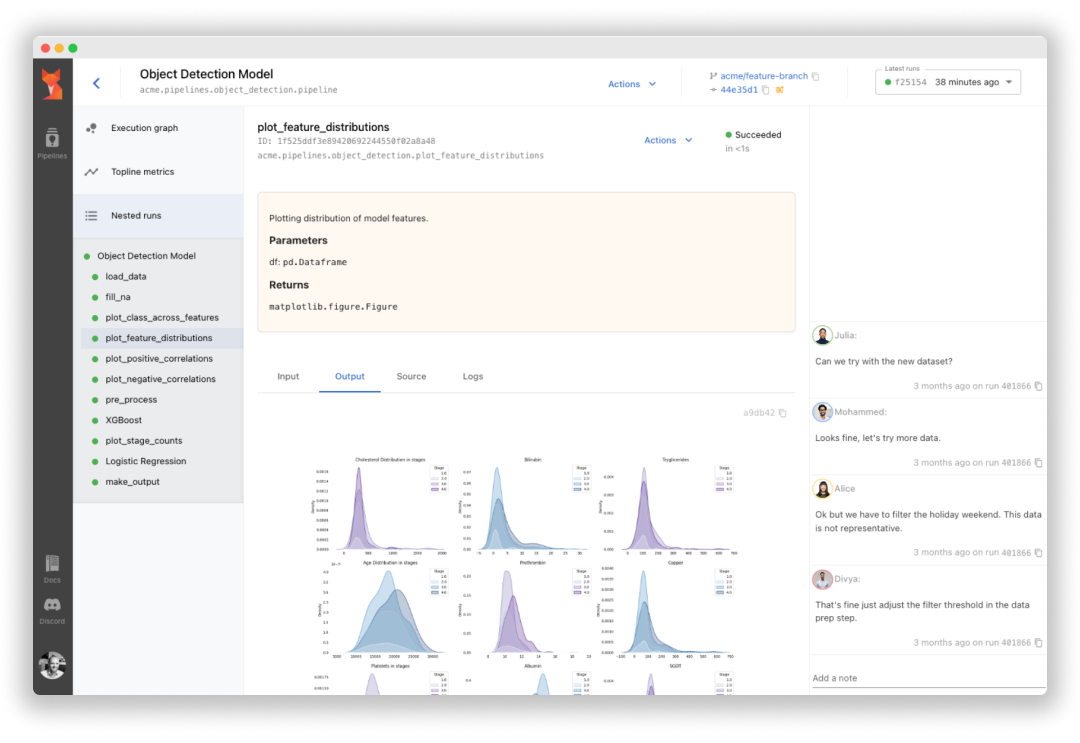
Sematic is an open-source ML development platform. It lets ML Engineers and Data Scientists write arbitrarily complex end-to-end pipelines with simple Python and execute them on their local machine, in a cloud VM, or on a Kubernetes cluster to leverage cloud resources.
Sematic is based on learnings gathered at top self-driving car companies. It enables chaining data processing jobs (e.g. Apache Spark) with model training (e.g. PyTorch, Tensorflow), or any other arbitrary Python business logic into type-safe, traceable, reproducible end-to-end pipelines that can be monitored and visualized in a modern web dashboard.
Read our documentation and join our Discord channel.
Why Sematic
Easy onboarding – no deployment or infrastructure needed to get started, simply install Sematic locally and start exploring.
Local-to-cloud parity – run the same code on your local laptop and on your Kubernetes cluster.
End-to-end traceability – all pipeline artifacts are persisted, tracked, and visualizable in a web dashboard.
Access heterogeneous compute – customize required resources for each pipeline step to optimize your performance and cloud footprint (CPUs, memory, GPUs, Spark cluster, etc.)
Reproducibility – rerun your pipelines from the UI with guaranteed reproducibility of results
Getting Started
To get started locally, simply install Sematic in your Python environment:
$ pip install sematicStart the local web dashboard:
$ sematic startRun an example pipeline:
$ sematic run examples/mnist/pytorchCreate a new boilerplate project:
$ sematic new my_new_projectOr from an existing example:
$ sematic new my_new_project --from examples/mnist/pytorchThen run it with:
$ python3 -m my_new_projectTo deploy Sematic to Kubernetes and leverage cloud resources, see our documentation.
Features
Lightweight Python SDK – define arbitrarily complex end-to-end pipelines
Pipeline nesting – arbitrarily nest pipelines into larger pipelines
Dynamic graphs – Python-defined graphs allow for iterations, conditional branching, etc.
Lineage tracking – all inputs and outputs of all steps are persisted and tracked
Runtime type-checking – fail early with run-time type checking
Web dashboard – Monitor, track, and visualize pipelines in a modern web UI
Artifact visualization – visualize all inputs and outputs of all steps in the web dashboard
Local execution – run pipelines on your local machine without any deployment necessary
Cloud orchestration – run pipelines on Kubernetes to access GPUs and other cloud resources
Heterogeneous compute resources – run different steps on different machines (e.g. CPUs, memory, GPU, Spark, etc.)
Helm chart deployment – install Sematic on your Kubernetes cluster
Pipeline reruns – rerun pipelines from the UI from an arbitrary point in the graph
Step caching – cache expensive pipeline steps for faster iteration
Step retry – recover from transient failures with step retries
Metadata and collaboration – Tags, source code visualization, docstrings, notes, etc.
Numerous integrations – See below
Integrations
Apache Spark – on-demand in-cluster Spark cluster
Ray – on-demand Ray in-cluster Ray resources
Snowflake – easily query your data warehouse (other warehouses supported too)
Plotly, Matplotlib – visualize plot artifacts in the web dashboard
Pandas – visualize dataframe artifacts in the dashboard
Grafana – embed Grafana panels in the web dashboard
Bazel – integrate with your Bazel build system
Helm chart – deploy to Kubernetes with our Helm chart
Git – track git information in the web dashboard
Community and resources
Learn more about Sematic and get in touch with the following resources:
Contribute!
To contribute to Sematic, check out open issues tagged “good first issue”, and get in touch with us on Discord.

3 maintainers


Metadata
3 maintainers
Release files for sematic-ee 0.0.1
For a detailed explanation of source distributions (sdists) and built distributions (wheels), please see the package formats documentation.
Built distribution (wheel)
| File | Interpreter | ABI | Platform | Reset |
|---|---|---|---|---|
| sematic_ee-0.0.1-py3-none-any.whl | Python 3 | none | any | Details |
Release files / sematic_ee-0.0.1-py3-none-any.whl
| Download URL | sematic_ee-0.0.1-py3-none-any.whl |
|---|---|
| Size | 6.5 MB |
| Tags | Python 3 |
|
SHA-256 checksum How to use checksums |
ed7c8969b6d49772ca59c77e37e1c690a83a89da43b612f6054cb5e498d06e84
|
|
BLAKE2b-256 checksum How to use checksums |
ca8e01fc95decf38976f88512983b655fafb7aa64a90d1096140853cdd617ea9
|
| Upload date | |
|
Uploaded using Trusted Publishing? What is trusted publishing? |
No |
| Uploaded via |
twine/4.0.1 CPython/3.9.16
|













