
seqviz
seqviz (sequence visualization) is a Python package to visualize sequence tagging results. It can be either be used to print to console or in Jupyter Notebooks.

Usage
You can load tagged sentences from many common formats:
iob1
from seqviz import TaggedSequence

data = [
    ('Alex', 'I-PER'),
    ('is', 'O'),
    ('going', 'O'),
    ('to', 'O'),
    ('Los', 'I-LOC'),
    ('Angeles', 'I-LOC'),
    ('in', 'O'),
    ('California', 'I-LOC')
]

tagged = TaggedSequence.from_bio(data, fmt="iob1")

print(tagged) # [Alex](PER) is going to [Los Angeles](LOC) in [California](LOC)
iob2
from seqviz import TaggedSequence

data = [
    ("Today", "O"),
    ("Alice", "B-PER"),
    ("Bob", "B-PER"),
    ("and", "O"),
    ("I", "B-PER"),
    ("ate", "O"),
    ("lasagna", "O"),
]

tagged = TaggedSequence.from_bio(data, fmt="iob2")

print(tagged) # Today [Alice](PER) [Bob](PER) and [I](PER) ate lasagna
BIOES
from seqviz import TaggedSequence

data = [
    ("Alex", "S-PER"),
    ("is", "O"),
    ("going", "O"),
    ("with", "O"),
    ("Marty", "B-PER"),
    ("A", "I-PER"),
    ("Rick", "E-PER"),
    ("to", "O"),
    ("Los", "B-LOC"),
    ("Angeles", "E-LOC")
]

tagged = TaggedSequence.from_bio(data, fmt="bioes")

print(tagged) # "[Alex](PER) is going with [Marty A Rick](PER) to [Los Angeles](LOC)"
Output formats
Use it in terminal via str(seq):
[Alex](PER) is going to [Los Angeles](LOC) in [California](LOC)
Or as HTML via seq.to_html():
Jupyter Notebook integration
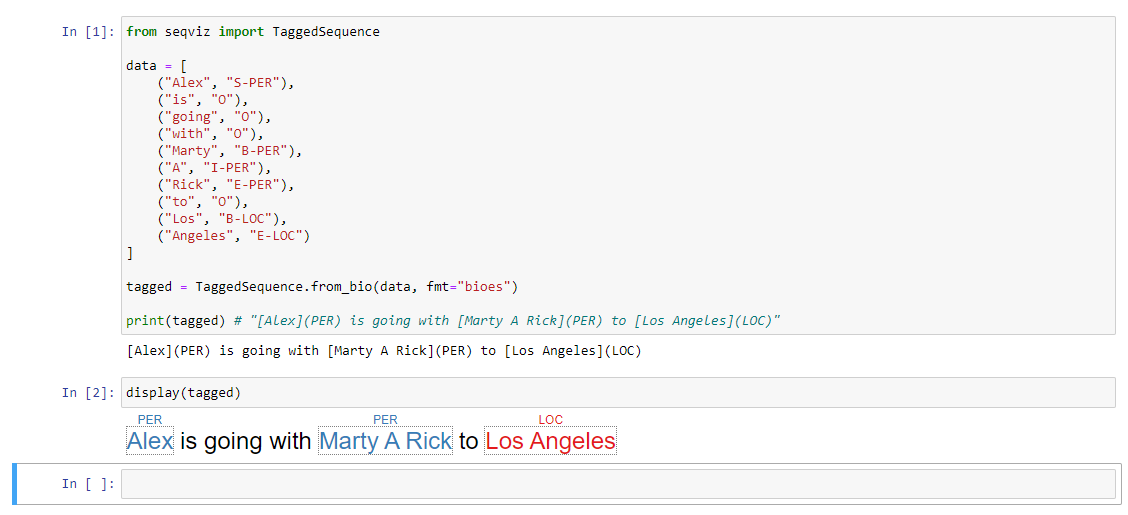
You can also use TaggedSequence in an Jupyter notebook:
Integration with other NLP frameworks
seqviz can be used to visualize sequences from many different popular NLP frameworks.
Hugging Face Transformers
from transformers import AutoModelForTokenClassification, AutoTokenizer
import torch

from seqviz import TaggedSequence, tokenize_for_bert

model = AutoModelForTokenClassification.from_pretrained("dbmdz/bert-large-cased-finetuned-conll03-english")
tokenizer = AutoTokenizer.from_pretrained("bert-base-cased")

label_list = [
    "O",       # Outside of a named entity
    "B-MISC",  # Beginning of a miscellaneous entity right after another miscellaneous entity
    "I-MISC",  # Miscellaneous entity
    "B-PER",   # Beginning of a person's name right after another person's name
    "I-PER",   # Person's name
    "B-ORG",   # Beginning of an organisation right after another organisation
    "I-ORG",   # Organisation
    "B-LOC",   # Beginning of a location right after another location
    "I-LOC"    # Location
]

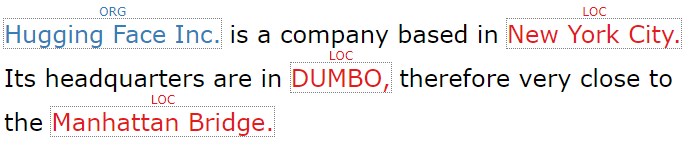
text = "Hugging Face Inc. is a company based in New York City. Its headquarters are in DUMBO, therefore very " \
           "close to the Manhattan Bridge."

inputs, groups = tokenize_for_bert(text, tokenizer)

outputs = model(inputs)[0]
predictions_tensor = torch.argmax(outputs, dim=2)[0]

predictions = [label_list[prediction] for prediction in predictions_tensor]

seq = TaggedSequence.from_transformers_bio(text, groups, predictions)
1 maintainer

Metadata
1 maintainer
Release files for seqviz 0.1.1
For a detailed explanation of source distributions (sdists) and built distributions (wheels), please see the package formats documentation.
Source distribution (sdist)
| File | Size | Uploaded | |
|---|---|---|---|
| seqviz-0.1.1.tar.gz | 6.6 kB | Details |
Built distribution (wheel)
| File | Interpreter | ABI | Platform | Reset |
|---|---|---|---|---|
| seqviz-0.1.1-py3-none-any.whl | Python 3 | none | any | Details |
Total release size: 14.5 kB
Release files / seqviz-0.1.1.tar.gz
| Download URL | seqviz-0.1.1.tar.gz |
|---|---|
| Size | 6.6 kB |
| Tags | Source |
|
SHA-256 checksum How to use checksums |
fc7d8e110d1244ed1fd72e26c88f806d9f694550647bddcd2152c2d6e0109e80
|
|
BLAKE2b-256 checksum How to use checksums |
61a859f7209bd087ac1fe92c57e88c5af494c2004059e90d1147eb89d9c13363
|
| Upload date | |
|
Uploaded using Trusted Publishing? What is trusted publishing? |
No |
| Uploaded via |
poetry/1.0.10 CPython/3.7.4 Windows/10
|
Release files / seqviz-0.1.1-py3-none-any.whl
| Download URL | seqviz-0.1.1-py3-none-any.whl |
|---|---|
| Size | 7.8 kB |
| Tags | Python 3 |
|
SHA-256 checksum How to use checksums |
b2936972af22ec439a95fe9f9add924eccf7aac3c15707debc2d44d25b70e381
|
|
BLAKE2b-256 checksum How to use checksums |
2ae9a855936d1ccf094071b472aae978b9f92dcaf32fdb475fa69ca19adcc306
|
| Upload date | |
|
Uploaded using Trusted Publishing? What is trusted publishing? |
No |
| Uploaded via |
poetry/1.0.10 CPython/3.7.4 Windows/10
|














