








🔍 Overview
Shapash is a Python library designed to make machine learning interpretable and comprehensible for everyone. It offers various visualizations with clear and explicit labels that are easily understood by all.
With Shapash, you can generate a Webapp that simplifies the comprehension of interactions between the model's features, and allows seamless navigation between local and global explainability. This Webapp enables Data Scientists to effortlessly understand their models and share their results with both data scientists and non-data experts.
Additionally, Shapash contributes to data science auditing by presenting valuable information about any model and data in a comprehensive report.
Shapash is suitable for Regression, Binary Classification and Multiclass problems. It is compatible with numerous models, including Catboost, Xgboost, LightGBM, Sklearn Ensemble, Linear models, and SVM. For other models, solutions to integrate Shapash are available; more details can be found here.
🌱 Documentation and resources
- Readthedocs:
- Video presentation for french speakers
- Medium:
- Understand your model with Shapash - Towards AI
- Model auditability - Towards DS
- Group of features - Towards AI
- Building confidence on explainability - Towards DS
- Picking Examples to Understand Machine Learning Model
- Enhancing Webapp Built-In Features for Comprehensive Machine Learning Model Interpretation
🎉 What's new ?
| Version | New Feature | Description | Tutorial |
|---|---|---|---|
| 2.3.x | Additional dataset columns New demo Article |
In Webapp: Target and error columns added to dataset and possibility to add features outside the model for more filtering options |  |
| 2.3.x | Identity card New demo Article |
In Webapp: New identity card to summarize the information of the selected sample |  |
| 2.2.x | Picking samples Article |
New tab in the webapp for picking samples. The graph represents the "True Values Vs Predicted Values" |  |
| 2.2.x | Dataset Filter |
New tab in the webapp to filter data. And several improvements in the webapp: subtitles, labels, screen adjustments |  |
| 2.0.x | Refactoring Shapash |
Refactoring attributes of compile methods and init. Refactoring implementation for new backends |  |
| 1.7.x | Variabilize Colors |
Giving possibility to have your own colour palette for outputs adapted to your design |  |
| 1.6.x | Explainability Quality Metrics Article |
To help increase confidence in explainability methods, you can evaluate the relevance of your explainability using 3 metrics: Stability, Consistency and Compacity |  |
| 1.4.x | Groups of features Demo |
You can now regroup features that share common properties together. This option can be useful if your model has a lot of features. |
 |
| 1.3.x | Shapash Report Demo |
A standalone HTML report that constitutes a basis of an audit document. |  |
🔥 Features
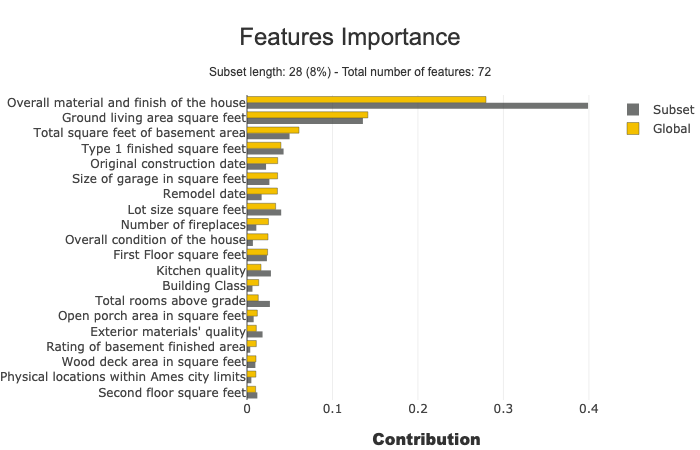
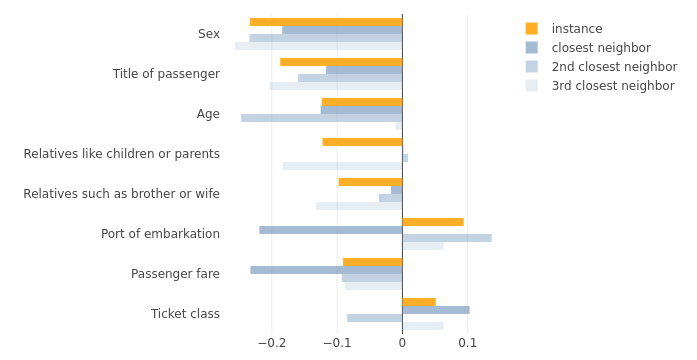
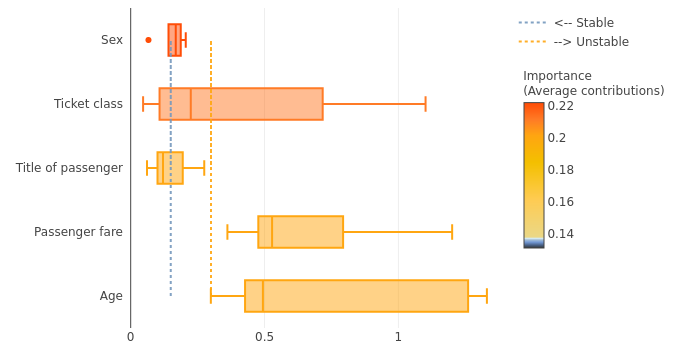
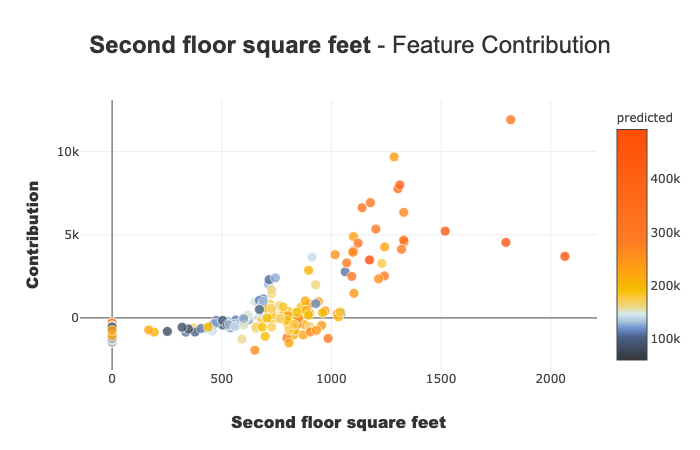
- Display clear and understandable results: plots and outputs use explicit labels for each feature and its values
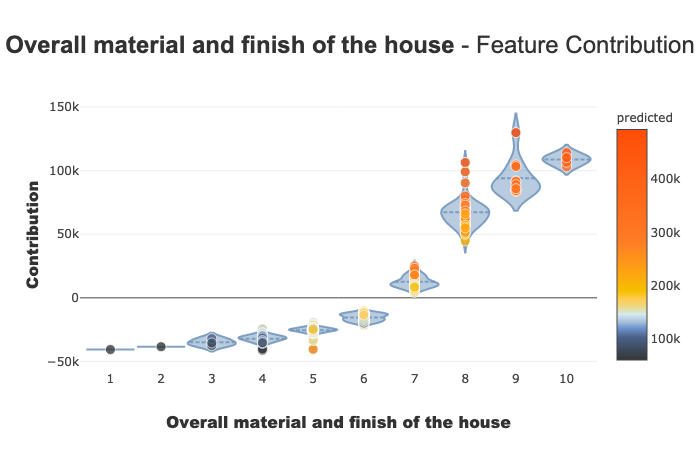
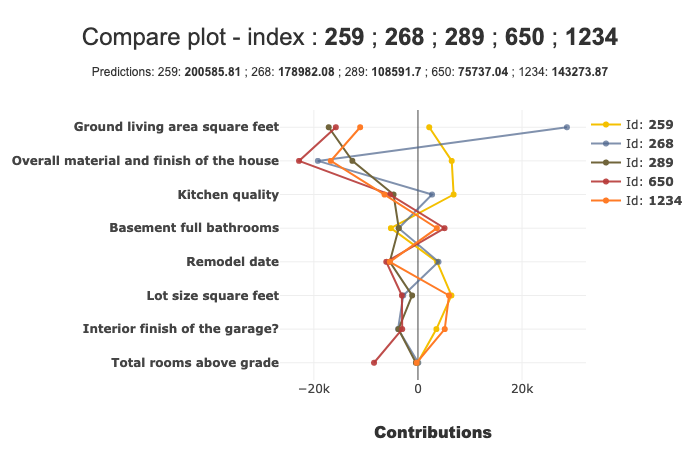
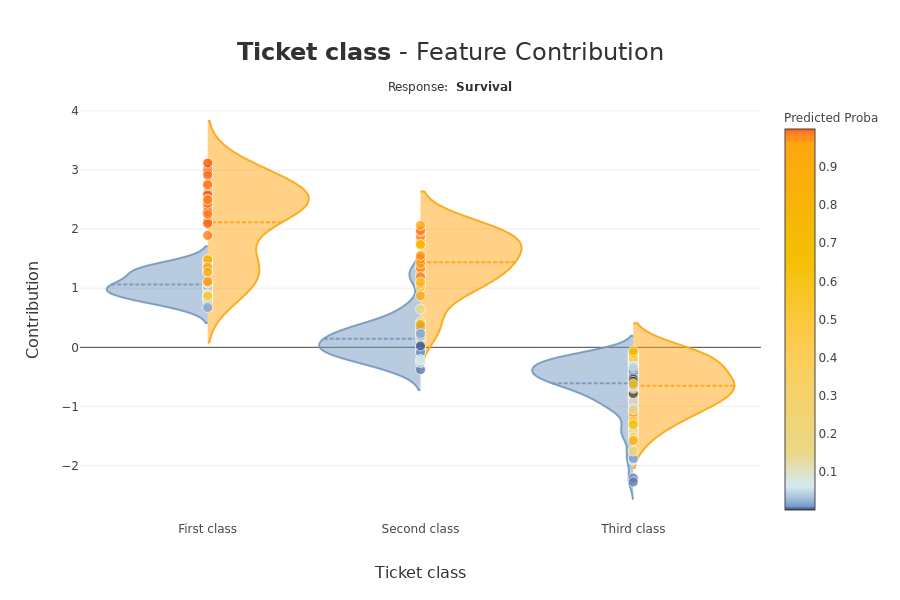

-
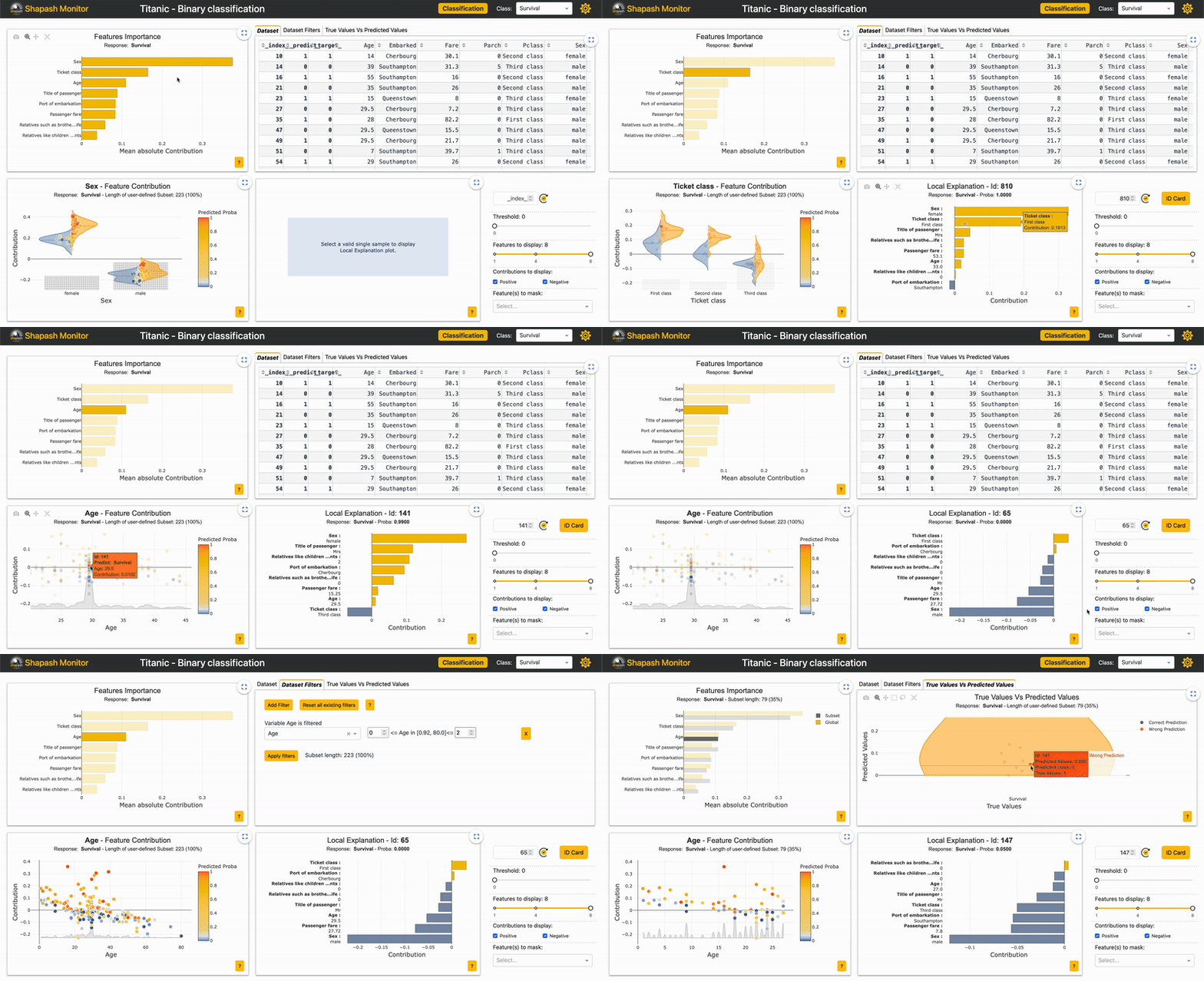
Allow Data Scientists to quickly understand their models using a webapp to easily navigate between global and local explainability, and understand how the different features contribute: Live Demo Shapash-Monitor
-
Summarize and export local explanation
Shapash provides concise and clear local explanations, It allows each user, enabling users of any Data background to understand a local prediction of a supervised model through a summarized and explicit explanation
-
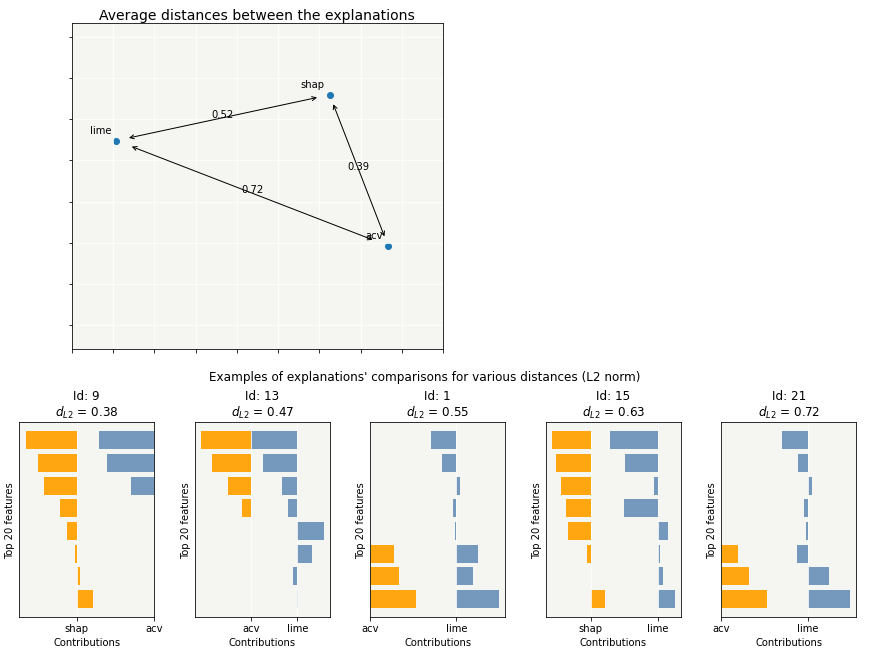
Evaluate the quality of your explainability with various metrics
-
Effortlessly share and discuss results with non-Data users
-
Select subsets for in-depth analysis of explainability by filtering based on explanatory and additional features, as well as correct or wrong predictions. Picking Examples to Understand Machine Learning Model
-
Deploy interpretability part of your project: From model training to deployment (API or Batch Mode)
-
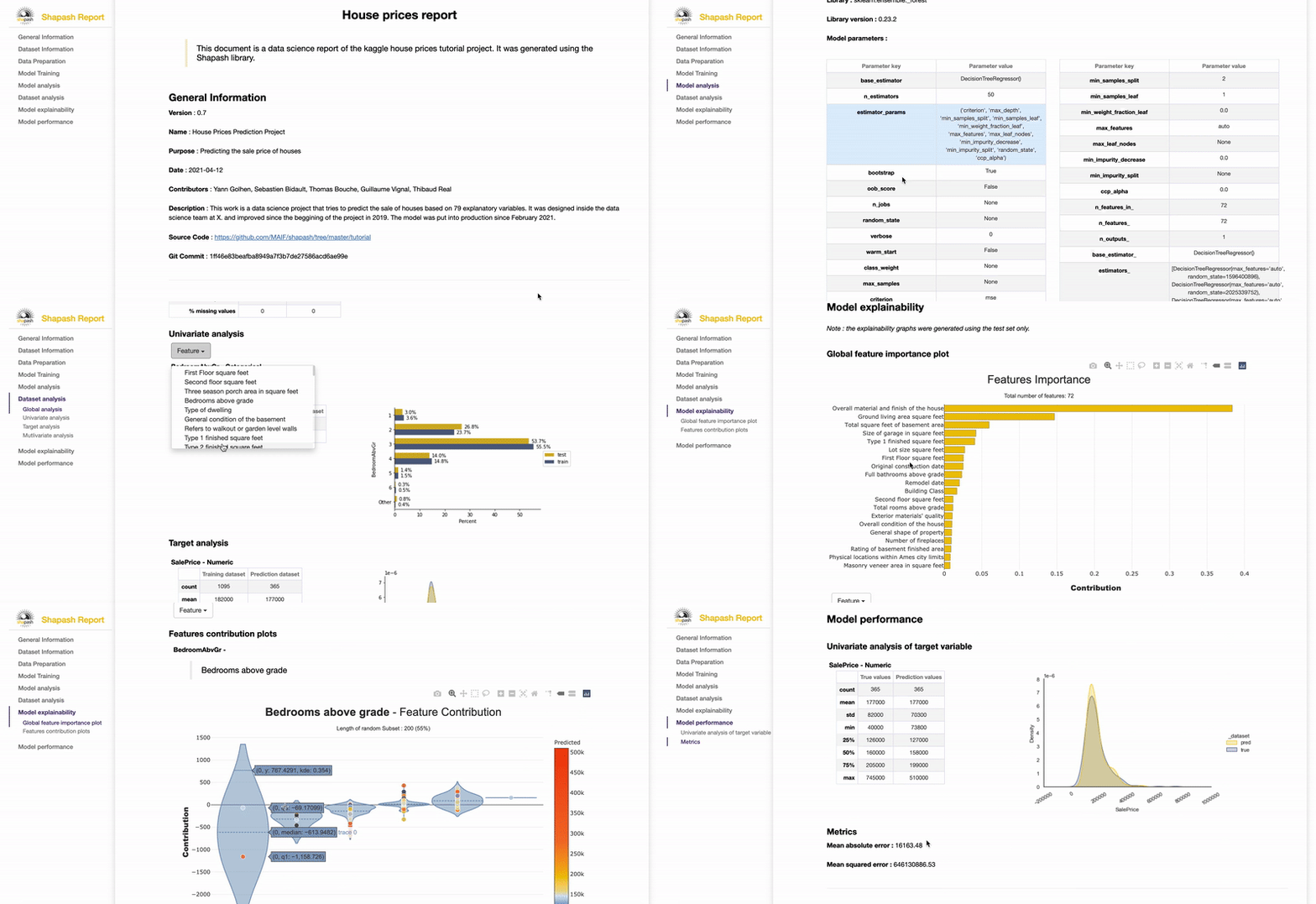
Contribute to the auditability of your model by generating a standalone HTML report of your projects. Report Example
We believe that this report will offer valuable support for auditing models and data, leading to improved AI governance. Data Scientists can now provide anyone interested in their project with a document that captures various aspects of their work as the foundation for an audit report. This document can be easily shared among teams (internal audit, DPO, risk, compliance...).
⚙️ How Shapash works
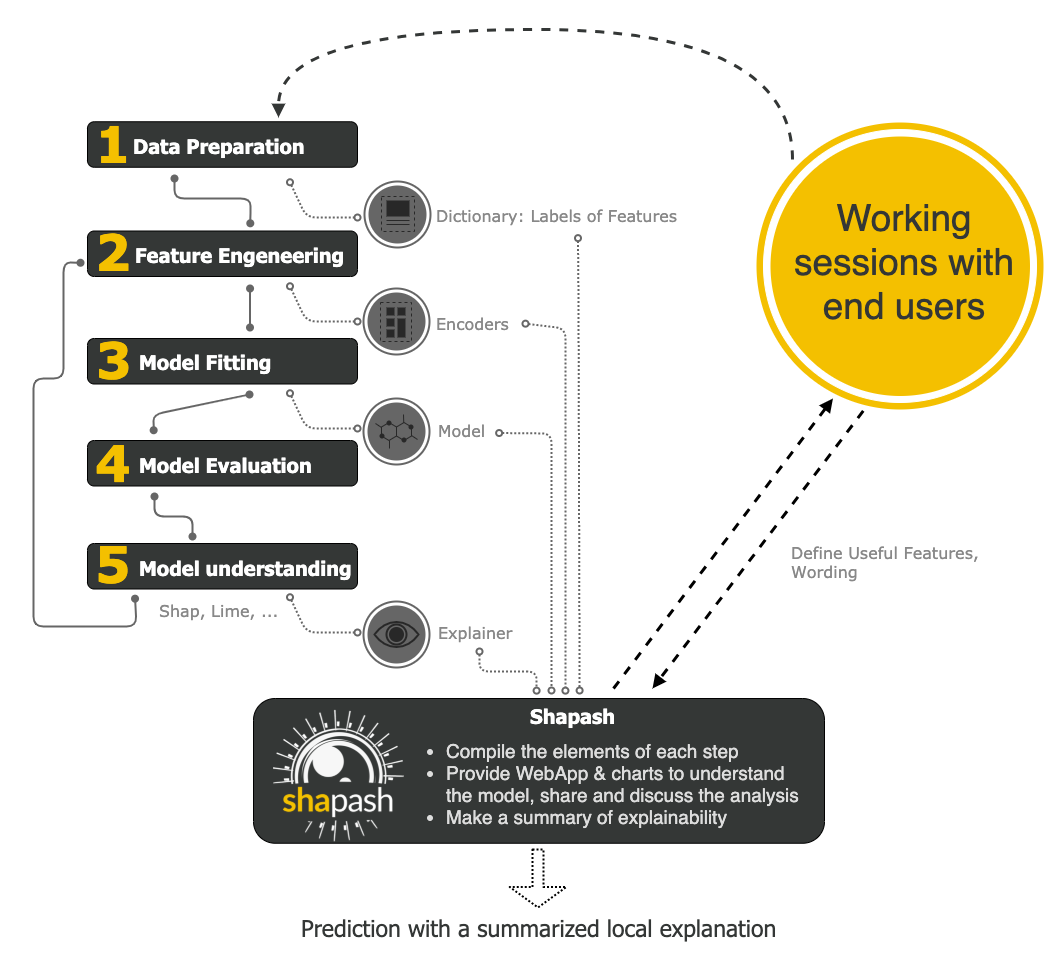
Shapash is an overlay package for libraries focused on model interpretability. It uses Shap or Lime backend to compute contributions. Shapash builds upon the various steps required to create a machine learning model, making the results more understandable.
Shapash is suitable for Regression, Binary Classification or Multiclass problem.
It is compatible with numerous models: Catboost, Xgboost, LightGBM, Sklearn Ensemble, Linear models, SVM.
If your model is not in the list of compatible models, it is possible to provide Shapash with local contributions calculated with shap or another method. Here's an example of how to provide contributions to Shapash. An issue has been created to enhance this use case.
Shapash can use category-encoders object, sklearn ColumnTransformer or simply features dictionary.
- Category_encoder: OneHotEncoder, OrdinalEncoder, BaseNEncoder, BinaryEncoder, TargetEncoder
- Sklearn ColumnTransformer: OneHotEncoder, OrdinalEncoder, StandardScaler, QuantileTransformer, PowerTransformer
🛠 Installation
Shapash is intended to work with Python versions 3.11 to 3.14. Installation can be done with pip:
pip install shapash
In order to generate the Shapash Report some extra requirements are needed. You can install these using the following command :
pip install shapash[report]
If you encounter compatibility issues you may check the corresponding section in the Shapash documentation here.
🕐 Quickstart
The 4 steps to display results:
- Step 1: Declare SmartExplainer Object
There 1 mandatory parameter in compile method: Model You can declare features dict here to specify the labels to display
from shapash import SmartExplainer

xpl = SmartExplainer(
    model=regressor,
    features_dict=house_dict,  # Optional parameter
    preprocessing=encoder,  # Optional: compile step can use inverse_transform method
    postprocessing=postprocess,  # Optional: see tutorial postprocessing
)
- Step 2: Compile Dataset, ...
There 1 mandatory parameter in compile method: Dataset
xpl.compile(
    x=xtest,
    y_pred=y_pred,  # Optional: for your own prediction (by default: model.predict)
    y_target=yTest,  # Optional: allows to display True Values vs Predicted Values
    additional_data=xadditional,  # Optional: additional dataset of features for Webapp
    additional_features_dict=features_dict_additional,  # Optional: dict additional data
)
- Step 3: Display output
There are several outputs and plots available. for example, you can launch the web app:
app = xpl.run_app()
- Step 4: Generate the Shapash Report
This step generates a standalone HTML report from a block-based layout. You can optionally provide a YAML file to customize report sections and blocks.
xpl.generate_report(
    output_file="path/to/output/report.html",
    project_info_file="path/to/project_info.yml",
    x_train=xtrain,
    y_train=ytrain,
    y_test=ytest,
    yaml_path="path/to/report_config.yml",  # Optional: custom block configuration
    title_story="House prices report",
    title_description="""This document is a data science report of the kaggle house prices tutorial project.
        It was generated using the Shapash library.""",
    metrics=[{"name": "MSE", "path": "sklearn.metrics.mean_squared_error"}],
)
- Step 5: From training to deployment : SmartPredictor Object
Shapash provides a SmartPredictor object to deploy the summary of local explanation for the operational needs. It is an object dedicated to deployment, lighter than SmartExplainer with additional consistency checks. SmartPredictor can be used with an API or in batch mode. It provides predictions, detailed or summarized local explainability using appropriate wording.
predictor = xpl.to_smartpredictor()
See the tutorial part to know how to use the SmartPredictor object
📖 Tutorials
This github repository offers many tutorials to allow you to easily get started with Shapash.
Overview
Charts and plots
- Shapash Features Importance
- Contribution plot to understand how one feature affects a prediction
- Summarize, display and export local contribution using filter and local_plot method
- Contributions Comparing plot to understand why predictions on several individuals are different
- Visualize interactions between couple of variables
- Display True Values Vs Predicted Values
- Customize colors in Webapp, plots and report
Different ways to use Encoders and Dictionaries
Displaying data with postprocessing
Using different backends
Evaluating the quality of your explainability
Generate a report of your project
Analysing your model via Shapash WebApp
🤝 Contributors







🏆 Awards


1 maintainer

Metadata
1 maintainer
Release files for shapash 2.10.0
For a detailed explanation of source distributions (sdists) and built distributions (wheels), please see the package formats documentation.
Source distribution (sdist)
| File | Size | Uploaded | Provenance | Actions |
|---|---|---|---|---|
| shapash-2.10.0.tar.gz | 24.9 MB | With provenance | Details for shapash-2.10.0.tar.gz |
Built distribution (wheel)
| File | Interpreter | ABI | Platform | Actions Reset |
|---|---|---|---|---|
| shapash-2.10.0-py3-none-any.whl | Python 3 | none | any | Details for shapash-2.10.0-py3-none-any.whl |
Total release size: 37.9 MB
Release files / shapash-2.10.0.tar.gz
| Download URL | shapash-2.10.0.tar.gz |
|---|---|
| Size | 24.9 MB |
| Tags | Source |
|
SHA-256 checksum How to use checksums |
05cf94b8934ce0025a29328f6200690d8da4727cc40760f00ef362abb0c1b0fd
|
|
BLAKE2b-256 checksum How to use checksums |
a4616ce1ed3a5f72ba1ea5fe661123211d37c5c8d35fcf3edf8f937a79f70a08
|
| Upload date | |
|
Uploaded using Trusted Publishing? What is trusted publishing? |
Yes |
| Uploaded via |
twine/7.0.0 CPython/3.13.14
|
Provenance
Provenance describes where a file came from. On PyPI, provenance is shared via attestations, which provide a verifiable record of the build or publishing details. View details, limitations and caveats.


PyPI Publish Attestation
PyPI verified that this artifact, at this checksum, originated from the publisher listed below.
Signed by GitHub Actions, verified by PyPI on Oct 13, 2026.
Transparency logRelease files / shapash-2.10.0-py3-none-any.whl
| Download URL | shapash-2.10.0-py3-none-any.whl |
|---|---|
| Size | 13.1 MB |
| Tags | Python 3 |
|
SHA-256 checksum How to use checksums |
d729143775f9efd74a876cad2047eddf182d2448261bdebf5d0de7bcf88ab320
|
|
BLAKE2b-256 checksum How to use checksums |
d3cb1217822fe578fb098eda8566e74687d9f7e2ed72a32d6b41bc38d4a3fba9
|
| Upload date | |
|
Uploaded using Trusted Publishing? What is trusted publishing? |
Yes |
| Uploaded via |
twine/7.0.0 CPython/3.13.14
|
Provenance
Provenance describes where a file came from. On PyPI, provenance is shared via attestations, which provide a verifiable record of the build or publishing details. View details, limitations and caveats.
PyPI Publish Attestation
PyPI verified that this artifact, at this checksum, originated from the publisher listed below.
Signed by GitHub Actions, verified by PyPI on Oct 13, 2026.
Transparency logSecurity for shapash 2.10.0
Provenance
Provenance describes where a file came from. On PyPI, provenance is shared via attestations, which provide a verifiable record of the build or publishing details. View details, limitations and caveats.
Full provenance
All 2 files in this release have been uploaded with provenance metadata.
Attestation for shapash-2.10.0.tar.gz
PyPI Publish Attestation
PyPI verified that this artifact, at this checksum, originated from the publisher listed below.
Signed by GitHub Actions, verified by PyPI on Oct 13, 2026.
Transparency logA note on package security
PyPI is a repository for distributing packages, not a service for auditing them. While third-party security researchers and our staff do their best to detect and remove malicious packages, PyPI cannot guarantee the quality, security or suitability of any given package.
To learn more about protecting yourself from malicious actors, visit our package security documentation.














