
Show Configuration Parser (shconfparser)







🚀 Version 3.0 - Modern Python library (3.8+) with uv support! See docs/ for guides.
Introduction
Show configuration parser (shconfparser) is a Python library for parsing network device configurations. This library examines the config and breaks it into a set of parent and clild relationships.
shconfparser is a vendor independent library where you can parse the following formats:
- Tree structure
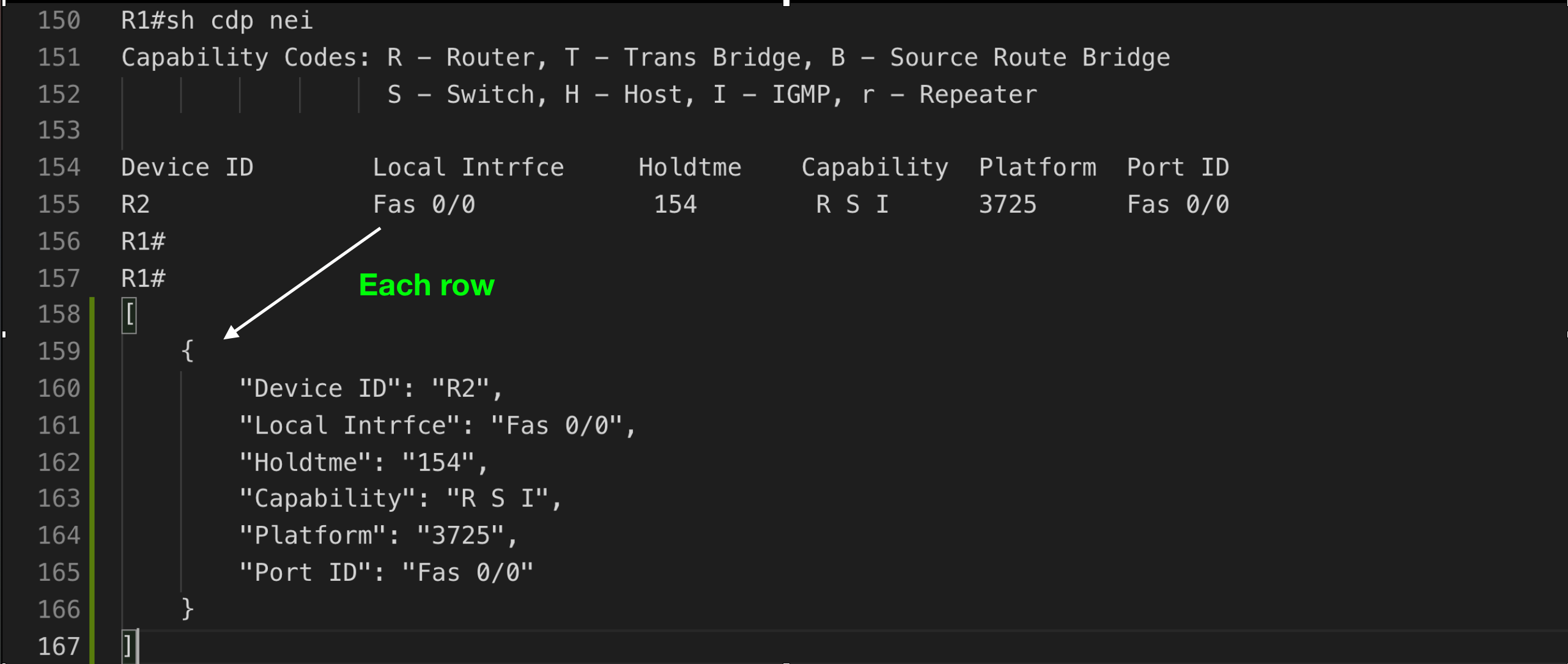
i.e. show running - Table structure
i.e. show ip interface - Data
i.e. show version
Modern Format (JSON/YAML) - Hierarchical Structure
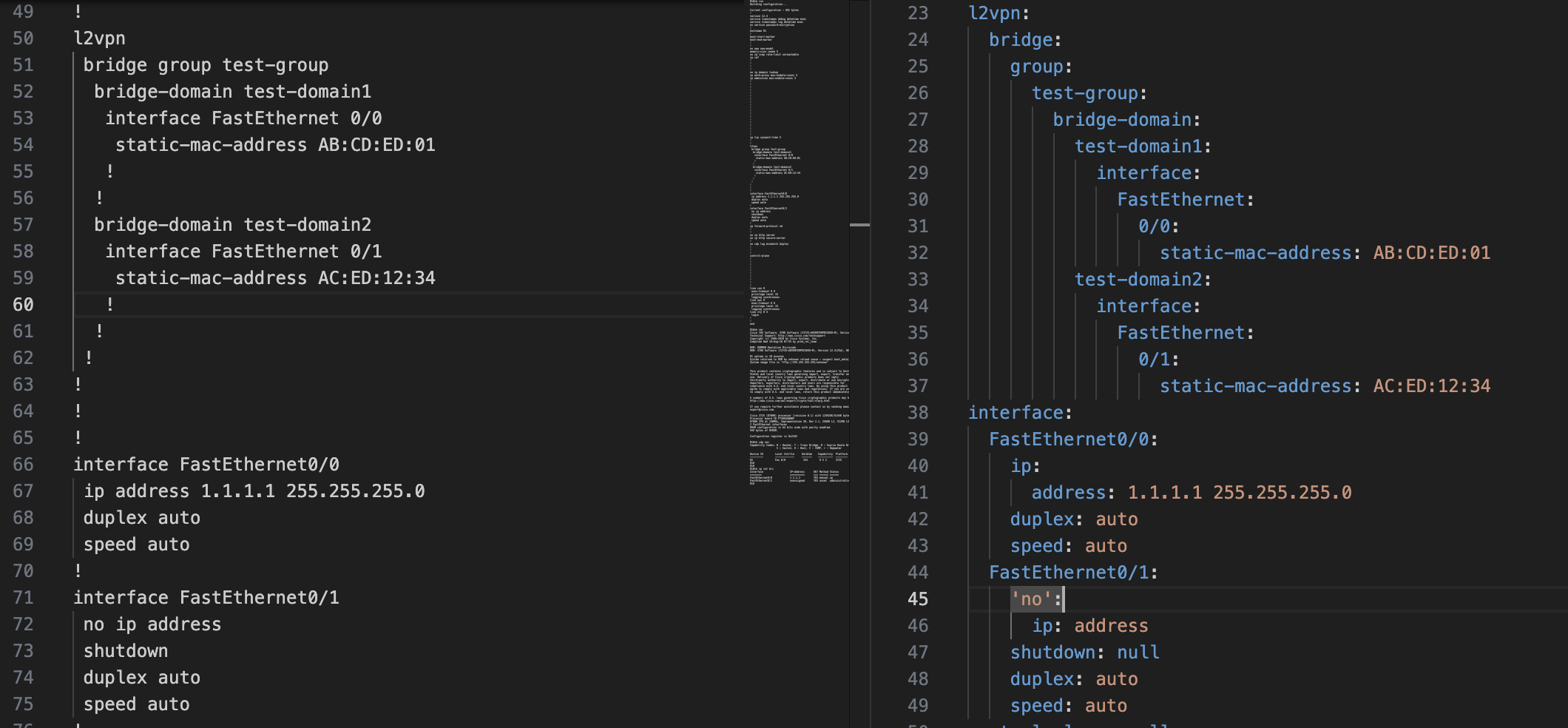
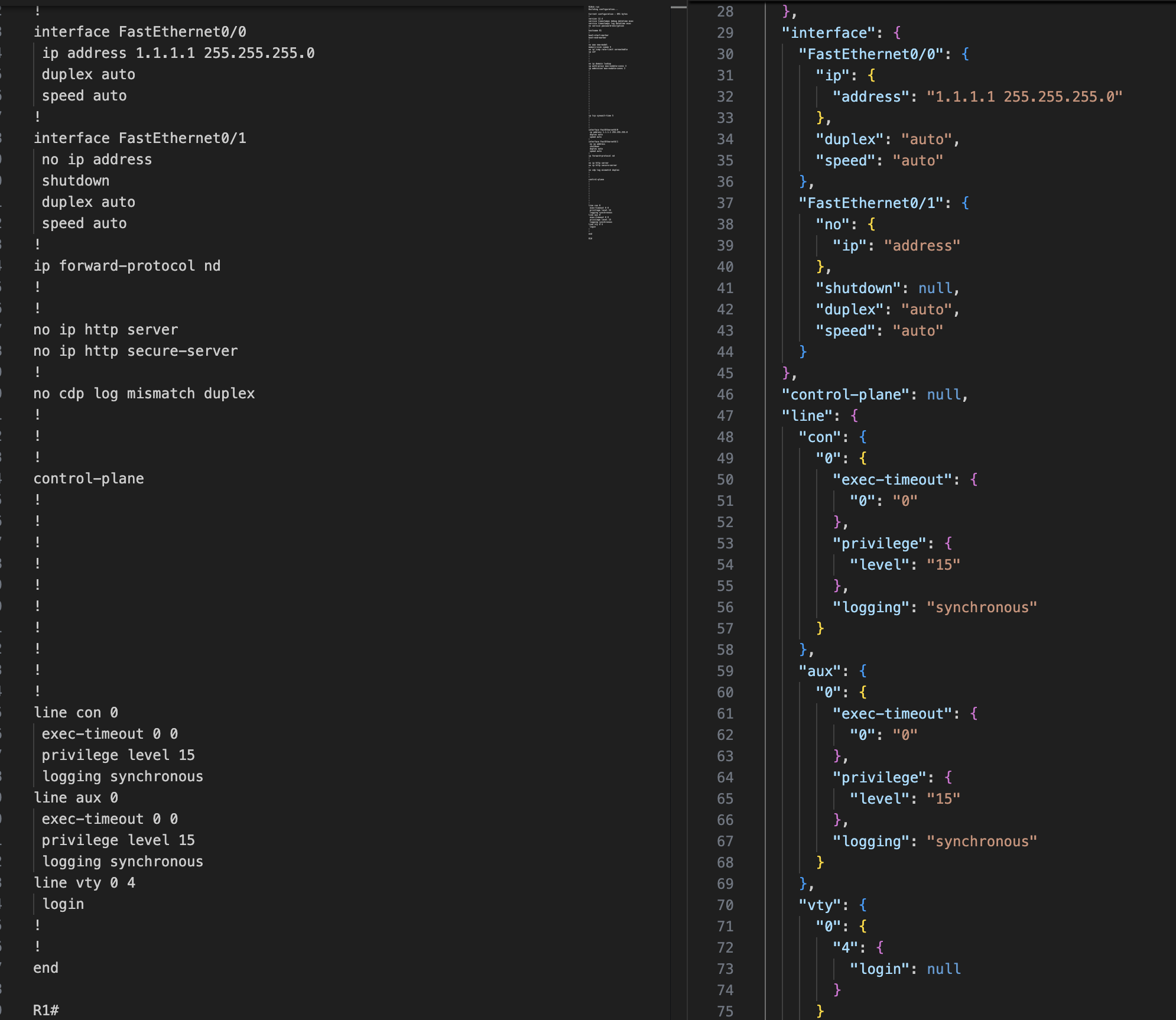
Legacy Format - OrderedDict with Full Keys

Table Structure
Key Features
✨ Zero Dependencies - Uses only Python standard library
⚡ Fast - Modern tooling with uv package manager support
🔒 Type Safe - Full type hints and py.typed marker
🎯 Vendor Independent - Works with any network device configuration
📊 Multiple Formats - Parse trees, tables, and unstructured data
📄 Format Flexibility - Output as JSON or YAML structures
🔍 XPath Queries - NSO-style queries with context tracking (NEW!)
🧪 Well Tested - 80%+ code coverage, tested on Python 3.8-3.13
Quick Start
Installation
pip install shconfparser
Faster with uv:
curl -LsSf https://astral.sh/uv/install.sh | sh
uv pip install shconfparser
Basic Usage
Modern format (recommended - hierarchical structure with XPath):
from shconfparser.parser import Parser

# Use modern format for cleaner output and XPath support
p = Parser(output_format='json')  # or 'yaml'
data = p.read('running_config.txt')

# Parse directly (no split needed for single show running command)
tree = p.parse_tree(data)
print(p.dump(tree, indent=2))

# Query with XPath
result = p.xpath('/hostname')
print(result.data)  # 'R1'
Alternative: Legacy format (backward compatible)
p = Parser()  # Defaults to 'legacy' format
# or explicitly: Parser(output_format='legacy')
data = p.read('running_config.txt')
tree = p.parse_tree(data)
print(p.dump(tree, indent=4))
# Returns OrderedDict with full command strings as keys
# Example: {'interface FastEthernet0/0': {...}}
Multiple show commands in one file:
from shconfparser.parser import Parser

p = Parser(output_format='json')  # Modern format recommended
data = p.read('multiple_commands.txt')  # Contains multiple show outputs
data = p.split(data)  # Split into separate commands
data.keys()
# odict_keys(['running', 'version', 'cdp_neighbors', 'ip_interface_brief'])

# Now parse each command separately
data['running'] = p.parse_tree(data['running'])

headers = ['Device ID', 'Local Intrfce', 'Holdtme', 'Capability', 'Platform', 'Port ID']
data['cdp_neighbors'] = p.parse_table(data['cdp_neighbors'], header_names=headers)

print(p.dump(data['running'], indent=2))
Alternative: Access internal properties
p = Parser()
p.read('multiple_commands.txt')
p.split(p.r.data)

# Access split data from internal property
data = p.s.shcmd_dict
data['running'] = p.parse_tree(data['running'])
print(p.dump(data['running'], indent=4))
Usage Examples
Check Library Version
import shconfparser
print(shconfparser.__version__)  # '3.0.0'
Parse Tree Structure (show running-config)
from shconfparser.parser import Parser

p = Parser()

# Single command file - parse directly
data = p.read('running_config.txt')
tree = p.parse_tree(data)  # No split() needed

# Access nested configuration
print(p.dump(tree['interface FastEthernet0/0'], indent=2))
# {
#   "ip address 1.1.1.1 255.255.255.0": null,
#   "duplex auto": null,
#   "speed auto": null
# }
Parse Table Structure (show cdp neighbors)
# Single command file
p = Parser()
data = p.read('cdp_neighbors.txt')

# Parse table directly (no split needed)
headers = ['Device ID', 'Local Intrfce', 'Holdtme', 'Capability', 'Platform', 'Port ID']
cdp_data = p.parse_table(data, header_names=headers)

# Access as list of dictionaries
for neighbor in cdp_data:
    print(f"{neighbor['Device ID']} on {neighbor['Local Intrfce']}")
# Output: R2 on Fas 0/0
Parse Unstructured Data (show version)
# Single command file
p = Parser()
data = p.read('show_version.txt')

# Parse show version output directly
version_data = p.parse_data(data)  # No split() needed

# Search for specific information
import re
for line in version_data.keys():
    if re.search(r'IOS.*Version', line):
        print(line)
# Output: Cisco IOS Software, 3700 Software (C3725-ADVENTERPRISEK9-M), Version 12.4(25d)...
Search in Tree
# Search for all interfaces
pattern = r'interface\s+\w+.*'
matches = p.search.search_all_in_tree(pattern, tree)

for key, value in matches.items():
    print(value)
# interface FastEthernet0/0
# interface FastEthernet0/1
Search in Table
# Find specific device in CDP table
pattern = r'R\d+'
match = p.search.search_in_table(pattern, cdp_data, 'Device ID')
print(match)
# {'Device ID': 'R2', 'Local Intrfce': 'Fas 0/0', ...}
Output Format Selection
Parse configurations in legacy (OrderedDict) or modern (dict) hierarchical structures:
from shconfparser.parser import Parser

# Legacy format (backward compatible - OrderedDict with full keys)
p = Parser()  # Defaults to 'legacy'
# or explicitly: Parser(output_format='legacy')
data = p.read('running_config.txt')
tree = p.parse_tree(data)  # Returns OrderedDict
print(type(tree))  # <class 'collections.OrderedDict'>
# Example: {'interface FastEthernet0/0': {'ip address 1.1.1.1': ''}}

# Modern formats: JSON or YAML (hierarchical dict structure)
p = Parser(output_format='json')  # Hierarchical dict
# or: Parser(output_format='yaml')  # Same structure, different name
data = p.read('running_config.txt')
tree = p.parse_tree(data)  # Returns dict
print(type(tree))  # <class 'dict'>
# Example: {'interface': {'FastEthernet0/0': {'ip': {'address': '1.1.1.1'}}}}

# Override format per call
p = Parser()  # Legacy by default
tree_legacy = p.parse_tree(data)  # OrderedDict
tree_json = p.parse_tree(data, format='json')  # dict
Format Comparison:
# Legacy format - preserves exact CLI structure (OrderedDict)
{
    "interface FastEthernet0/0": {
        "ip address 1.1.1.1 255.255.255.0": "",
        "duplex auto": ""
    }
}

# Modern formats (json/yaml) - hierarchical and programmatic (dict)
{
    "interface": {
        "FastEthernet0/0": {
            "ip": {
                "address": "1.1.1.1 255.255.255.0"
            },
            "duplex": "auto"
        }
    }
}
Benefits of modern formats (json/yaml):
- Cleaner hierarchy for nested configurations
- Better for programmatic access
- XPath query support
- Easier to convert to actual JSON/YAML files
- Natural structure for complex configs
XPath Queries (New in 3.0!)
Query YAML-formatted configurations using NSO-style XPath with optional context tracking:
from shconfparser.parser import Parser

# XPath requires YAML format
p = Parser(output_format='yaml')
data = p.read('running_config.txt')
tree = p.parse_tree(data)

# Simple queries
result = p.xpath('/hostname')
print(result.data)  # 'R1'

# Wildcards - find all interface duplex settings
result = p.xpath('/interface/*/duplex')
print(result.matches)  # ['auto', 'auto']
print(result.count)    # 2

# Predicates with slashes (network interface names)
result = p.xpath('/interface[FastEthernet0/0]/duplex')
print(result.data)  # 'auto'

# Recursive search - find anywhere in tree
result = p.xpath('//duplex')
print(result.matches)  # ['auto', 'auto']

# Predicate wildcards
result = p.xpath('/interface[FastEthernet*]/ip/address')
print(result.data)  # '1.1.1.1 255.255.255.0'
Context Options - Solve the "which interface?" problem:
# Problem: Can't identify source with wildcards
result = p.xpath('/interface/*/duplex')
print(result.matches)  # ['auto', 'auto'] - Which interface?

# Solution 1: context='none' (default - just values)
result = p.xpath('/interface/*/duplex', context='none')
print(result.matches)  # ['auto', 'auto']

# Solution 2: context='partial' (from wildcard match point)
result = p.xpath('/interface/*/duplex', context='partial')
print(result.matches)
# [{'FastEthernet0/0': {'duplex': 'auto'}},
#  {'FastEthernet0/1': {'duplex': 'auto'}}]

# Solution 3: context='full' (complete tree hierarchy)
result = p.xpath('/interface/*/duplex', context='full')
print(result.matches)
# [{'interface': {'FastEthernet0/0': {'duplex': 'auto'}}},
#  {'interface': {'FastEthernet0/1': {'duplex': 'auto'}}}]

# Path tracking (always available)
result = p.xpath('/interface/*/speed')
print(result.paths)
# [['interface', 'FastEthernet0/0', 'speed'],
#  ['interface', 'FastEthernet0/1', 'speed']]
XPath Features:
- ✅ Absolute paths:
/interface/FastEthernet0/0/duplex - ✅ Recursive search:
//duplex(find anywhere) - ✅ Wildcards:
/interface/*/duplex - ✅ Predicates:
/interface[FastEthernet0/0] - ✅ Predicate wildcards:
/interface[FastEthernet*] - ✅ Context tracking: See which match came from where
- ✅ Path tracking:
result.pathsshows path components
XPathResult Structure:
result = p.xpath('//duplex')
print(result.success)   # True
print(result.data)      # First match: 'auto'
print(result.matches)   # All matches: ['auto', 'auto']
print(result.count)     # Number of matches: 2
print(result.query)     # Original query: '//duplex'
print(result.paths)     # Path to each match
print(result.error)     # Error message if failed

# Boolean check
if result:
    print(f"Found {result.count} matches")
Note: XPath queries only work with output_format='yaml'. JSON format (OrderedDict) preserves exact CLI structure and should use traditional dict navigation.
Alternative: Using Individual Components
For advanced users who need granular control
from shconfparser import Reader, ShowSplit, TreeParser, TableParser

# For multiple show commands
reader = Reader('multiple_commands.txt')
splitter = ShowSplit()
data = splitter.split(reader.data)  # Split only if multiple commands

# Use specific parsers
tree_parser = TreeParser()
table_parser = TableParser()

running = tree_parser.parse(data['running'])
cdp = table_parser.parse(data['cdp_neighbors'], header_names=headers)
💡 Remember: Use split() only when your file contains multiple show commands. For single command files, parse directly.
📖 For more examples, see docs/ folder.
Documentation
📚 Complete documentation: docs/README.md
For Users
| Guide | Description |
|---|---|
| Usage Examples | Detailed parsing examples (tree, table, data) |
| API Reference | Complete API documentation |
| Migration Guide | Upgrade from v2.x to v3.0 |
| Python Compatibility | Python version support |
For Contributors
| Guide | Description |
|---|---|
| Quick Start | 5-minute contributor setup |
| Contributing Guide | How to contribute |
| Architecture | System design and structure |
| Business Standards | Quality and compliance standards |
Support
Getting Help
- 📖 Documentation: docs/README.md
- 🐛 Bug Reports: GitHub Issues
- 💬 Questions: Stack Overflow (tag:
shconfparser) - 📧 Email: kirankotari@live.com
Frequently Asked Questions
Q: What Python versions are supported?
A: Python 3.8-3.13 are fully tested and supported.
Q: Does this work with my network vendor?
A: Yes! shconfparser is vendor-independent and works with any hierarchical configuration format.
Q: Are there any dependencies?
A: No runtime dependencies - uses only Python standard library.
Q: How do I migrate from v2.x?
A: The API is backward compatible. Just run pip install --upgrade shconfparser. See Migration Guide for details.
Community
- 🌟 Star us on GitHub
- 🤝 Contribute: See CONTRIBUTING.md
- 📊 CI/CD: Automated testing on Python 3.8-3.13 across Ubuntu, macOS, Windows
License
MIT License © 2016-2025 Kiran Kumar Kotari
Special thanks to all contributors
2 maintainers


Metadata
2 maintainers
Release files for shconfparser 3.1.1
For a detailed explanation of source distributions (sdists) and built distributions (wheels), please see the package formats documentation.
Source distribution (sdist)
| File | Size | Uploaded | |
|---|---|---|---|
| shconfparser-3.1.1.tar.gz | 1.8 MB | Details |
Built distribution (wheel)
| File | Interpreter | ABI | Platform | Reset |
|---|---|---|---|---|
| shconfparser-3.1.1-py3-none-any.whl | Python 3 | none | any | Details |
Total release size: 1.9 MB
Release files / shconfparser-3.1.1.tar.gz
| Download URL | shconfparser-3.1.1.tar.gz |
|---|---|
| Size | 1.8 MB |
| Tags | Source |
|
SHA-256 checksum How to use checksums |
87d0cf33e25ac0f6176715c780adf382cfc981048b07d8eb003d104f880a5c77
|
|
BLAKE2b-256 checksum How to use checksums |
672a09ddba3808d1000a654257ea1bfb7db516fe720ad947062b324df292e33b
|
| Upload date | |
|
Uploaded using Trusted Publishing? What is trusted publishing? |
No |
| Uploaded via |
uv/0.9.21 {"installer":{"name":"uv","version":"0.9.21","subcommand":["publish"]},"python":null,"implementation":{"name":null,"version":null},"distro":{"name":"Ubuntu","version":"24.04","id":"noble","libc":null},"system":{"name":null,"release":null},"cpu":null,"openssl_version":null,"setuptools_version":null,"rustc_version":null,"ci":true}
|
Release files / shconfparser-3.1.1-py3-none-any.whl
| Download URL | shconfparser-3.1.1-py3-none-any.whl |
|---|---|
| Size | 27.9 kB |
| Tags | Python 3 |
|
SHA-256 checksum How to use checksums |
9a4da79eed0b1872008317be97706b45f25efb58fc3b076a9d1b17546b7c6271
|
|
BLAKE2b-256 checksum How to use checksums |
b864b3ba60408b790afd6ca409579ea2994af3586c879bfaef97995bf576aa7c
|
| Upload date | |
|
Uploaded using Trusted Publishing? What is trusted publishing? |
No |
| Uploaded via |
uv/0.9.21 {"installer":{"name":"uv","version":"0.9.21","subcommand":["publish"]},"python":null,"implementation":{"name":null,"version":null},"distro":{"name":"Ubuntu","version":"24.04","id":"noble","libc":null},"system":{"name":null,"release":null},"cpu":null,"openssl_version":null,"setuptools_version":null,"rustc_version":null,"ci":true}
|














