
Synchronize rows of data with a google spreadsheet (Python2.7 version)

Project description

A python 2.7 library to create, update and delete rows of data in a google spreadsheet. Click here to read the full documentation.
Installation
Install from PyPi using pip:
pip install sheetsync2
Or you can clone the git repo and install from the code:
git clone -b master27 git@github.com:mbrenig/sheetsync.git LocalSheetSync
pip install LocalSheetSync
Note, you may need to run the commands above with sudo.
Setting up OAuth 2.0 access
The Google Drive API now requires the use of OAuth2.0. This means you will need to go through a bit of configuration to get an API Client ID and Client Secret before using sheetsync.
Read the step-by-step getting started guide for instructions.
Injecting data to a Google sheet
SheetSync works with data in a dictionary of dictionaries. Each row is represented by a dictionary, and these are themselves stored in a dictionary indexed by a row-specific key. For example this dictionary represents two rows of data each with columns “Color” and “Performer”:
data = { "Kermit": {"Color" : "Green", "Performer" : "Jim Henson"},
         "Miss Piggy" : {"Color" : "Pink", "Performer" : "Frank Oz"}
        }
To insert this data (add or update rows) into a target worksheet in a google spreadsheet doc use this code:
import logging
from sheetsync import Sheet, ia_credentials_helper
# Turn on logging so you can see what sheetsync is doing.
logging.getLogger('sheetsync').setLevel(logging.DEBUG)
logging.basicConfig()

# Create OAuth2 credentials, or reload them from a local cache file.
CLIENT_ID = '171566521677-3ppd15g5u4lv93van0eri4tbk4fmaq2c.apps.googleusercontent.com'
CLIENT_SECRET = 'QJN*****************hk-i'
creds = ia_credentials_helper(CLIENT_ID, CLIENT_SECRET,
                              credentials_cache_file='cred_cache.json')

data = { "Kermit": {"Color" : "Green", "Performer" : "Jim Henson"},
         "Miss Piggy" : {"Color" : "Pink", "Performer" : "Frank Oz"} }

# Find or create a spreadsheet, then inject data.
target = Sheet(credentials=creds, document_name="sheetsync Getting Started")
target.inject(data)
print "Spreadsheet created here: %s" % target.document_href
The first part of this script imports the Sheet object and ia_credentials_helper function. This function is included to help you quickly generate an OAuth2Credentials object using your Client ID and Secret.
The second part creates a new spreadsheet document in your google drive and then inserts the data like so:
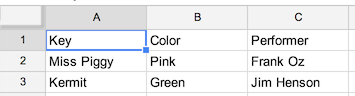
Later on you’ll probably want to access this data, to do that note the spreadsheet’s document key from the URL:

and access the data as follows:
source = Sheet(credentials=creds,
               document_key="1bnieREGAyXZ2TnhXgYrIacCIY09Q2lfGXNZbjsvJ82M",
               worksheet_name='Sheet1')
print source.data()
The ‘inject’ method only adds or updates rows. If you want to delete rows from the spreadsheet to keep it in sync with the input data then use the ‘sync’ method.
Full documentation
Is available here.
Testing and development
SheetSync comes with tox tests. To run them, you’ll need to copy the .secret file to .mysecrets and fill in your own Client ID, Secret and Testdoc folder key. Then run with the following two commands:
. .mysecrets
tox
The license is MIT so feel free to edit, improve. Cheers.
Release history Release notifications | RSS feed

Download files
Download the file for your platform. If you're not sure which to choose, learn more about installing packages.
Source Distribution
File details
Details for the file sheetsync2-0.2.5.tar.gz.
File metadata
- Download URL: sheetsync2-0.2.5.tar.gz
- Upload date:
- Size: 20.6 kB
- Tags: Source
- Uploaded using Trusted Publishing? No
File hashes
| Algorithm | Hash digest | |
|---|---|---|
| SHA256 |
6904716be4f46a21c09555ddab4305e3d06e60101aa1334e2e94f51c5a0af228
|
|
| MD5 |
2cbf1a6ddbffc50fc6e8d0eccdd12834
|
|
| BLAKE2b-256 |
7c1923f8dc2cc97ab210ff4686c544d1eae7a722c8154ad1093609b67bacbdc4
|






