
simple-proxy 🚀
A very simple TCP proxy tool (not http proxy) empowered by nio tcp framework py-netty
Installation
pip install simple-proxy
Usage
Usage: simple-proxy [OPTIONS]

Options:
  -l, --local-server TEXT         Local server address  [default: localhost]
  -lp, --local-port INTEGER       Local port  [default: 8080]
  -r, --remote-server TEXT        Remote server address  [default: localhost]
  -rp, --remote-port INTEGER      Remote port  [default: 80]
  -g, --global                    Listen on 0.0.0.0
  -c, --tcp-flow                  Dump tcp flow on to console
  -f, --save-tcp-flow             Save tcp flow to file
  -s, --tls                       Denote remote server listening on secure
                                  port
  -ss                             Denote local sever listening on secure port
  -kf, --key-file PATH            Key file for local server
  -cf, --cert-file PATH           Certificate file for local server
  --speed-monitor                 Print speed info to console for established
                                  connection
  --speed-monitor-interval INTEGER
                                  Speed monitor interval  [default: 5]
  -dti, --disguise-tls-ip TEXT    Disguise TLS IP
  -dtp, --disguise-tls-port INTEGER
                                  Disguise TLS port  [default: 443]
  -wl, --white-list TEXT          IP White list for incoming connections
                                  (comma separated)
  --run-mock-tls-server           Run mock TLS server
  -v, --verbose                   Verbose mode
  -h, --help                      Show this message and exit.
Features
Basic proxy (TLS termination)
> simple-proxy --tls -r www.google.com -rp 443 -lp 8080
Proxy server started listening: localhost:8080 => www.google.com:443(TLS) ...
console:False, file:False, disguise:n/a, whitelist:*
> curl -I -H 'Host: www.google.com'  http://localhost:8080
HTTP/1.1 200 OK
...
> simple-proxy -r www.google.com -rp 80 -lp 8443 -ss
Proxy server started listening: localhost:8443(TLS) => www.google.com:80 ...
console:False, file:False, disguise:n/a, whitelist:*
> curl -I -H 'Host: www.google.com' -k https://localhost:8443
HTTP/1.1 200 OK
...
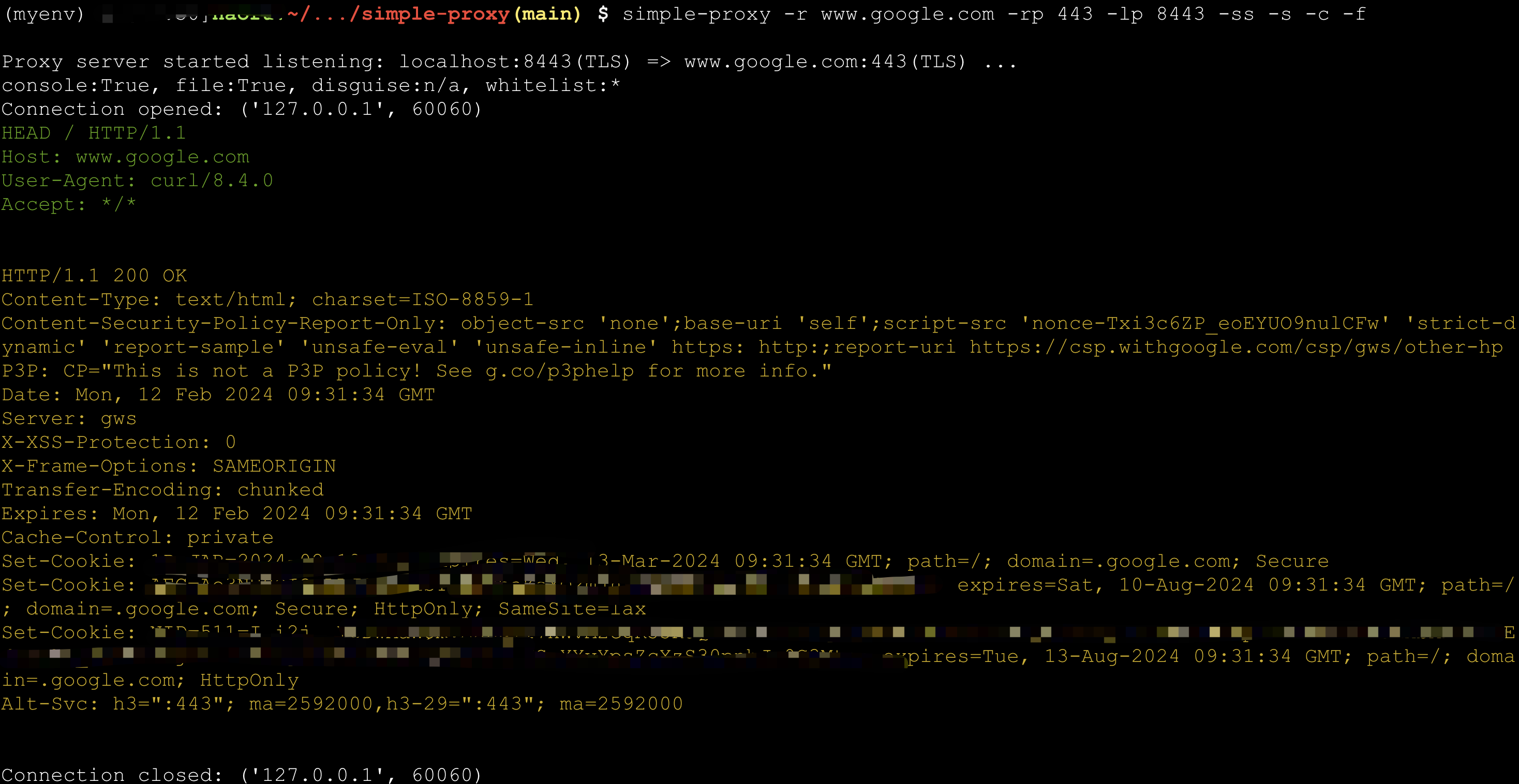
Dump TCP flow
TCP flow can be dumped into console or files (under directory tcpflow)
> simple-proxy -r www.google.com -rp 443 -lp 8443 -ss -s -c -f
Proxy server started listening: localhost:8443(TLS) => www.google.com:443(TLS) ...
console:True, file:True, disguise:n/a, whitelist:*
> curl -k -I -H 'Host: www.google.com'  https://localhost:8443
Connection status monitor
> $ simple-proxy -r echo-server.proxy.com -rp 8080 -lp 48080 --speed-monitor
Proxy server started listening: localhost:48080 => echo-server.proxy.com:8080 ...
console:False, file:False, disguise:n/a, whitelist:*
Connection opened: ('127.0.0.1', 60937)
Connection opened: ('127.0.0.1', 60938)
Connection opened: ('127.0.0.1', 60939)
Connection opened: ('127.0.0.1', 60940)
Connection opened: ('127.0.0.1', 60941)
Connection opened: ('127.0.0.1', 60942)
Connection opened: ('127.0.0.1', 60943)
Connection opened: ('127.0.0.1', 60944)
---------------------------2024-02-12 17:43:02.337268 (total:8, rounds:1)---------------------------
[  1] | 127.0.0.1:60937       | Speed Rx:32.00 K/s  Tx:32.00 K/s  | Total Rx:235.00 K   Tx:235.00 K   | duration: 7s
[  2] | 127.0.0.1:60938       | Speed Rx:32.00 K/s  Tx:32.00 K/s  | Total Rx:235.00 K   Tx:234.00 K   | duration: 7s
[  3] | 127.0.0.1:60939       | Speed Rx:32.00 K/s  Tx:32.00 K/s  | Total Rx:235.00 K   Tx:234.00 K   | duration: 7s
[  4] | 127.0.0.1:60940       | Speed Rx:32.00 K/s  Tx:32.00 K/s  | Total Rx:235.00 K   Tx:234.00 K   | duration: 7s
[  5] | 127.0.0.1:60941       | Speed Rx:32.00 K/s  Tx:32.00 K/s  | Total Rx:235.00 K   Tx:234.00 K   | duration: 7s
[  6] | 127.0.0.1:60942       | Speed Rx:32.00 K/s  Tx:32.00 K/s  | Total Rx:234.00 K   Tx:234.00 K   | duration: 7s
[  7] | 127.0.0.1:60943       | Speed Rx:32.00 K/s  Tx:32.00 K/s  | Total Rx:234.00 K   Tx:234.00 K   | duration: 7s
[  8] | 127.0.0.1:60944       | Speed Rx:32.00 K/s  Tx:32.00 K/s  | Total Rx:234.00 K   Tx:234.00 K   | duration: 7s
Average Read Speed:  32765.0 bytes/s, Average Write Speed: 32752.88 bytes/s
Disguise as HTTPS server with whitelist
Any connection beyond whitelist will be served by a mock https server. Real service can thus be hided.
For example, you can protect your Scurrying Squirrel against attack from Grim Foolish Weasel.
> simple-proxy -rp 8388 -lp 443 -g --run-mock-tls-server -wl=<your ip>,<your wife's ip>,<your friend's wife's ip>

1 maintainer

Metadata
1 maintainer
Release files for simple-proxy 0.0.11
For a detailed explanation of source distributions (sdists) and built distributions (wheels), please see the package formats documentation.
Source distribution (sdist)
| File | Size | Uploaded | |
|---|---|---|---|
| simple-proxy-0.0.11.tar.gz | 13.3 kB | Details |
Built distribution (wheel)
| File | Interpreter | ABI | Platform | Reset |
|---|---|---|---|---|
| simple_proxy-0.0.11-py3-none-any.whl | Python 3 | none | any | Details |
Total release size: 25.7 kB
Release files / simple-proxy-0.0.11.tar.gz
| Download URL | simple-proxy-0.0.11.tar.gz |
|---|---|
| Size | 13.3 kB |
| Tags | Source |
|
SHA-256 checksum How to use checksums |
f04052fb5c439a7c003155a4c5b1d464dfca8537ef745e15a2478f0631947fe5
|
|
BLAKE2b-256 checksum How to use checksums |
2924278ec0f57bfb3e99e62b6db501f890fc25a2dd2b079bb6362c9627fdd3d3
|
| Upload date | |
|
Uploaded using Trusted Publishing? What is trusted publishing? |
No |
| Uploaded via |
twine/4.0.2 CPython/3.10.13
|
Release files / simple_proxy-0.0.11-py3-none-any.whl
| Download URL | simple_proxy-0.0.11-py3-none-any.whl |
|---|---|
| Size | 12.4 kB |
| Tags | Python 3 |
|
SHA-256 checksum How to use checksums |
74cd3b4d7e5cc0edd8ab90039ed607c3ea37fc96ddf3f7888de80b1d8f94d3da
|
|
BLAKE2b-256 checksum How to use checksums |
74ce075272bb810e847edcb39c0b2765a490393685962af58a9dcc32cddb0136
|
| Upload date | |
|
Uploaded using Trusted Publishing? What is trusted publishing? |
No |
| Uploaded via |
twine/4.0.2 CPython/3.10.13
|














