
skunk 

Insert SVG images into matplotlib elements. Can be used to also compose matplotlib plots by nesting them.
pip install skunk
Jupyter Notebooks
To show generated SVGs in Jupyter Notebooks:
skunk.display(svg)
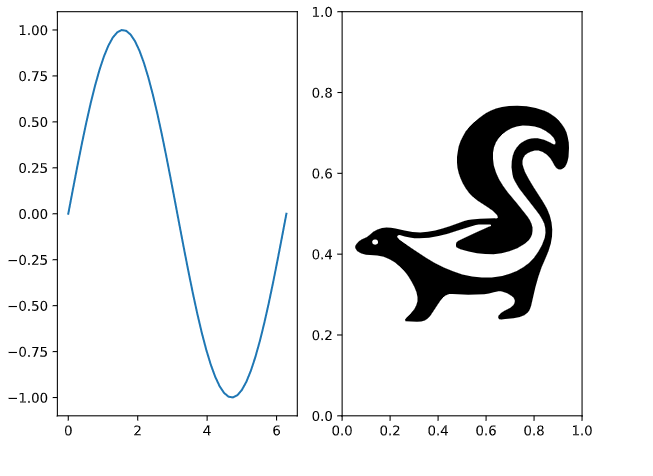
Overwrite Subplot
import skunk
import numpy as np
import os
import matplotlib.pyplot as plt

fig, axs = plt.subplots(ncols=2)

x = np.linspace(0, 2 * np.pi)
axs[0].plot(x, np.sin(x))

# important line where we set ID
skunk.connect(axs[1], 'sk')

plt.tight_layout()

# Overwrite using file path to my svg
# Can also use a string that contains the SVG
svg = skunk.insert(
    {
        'sk': 'skunk.svg'
    })

# write to file
with open('replaced.svg', 'w') as f:
    f.write(svg)
# or in jupyter notebook
skunk.display(svg)
Output
SVG in Annotation
Read about annotation boxes first
import skunk
from matplotlib.offsetbox import AnnotationBbox
import numpy as np
import matplotlib.pyplot as plt

fig, ax = plt.subplots()

x = np.linspace(0, 2 * np.pi)
ax.plot(x, np.sin(x))

# new code: using skunk box with id sk1
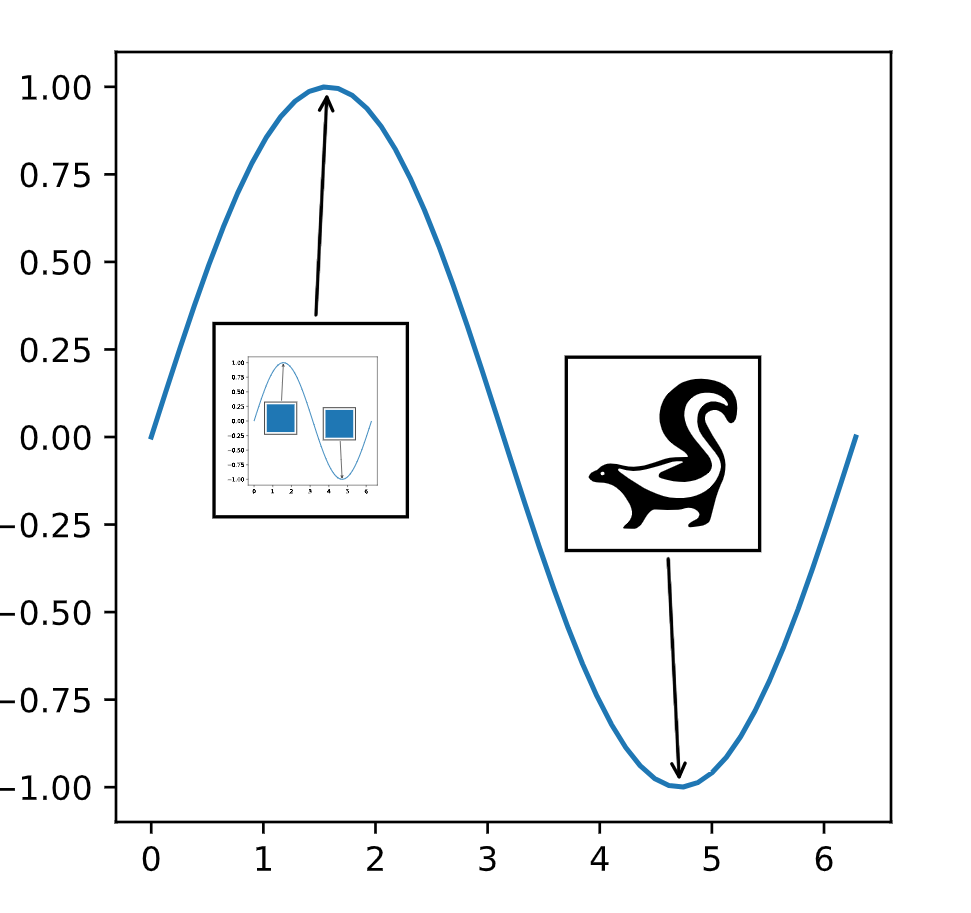
box = skunk.Box(50, 50, 'sk1')
ab = AnnotationBbox(box, (np.pi / 2, 1),
                    xybox=(-5, -100),
                    xycoords='data',
                    boxcoords='offset points',
                    arrowprops=dict(arrowstyle="->"))
ax.add_artist(ab)

# sknunk box with id sk2
box = skunk.Box(50, 50, 'sk2')
ab = AnnotationBbox(box, (3 * np.pi / 2, -1),
                    xybox=(-5, 100),
                    xycoords='data',
                    boxcoords='offset points',
                    arrowprops=dict(arrowstyle="->"))

ax.add_artist(ab)

# insert current figure into itself at sk1
# insert svg file in sk2
svg = skunk.insert(
    {
        'sk1': skunk.pltsvg(),
        'sk2': 'skunk.svg'
    })

# write to file
with open('replaced2.svg', 'w') as f:
    f.write(svg)
# or in jupyter notebook
skunk.display(svg)
Output
SVG to Replace Image
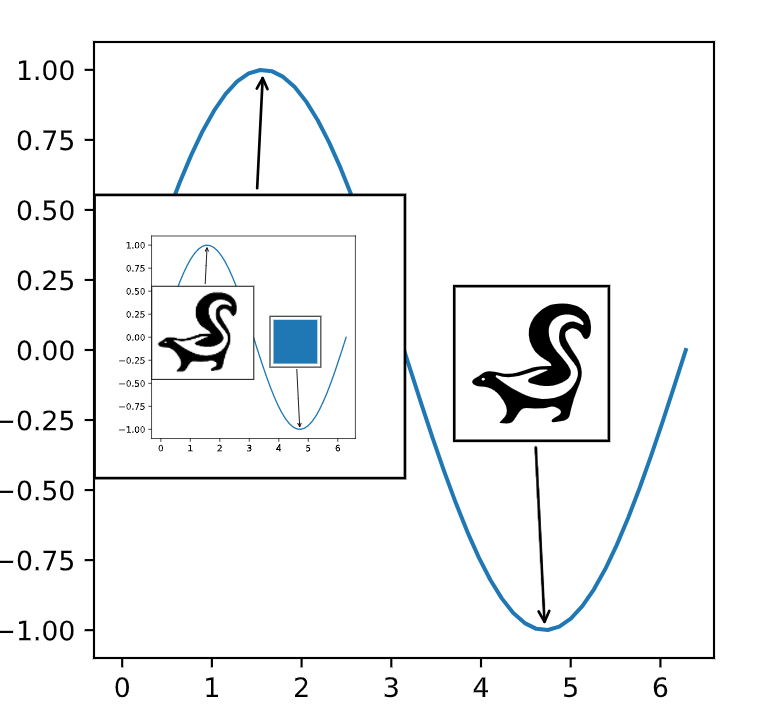
Sometimes you may want a raster image to appear if not using an SVG. This can be done with an ImageBox.
The example above is identical, except we replace the skunk.Box with a skunk.ImageBox that has the same
arguments (after first) as OffsetImage
# use image box, so can have PNG when not in SVG
with open('skunk.png', 'rb') as file:
    skunk_img = plt.imread(file)
box = skunk.ImageBox('sk2', skunk_img, zoom=0.1)
Output
You can see that the inner image contains the raster now instead of the blue rectangle. This example is overly fancy, normally you won't be recursively nesting plots so the raster image will only appear if you're not using SVG.
Save to PDF
I prefer cairosvg:
import cairosvg
cairosvg.svg2pdf(bytestring=svg, write_to='image.pdf')
Layout a set of SVGs
Sometimes you just want to slap a bunch of SVGs together into a grid. You can do that with this method:
svg = skunk.layout_svgs(svgs)
1 maintainer

Metadata
1 maintainer
Release files for skunk 1.3.0
For a detailed explanation of source distributions (sdists) and built distributions (wheels), please see the package formats documentation.
Source distribution (sdist)
| File | Size | Uploaded | |
|---|---|---|---|
| skunk-1.3.0.tar.gz | 6.8 kB | Details |
Built distribution (wheel)
| File | Interpreter | ABI | Platform | Reset |
|---|---|---|---|---|
| skunk-1.3.0-py3-none-any.whl | Python 3 | none | any | Details |
Total release size: 13.3 kB
Release files / skunk-1.3.0.tar.gz
| Download URL | skunk-1.3.0.tar.gz |
|---|---|
| Size | 6.8 kB |
| Tags | Source |
|
SHA-256 checksum How to use checksums |
a42c672ad08c7d5dcf174345ee3a12bc7f2c0c7182c3c9fd75548cc7729676b6
|
|
BLAKE2b-256 checksum How to use checksums |
a47a97df99154b35f9342175383ff51716ad0ee8b990d33faebbe7990e06a70a
|
| Upload date | |
|
Uploaded using Trusted Publishing? What is trusted publishing? |
No |
| Uploaded via |
twine/4.0.2 CPython/3.9.18
|
Release files / skunk-1.3.0-py3-none-any.whl
| Download URL | skunk-1.3.0-py3-none-any.whl |
|---|---|
| Size | 6.5 kB |
| Tags | Python 3 |
|
SHA-256 checksum How to use checksums |
c7f0e11dcc56feb9182a5806d68d4753f5abb86f634ea3b1b303177b0d396624
|
|
BLAKE2b-256 checksum How to use checksums |
7589a3f02a03a0468c59b7692204b6e8b54aec539fc3595ca3e8f133ab2d70e7
|
| Upload date | |
|
Uploaded using Trusted Publishing? What is trusted publishing? |
No |
| Uploaded via |
twine/4.0.2 CPython/3.9.18
|














