
SlackMQ
Slack can do the heavy lifting of a simple Message Queue. When a message is received, it is "locked" while being processed. This keeps other worker bots from processing the message simultaneously.
SlackMQ is suited to high latency message queuing applications due to rate limiting. For a minimalist architecture, leverage the power of SlackMQ and a Slack bot becomes highly available out of the box.
To install:
pip install slackmq
The Slack API allows pins to be added once per message per channel. Also, reactions and stars can be added to a message once per bot. For example, a person or bot cannot pin a message that has already been pinned. A user or bot cannot give a post a thumbs up twice. In the UI, if you try, the action is revoked. In the API, an exception is thrown.
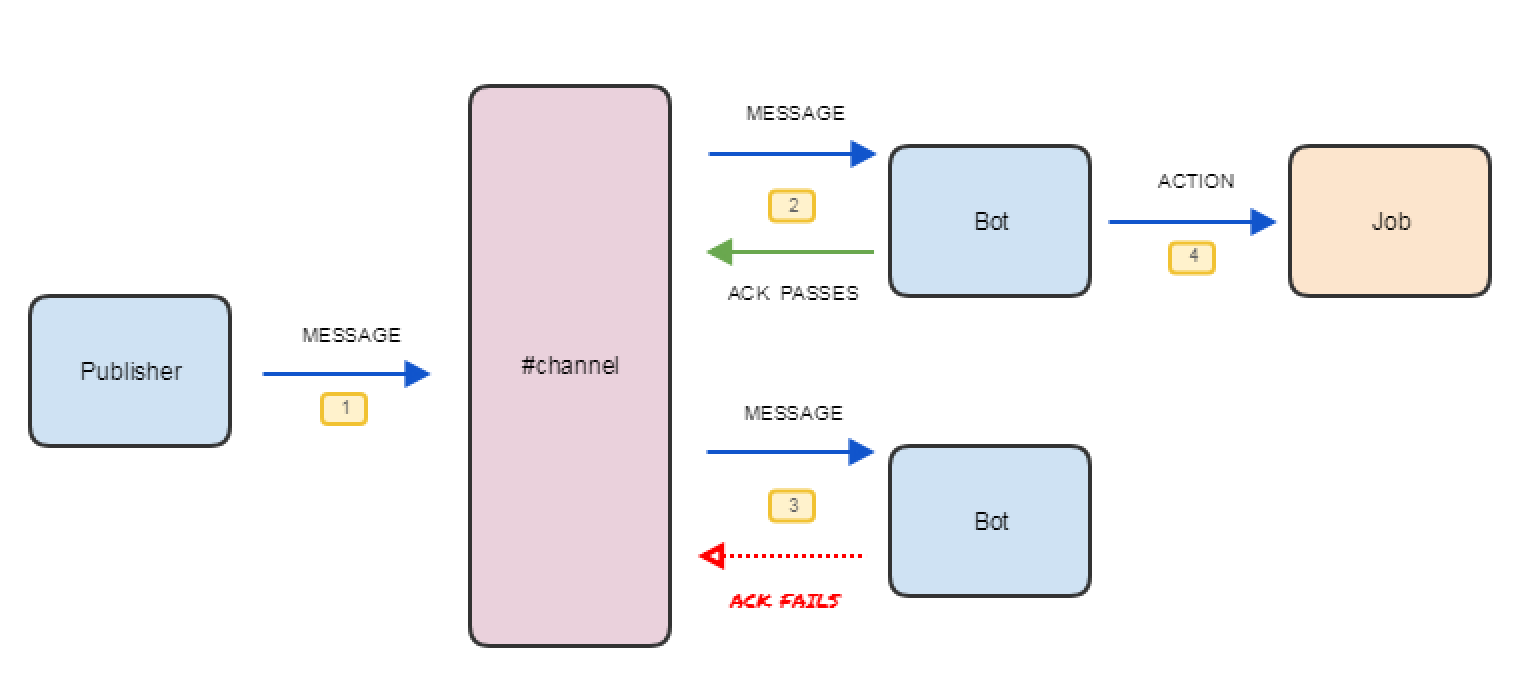
Slack can be made to behave like a basic Message Queuing system by using pins to acknowledge (lock) and unacknowledge a message, as demonstrated in the diagram above. Using pins is ideal as this allows "unlimited" bot workers. The Slack RTM API also allows a bot to connect multiple times. With this account concurrency, this method limits the bot to 16 concurrent workers. You may find using a combination of pins, stars and reactions more reliable for low latency messages.
To use SlackMQ, wrap the post acknowledgement around a bot action. Below is an example of how a bot (using the slackbot library) uses SlackMQ to pull from the "queue", i.e, the channel.
from slackmq import slackmq
from slackbot.bot import listen_to
import socket

API_TOKEN = 'SLACK-BOT-API-TOKEN'


@listen_to('hello')
def helloworld(message):
    post = slackmq(API_TOKEN,
                   message.body['channel'],
                   message.body['ts'])
    if post.ack():
        message.send('Hello from {}.'.format(socket.gethostname()))
        post.unack()
Implementation Examples
Troupe, which is a group of Slack bots working together to control and operate a smart home implements SlackMQ.
- See Troupe's source code for an insight into SlackMQ usage: https://github.com/meltaxa/troupe.
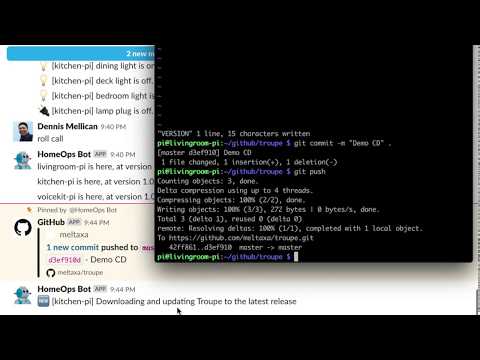
Another implementation of SlackMQ is to perform DevOps manoeuvres, such as Remote Management, Continuous Delivery, Canary Deployments and Rolling Updates. In the Troupe example, a Federation of Slack bots can self-update with zero downtime using the SlackMQ library. Watch The Travelling DevOps Troupe in action:
1 maintainer

Metadata
1 maintainer
Release files for slackmq 0.1.2
For a detailed explanation of source distributions (sdists) and built distributions (wheels), please see the package formats documentation.
Source distribution (sdist)
| File | Size | Uploaded | |
|---|---|---|---|
| slackmq-0.1.2.tar.gz | 3.1 kB | Details |
Built distribution (wheel)
| File | Interpreter | ABI | Platform | Reset |
|---|---|---|---|---|
| slackmq-0.1.2-py2.py3-none-any.whl | Python 3, Python 2 | none | any | Details |
Total release size: 6.9 kB
Release files / slackmq-0.1.2.tar.gz
| Download URL | slackmq-0.1.2.tar.gz |
|---|---|
| Size | 3.1 kB |
| Tags | Source |
|
SHA-256 checksum How to use checksums |
df722fdf357a3464950eea9739aedb52055834d2234d1d99a6e94f948403022c
|
|
BLAKE2b-256 checksum How to use checksums |
176e31bf4133366d523aff6950460aa0673bd4820f904c4bec6d55aeeb427b0a
|
| Upload date | |
|
Uploaded using Trusted Publishing? What is trusted publishing? |
No |
| Uploaded via |
twine/1.12.1 pkginfo/1.4.2 requests/2.21.0 setuptools/40.8.0 requests-toolbelt/0.8.0 tqdm/4.26.0 CPython/3.5.3
|
Release files / slackmq-0.1.2-py2.py3-none-any.whl
| Download URL | slackmq-0.1.2-py2.py3-none-any.whl |
|---|---|
| Size | 3.8 kB |
| Tags | Python 2 Python 3 |
|
SHA-256 checksum How to use checksums |
a48181bdfb558d54fd9448c1df5ac496f168daa561dfeab6b5764e7938d53cac
|
|
BLAKE2b-256 checksum How to use checksums |
f62419c9214a3048064b0c16b23e26d18ca40f09451a4387c124e23557a4d3b4
|
| Upload date | |
|
Uploaded using Trusted Publishing? What is trusted publishing? |
No |
| Uploaded via |
twine/1.12.1 pkginfo/1.4.2 requests/2.21.0 setuptools/40.8.0 requests-toolbelt/0.8.0 tqdm/4.26.0 CPython/3.5.3
|














