
Selective Copy v0.3.0





Simple command line application that copies all files with given extensions from a directory and its subfolders to another directory showing progress bar and remaining files counter.
Allows to preserve a source folder structure, to process only files without given extensions, to move files instead of copying, to exclude certain files from processing and to create a log if necessary.
Opens a filedialog if source and/or destination are not given in the command line.
Creates folders in a destination path if they don't exist.
Installing
pip install slcp
Usage
slcp ext [ext ...] [-s SRC] [-d DST] [-sc | -dc] [-p] [-i] [-m] [-e FILE [FILE ...]] [-l] [-h]

Positional arguments:
ext                         One or more extensions of the files to copy.
                            Enter extensions without a dot and separate by spaces.

Optional arguments:
-s SRC, --source SRC        Source folder path.
-d DST, --dest DST          Destination folder path.
-sc, --srccwd               Use current working directory as a source folder.
-dc, --dstcwd               Use current working directory as a destination folder.
-p, --preserve              Preserve source folder structure.
-i, --invert                Process only files without given extensions.
-m, --move                  Move files instead of copying, be careful with this option.
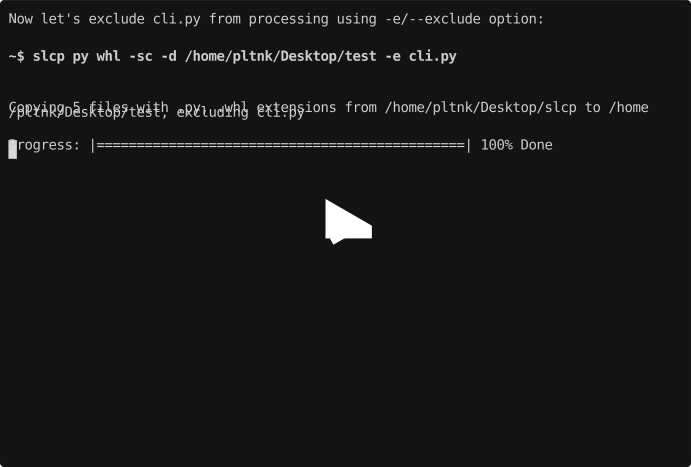
-e FILE [FILE ...],         Exclude one or more files from processing.
--exclude FILE [FILE ...]   Enter filenames with extensions and separate by spaces.
-l, --log                   Create and save log to the destination folder.
-h, --help                  Show this help message and exit.
Examples
Changelog
v0.3.0 - 2019-08-22
Added
- Black code style
Changed
- The code is now divided into separate modules
- Dots that come with extensions are removed from output folder name. The reason is that folders with a name starting with a dot are considered as hidden on Linux.
- Log saving indication
- Name of the logfile
Fixed
- Issue when paths like /home/user/test and /home/user/test2 were considered as nested which lead to an error.
v0.2.1 - 2019-07-16
Added
- Changelog
Fixed
v0.2.0 - 2019-07-15
Added
- Support of processing several extensions at once
- --invert option
- --move option
- --exclude option
License
This project is licensed under the MIT License - see the LICENSE file for details
Acknowledgments
Inspired by the task from Chapter 9 of Automate the Boring Stuff.
1 maintainer

Metadata
1 maintainer
Release files for slcp 0.3.0
For a detailed explanation of source distributions (sdists) and built distributions (wheels), please see the package formats documentation.
Source distribution (sdist)
| File | Size | Uploaded | |
|---|---|---|---|
| slcp-0.3.0.tar.gz | 6.8 kB | Details |
Built distribution (wheel)
| File | Interpreter | ABI | Platform | Reset |
|---|---|---|---|---|
| slcp-0.3.0-py3-none-any.whl | Python 3 | none | any | Details |
Total release size: 15.4 kB
Release files / slcp-0.3.0.tar.gz
| Download URL | slcp-0.3.0.tar.gz |
|---|---|
| Size | 6.8 kB |
| Tags | Source |
|
SHA-256 checksum How to use checksums |
5215788e6fbd8cf34906538746fd35bf56a3bc1fc2ab92560c55db54f70efca5
|
|
BLAKE2b-256 checksum How to use checksums |
175b4660dc293789852a633334b80d5a15a856c742f47f72fab8389e5a38ff95
|
| Upload date | |
|
Uploaded using Trusted Publishing? What is trusted publishing? |
No |
| Uploaded via |
poetry/0.12.16 CPython/3.7.4 Linux/5.0.0-25-generic
|
Release files / slcp-0.3.0-py3-none-any.whl
| Download URL | slcp-0.3.0-py3-none-any.whl |
|---|---|
| Size | 8.6 kB |
| Tags | Python 3 |
|
SHA-256 checksum How to use checksums |
e980b1db94c2a7eb8a2f8fa1dcf2cd9630abd1dbb12b0754274264016e335077
|
|
BLAKE2b-256 checksum How to use checksums |
f9a33d74cae1120284a47d47398d3598b850ae7c101e3a0efb4332dfde4a39b6
|
| Upload date | |
|
Uploaded using Trusted Publishing? What is trusted publishing? |
No |
| Uploaded via |
poetry/0.12.16 CPython/3.7.4 Linux/5.0.0-25-generic
|














