

SlipCover: Near Zero-Overhead Python Code Coverage
by Juan Altmayer Pizzorno and Emery Berger at UMass Amherst's PLASMA lab.





About Slipcover
SlipCover is a fast code coverage tool. It tracks a Python program as it runs and reports on the parts that executed and those that didn't. That can help guide your testing (showing code that isn't being tested), debugging, fuzzing or to find "dead" code.
Past code coverage tools can make programs significantly slower; it is not uncommon for them to take twice as long to execute. SlipCover aims to provide the same information with near-zero overhead, often almost as fast as running the original Python program.
How it works
Previous coverage tools like Coverage.py rely on
Python's tracing facilities,
which add significant overhead.
Instead, SlipCover uses just-in-time instrumentation and de-instrumentation.
When SlipCover gathers coverage information, it modifies the program's Python byte codes,
inserting instructions that let it keep track the lines executed by the program.
As the program executes, SlipCover gradually removes instrumentation that
is no longer needed, allowing those parts to run at full speed.
Care is taken throughout SlipCover to keep things as efficient as possible.
On Python 3.12 and later, rather than rewrite bytecode, SlipCover uses the
sys.monitoring API
to collect coverage information.
Performance
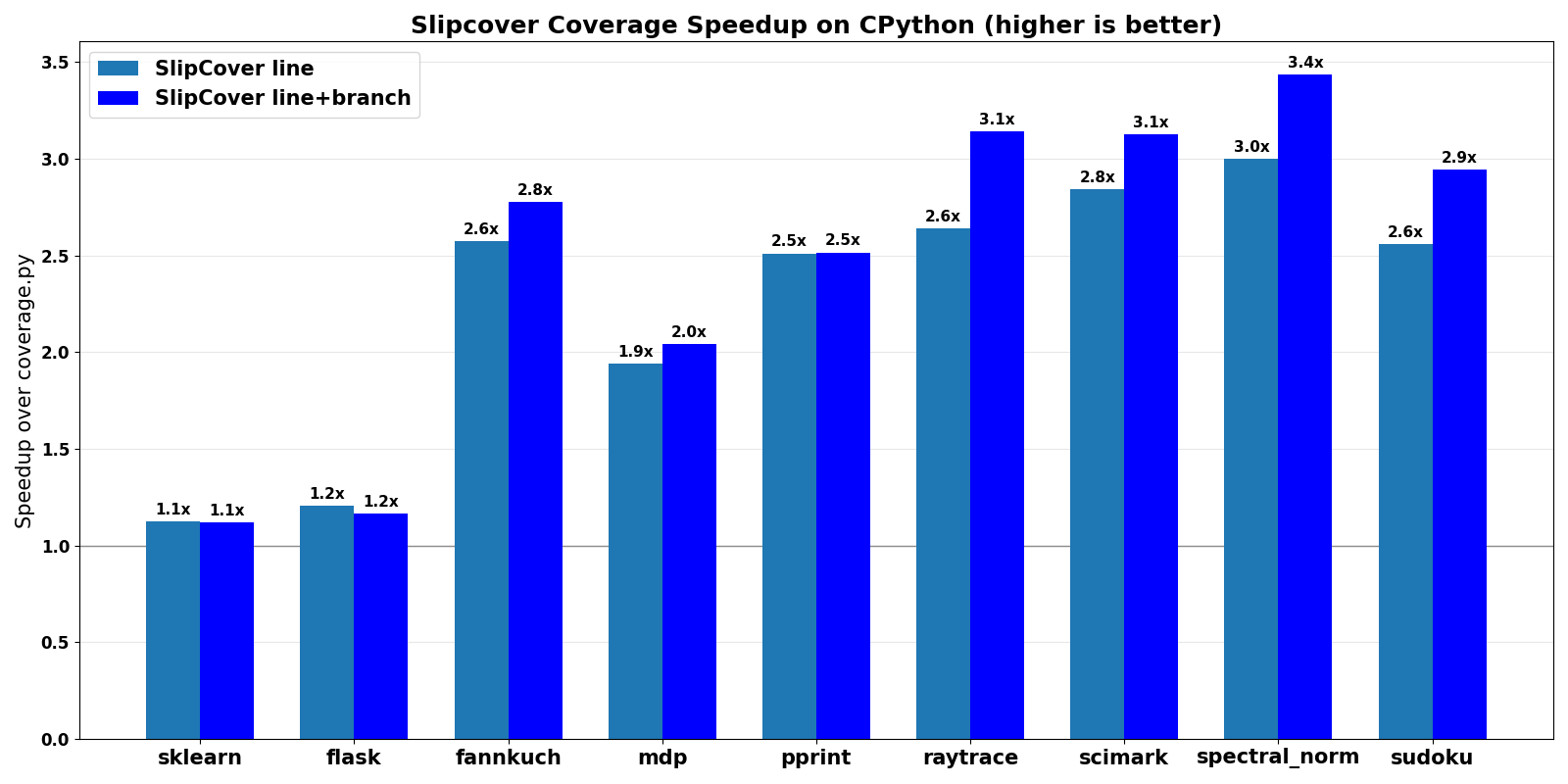
The first image on the right shows SlipCover's speedup, ranging from 1.1x to 3.4x, in relation to Coverage.py, running on CPython 3.10.5.
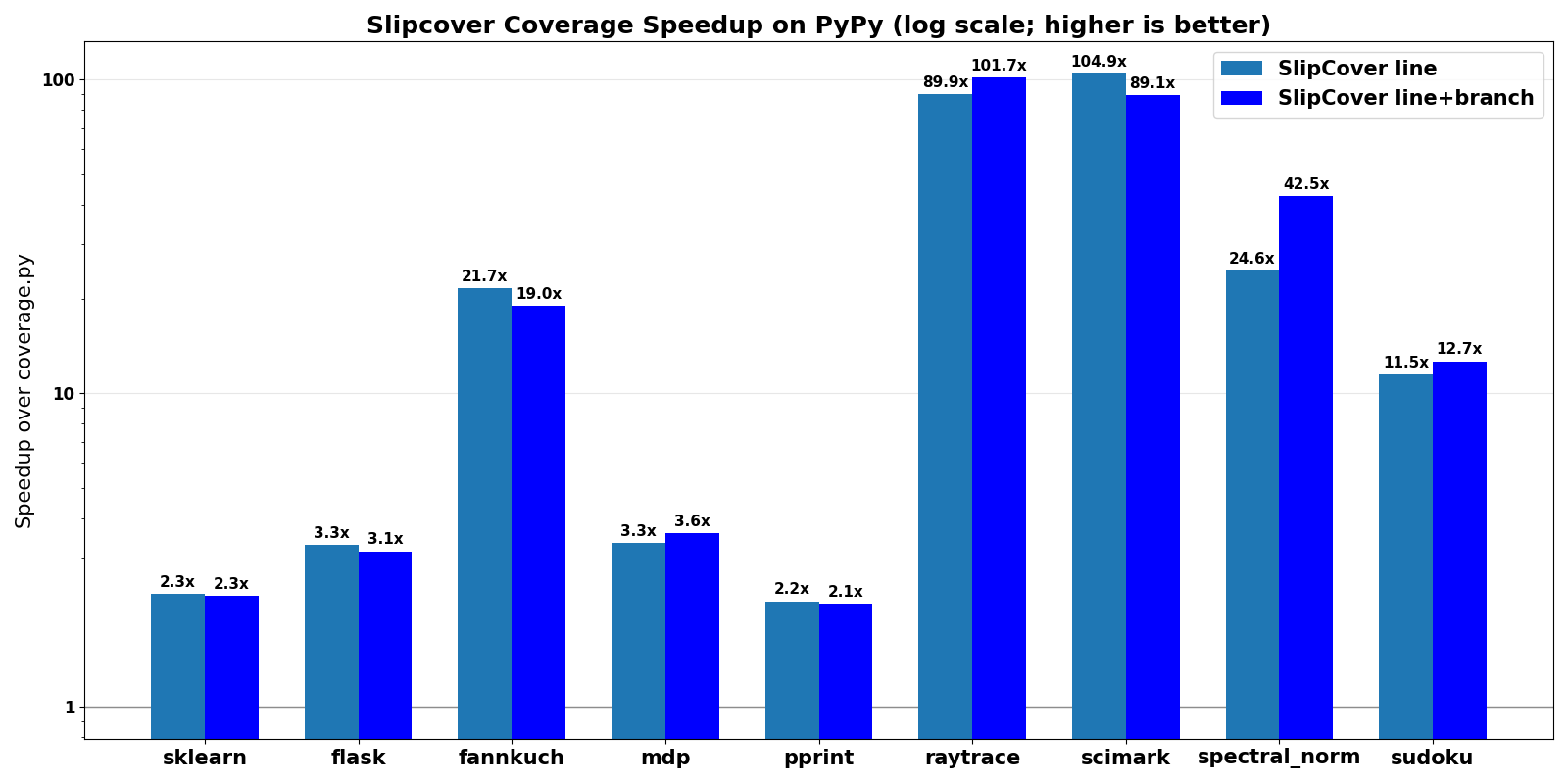
The first two benchmarks are the test suites for scikit-learn and Flask; "sudoku" runs Peter Norvig's Sudoku solver while the others were derived from the Python Benchmark Suite.
More "Python-intensive" programs such as sudoku and those from the benchmark suite (with a larger proportion of execution time spent in Python, rather than in native code) generate more tracing events, causing more overhead in Coverage.py. While each program's structure can affect SlipCover's ability to de-instrument, its running time stays relatively close to the original.
On PyPy 3.9, the speedup ranges from 2.1x to 104.9x. Since it is so high for some of the benchmarks, we plot it on a logarithmic scale (see the second image on the right).
In a proof-of-concept integration with a property-based testing package, SlipCover sped up coverage-based testing 22x.
Accuracy
We verified SlipCover's accuracy against Coverage.py and against a simple script of our own that collects coverage using Python tracing. We found SlipCover's results to be accurate, in fact, in certain cases more accurate.
Getting started
SlipCover is available from PyPI. You can install it like any other Python module with
pip3 install slipcover
You could then run your Python script with:
python3 -m slipcover myscript.py
Using it with a test harness
SlipCover can also execute a Python module, as in:
python3 -m slipcover -m pytest -x -v
which starts pytest, passing it any options (-x -v in this example)
after the module name.
No plug-in is required for pytest.
This also works with pytest-xdist for parallel test execution:
python3 -m slipcover -m pytest -n auto
SlipCover activates in each worker process and automatically merges the coverage collected by every worker into a single report.
Configuration via pyproject.toml
Instead of passing options on every command invocation, you can store them
in your project's pyproject.toml under the [tool.slipcover] section.
SlipCover automatically discovers the nearest pyproject.toml by walking up
from the current working directory.
[tool.slipcover]
branch = true
source = "src"        # or ["src", "lib"]
omit = "tests/*"       # or ["tests/*", "*.pyc"]
fail-under = 80.0
format = "json"        # "text" (default), "json", "xml", or "lcov"
pretty-print = true
skip-covered = true
immediate = false
out = "coverage.json"
threshold = 75
missing-width = 120
xml-package-depth = 3
Most command-line flags have a matching key (use hyphens, as shown above);
source and omit also accept a TOML array instead of a single
comma-separated string. --json/--xml/--lcov map to the single format
key shown above rather than one key per flag. --merge, -m/module, the
script argument, --version, and --help are per-invocation choices rather
than settings, so they aren't configurable this way. Command-line arguments
always take precedence over values in pyproject.toml, so you can override
any setting on a per-run basis.
exclude-lines and exclude-also (coverage.py-style regex-based line/block
exclusion, e.g. # pragma: no cover) are the one exception: they're
configurable only via pyproject.toml, with no command-line flag, matching
coverage.py's own design.
[tool.slipcover]
exclude-lines = ["# pragma: no cover", "if DEBUG:"]  # replaces the built-in defaults
exclude-also = ["# my-custom-marker"]                # adds to whichever list is active
Usage example
$ python3 -m slipcover -m pytest
================================================================ test session starts ================================================================
platform darwin -- Python 3.9.12, pytest-7.1.2, pluggy-1.0.0
rootdir: /Users/juan/project/wally/d2k-5, configfile: pytest.ini
plugins: hypothesis-6.39.3, mock-3.7.0, repeat-0.9.1, doctestplus-0.12.0, arraydiff-0.5.0
collected 439 items

tests/box_test.py .........................                                                                                                   [  5%]
tests/image_test.py ...............                                                                                                           [  9%]
tests/network_equivalence_test.py .........................................s................................................................. [ 33%]
..............................................................................                                                                [ 51%]
tests/network_test.py ....................................................................................................................... [ 78%]
...............................................................................................                                               [100%]

=================================================== 438 passed, 1 skipped, 62 warnings in 48.43s ====================================================

File                                 #lines    #miss    Cover%  Lines missing
---------------------------------  --------  -------  --------  ------------------------
d2k/__init__.py                           3        0       100
d2k/box.py                              105       27        74  73, 142-181
d2k/image.py                             38        4        89  70-73
d2k/network.py                          359        1        99  236
tests/box_test.py                       178        0       100
tests/darknet.py                        132       11        91  146, 179-191
tests/image_test.py                      45        0       100
tests/network_equivalence_test.py       304       30        90  63, 68, 191-215, 455-465
tests/network_test.py                   453        0       100
$
As can be seen in the coverage report, d2k lacks some coverage, especially in
its box.py and image.py components.
Command-line options
$ python3 -m slipcover --help
usage: SlipCover [-h] [--branch] [--format {text,json,xml,lcov}] [--json]
                 [--pretty-print] [--xml]
                 [--xml-package-depth XML_PACKAGE_DEPTH] [--lcov]
                 [--lcov-test-name LCOV_TEST_NAME]
                 [--lcov-comment LCOV_COMMENTS] [--out OUT]
                 [--source SRC1,SRC2,...] [--omit PAT1,PAT2,...] [--immediate]
                 [--skip-covered] [--fail-under FAIL_UNDER] [--threshold T]
                 [--missing-width WIDTH] [--sigterm] [--version] [-m MODULE]
                 [--merge MERGE [MERGE ...]]
                 [script] ...

positional arguments:
  script                the script to run
  script_or_module_args

options:
  -h, --help            show this help message and exit
  --branch              measure both branch and line coverage
  --format {text,json,xml,lcov}
                        select output format
  --json                select JSON output (shortcut for --format=json)
  --pretty-print        pretty-print JSON output
  --xml                 select XML output (shortcut for --format=xml)
  --xml-package-depth XML_PACKAGE_DEPTH
                        Controls which directories are identified as packages
                        in the report. Directories deeper than this depth are
                        not reported as packages. The default is that all
                        directories are reported as packages.
  --lcov                select LCOV output (shortcut for --format=lcov)
  --lcov-test-name LCOV_TEST_NAME
                        test name for LCOV TN: entries
  --lcov-comment LCOV_COMMENTS
                        add comment lines at the beginning of LCOV output (can
                        be used multiple times)
  --out OUT             specify output file name
  --source SRC1,SRC2,...
                        specify directories to cover; comma-separated for
                        multiple
  --omit PAT1,PAT2,...  specify file pattern(s) to omit; comma-separated for
                        multiple
  --immediate           request immediate de-instrumentation
  --skip-covered        omit fully covered files (from text, non-JSON output)
  --fail-under FAIL_UNDER
                        fail execution with RC 2 if the overall coverage lays
                        lower than this
  --threshold T         threshold for de-instrumentation (if not immediate)
  --missing-width WIDTH
                        maximum width for `missing' column
  --sigterm             if true, register a SIGTERM signal handler to capture
                        data when the process ends due to a SIGTERM signal.
  --version             show program's version number and exit
  -m MODULE             run given module as __main__
  --merge MERGE [MERGE ...]
                        merge JSON coverage files, saving to --out
--exclude-lines/--exclude-also aren't listed here — they're configurable
only via pyproject.toml (see Configuration via pyproject.toml above).
Platforms
Our GitHub workflows run the automated test suite on Linux, MacOS and Windows, but really it should work anywhere where CPython/PyPy does.
Contributing
SlipCover is under active development; contributions are welcome! Please also feel free to create a new issue with any suggestions or issues you may encounter.
Technical Information
For more details about how SlipCover works please see the following paper, published at ISSTA'23: SlipCover: Near Zero-Overhead Code Coverage for Python.
Acknowledgements
Logo design by Sophia Berger.
This material is based upon work supported by the National Science Foundation under Grant No. 1955610. Any opinions, findings, and conclusions or recommendations expressed in this material are those of the author(s) and do not necessarily reflect the views of the National Science Foundation.
1 maintainer

Metadata
1 maintainer
Release files for slipcover 1.1.0
For a detailed explanation of source distributions (sdists) and built distributions (wheels), please see the package formats documentation.
Source distribution (sdist)
| File | Size | Uploaded | Provenance | |
|---|---|---|---|---|
| slipcover-1.1.0.tar.gz | 95.6 kB | Without provenance | Details |
Built distributions (wheels)
| File | Reset | |||
|---|---|---|---|---|
| slipcover-1.1.0-py312-none-any.whl | Python 3.12 | none | any | Details |
| slipcover-1.1.0-cp310-abi3-win_amd64.whl | CPython 3.10 | abi3 | Windows x86-64 | Details |
| slipcover-1.1.0-cp310-abi3-manylinux_2_24_x86_64.manylinux_2_28_x86_64.whl | CPython 3.10 | abi3 | Linux glibc 2.24+ x86-64, Linux glibc 2.28+ x86-64 | Details |
| slipcover-1.1.0-cp310-abi3-macosx_14_0_universal2.whl | CPython 3.10 | abi3 | macOS 14.0+ universal2 (ARM64, x86-64) | Details |
| slipcover-1.1.0-cp39-cp39-win_amd64.whl | CPython 3.9 | CPython 3.9 | Windows x86-64 | Details |
| slipcover-1.1.0-cp39-cp39-manylinux_2_24_x86_64.manylinux_2_28_x86_64.whl | CPython 3.9 | CPython 3.9 | Linux glibc 2.24+ x86-64, Linux glibc 2.28+ x86-64 | Details |
| slipcover-1.1.0-cp39-cp39-macosx_14_0_universal2.whl | CPython 3.9 | CPython 3.9 | macOS 14.0+ universal2 (ARM64, x86-64) | Details |
Total release size: 626.9 kB
Release files / slipcover-1.1.0.tar.gz
| Download URL | slipcover-1.1.0.tar.gz |
|---|---|
| Size | 95.6 kB |
| Tags | Source |
|
SHA-256 checksum How to use checksums |
e6eac07f65abded47e0646e550b42b1d87fff48460730da0a11d0024e2dd5ec4
|
|
BLAKE2b-256 checksum How to use checksums |
5235f958527ef887929049a7b80c0e7a9784b3e2c8e4bd50d792d5419cd0819c
|
| Upload date | |
|
Uploaded using Trusted Publishing? What is trusted publishing? |
No |
| Uploaded via |
twine/7.0.0 CPython/3.12.13
|
Release files / slipcover-1.1.0-py312-none-any.whl
| Download URL | slipcover-1.1.0-py312-none-any.whl |
|---|---|
| Size | 52.1 kB |
| Tags | Python 3.12 |
|
SHA-256 checksum How to use checksums |
74091d24d836b86f65644326478a7fe971cd3ae3f3dc9fe0e996fdacd4c5deeb
|
|
BLAKE2b-256 checksum How to use checksums |
a4c5b365cf373dddaf37bcf5b0fbf9546c1f3435f4dcab5d16e9e8b73864df45
|
| Upload date | |
|
Uploaded using Trusted Publishing? What is trusted publishing? |
No |
| Uploaded via |
twine/7.0.0 CPython/3.12.13
|
Release files / slipcover-1.1.0-cp310-abi3-win_amd64.whl
| Download URL | slipcover-1.1.0-cp310-abi3-win_amd64.whl |
|---|---|
| Size | 106.2 kB |
| Tags | CPython 3.10 Windows x86-64 abi3 |
|
SHA-256 checksum How to use checksums |
51134edd5ce8897af6aa97318f7983110c60b9b0e19e6d5a874c32f1035c78e0
|
|
BLAKE2b-256 checksum How to use checksums |
1d492e4e08e410c1ed65f446902e2d99c46253b63d3fc8cda7c7f90ead10696a
|
| Upload date | |
|
Uploaded using Trusted Publishing? What is trusted publishing? |
No |
| Uploaded via |
twine/7.0.0 CPython/3.10.11
|
Release files / slipcover-1.1.0-cp310-abi3-manylinux_2_24_x86_64.manylinux_2_28_x86_64.whl
| Download URL | slipcover-1.1.0-cp310-abi3-manylinux_2_24_x86_64.manylinux_2_28_x86_64.whl |
|---|---|
| Size | 69.4 kB |
| Tags | CPython 3.10 Linux glibc 2.24+ x86-64 Linux glibc 2.28+ x86-64 abi3 |
|
SHA-256 checksum How to use checksums |
ca0fe66a2d3912009827868bdc3a08e052aff617172fccfcbaa7ed16e9e0d9f1
|
|
BLAKE2b-256 checksum How to use checksums |
8b68c31b9a0546fadc75d20d4b6e56375283962225e7ff2c217358f7a8fd42ef
|
| Upload date | |
|
Uploaded using Trusted Publishing? What is trusted publishing? |
No |
| Uploaded via |
twine/7.0.0 CPython/3.10.20
|
Release files / slipcover-1.1.0-cp310-abi3-macosx_14_0_universal2.whl
| Download URL | slipcover-1.1.0-cp310-abi3-macosx_14_0_universal2.whl |
|---|---|
| Size | 62.5 kB |
| Tags | CPython 3.10 abi3 macOS 14.0+ universal2 (ARM64, x86-64) |
|
SHA-256 checksum How to use checksums |
f8365ae86ecb46b43ddc38adb264c3ae16c6eeaabd114eae515333ad8bd10c9f
|
|
BLAKE2b-256 checksum How to use checksums |
5ff1c14f93f0f724fcd24af7da2a541f18b2be2783bfba76bfb6764030dae277
|
| Upload date | |
|
Uploaded using Trusted Publishing? What is trusted publishing? |
No |
| Uploaded via |
twine/7.0.0 CPython/3.10.11
|
Release files / slipcover-1.1.0-cp39-cp39-win_amd64.whl
| Download URL | slipcover-1.1.0-cp39-cp39-win_amd64.whl |
|---|---|
| Size | 106.3 kB |
| Tags | CPython 3.9 Windows x86-64 |
|
SHA-256 checksum How to use checksums |
4e6c2bec94b6c591d0c1d6919ea30767f5604850a0cc416b7ec54062e208125b
|
|
BLAKE2b-256 checksum How to use checksums |
413d9d960470777cf6d3376f63bb6dc0413c39f0d8c99d935baf4fdc61532f4a
|
| Upload date | |
|
Uploaded using Trusted Publishing? What is trusted publishing? |
No |
| Uploaded via |
twine/6.2.0 CPython/3.9.13
|
Release files / slipcover-1.1.0-cp39-cp39-manylinux_2_24_x86_64.manylinux_2_28_x86_64.whl
| Download URL | slipcover-1.1.0-cp39-cp39-manylinux_2_24_x86_64.manylinux_2_28_x86_64.whl |
|---|---|
| Size | 72.2 kB |
| Tags | CPython 3.9 Linux glibc 2.24+ x86-64 Linux glibc 2.28+ x86-64 |
|
SHA-256 checksum How to use checksums |
c723719908b53129f012d7aa1870ff689ec47ecf1f066bb03bdf2a2a3cdcb919
|
|
BLAKE2b-256 checksum How to use checksums |
3c6847748913f32f0f6e9fc9d171ad8ada3e47f798c0e3d811a16280a2fa47b2
|
| Upload date | |
|
Uploaded using Trusted Publishing? What is trusted publishing? |
No |
| Uploaded via |
twine/6.2.0 CPython/3.9.25
|
Release files / slipcover-1.1.0-cp39-cp39-macosx_14_0_universal2.whl
| Download URL | slipcover-1.1.0-cp39-cp39-macosx_14_0_universal2.whl |
|---|---|
| Size | 62.6 kB |
| Tags | CPython 3.9 macOS 14.0+ universal2 (ARM64, x86-64) |
|
SHA-256 checksum How to use checksums |
c1493c45c8e1cda280467a4886c1e3145e5de247f3878d2a95ddc328982be9d3
|
|
BLAKE2b-256 checksum How to use checksums |
eee7eb0ee9d0de99264340781504b6c6ad7832ad3f2656645ba28fc697e45689
|
| Upload date | |
|
Uploaded using Trusted Publishing? What is trusted publishing? |
No |
| Uploaded via |
twine/6.2.0 CPython/3.9.13
|
Security for slipcover 1.1.0
Provenance
Provenance describes where a file came from. On PyPI, provenance is shared via attestations, which provide a verifiable record of the build or publishing details. View details, limitations and caveats.
No provenance found
None of the files in this release were uploaded with provenance metadata.
A note on package security
PyPI is a repository for distributing packages, not a service for auditing them. While third-party security researchers and our staff do their best to detect and remove malicious packages, PyPI cannot guarantee the quality, security or suitability of any given package.
To learn more about protecting yourself from malicious actors, visit our package security documentation.














