


smartcrop.py
smartcrop implementation in Python.
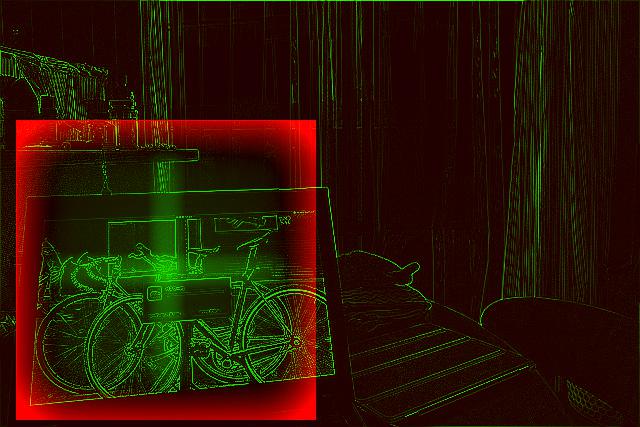
smartcrop finds good crops for arbitrary images and crop sizes, based on Jonas Wagner's smartcrop.js.


Requirements
Python requirements are defined in pyproject.toml.
Installation
pip3 install -U pip setuptools wheel # optional but recommended
pip3 install smartcrop
or directly from GitHub:
pip3 install -U pip setuptools wheel # optional but recommended
pip install -e git+git://github.com/smartcrop/smartcrop.py.git@master#egg=smartcrop
Usage
Use the basic command-line tool:
$ smartcroppy --help
usage: smartcroppy [-h] [--debug-file DEBUG_FILE] [--width WIDTH] [--height HEIGHT] INPUT_FILE OUTPUT_FILE

positional arguments:
  INPUT_FILE            Input image file
  OUTPUT_FILE           Output image file

options:
  -h, --help            show this help message and exit
  --debug-file DEBUG_FILE
                        Debugging image file
  --width WIDTH         Crop width
  --height HEIGHT       Crop height
Processing an image:
smartcroppy --width 300 --height 300 tests/images/business-work-1.jpg output.jpg --debug-file debug.jpg
Or use the module it in your code (this is a really basic example, see examples/ and smartcrop/cli.py for inspiration):
import json
import sys

import smartcrop
from PIL import Image

image = Image.open(sys.argv[1])
cropper = smartcrop.SmartCrop()
result = cropper.crop(image, 100, 100)
print(json.dumps(result, indent=2))
Testing
Install dependencies for testing, then call pytest:
pip3 install smartcrop[test]
pytest
License
MIT
1 maintainer

Metadata
1 maintainer
Release files for smartcrop 0.5.0
For a detailed explanation of source distributions (sdists) and built distributions (wheels), please see the package formats documentation.
Source distribution (sdist)
| File | Size | Uploaded | |
|---|---|---|---|
| smartcrop-0.5.0.tar.gz | 6.6 MB | Details |
Built distribution (wheel)
| File | Interpreter | ABI | Platform | Reset |
|---|---|---|---|---|
| smartcrop-0.5.0-py3-none-any.whl | Python 3 | none | any | Details |
Total release size: 6.6 MB
Release files / smartcrop-0.5.0.tar.gz
| Download URL | smartcrop-0.5.0.tar.gz |
|---|---|
| Size | 6.6 MB |
| Tags | Source |
|
SHA-256 checksum How to use checksums |
7df6b004cc1da7f2f47baa3433a9291affc6dab3ca2dd19101e83bef6c5a07aa
|
|
BLAKE2b-256 checksum How to use checksums |
79020e3fd1b276a19c5be2e938505641756f5be6653f9a00aba88ae62c497dad
|
| Upload date | |
|
Uploaded using Trusted Publishing? What is trusted publishing? |
No |
| Uploaded via |
twine/6.2.0 CPython/3.12.3
|
Release files / smartcrop-0.5.0-py3-none-any.whl
| Download URL | smartcrop-0.5.0-py3-none-any.whl |
|---|---|
| Size | 9.2 kB |
| Tags | Python 3 |
|
SHA-256 checksum How to use checksums |
d9fab10436f3650d995e1e517233a2cf9a52a4c6255e645814dee621d966b0fe
|
|
BLAKE2b-256 checksum How to use checksums |
a18d4870eedf7f32f6818fd92c0a7f88f471f9b2b777cbb4468c0199c2470def
|
| Upload date | |
|
Uploaded using Trusted Publishing? What is trusted publishing? |
No |
| Uploaded via |
twine/6.2.0 CPython/3.12.3
|














