



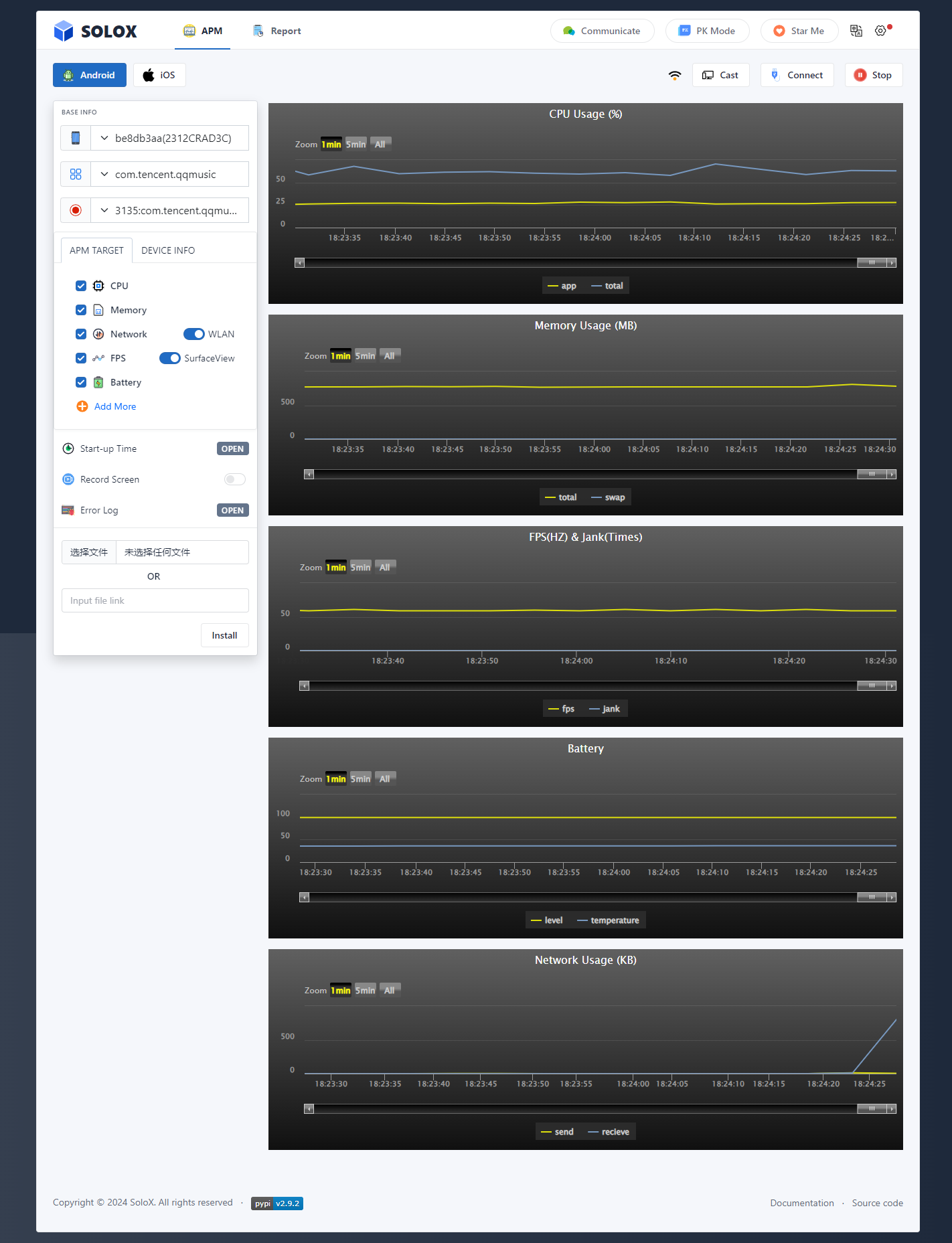
🔎Preview
SoloX - Real-time collection tool for Android/iOS performance data.
Quickly locate and analyze performance issues to improve application performance and quality. No need for ROOT/jailbreak, plug and play.
📦Requirements
- Install Python 3.10 + Download
- Install adb and configure environment variables (SoloX's adb may not necessarily fit your computer) Download
💡 If Windows users need to test ios, install and start Itunes. Documentation (Not support iOS17)
📥Installation
default
pip install -U solox (pip install solox==version)
mirrors
pip install -i https://mirrors.ustc.edu.cn/pypi/web/simple -U solox
💡 If your network is unable to download through [pip install -U solox], please try using mirrors to download, but the download of SoloX may not be the latest version.
🚀Quickstart
default
python -m solox
customize
python -m solox --host=ip --port=port
🏴Python API
# solox version : >= 2.8.5
from solox.public.apm import AppPerformanceMonitor
from solox.public.common import Devices

d = Devices()
processList = d.getPid(deviceId='ca6bd5a5', pkgName='com.bilibili.app.in') # for android
print(processList) # ['{pid}:{packagename}',...]

apm = AppPerformanceMonitor(pkgName='com.bilibili.app.in',platform='Android', deviceId='ca6bd5a5', surfaceview=True,
                            noLog=False, pid=None, record=False, collect_all=False, duration=0)
# apm = AppPerformanceMonitor(pkgName='com.bilibili.app.in', platform='iOS') only supports one device
# surfaceview: False = gfxinfo (Developer - GPU rendering mode - adb shell dumpsys gfxinfo)
# noLog : False (Save test data to log file)

# ************* Collect a performance parameter ************* #
cpu = apm.collectCpu() # %
memory = apm.collectMemory() # MB
memory_detail = apm.collectMemoryDetail() # MB
network = apm.collectNetwork(wifi=True) # KB
fps = apm.collectFps() # HZ
battery = apm.collectBattery() # level:% temperature:°C current:mA voltage:mV power:w
gpu = apm.collectGpu() # %
disk = apm.collectDisk()
thermal = apm.collectThermal()
# ************* Collect all performance parameter ************* #

if __name__ == '__main__':
  apm = AppPerformanceMonitor(pkgName='com.bilibili.app.in',platform='Android', deviceId='ca6bd5a5', surfaceview=True,
                              noLog=False, pid=None, record=False, collect_all=True, duration=0)
  # apm = AppPerformanceMonitor(pkgName='com.bilibili.app.in', platform='iOS',  deviceId='xxxx', noLog=False, record=False, collect_all=True, duration=0)
  #duration: running time (second)
  #record: record android screen
  apm.collectAll(report_path=None) # report_path='/test/report.html'

# in other python file
from solox.public.apm import initPerformanceService

initPerformanceService.stop() # stop solox
🏴Service API
Start the service in the background
# solox version >= 2.1.5

macOS/Linux: nohup python3 -m solox &
Windows: start /min python3 -m solox &
Request performance data from api
Android: http://{ip}:{port}/apm/collect?platform=Android&deviceid=ca6bd5a5&pkgname=com.bilibili.app.in&target=cpu
iOS: http://{ip}:{port}/apm/collect?platform=iOS&pkgname=com.bilibili.app.in&target=cpu

target in ['cpu','memory','memory_detail','network','fps','battery','gpu']
🔥Features
-
No ROOT/Jailbreak: No need of Root for Android devices, Jailbreak for iOS devices. Efficiently solving the test and analysis challenges in Android & iOS performance.
-
Data Integrality: We provide the data about CPU, GPU, Memory, Battery, Network,FPS, Jank, etc., which you may easy to get.
-
Beautiful Report: A beautiful and detailed report analysis, where to store, visualize, edit, manage, and download all the test cases collected with SoloX no matter where you are or when is it.
-
Useful Monitoring Settings: Support setting alarm values, collecting duration, and accessing mobile devices on other PC machines during the monitoring process.
-
PK Model: Supports simultaneous comparative testing of two mobile devices.
- 🌱2-devices: test the same app on two different phones.
- 🌱2-apps: test two different apps on two phones with the same configuration.
-
Collect In Python/API: Support Python and API to collect performance data, helping users easily integrate into automated testing processes.
Develop
debug
- remove [solox] moudel in all python file
example
from solox.view.apis import api
change to
from view.apis import api
- run [python ./solox/debug.py]
cd solox
python debug.py
Browser

Terminal
- windows: PowerShell
- macOS:iTerm2 (https://iterm2.com/)
💕Thanks
1 maintainer

Metadata
1 maintainer
Release files for solox 2.9.3
For a detailed explanation of source distributions (sdists) and built distributions (wheels), please see the package formats documentation.
Source distribution (sdist)
| File | Size | Uploaded | Provenance | Actions |
|---|---|---|---|---|
| solox-2.9.3.tar.gz | 17.4 MB | Without provenance | Details for solox-2.9.3.tar.gz |
Built distribution (wheel)
| File | Interpreter | ABI | Platform | Actions Reset |
|---|---|---|---|---|
| solox-2.9.3-py3-none-any.whl | Python 3 | none | any | Details for solox-2.9.3-py3-none-any.whl |
Total release size: 34.9 MB
Release files / solox-2.9.3.tar.gz
| Download URL | solox-2.9.3.tar.gz |
|---|---|
| Size | 17.4 MB |
| Tags | Source |
|
SHA-256 checksum How to use checksums |
f935e9773b2295b6046b69267a43b3e0d8873170aa5be14d1464d74b80d50074
|
|
BLAKE2b-256 checksum How to use checksums |
d30140cc4ab1d3657ad902b89e14946b19cf154ed3645a4c4c91176ec38d7ecf
|
| Upload date | |
|
Uploaded using Trusted Publishing? What is trusted publishing? |
No |
| Uploaded via |
twine/5.1.1 CPython/3.9.19
|
Release files / solox-2.9.3-py3-none-any.whl
| Download URL | solox-2.9.3-py3-none-any.whl |
|---|---|
| Size | 17.5 MB |
| Tags | Python 3 |
|
SHA-256 checksum How to use checksums |
31308734d729ead0006af029a0b34f688f15881cae01e90145d204cd21daedb4
|
|
BLAKE2b-256 checksum How to use checksums |
c94f0f16cf89dafa4d2669b1c44da028cc6852a3d038df68be526ff995517d9a
|
| Upload date | |
|
Uploaded using Trusted Publishing? What is trusted publishing? |
No |
| Uploaded via |
twine/5.1.1 CPython/3.9.19
|
Security for solox 2.9.3
Provenance
Provenance describes where a file came from. On PyPI, provenance is shared via attestations, which provide a verifiable record of the build or publishing details. View details, limitations and caveats.
No provenance found
None of the files in this release were uploaded with provenance metadata.
A note on package security
PyPI is a repository for distributing packages, not a service for auditing them. While third-party security researchers and our staff do their best to detect and remove malicious packages, PyPI cannot guarantee the quality, security or suitability of any given package.
To learn more about protecting yourself from malicious actors, visit our package security documentation.














