
spacy-partial-tagger
This is a library to build a CRF tagger for a partially annotated dataset in spaCy. You can build your own NER tagger only from dictionary. The algorithm of this tagger is based on Effland and Collins. (2021).
Overview
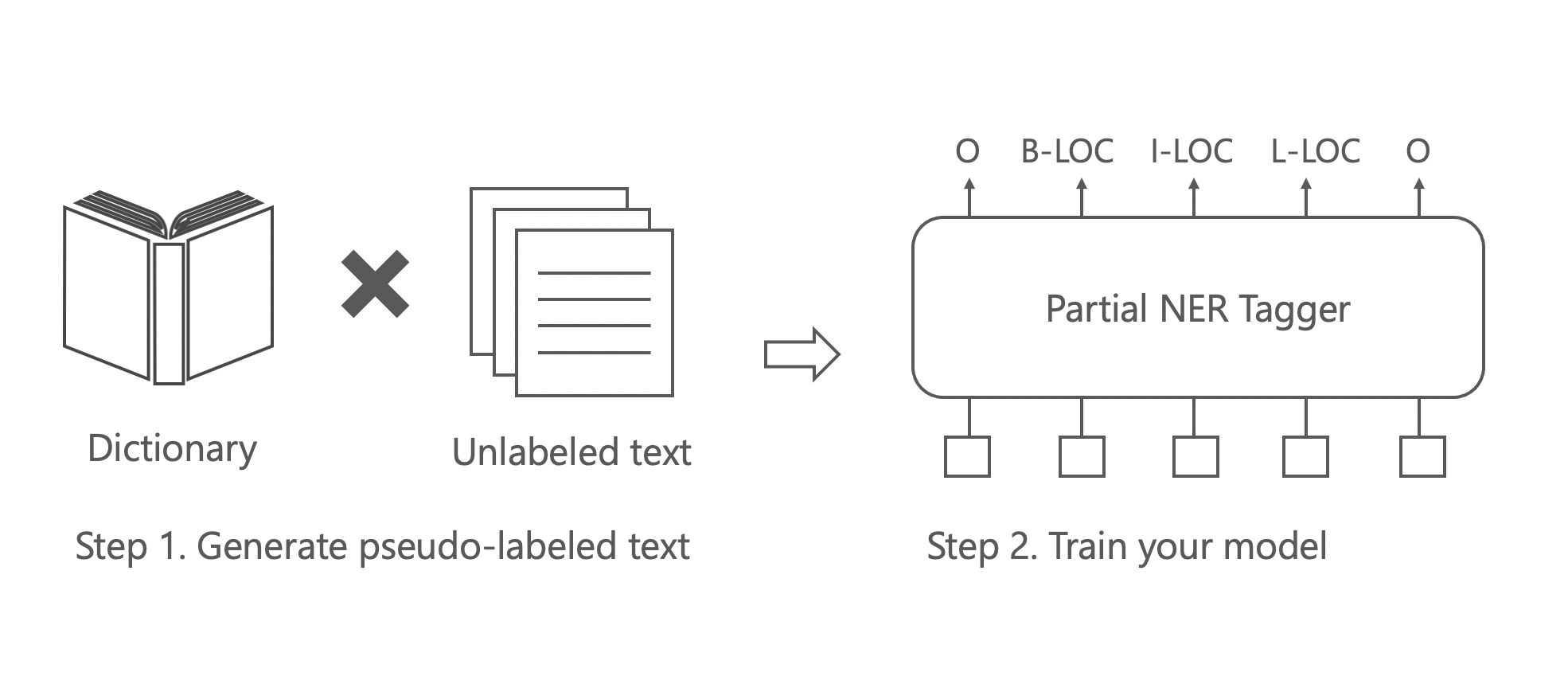
Dataset Preparation
Prepare spaCy binary format file to train your tagger. If you are not familiar with spaCy binary format, see this page.
You can prepare your own dataset with spaCy's entity ruler as follows:
import spacy
from spacy.tokens import DocBin


nlp = spacy.blank("en")

patterns = [{"label": "LOC", "pattern": "Tokyo"}, {"label": "LOC", "pattern": "Japan"}]
ruler = nlp.add_pipe("entity_ruler")
ruler.add_patterns(patterns)

doc = nlp("Tokyo is the capital of Japan.")

doc_bin = DocBin()
doc_bin.add(doc)

# Replace /path/to/data.spacy with your own path
doc_bin.to_disk("/path/to/data.spacy")
Training
Train your tagger as follows:
python -m spacy train config.cfg --output outputs --paths.train /path/to/train.spacy --paths.dev /path/to/dev.spacy --gpu-id 0
This library is implemented as a trainable component in spaCy, so you could control the training setting via spaCy's configuration system. We provide you the default configuration file here. Or you could setup your own. If you are not familiar with spaCy's config file format, please check the documentation.
Don't forget to replace /path/to/train.spacy and /path/to/dev.spacy with your own.
Evaluation
Evaluate your tagger as follows:
python -m spacy evaluate outputs/model-best /path/to/test.spacy --gpu-id 0
Don't forget to replace /path/to/test.spacy with your own.
Installation
pip install spacy-partial-tagger
If you use M1 Mac, you might have problems installing fugashi. In that case, please try brew install mecab before the installation.
References
- Thomas Effland and Michael Collins. 2021. Partially Supervised Named Entity Recognition via the Expected Entity Ratio Loss. Transactions of the Association for Computational Linguistics, 9:1320–1335.
1 maintainer

Metadata
1 maintainer
Release files for spacy-partial-tagger 0.15.6
For a detailed explanation of source distributions (sdists) and built distributions (wheels), please see the package formats documentation.
Source distribution (sdist)
| File | Size | Uploaded | Provenance | Actions |
|---|---|---|---|---|
| spacy_partial_tagger-0.15.6.tar.gz | 267.4 kB | Without provenance | Details for spacy_partial_tagger-0.15.6.tar.gz |
Built distribution (wheel)
| File | Interpreter | ABI | Platform | Actions Reset |
|---|---|---|---|---|
| spacy_partial_tagger-0.15.6-py3-none-any.whl | Python 3 | none | any | Details for spacy_partial_tagger-0.15.6-py3-none-any.whl |
Total release size: 278.5 kB
Release files / spacy_partial_tagger-0.15.6.tar.gz
| Download URL | spacy_partial_tagger-0.15.6.tar.gz |
|---|---|
| Size | 267.4 kB |
| Tags | Source |
|
SHA-256 checksum How to use checksums |
ed96ea292b7ff8d06049a4de899e531b736dd326b3f5eacf48d4393034caebd7
|
|
BLAKE2b-256 checksum How to use checksums |
e0c1d45983c1d8b69274582d305b348f24032acf8bb1d342c78f980cca6e25eb
|
| Upload date | |
|
Uploaded using Trusted Publishing? What is trusted publishing? |
No |
| Uploaded via |
twine/4.0.2 CPython/3.11.6
|
Release files / spacy_partial_tagger-0.15.6-py3-none-any.whl
| Download URL | spacy_partial_tagger-0.15.6-py3-none-any.whl |
|---|---|
| Size | 11.0 kB |
| Tags | Python 3 |
|
SHA-256 checksum How to use checksums |
3717b4e6099736737876fa857098b3269391eaa6554249a1800a5a3dd954802c
|
|
BLAKE2b-256 checksum How to use checksums |
86d34a5e7fa8d86172f8d542e0cf5791632d9c929e0f17ec841631ed861e3a07
|
| Upload date | |
|
Uploaded using Trusted Publishing? What is trusted publishing? |
No |
| Uploaded via |
twine/4.0.2 CPython/3.11.6
|
Security for spacy-partial-tagger 0.15.6
Provenance
Provenance describes where a file came from. On PyPI, provenance is shared via attestations, which provide a verifiable record of the build or publishing details. View details, limitations and caveats.
No provenance found
None of the files in this release were uploaded with provenance metadata.
A note on package security
PyPI is a repository for distributing packages, not a service for auditing them. While third-party security researchers and our staff do their best to detect and remove malicious packages, PyPI cannot guarantee the quality, security or suitability of any given package.
To learn more about protecting yourself from malicious actors, visit our package security documentation.














