
Sphinx GraphiQL
This is a GraphiQL plugin for Sphinx that lets you make GraphQL queries from your docs.
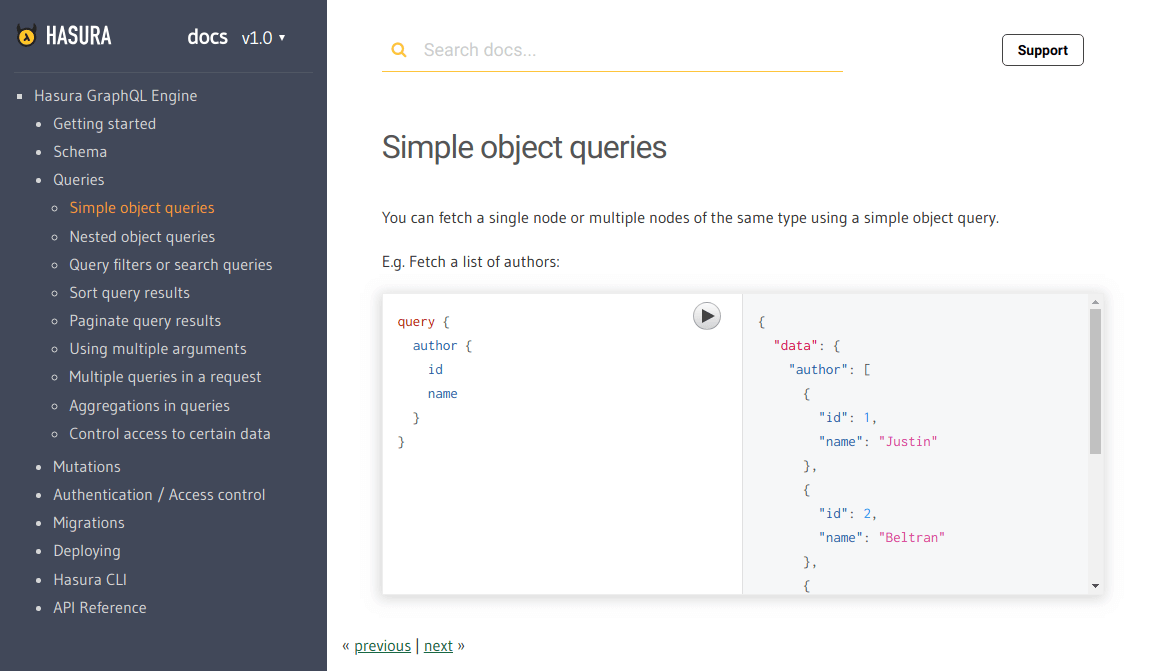
We built this for documenting Hasura GraphQL engine's API. Check it out in action here. (Note: In our docs we have added custom css overrides to make GraphiQL look as per our needs)
Usage
To insert a GraphiQL component inside your .rst doc, use the declarative:
.. graphiql::
   :query:
      query {
         author {
            id
            name
         }
      }
View only
If you want to make GraphiQL view-only (ie: disable execution), you just have to add another option :view_only:. For example:
.. graphiql::
   :view_only:
   :query:
      query {
         author {
            id
            name
         }
      }
Show a dummy response
Sometimes you will want to show the response along with the query without executing it. You can do that by adding a :response: option.
.. graphiql::
   :view_only:
   :query:
      query {
         author {
            id
            name
         }
      }
   :response:
      {
         "data": {
            "author": [
               {
                  "id": 1
                  "name": "Justin",
               },
               {
                  "id": 2
                  "name": "Beltran",
               },
               {
                  "id": 3
                  "name": "Sidney",
               }
           ]
        }
     }
Custom endpoint
By default, the GraphQL endpoint is picked up from an environment variable as described here.
In case you want to explicitly set an endpoint for a query, you can do so by adding an :endpoint: option.
.. graphiql::
   :endpoint: http://localhost:8080/v1/graphql
   :query:
      query {
         author {
            id
            name
         }
      }
Installation
Step 1: Install the plugin
$ pip install sphinx_graphiql
Step 2: Mention the plugin as an extension in conf.py
You might be using other extensions in your docs. Append sphinx_graphiql to the list of extensions.
extensions.append('sphinx_graphiql')
Step 3: Add the required scripts to your template HTML
Add the following tags inside the <head></head> of your template html file (typically layout.html).
<!-- GraphiQL -->
<script src="//cdn.jsdelivr.net/react/15.4.2/react.min.js"></script>
<script src="//cdn.jsdelivr.net/react/15.4.2/react-dom.min.js"></script>
<script src="https://rawgit.com/hasura/sphinx_graphiql/master/static/graphiql/graphiql.min.js"></script>
<link href="https://rawgit.com/hasura/sphinx_graphiql/master/static/graphiql/graphiql.css" rel="stylesheet">
<link href="https://rawgit.com/hasura/sphinx_graphiql/master/static/styles.css" rel="stylesheet">
<script type="text/javascript">
  // graphql query fetcher
  const graphQLFetcher = function(endpoint) {
    endpoint = endpoint || "{{ GRAPHIQL_DEFAULT_ENDPOINT }}";
    return function(graphQLParams) {
      const params = {
        method: 'post',
        headers: {
          'Accept': 'application/json',
          'Content-Type': 'application/json'
        },
        body: JSON.stringify(graphQLParams),
        credentials: 'include'
      };
      return fetch(endpoint, params)
        .then(function (response) {
          return response.text();
        })
        .then(function (responseBody) {
          try {
            return JSON.parse(responseBody);
          } catch (error) {
            return responseBody;
          }
        });
    }
  };

  // create GraphiQL components and embed into HTML
  const setupGraphiQL = function() {
    if (typeof(React) === 'undefined' || typeof(ReactDOM) === 'undefined' || typeof(GraphiQL) === 'undefined') {
      return;
    }

    const targets = document.getElementsByClassName('graphiql');
    for (let i = 0; i < targets.length; i++) {
      const target = targets[i];
      const endpoint = target.getElementsByClassName("endpoint")[0].innerHTML.trim();
      const query = target.getElementsByClassName("query")[0].innerHTML.trim();
      const response = target.getElementsByClassName("response")[0].innerHTML.trim();
      const graphiQLElement = React.createElement(GraphiQL, {
        fetcher: graphQLFetcher(endpoint),
        schema: null, // TODO: Pass undefined to fetch schema via introspection
        query: query,
        response: response
      });
      ReactDOM.render(graphiQLElement, target);
    }
  };

  // if graphiql elements present, setup graphiql
  if (document.getElementsByClassName('graphiql').length > 0) {
    setupGraphiQL();
  }
</script>
You can find these tags at
static/static.htmlof the root directory.
Configuration
Default GraphQL Endpoint
You have to set the GraphQL endpoint as an environment variable in your sphinx configuration file (typically conf.py at the root your your project).
For example:
GRAPHIQL_DEFAULT_ENDPOINT = "https://graphql.my-graphql-app.io/v1/graphql"
Auto-completion
GraphiQL uses the GraphQL schema to auto complete as you type in queries and mutations.
If your GraphQL endpoint supports introspection, just pass undefined as the schema variable and
auto-completion will work out of the box.
const graphiQLElement = React.createElement(GraphiQL, {
  fetcher: graphQLFetcher(endpoint),
  schema: undefined, // the schema will be fetched using introspection
  query: query,
  response: response
});
1 maintainer

Release files for sphinx-graphiql 0.0.3
For a detailed explanation of source distributions (sdists) and built distributions (wheels), please see the package formats documentation.
Source distribution (sdist)
| File | Size | Uploaded | |
|---|---|---|---|
| sphinx_graphiql-0.0.3.tar.gz | 4.2 kB | Details |
Built distribution (wheel)
| File | Interpreter | ABI | Platform | Reset |
|---|---|---|---|---|
| sphinx_graphiql-0.0.3-py3-none-any.whl | Python 3 | none | any | Details |
Total release size: 8.4 kB
Release files / sphinx_graphiql-0.0.3.tar.gz
| Download URL | sphinx_graphiql-0.0.3.tar.gz |
|---|---|
| Size | 4.2 kB |
| Tags | Source |
|
SHA-256 checksum How to use checksums |
a0671013d4710863b6451a427d1deeb8dff4ef9ca52f977da2db9cf2afa20503
|
|
BLAKE2b-256 checksum How to use checksums |
c1ce1445162b9f0724af3345dda830eba8445d1a587d4d4c97c848efbc657f22
|
| Upload date | |
|
Uploaded using Trusted Publishing? What is trusted publishing? |
No |
| Uploaded via |
twine/1.11.0 pkginfo/1.4.2 requests/2.19.1 setuptools/40.0.0 requests-toolbelt/0.8.0 tqdm/4.24.0 CPython/3.6.5
|
Release files / sphinx_graphiql-0.0.3-py3-none-any.whl
| Download URL | sphinx_graphiql-0.0.3-py3-none-any.whl |
|---|---|
| Size | 4.2 kB |
| Tags | Python 3 |
|
SHA-256 checksum How to use checksums |
3ced313097a3299799d02a4864d8e1d8750ae4640aca5f58c459c467b67599dc
|
|
BLAKE2b-256 checksum How to use checksums |
9d80afc15d179d13fbb961b095769dfa7cec8c6a8fee9b4005529893edbdf782
|
| Upload date | |
|
Uploaded using Trusted Publishing? What is trusted publishing? |
No |
| Uploaded via |
twine/1.11.0 pkginfo/1.4.2 requests/2.19.1 setuptools/40.0.0 requests-toolbelt/0.8.0 tqdm/4.24.0 CPython/3.6.5
|














