
JSON Call
About
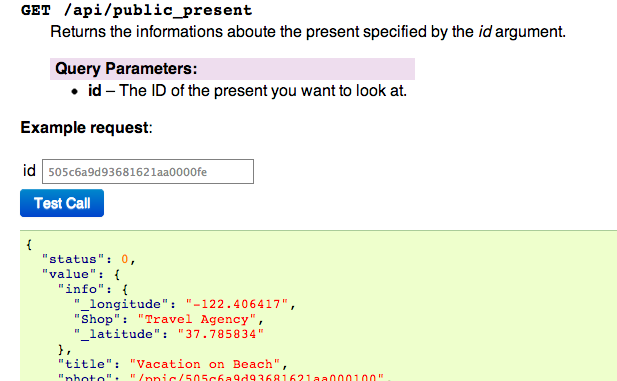
This extension adds a simple button to perform test calls to JSON based apis making also possible to change parameters values through a set of input fields.
The resulting JSON response from the API will be displayed under the call button in a block as prettyfied and highlighted JSON.
It is meant to be used in conjunction with the sphinxcontrib.httpdomain extension to document APIs and provide a way to play with them.
CORS
Keep in mind that the requests are performed using an ajax call so it is required that the documentation and the API server are on same domain, or that the API server provides a Access-Control-Allow-Origin header
Usage
First you must add the extension to your list of extensions in conf.py:
extensions = ['sphinxcontrib.httpdomain', 'sphinxcontrib.jsoncall']
Now simply providing the base url for your api calls is enough to start using the jsoncall directive:
jsoncall_baseurl = 'http://somwhere.com/api'
Directives
This module defines a directive, jsoncall this directive takes a single required argument which is the url of the API relative to the jsoncall_baseurl:
.. jsoncall:: /publicapitest
It is also possible to provide a bunch of arguments to the API call through the content of the directive. The content itself needs to be a JSON dictionary with all the parameters.
Supposing we have a /movies/retrieve?id=movieid API it would be possible to test it with:
.. jsoncall:: /movies/retrieve

      {"id": "505c6a9d93681621aa0000fe"}
This will also add an id input field which makes possible to modify the id value to try with different api calls.
It is possible to manually insert a response in the response field, just write it under the input fields:
.. jsoncall:: /movies/retrieve

      {"id": "505c6a9d93681621aa0000fe"}

      {"title": "The Hitchhiker's Guide to the Galaxy"}
STYLING
The extension provides a default CSS file which can be disabled using the jsoncall_inject_css option.
TGJSonAutodoc
This module provides a tgjsonautodoc directive inside the sphinxcontrib.tgjsonautodoc which given a TurboGears2 application automatically inspects it looking for controllers that @expose a json template and documents their path, their arguments and validators. The docstring of the method is treated as the sphinx paragraph for that specific method.
By default if no .. jsoncall:: directive is found inside the docstring one is automatically generated.
Using TGJsonAutodoc
To start using tgjsonautoc directive simply add to your conf.py the following extensions:
extensions = ['sphinxcontrib.httpdomain', 'sphinxcontrib.jsoncall', 'sphinxcontrib.tgjsonautodoc']
then you must specify the PasteDeploy compatible configuration file from where your application has to be loaded:
tgjsonautodoc_app = '/home/myuser/myproject/development.ini'
then where you want to generate the documentation for all the found methods:
.. tgjsonautodoc::
1 maintainer

Release files for sphinxcontrib-jsoncall 0.3
For a detailed explanation of source distributions (sdists) and built distributions (wheels), please see the package formats documentation.
Source distribution (sdist)
| File | Size | Uploaded | |
|---|---|---|---|
| sphinxcontrib-jsoncall-0.3.tar.gz | 7.9 kB | Details |
Release files / sphinxcontrib-jsoncall-0.3.tar.gz
| Download URL | sphinxcontrib-jsoncall-0.3.tar.gz |
|---|---|
| Size | 7.9 kB |
| Tags | Source |
|
SHA-256 checksum How to use checksums |
ad50ff4ff651a8712faee19f3d04d13db2a2d107d97ac57fcbe90b6f985ff177
|
|
BLAKE2b-256 checksum How to use checksums |
7241483b561f73eca3a66479a79101e4ba0ef212b69d21921185eecde2635614
|
| Upload date | |
|
Uploaded using Trusted Publishing? What is trusted publishing? |
No |














