
SpiralSort



A point-cloud spiral-sorting algorithm

| requirements | optional | os |
|---|---|---|
| python3 | pillow>=7.0.0 | GNU/Linux |
| click>=7.0 | matplotlib>=3.1.3 | Windows |
| numba>=0.48.0 | ffmpeg>=4.1.4 | |
| numpy>=1.18.0 | pytest>=5.4.2 | |
| pandas>=1.0.1 |
Install
$ pip install spiralsort
$ conda install -c mattasa spiralsort
Usage
- command line
$ spiralsort <file_name> <start_node_id>
- inside a python script
from spiralsort.core import spiralsorted

point_cloud_spiralsorted = spiralsorted(point_cloud, start_node_id)
- docker container

Insert input_file and take the output, using a shared volume between the host and the container.
$ docker pull thanasismatt/spiralsort:latest
$ docker run -it --rm -v ${PWD}:<container_dir> thanasismatt/spiralsort bin/bash
root@<container_id>:/# spiralsort <container_dir>/<file_name> <start_node_id>
Options
-f/--output-format=<format >
(suported: csv, json, xlsx; defaults to the format of the input file)
-a/--save-animation
save an animation of the spiralsorting process (.mp4)
Input/Output format
| node_id | x | y | z |
|---|---|---|---|
| N000 | 1.12 | 2.32 | 12.24 |
| N001 | 1.28 | 2.64 | 13.04 |
| ... |
- File (csv, json) or DataFrame
- node_ids have to be unique
- In case of 2D data, just use a constant value for the 3rd dimension.
Test
$ pytest spiralsort
Under the hood
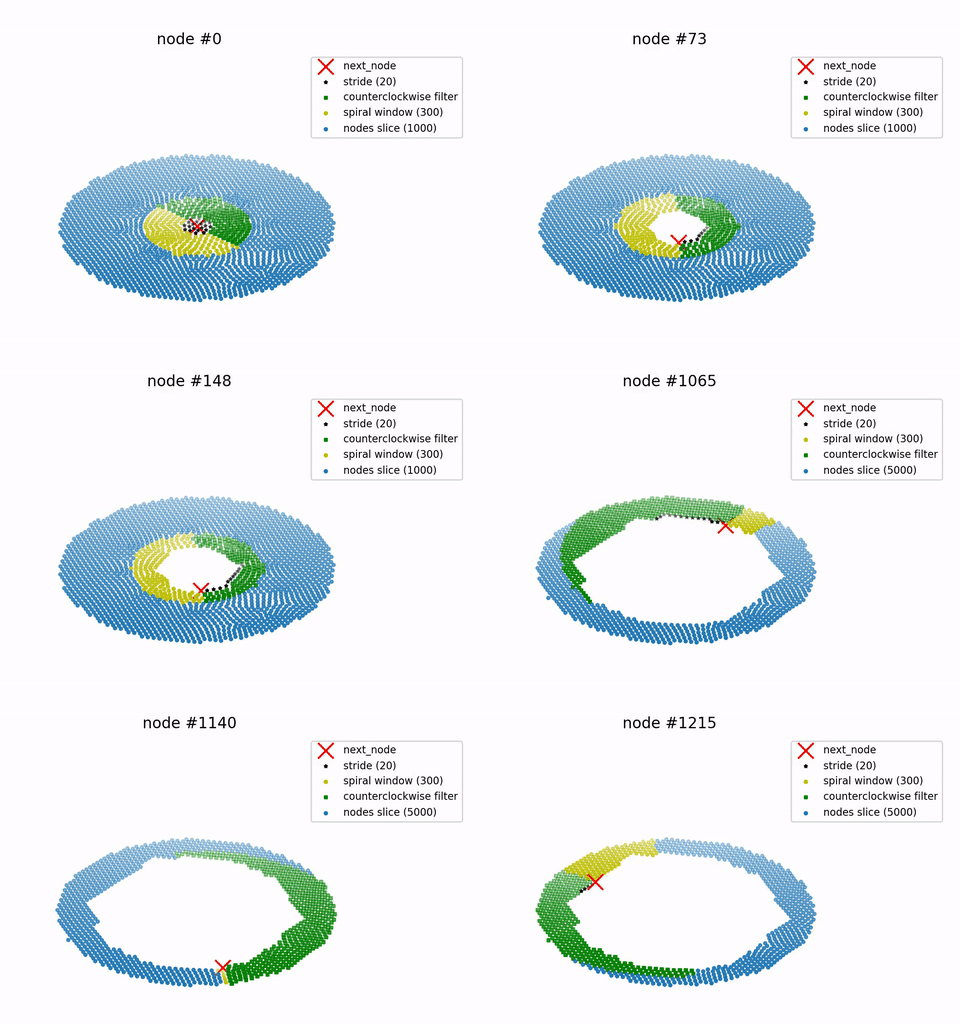
Starting from the start_node the algorithm evaluates a cost for each node and
moves to the
node with the minimum cost (cost for nodei+1 is
the distance from nodei plus the distance from
the
start_node). At each step, a counterclockwise filter is applied, in order to
force a constant
rotational direction.
Optimizing the process, a methodology of slicing is applied on the point-cloud,
described by the
following steps:
- Sort the point cloud with respect to the distance from the start node
- Segment it into slices and take the first slice
- Take a SPIRAL_WINDOW (slice further)
Spiral windows for the 1st slice consist of 400 nodes, starting from the last sorted node
(the start_node for the 1st window) - Iteretively pop 15 nodes (a STRIDE), by the minimum cost. Namely, a
SPIRAL_WINDOW is
sliced to spiralsort a STRIDE of nodes, before moving to the next SPIRAL_WINDOW.
(cost = |node - start_node| + |node - prev_node|)
At each iterative step, a filter is applied, keeping only nodes from the counterclockwise side
of the vector that starts from the start node and ends at the previous node, in order to
force the algorithm to move on a constant rotating direction. - Take the next SPIRAL_WINDOW and pop the next STRIDE.
- Continue until the remainder of the nodes reaches the size of the
half slice (1000 nodes for
the 1st slice). - Merge the remaining nodes with the next slice
This overlap of the slices ensures that there is a continuity while selecting the next nodes,
when the algorithm reaches the last nodes of the slice. - For the next slices, while moving away from the start_node, the
SPIRAL_WINDOW is
selected differently. Specifically, before each STRIDE, the counterclockwise filter is applied,
then the remaining nodes are cost-sorted (with respect to their cost) from the last
spiralsorted node and, finally, a SPIRAL_WINDOW is sliced, to start the iterative spiralsorting
of the nodes in the next STRIDE. - Keep moving by SPIRAL_WINDOWs, counterclockwise
filtering at each stride, popping
STRIDEs of nodes until the half slice thresshold. - Upon reaching the last slice, remove the half_slice threshold, to pop all the remaining nodes.
Animate the process
- command line
$ spiralsort <file_name> <start_node_id> --save-animation
- inside a python script
from spiralsort.spiralsort_post import animate

animate(point_cloud_sorted, path_to_input_file)
License
GNU General Public License v3.0
(C) 2020, Athanasios Mattas
thanasismatt@gmail.com
1 maintainer

Metadata
1 maintainer
Release files for spiralsort 0.3.1
For a detailed explanation of source distributions (sdists) and built distributions (wheels), please see the package formats documentation.
Source distribution (sdist)
| File | Size | Uploaded | Provenance | |
|---|---|---|---|---|
| spiralsort-0.3.1.tar.gz | 17.4 kB | Without provenance | Details |
Built distribution (wheel)
| File | Interpreter | ABI | Platform | Reset |
|---|---|---|---|---|
| spiralsort-0.3.1-py3-none-any.whl | Python 3 | none | any | Details |
Total release size: 50.7 kB
Release files / spiralsort-0.3.1.tar.gz
| Download URL | spiralsort-0.3.1.tar.gz |
|---|---|
| Size | 17.4 kB |
| Tags | Source |
|
SHA-256 checksum How to use checksums |
df46afe09c11dfdd4e5577a40353905ea2f5cf5b36aa0c9b7dbdb685907e0ae4
|
|
BLAKE2b-256 checksum How to use checksums |
71ad808f95fc35e3c007c74d9ac44b94fa349f46a3be2d557f5b802ee33ec941
|
| Upload date | |
|
Uploaded using Trusted Publishing? What is trusted publishing? |
No |
| Uploaded via |
twine/3.2.0 pkginfo/1.6.1 requests/2.24.0 setuptools/46.1.3.post20200330 requests-toolbelt/0.9.1 tqdm/4.52.0 CPython/3.8.2
|
Release files / spiralsort-0.3.1-py3-none-any.whl
| Download URL | spiralsort-0.3.1-py3-none-any.whl |
|---|---|
| Size | 33.3 kB |
| Tags | Python 3 |
|
SHA-256 checksum How to use checksums |
fd46232338923f590513fbe901740748c367c915df649488080378f73e37a596
|
|
BLAKE2b-256 checksum How to use checksums |
ea23456d5172109eab39f9b89a1a4fe86a003ed0a4f1ea2e471372f0c191ece1
|
| Upload date | |
|
Uploaded using Trusted Publishing? What is trusted publishing? |
No |
| Uploaded via |
twine/3.2.0 pkginfo/1.6.1 requests/2.24.0 setuptools/46.1.3.post20200330 requests-toolbelt/0.9.1 tqdm/4.52.0 CPython/3.8.2
|
Security for spiralsort 0.3.1
Provenance
Provenance describes where a file came from. On PyPI, provenance is shared via attestations, which provide a verifiable record of the build or publishing details. View details, limitations and caveats.
No provenance found
None of the files in this release were uploaded with provenance metadata.
A note on package security
PyPI is a repository for distributing packages, not a service for auditing them. While third-party security researchers and our staff do their best to detect and remove malicious packages, PyPI cannot guarantee the quality, security or suitability of any given package.
To learn more about protecting yourself from malicious actors, visit our package security documentation.














