
sqlite_bro is a tool to browse SQLite (and optionally DuckDB) databases with any basic python installation.
Features
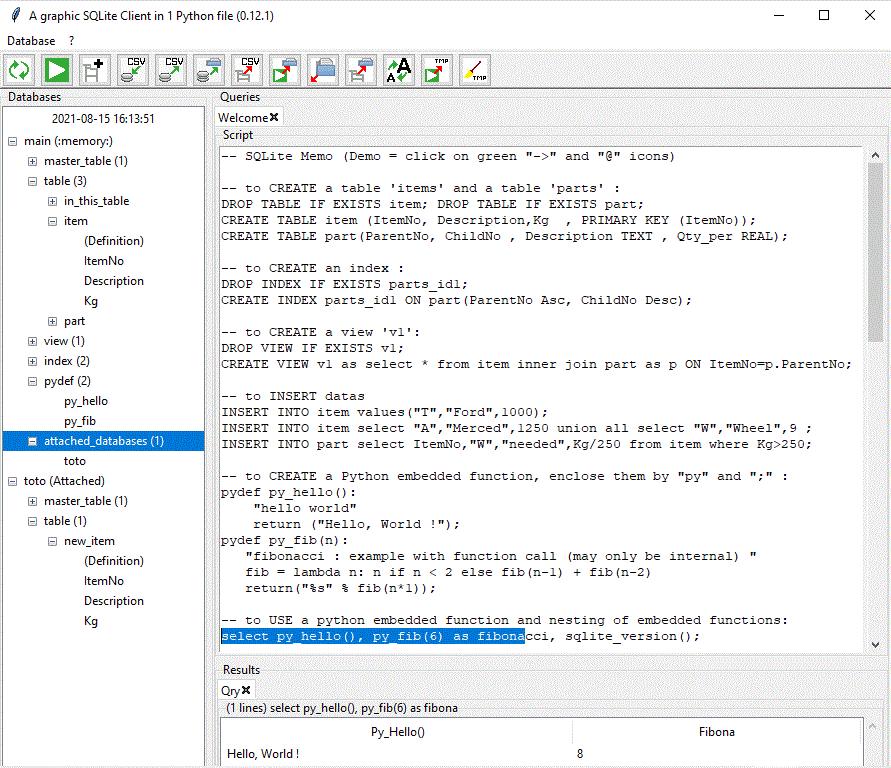
Tabular browsing of a SQLite or DuckDB database (needs ‘pip install duckdb’)
Import/Export of .csv and .json files with auto-detection
Import/Export of clipboard Data (copy / paste)
Import/Export of .sql script
Export of database creation .sql script
Support of sql-embedded Python functions
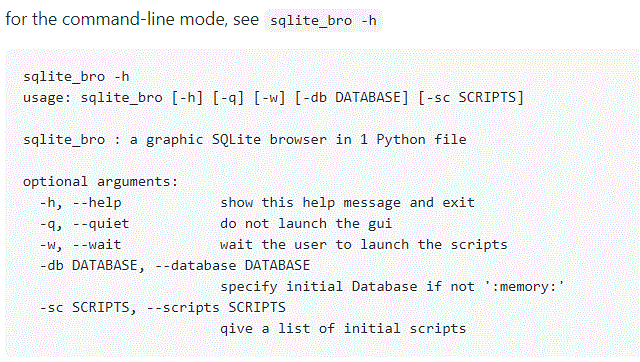
support supports command-line scripting if Python>=3.3 (see sqlite_bro -h), with or without Graphic User Interface
Easy to distribute : 1 Python source file, Python and PyPy3 compatible
Easy to start : just launch sqlite_bro
Easy to learn : Welcome example, minimal interface
Easy to teach : Character size, SQL + SQL result export on a click
Installation
You can install, upgrade, uninstall sqlite_bro.py with these commands:
$ apt-get install python3-tk # apt-get install python-tk if you are using python2
$ pip install sqlite_bro
$ pip install --upgrade sqlite_bro
$ pip uninstall sqlite_bro
or just launch latest version from IPython with %load https://raw.githubusercontent.com/stonebig/sqlite_bro/master/sqlite_bro/sqlite_bro.py or just copy the file ‘sqlite_bro.py’ to any pc and type ‘python sqlite_bro.py’
Example usage
$ python -m sqlite_bro
$ sqlite_bro
$ sqlite_bro -h
Screenshots
Links
1 maintainer

Metadata
1 maintainer
Release files for sqlite-bro 1.3.2
For a detailed explanation of source distributions (sdists) and built distributions (wheels), please see the package formats documentation.
Source distribution (sdist)
| File | Size | Uploaded | |
|---|---|---|---|
| sqlite_bro-1.3.2.tar.gz | 43.8 kB | Details |
Built distribution (wheel)
| File | Interpreter | ABI | Platform | Reset |
|---|---|---|---|---|
| sqlite_bro-1.3.2-py3-none-any.whl | Python 3 | none | any | Details |
Total release size: 91.3 kB
Release files / sqlite_bro-1.3.2.tar.gz
| Download URL | sqlite_bro-1.3.2.tar.gz |
|---|---|
| Size | 43.8 kB |
| Tags | Source |
|
SHA-256 checksum How to use checksums |
09602d8e0272e25a94a74c3f34c19ab2bb7bc8cb4a7c021910863d561efc69b4
|
|
BLAKE2b-256 checksum How to use checksums |
337f902d2d49861d54c6dfc693ea6d2f739597525408a60db899054c0975a9d0
|
| Upload date | |
|
Uploaded using Trusted Publishing? What is trusted publishing? |
Yes |
| Uploaded via |
twine/7.0.0 CPython/3.13.14
|
Provenance
Provenance describes where a file came from. On PyPI, provenance is shared via attestations, which provide a verifiable record of the build or publishing details. View details, limitations and caveats.


PyPI Publish Attestation
PyPI verified that this artifact, at this checksum, originated from the publisher listed below.
Signed by GitHub Actions, verified by PyPI on Aug 4, 2026.
Transparency logRelease files / sqlite_bro-1.3.2-py3-none-any.whl
| Download URL | sqlite_bro-1.3.2-py3-none-any.whl |
|---|---|
| Size | 47.5 kB |
| Tags | Python 3 |
|
SHA-256 checksum How to use checksums |
0ecda886fbd9c9536cbc7192662be0a0b7d963e9df506dcc788cf1e37e572034
|
|
BLAKE2b-256 checksum How to use checksums |
17ce51e2a8e3e11cfd7f8dffcdbbf080721322a1ad62533b58ebc26162a16038
|
| Upload date | |
|
Uploaded using Trusted Publishing? What is trusted publishing? |
Yes |
| Uploaded via |
twine/7.0.0 CPython/3.13.14
|
Provenance
Provenance describes where a file came from. On PyPI, provenance is shared via attestations, which provide a verifiable record of the build or publishing details. View details, limitations and caveats.
PyPI Publish Attestation
PyPI verified that this artifact, at this checksum, originated from the publisher listed below.
Signed by GitHub Actions, verified by PyPI on Aug 4, 2026.
Transparency log













