
A SIMD boosted high-performance and correct Python JSON parsing library, faster than the fastest.

Project description
ssrJSON




A SIMD boosted high-performance and correct Python JSON parsing library, faster than the fastest.
Introduction
ssrJSON is a Python JSON library that leverages modern hardware capabilities to achieve peak performance, implemented primarily in C. It offers a fully compatible interface to Python’s standard json module, making it a seamless drop-in replacement, while providing exceptional performance for JSON encoding and decoding.
If you prefer to skip the technical details below, please proceed directly to the How To Install section.
How Fast is ssrJSON?
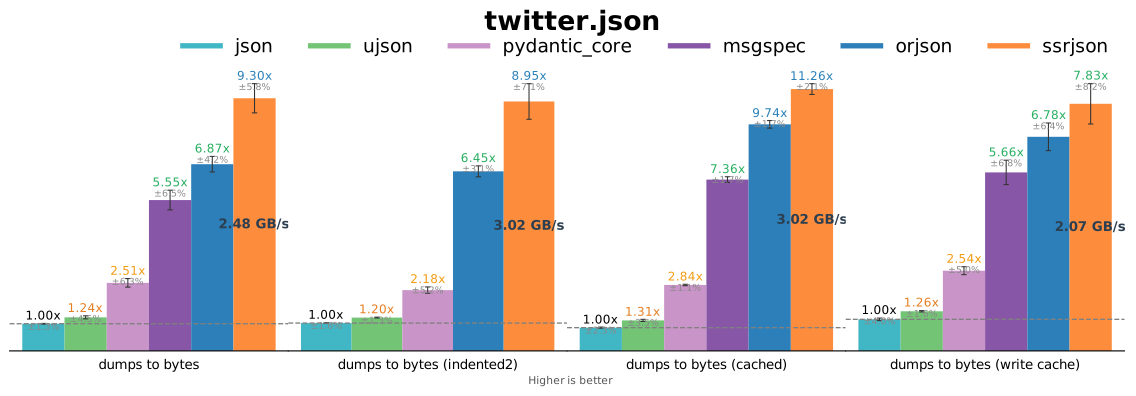
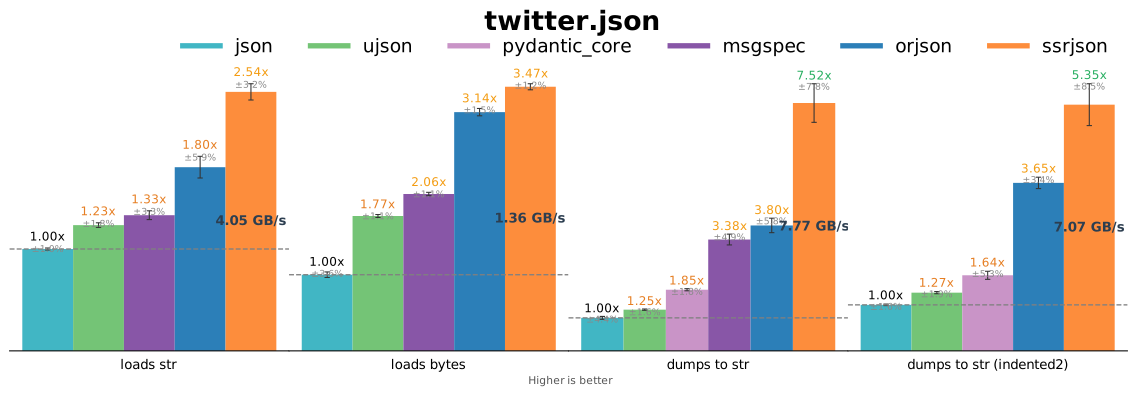
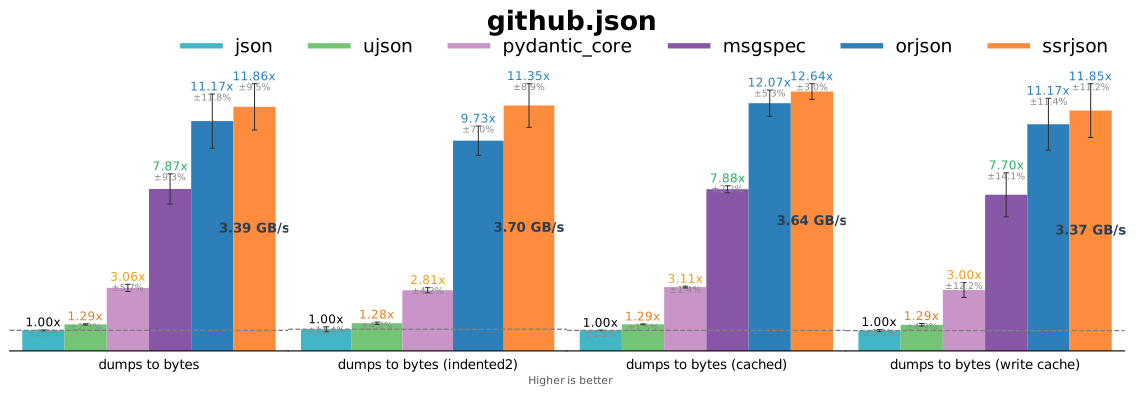
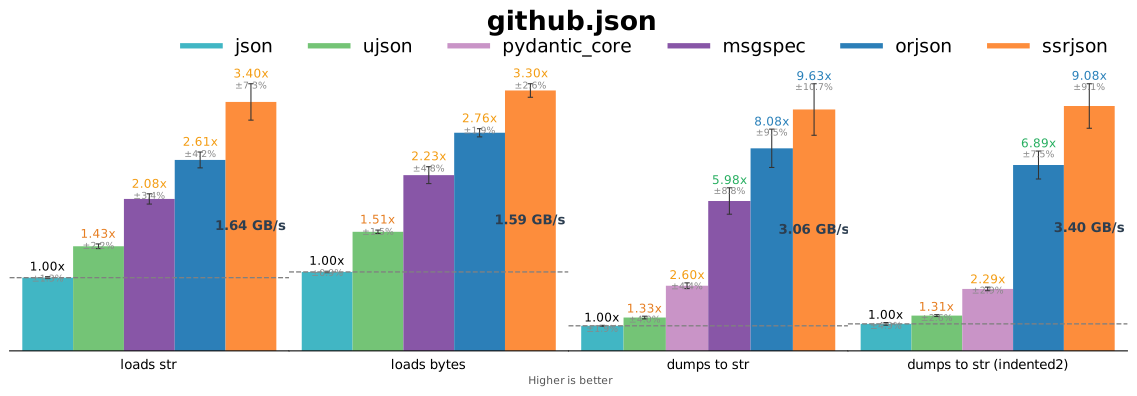
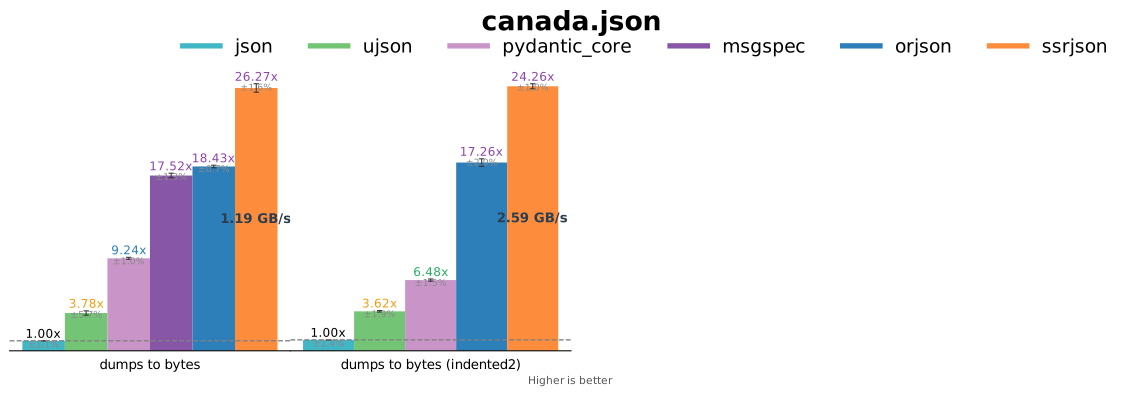
TL;DR: ssrJSON is faster than or nearly as fast as orjson (which announces itself as the fastest Python library for JSON) on most benchmark cases.
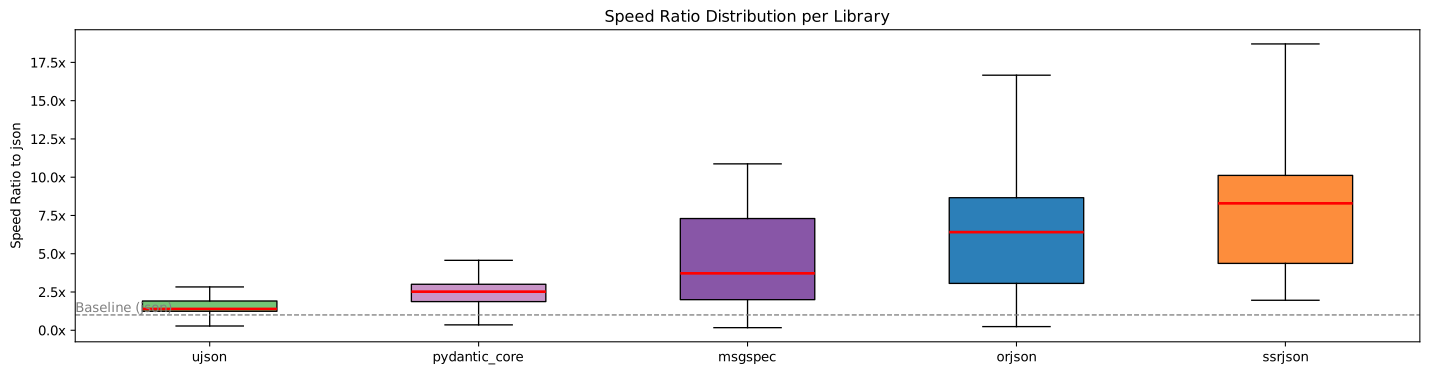
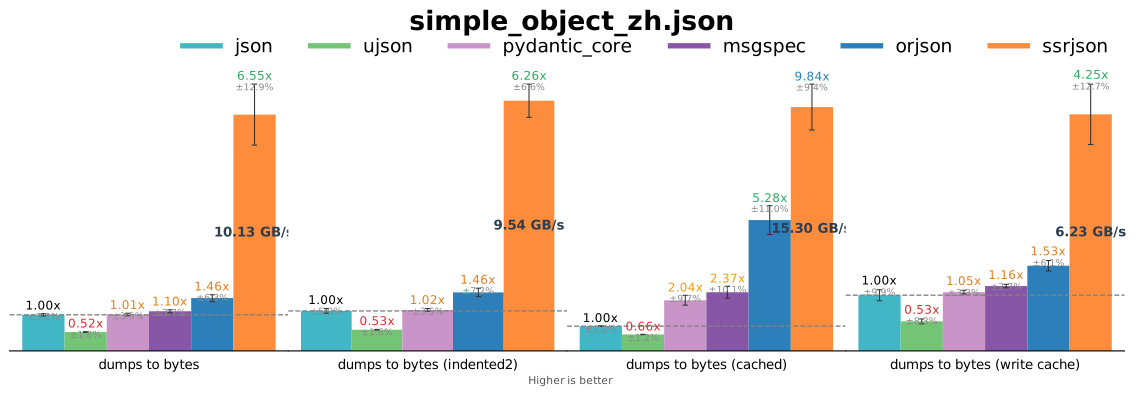
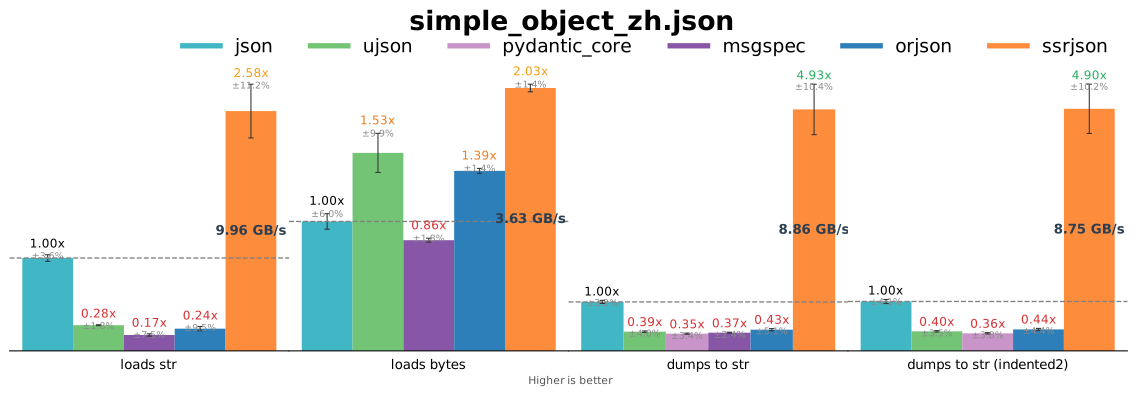
Below is an artificial benchmark case to demonstrate the speed of encoding non-ASCII JSON (simple_object_zh.json). Upon seeing the diagram below, you might wonder: why do the performance results from other libraries appear so poor? If you are interested, please refer to the section UTF-8 Cache of str Objects.
Real-world case (twitter.json):
Real-world case II (github.json):
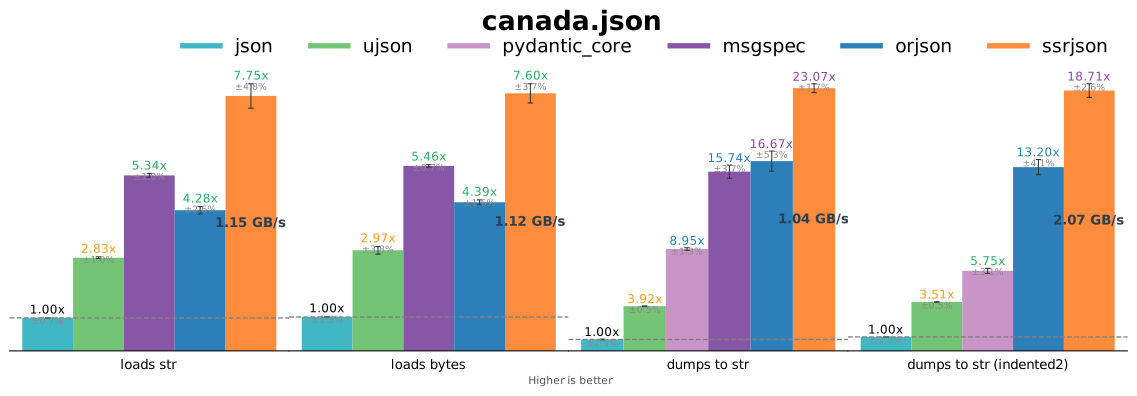
Floats (canada.json):
Numbers (mesh.json):
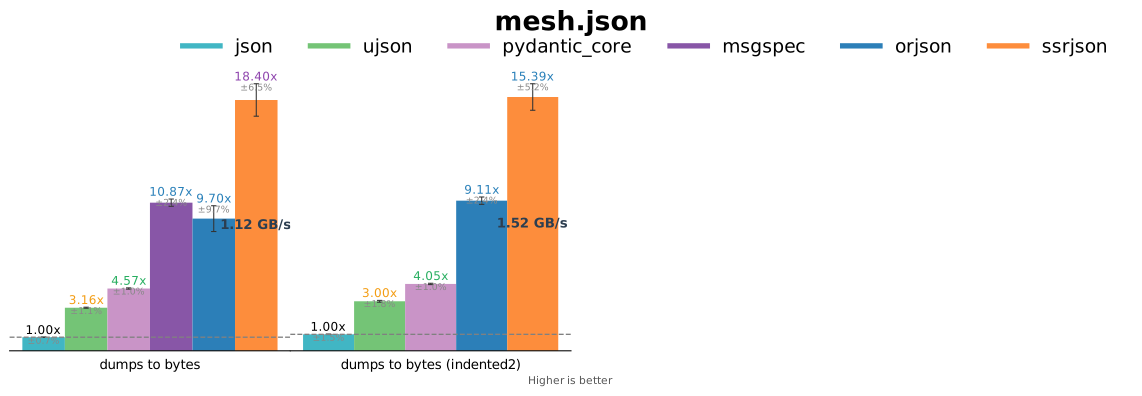
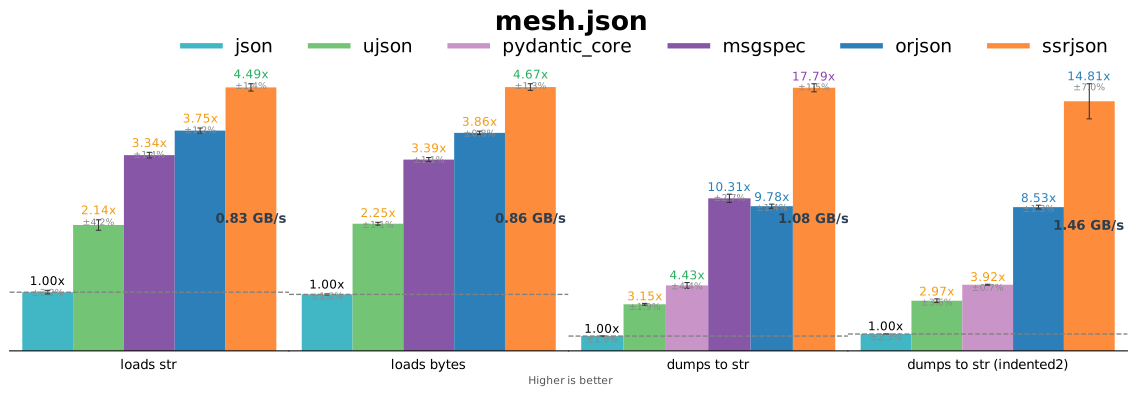
ssrjson.dumps() is about 4x-31x as fast as json.dumps() (Python3.14, x86-64, AVX2). ssrjson.loads() is about 2x-8x as fast as json.loads() for str input and is about 2x-8x as fast as json.loads() for bytes input (Python3.14, x86-64, AVX2). ssrJSON also provides ssrjson.dumps_to_bytes(), which encode Python objects directly to UTF-8 encoded bytes object using SIMD instructions.
Details of benchmarking can be found in the ssrjson-benchmark project. If you wish to run the benchmark tests yourself, you can execute the following commands:
pip install ssrjson-benchmark
python -m ssrjson_benchmark
This will generate a PDF report of the results. If you choose to, you may submit this report to the benchmark repository, allowing others to view the performance metrics of ssrJSON on your device.
SIMD Acceleration
ssrJSON is designed for modern hardware and extensively leverages SIMD instruction sets to accelerate encoding and decoding processes. This includes operations such as memory copying, integer type conversions, JSON encoding, and UTF-8 encoding. Currently, ssrJSON supports x86-64-v2 and above (requiring at least SSE4.2) as well as aarch64 devices. It does not support 32-bit systems or older x86-64 and ARM hardware with limited SIMD capabilities.
On the x86-64 platform, ssrJSON provides three distinct SIMD libraries optimized for SSE4.2, AVX2, and AVX512, respectively, automatically selecting the most appropriate library based on the device’s capabilities. For aarch64 architectures, it utilizes the NEON instruction set. Combined with Clang’s powerful vector extensions and compiler optimizations, ssrJSON can almost fully exploit CPU performance during encoding operations.
UTF-8 Cache of str Objects
The author has a detailed tech blog about this topic: Beware of Performance Pitfalls in Third-Party Python JSON Libraries.
Non-ASCII str objects may store a cached representation of their UTF-8 encoding (within the corresponding C structure PyUnicodeObject, represented as a const char * and a length with type Py_ssize_t) to minimize the overhead of subsequent UTF-8 encoding operations. When PyUnicode_AsUTF8AndSize (or other similar functions) is invoked, the CPython implementation utilizes it to store the C string along with its length. This mechanism ensures that the caller does not need to manage the lifetime of the returned C string. The str.encode("utf-8") operation does not write to the cache; however, if the cache is already present, it utilizes the cached data to create the bytes object.
To the best of author's knowledge, existing third-party Python JSON libraries typically utilize certain CPython APIs to indirectly write the UTF-8 cache when performing dumps on non-ASCII str objects when the cache does not exist. This results in benchmark tests appearing more favorable than they actually are, since the same object is repeatedly dumped during performance measurements and the cache written will be utilized. But in reality, UTF-8 encoding is computationally intensive on the CPU and often becomes a major performance bottleneck in the dumping process. Also, writing cache will increase the memory usage. Also it is worth noting that during JSON encoding and decoding in Python, converting between str objects does not involve any UTF-8-related operations. However, some third-party JSON libraries still directly or indirectly invoke UTF-8 encoding APIs, which are resource-intensive. This explains why other third-party libraries exhibit poor performance when performing loads on str inputs, or when their dumps function outputs str types.
ssrjson.dumps_to_bytes addresses this by leveraging SIMD instruction sets for UTF-8 encoding, achieving significantly better performance than conventional encoding algorithms implemented in CPython. Furthermore, ssrJSON grants users explicit control over whether or not to write this cache. It is recommended that users evaluate their projects for repeated encoding of each str object to decide on enabling or disabling this caching mechanism accordingly. (Note that ssrjson.dumps produces a str object; there is nothing related to this topic.)
Also, the ssrjson-benchmark project takes this aspect into account by differentiating test scenarios based on the presence or absence of this cache. The results demonstrate that ssrJSON maintains a substantial performance advantage over other third-party Python JSON libraries regardless of whether the cache exists.
If you decide to enable writing cache, ssrJSON will first ensure the cache. The following dumps_to_bytes calls on the same str object will be faster, but the first time may be slower and memory cost may grow.
Pros:
- The following calls after the first call to
dumps_to_byteson the samestrmight be faster.
Cons:
- The first call to
dumps_to_bytes(when visiting a non-ASCIIstrwithout cache) might be slower. - The memory cost will grow. Each non-ASCII
strvisited will result in memory usage corresponding to the length of its UTF-8 representation. The memory will be released only when thestrobject is deallocated.
If you decide to disable it, ssrJSON will not write cache; but if the cache already exists, ssrJSON will still use it.
By default, writing cache is enabled globally. You can use ssrjson.write_utf8_cache to control this behavior globally, or pass is_write_cache to ssrjson.dumps_to_bytes in each call.
xjb64
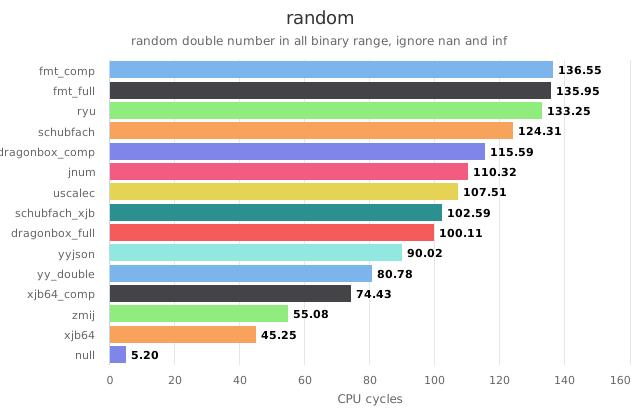
ssrJSON employs xjb64 as float-to-string algorithm. Tests and comparisons reveals that the xjb64 algorithm significantly outperforms other algorithms in terms of performance and is more compatible. ssrJSON project adopts a slightly modified version to fit the standard behavior of Python's json module.
Random double on Apple M1:
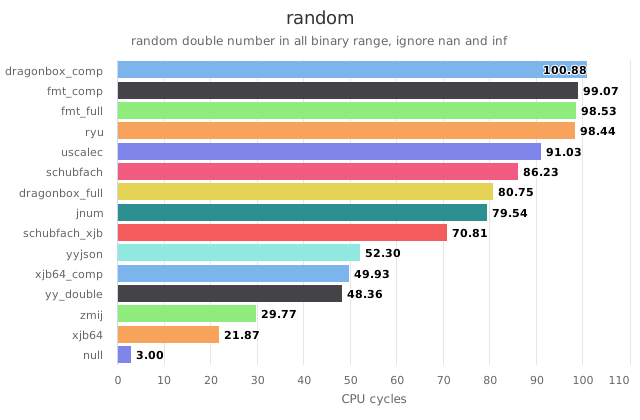
Random double on AMD R7-7840H:
JSON Module compatibility
The design goal of ssrJSON is to provide a straightforward and highly compatible approach to replace the inherently slower Python standard JSON encoding and decoding implementation with a significantly more efficient and high-performance alternative. If your module exclusively utilizes dumps and loads, you can replace the current JSON implementation by importing ssrJSON as import ssrjson as json. To facilitate this, ssrJSON maintains compatibility with the argument formats of json.dumps and json.loads; however, it does not guarantee identical results to the standard JSON module, as many features are either intentionally omitted or not yet supported. For further information, please refer to the section Features.
Other Implementation Details
Overview of Encoding
The encoding performance of JSON libraries is not significantly limited by CPython, resulting in a very high potential maximum. As mentioned above, during string encoding, ssrJSON extensively utilizes SIMD instructions to accelerate copying and conversion operations. The implementation of dumps_to_bytes also tackles challenges related to UTF-8 encoding. ssrJSON includes a comprehensive UTF-8 encoding algorithm optimized for all supported SIMD features as well as Python’s internal string representation format (PyCompactUnicodeObject). When encoding integers, ssrJSON adapts the integer encoding approach from yyjson, a highly optimized C-language JSON parsing library.
Overview of Decoding
The main performance bottleneck in JSON decoding is the speed of creating Python objects. To address this, ssrJSON adopts the short-key caching mechanism from orjson, which greatly reduces the overhead of creating Python string objects. For string handling, when the input is of str type, ssrJSON applies SIMD optimizations similar to those used in encoding, speeding up the decoding process. For bytes inputs, ssrJSON uses a customized version of yyjson’s string decoding algorithm. Beyond string handling, ssrJSON extensively leverages yyjson’s codebase, including its numeric decoding algorithms and core decoding logic.
Limitations
Please note that ssrJSON is currently in its beta development stage, and some common features have yet to be implemented. We welcome your contributions to help build a highly performant Python JSON library.
ssrJSON will strive to minimize the addition of new features that are rarely used to maintain its stability. There are two main reasons for this approach: first, ssrJSON aims to serve as a high-performance foundational library rather than one overloaded with various elaborate features; second, although leveraging C language brings significant performance advantages, it also introduces considerable potential instability. Drawing from software engineering experience, limiting new features that are rarely used will help reduce the incidence of critical vulnerabilities.
How To Install
Install from PyPI
Pre-built wheels are available on PyPI, you can install it using pip.
pip install ssrjson
Note: ssrJSON requires at least SSE4.2 on x86-64 (x86-64-v2), or aarch64. 32-bit platforms are not supported. ssrJSON does not work with Python implementations other than CPython. Currently supported CPython versions are 3.10, 3.11, 3.12, 3.13, 3.14, 3.15. For Python >= 3.15, you need to build it from source.
Build From Source
Since ssrJSON utilizes Clang's vector extensions, it requires compilation with Clang and cannot be compiled in GCC or pure MSVC environments. On Windows, clang-cl can be used for this purpose. Build can be easily done by the following commands (make sure CMake, Clang and Python are already installed)
# On Linux:
# export CC=clang
# export CXX=clang++
mkdir build
cmake -S . -B build  # On Windows, configure with `cmake -T ClangCL`
cmake --build build
Or you like the pip way:
mv pysrc ssrjson  # rename the python source directory to make it installable
pip install .
Usage
Basic
>>> import ssrjson
>>> ssrjson.dumps({"key": "value"})
'{"key":"value"}'
>>> ssrjson.loads('{"key":"value"}')
{'key': 'value'}
>>> ssrjson.dumps_to_bytes({"key": "value"})
b'{"key":"value"}'
>>> ssrjson.loads(b'{"key":"value"}')
{'key': 'value'}
NumPy Support
ssrJSON can directly serialize NumPy scalar types and ndarray objects without converting them to Python types first. To avoid introducing NumPy as a hard dependency, you must explicitly enable this by calling setup_numpy_types once:
>>> import numpy as np
>>> import ssrjson
>>> ssrjson.setup_numpy_types(np)
After setup, NumPy scalars and arrays are recognized in dumps and dumps_to_bytes:
>>> ssrjson.dumps(np.int64(42))
'42'
>>> ssrjson.dumps(np.array([1, 2, 3]))
'[1,2,3]'
>>> ssrjson.dumps({"data": np.array([[1, 2], [3, 4]]), "score": np.float32(0.95)})
'{"data":[[1,2],[3,4]],"score":0.95}'
>>> ssrjson.dumps_to_bytes(np.arange(5))
b'[0,1,2,3,4]'
Supported NumPy types:
| Category | Types |
|---|---|
| Integers | int8, int16, int32, int64, uint8, uint16, uint32, uint64 |
| Floats | float16, float32, float64 |
| Boolean | bool_ |
| Array | ndarray (C-contiguous, any supported element dtype, up to 32 dimensions) |
np.float64 is a subclass of Python float and is always handled by the standard float path, regardless of whether setup_numpy_types has been called.
ndarray encoding writes element data directly from the array's memory buffer, bypassing Python object creation. Combined with the existing xjb64/xjb32 and yyjson-derived (for integers) encoding routines, this gives ssrJSON a significant performance advantage over converting to Python lists first. Indent is fully supported for ndarray output.
Note:
setup_numpy_typesmust be called before any concurrent encoding in free-threading builds. The function itself is not thread-safe with respect to concurrentdumps/dumps_to_bytescalls. Once setup is complete, encoding is safe to call concurrently.
Simple benchmark shows ssrJSON outperforms orjson in encoding numpy arrays:
$ python dev_tools/numpy_benchmark.py --scale 10
numpy 2.4.2  |  scale=10  number=20  repeat=7  warmup=2
Python 3.14.3

[dumps_to_bytes: ssrjson vs orjson — numpy ndarray]

  int32_1d[1000000]  shape=1000000  dtype=int32  3906.2 KiB raw
    ssrjson  : median 1.83 ms  best 1.78 ms  out=4391695B  2.24 GiB/s
    orjson   : median 4.96 ms  best 4.88 ms  out=4391695B  843.99 MiB/s
    ssrjson is 2.72x faster than orjson (median); best 2.74x

  int64_1d[1000000]  shape=1000000  dtype=int64  7812.5 KiB raw
    ssrjson  : median 4.30 ms  best 4.13 ms  out=10982023B  2.38 GiB/s
    orjson   : median 8.79 ms  best 8.66 ms  out=10982023B  1.16 GiB/s
    ssrjson is 2.05x faster than orjson (median); best 2.10x

  float32_1d[1000000]  shape=1000000  dtype=float32  3906.2 KiB raw
    ssrjson  : median 9.15 ms  best 9.04 ms  out=10627011B  1.08 GiB/s
    orjson   : median 17.25 ms  best 17.18 ms  out=10627112B  587.55 MiB/s
    ssrjson is 1.88x faster than orjson (median); best 1.90x

  float64_1d[1000000]  shape=1000000  dtype=float64  7812.5 KiB raw
    ssrjson  : median 13.27 ms  best 12.94 ms  out=19269164B  1.35 GiB/s
    orjson   : median 19.12 ms  best 18.99 ms  out=19269255B  961.00 MiB/s
    ssrjson is 1.44x faster than orjson (median); best 1.47x

  float64_2d[1000x1000]  shape=1000x1000  dtype=float64  7812.5 KiB raw
    ssrjson  : median 13.50 ms  best 13.14 ms  out=19272764B  1.33 GiB/s
    orjson   : median 19.09 ms  best 19.04 ms  out=19272837B  962.88 MiB/s
    ssrjson is 1.41x faster than orjson (median); best 1.45x

  float64_3d[100x100x100]  shape=100x100x100  dtype=float64  7812.5 KiB raw
    ssrjson  : median 13.46 ms  best 13.13 ms  out=19291108B  1.33 GiB/s
    orjson   : median 19.48 ms  best 19.42 ms  out=19291190B  944.22 MiB/s
    ssrjson is 1.45x faster than orjson (median); best 1.48x

  int32_2d[1000x1000]  shape=1000x1000  dtype=int32  3906.2 KiB raw
    ssrjson  : median 1.17 ms  best 1.17 ms  out=5391602B  4.31 GiB/s
    orjson   : median 5.04 ms  best 5.00 ms  out=5391602B  1020.42 MiB/s
    ssrjson is 4.32x faster than orjson (median); best 4.29x

  bool_1d[1000000]  shape=1000000  dtype=bool  976.6 KiB raw
    ssrjson  : median 323.7 µs  best 323.1 µs  out=5500290B  15.83 GiB/s
    orjson   : median 3.24 ms  best 3.21 ms  out=5500290B  1.58 GiB/s
    ssrjson is 10.02x faster than orjson (median); best 9.92x
Indent
ssrJSON only supports encoding with indent = 2, 4 or no indent (don't pass indent, or pass indent=None). When indent is used, a space is inserted between each key and value.
>>> import ssrjson
>>> ssrjson.dumps({"a": "b", "c": {"d": True}, "e": [1, 2]})
'{"a":"b","c":{"d":true},"e":[1,2]}'
>>> print(ssrjson.dumps({"a": "b", "c": {"d": True}, "e": [1, 2]}, indent=2))
{
  "a": "b",
  "c": {
    "d": true
  },
  "e": [
    1,
    2
  ]
}
>>> print(ssrjson.dumps({"a": "b", "c": {"d": True}, "e": [1, 2]}, indent=4))
{
    "a": "b",
    "c": {
        "d": true
    },
    "e": [
        1,
        2
    ]
}
>>> ssrjson.dumps({"a": "b", "c": {"d": True}, "e": [1, 2]}, indent=3)
Traceback (most recent call last):
  File "<python-input>", line 1, in <module>
    ssrjson.dumps({"a": "b", "c": {"d": True}, "e": [1, 2]}, indent=3)
    ~~~~~~~~~~~~~^^^^^^^^^^^^^^^^^^^^^^^^^^^^^^^^^^^^^^^^^^^^^^^^^^^^^
ValueError: integer indent must be 2 or 4
Other Arguments Supported by Python's json
object_hook can be used in loads, and works the same as json.loads.
Arguments like ensure_ascii, parse_float provided by json module can be recognized but ignored by design. To treat passing these arguments as an error, call ssrjson.strict_argparse(True) once and it will take effect globally.
Inspect Module Features and Settings
Call get_current_features to get current features and settings of ssrJSON.
>>> ssrjson.get_current_features()
{'multi_lib': True, 'write_utf8_cache': True, 'strict_arg_parse': False, 'free_threading': False, 'lockfree': False, 'simd': 'AVX2'}
Features
Generally, ssrjson.dumps behaves like json.dumps with ensure_ascii=False, and ssrjson.loads behaves like json.loads. Below we explain some feature details of ssrJSON, which might be different from json module or other third-party JSON libraries.
Strings
Code points within the range [0xd800, 0xdfff] cannot be represented in UTF-8 encoding, and the standard JSON specification typically prohibits the presence of such characters. However, since Python's str type is not encoded in UTF-8, ssrJSON aims to maintain compatibility with the Python json module's behavior, while other third-party Python JSON libraries may complain about this. In contrast, for the dumps_to_bytes function, which encodes output in UTF-8, the inclusion of these characters in the input is considered invalid.
>>> s = chr(0xd800)
>>> (json.dumps(s, ensure_ascii=False) == '"' + s + '"', json.dumps(s, ensure_ascii=False))
(True, '"\ud800"')
>>> (ssrjson.dumps(s) == '"' + s + '"', ssrjson.dumps(s))
(True, '"\ud800"')
>>> ssrjson.dumps_to_bytes(s)
Traceback (most recent call last):
  File "<python-input>", line 1, in <module>
    ssrjson.dumps_to_bytes(s)
    ~~~~~~~~~~~~~~~~~~~~~~^^^
ssrjson.JSONEncodeError: Cannot encode unicode character in range [0xd800, 0xdfff] to UTF-8
>>> json.loads(json.dumps(s, ensure_ascii=False)) == s
True
>>> ssrjson.loads(ssrjson.dumps(s)) == s
True
Integers
ssrjson.dumps can only handle integers that can be expressed by either uint64_t or int64_t in C.
>>> ssrjson.dumps(-(1<<63)-1)
Traceback (most recent call last):
  File "<python-input>", line 1, in <module>
    ssrjson.dumps(-(1<<63)-1)
    ~~~~~~~~~~~~~^^^^^^^^^^^^
ssrjson.JSONEncodeError: convert value to long long failed
>>> ssrjson.dumps(-(1<<63))
'-9223372036854775808'
>>> ssrjson.dumps((1<<64)-1)
'18446744073709551615'
>>> ssrjson.dumps(1<<64)
Traceback (most recent call last):
  File "<python-input>", line 1, in <module>
    ssrjson.dumps(1<<64)
    ~~~~~~~~~~~~~^^^^^^^
ssrjson.JSONEncodeError: convert value to unsigned long long failed
ssrjson.loads treats overflow integers as float objects.
>>> ssrjson.loads('-9223372036854775809')  # -(1<<63)-1
-9.223372036854776e+18
>>> ssrjson.loads('-9223372036854775808')  # -(1<<63)
-9223372036854775808
>>> ssrjson.loads('18446744073709551615')  # (1<<64)-1
18446744073709551615
>>> ssrjson.loads('18446744073709551616')  # 1<<64
1.8446744073709552e+19
Floats
For floating-point encoding, ssrJSON employs the xjb64 algorithm. xjb64 is a highly efficient algorithm for converting floating-point to strings.
Encoding and decoding math.inf are supported. ssrjson.dumps outputs the same result as json.dumps. The input of ssrjson.loads should be "infinity" with lower or upper cases (for each character), and cannot be "inf".
>>> json.dumps(math.inf)
'Infinity'
>>> ssrjson.dumps(math.inf)
'Infinity'
>>> json.dumps(-math.inf)
'-Infinity'
>>> ssrjson.dumps(-math.inf)
'-Infinity'
>>> ssrjson.loads("[infinity, Infinity, InFiNiTy, INFINITY]")  # allowed but not recommended to write `InFiNiTy` in JSON
[inf, inf, inf, inf]
The case of math.nan is similar. Note that NaN never has a sign.
>>> json.dumps(math.nan)
'NaN'
>>> ssrjson.dumps(math.nan)
'NaN'
>>> json.dumps(-math.nan)
'NaN'
>>> ssrjson.dumps(-math.nan)
'NaN'
>>> ssrjson.loads("[nan, Nan, NaN, NAN]")  # allowed but not recommended to write `Nan` in JSON
[nan, nan, nan, nan]
Free Threading
ssrJSON experimentally supports free-threading (Python >= 3.14). You can find stable wheel releases on PyPI. When building from source, enable this feature by specifying -DBUILD_FREE_THREADING=ON. In that build, during encoding ssrJSON acquires locks on dict and list objects from outer to inner; if another thread attempts to lock those objects in a different order, a deadlock may occur — this is expected behavior. If you encounter unexpected crashes, please file an issue. Decoding is lock-free.
If you require a lock-free encoding variant, build from source with -DFREE_THREADING_LOCKFREE=ON. Compared with the lock-based version, the lock-free version achieves approximately a 13% improvement in single-threaded encoding performance. In that configuration, multi-threaded modifications of the same dict/list can cause the program to crash; users are responsible for ensuring there are no race conditions. Lock-free builds are not distributed on PyPI.
License
This project is licensed under the MIT License. Licenses of other repositories are under licenses directory.
Acknowledgments
We would like to express our gratitude to the outstanding libraries and their authors:
- CPython
- yyjson: ssrJSON draws extensively from yyjson’s highly optimized implementations, including the core decoding logic, the decoding of bytes objects, the integer encoding and number decoding routines.
- orjson: ssrJSON references parts of orjson’s SIMD-based ASCII string encoding and decoding algorithms, as well as the key caching mechanism. Additionally, ssrJSON utilizes orjson’s pytest framework for testing purposes.
- xjb64: ssrJSON employs xjb64 for high-performance floating-point encoding.
- xxHash: ssrJSON leverages xxHash to efficiently compute hash values for key caching.
- klib: ssrJSON uses khash to implement circular detection in free-threading build.
Release history Release notifications | RSS feed


Download files
Download the file for your platform. If you're not sure which to choose, learn more about installing packages.
Source Distribution
Built Distributions
Filter files by name, interpreter, ABI, and platform.
If you're not sure about the file name format, learn more about wheel file names.
Copy a direct link to the current filters
File details
Details for the file ssrjson-0.0.18.tar.gz.
File metadata
- Download URL: ssrjson-0.0.18.tar.gz
- Upload date:
- Size: 292.7 kB
- Tags: Source
- Uploaded using Trusted Publishing? No
- Uploaded via: twine/6.2.0 CPython/3.14.3
File hashes
| Algorithm | Hash digest | |
|---|---|---|
| SHA256 |
a2a00f311c488ed9bb98639e7090c7b437c2de14224b10ae108c9c70ab215368
|
|
| MD5 |
fbd19b17641222904ab8bef7a5c2ad5a
|
|
| BLAKE2b-256 |
02df03c8cdbfdb1c65a3ec298fc94024363f2517202ecdfa6a1f602083e425d5
|
File details
Details for the file ssrjson-0.0.18-cp314-cp314t-win_amd64.whl.
File metadata
- Download URL: ssrjson-0.0.18-cp314-cp314t-win_amd64.whl
- Upload date:
- Size: 864.1 kB
- Tags: CPython 3.14t, Windows x86-64
- Uploaded using Trusted Publishing? No
- Uploaded via: twine/6.2.0 CPython/3.14.3
File hashes
| Algorithm | Hash digest | |
|---|---|---|
| SHA256 |
3916de62482d0850c6888110f6467ec8dc0b405a1cd06607cd13a02d69d40011
|
|
| MD5 |
0d53e86b6c9cf7bf22a96e068f005ed0
|
|
| BLAKE2b-256 |
58cc32b8bf4852b66d916962d206c198dd2c99314a824e634b90cec5065190b3
|
File details
Details for the file ssrjson-0.0.18-cp314-cp314t-manylinux_2_34_x86_64.whl.
File metadata
- Download URL: ssrjson-0.0.18-cp314-cp314t-manylinux_2_34_x86_64.whl
- Upload date:
- Size: 865.9 kB
- Tags: CPython 3.14t, manylinux: glibc 2.34+ x86-64
- Uploaded using Trusted Publishing? No
- Uploaded via: twine/6.2.0 CPython/3.14.3
File hashes
| Algorithm | Hash digest | |
|---|---|---|
| SHA256 |
007a23ccc9fb460d336a1a3b1797cdbdaaf2cd715e96676241295f02c8c5cf60
|
|
| MD5 |
b0f6f11aa33226eb9b67c31e29081668
|
|
| BLAKE2b-256 |
5188da995038658813220893b3776f474c70fd4f3f8fa5e73404e058961740cb
|
File details
Details for the file ssrjson-0.0.18-cp314-cp314t-manylinux_2_34_aarch64.whl.
File metadata
- Download URL: ssrjson-0.0.18-cp314-cp314t-manylinux_2_34_aarch64.whl
- Upload date:
- Size: 290.5 kB
- Tags: CPython 3.14t, manylinux: glibc 2.34+ ARM64
- Uploaded using Trusted Publishing? No
- Uploaded via: twine/6.2.0 CPython/3.14.3
File hashes
| Algorithm | Hash digest | |
|---|---|---|
| SHA256 |
99d0ac2ac337dff5c9425ae6e33786e2b8d7ed495c388a466d907e7a5e28a0a2
|
|
| MD5 |
5e7c10f3f93a415ea6a56bd3fa2e30ad
|
|
| BLAKE2b-256 |
c7fa1c363f5890fe80c8e8a036e5510d9d4e2b763333f750dc4c059378d27194
|
File details
Details for the file ssrjson-0.0.18-cp314-cp314t-macosx_11_0_arm64.whl.
File metadata
- Download URL: ssrjson-0.0.18-cp314-cp314t-macosx_11_0_arm64.whl
- Upload date:
- Size: 279.6 kB
- Tags: CPython 3.14t, macOS 11.0+ ARM64
- Uploaded using Trusted Publishing? No
- Uploaded via: twine/6.2.0 CPython/3.14.3
File hashes
| Algorithm | Hash digest | |
|---|---|---|
| SHA256 |
2be39f1909d78b3a0a39dd01e87c17e95bbd92df1e498cdb74d41413efbf664f
|
|
| MD5 |
06fd615954bc896c53f2c6d7378f5a72
|
|
| BLAKE2b-256 |
01de81c23ad38f14759018dd687d786cc3ff2258a2094e970f98107c41236c4d
|
File details
Details for the file ssrjson-0.0.18-cp314-cp314-win_amd64.whl.
File metadata
- Download URL: ssrjson-0.0.18-cp314-cp314-win_amd64.whl
- Upload date:
- Size: 841.6 kB
- Tags: CPython 3.14, Windows x86-64
- Uploaded using Trusted Publishing? No
- Uploaded via: twine/6.2.0 CPython/3.14.3
File hashes
| Algorithm | Hash digest | |
|---|---|---|
| SHA256 |
59811e0d881f9667c73c51b5c78e1319a62091a65feebe4213878989267a8b79
|
|
| MD5 |
68205f5193699ff92359ff88f4c99ea8
|
|
| BLAKE2b-256 |
b1463cb7bd4e56dbc273412b32fa3fcbb66804fff7d560ea90358117c41ab702
|
File details
Details for the file ssrjson-0.0.18-cp314-cp314-manylinux_2_34_x86_64.whl.
File metadata
- Download URL: ssrjson-0.0.18-cp314-cp314-manylinux_2_34_x86_64.whl
- Upload date:
- Size: 837.7 kB
- Tags: CPython 3.14, manylinux: glibc 2.34+ x86-64
- Uploaded using Trusted Publishing? No
- Uploaded via: twine/6.2.0 CPython/3.14.3
File hashes
| Algorithm | Hash digest | |
|---|---|---|
| SHA256 |
69dfdd749234d1ec85a8be274d175756f73a50d4deb0393970788210d425b228
|
|
| MD5 |
de82e080e34533c512fabdca29cb1bdc
|
|
| BLAKE2b-256 |
6521aaaefe44916fec0bb38c3e58dc28045411c0f3613dd0e9eb4c0a9e175f2e
|
File details
Details for the file ssrjson-0.0.18-cp314-cp314-manylinux_2_34_aarch64.whl.
File metadata
- Download URL: ssrjson-0.0.18-cp314-cp314-manylinux_2_34_aarch64.whl
- Upload date:
- Size: 282.6 kB
- Tags: CPython 3.14, manylinux: glibc 2.34+ ARM64
- Uploaded using Trusted Publishing? No
- Uploaded via: twine/6.2.0 CPython/3.14.3
File hashes
| Algorithm | Hash digest | |
|---|---|---|
| SHA256 |
260b3de7b1a65e5051be9dbd2ef1a4d913163935d87232f02ba6872b338b7f74
|
|
| MD5 |
aaf27150f2fa867affa89ffd76e18e22
|
|
| BLAKE2b-256 |
77028ac09bbb44f1858b8455f4eecedbc43861b6bb071fd10efced8286759184
|
File details
Details for the file ssrjson-0.0.18-cp314-cp314-macosx_11_0_arm64.whl.
File metadata
- Download URL: ssrjson-0.0.18-cp314-cp314-macosx_11_0_arm64.whl
- Upload date:
- Size: 270.8 kB
- Tags: CPython 3.14, macOS 11.0+ ARM64
- Uploaded using Trusted Publishing? No
- Uploaded via: twine/6.2.0 CPython/3.14.3
File hashes
| Algorithm | Hash digest | |
|---|---|---|
| SHA256 |
10b6670af41ba8c94154d0dc84d07605d98c74d297c2707a83f700eeca2a975a
|
|
| MD5 |
c4a9778343cdd237f3deb14c98faa0d2
|
|
| BLAKE2b-256 |
ec9f546213e97bf657a76d37b10bd360e260152c9a16f5cbdb7f4455dd00282d
|
File details
Details for the file ssrjson-0.0.18-cp313-cp313-win_amd64.whl.
File metadata
- Download URL: ssrjson-0.0.18-cp313-cp313-win_amd64.whl
- Upload date:
- Size: 820.5 kB
- Tags: CPython 3.13, Windows x86-64
- Uploaded using Trusted Publishing? No
- Uploaded via: twine/6.2.0 CPython/3.14.3
File hashes
| Algorithm | Hash digest | |
|---|---|---|
| SHA256 |
0c9b32f02ca57a7576a9911c2dbc4139f5c629663869ca092e00d56c96b1a7c2
|
|
| MD5 |
f1ca2118a24b728960ab43f398c7f433
|
|
| BLAKE2b-256 |
4100ab9cfa04ca8156575a67119877e6c067b626238f12ccbde70f588583c89e
|
File details
Details for the file ssrjson-0.0.18-cp313-cp313-manylinux_2_34_x86_64.whl.
File metadata
- Download URL: ssrjson-0.0.18-cp313-cp313-manylinux_2_34_x86_64.whl
- Upload date:
- Size: 837.8 kB
- Tags: CPython 3.13, manylinux: glibc 2.34+ x86-64
- Uploaded using Trusted Publishing? No
- Uploaded via: twine/6.2.0 CPython/3.14.3
File hashes
| Algorithm | Hash digest | |
|---|---|---|
| SHA256 |
f9d403cd16783812225d16973d9c2eabe1029d08cd182694d9c0806594fa2f3d
|
|
| MD5 |
fb2853c8fb9e35fcc7e9361542b409aa
|
|
| BLAKE2b-256 |
39634a147ea7333901da438ffba965c4e26e5a71a7ce31d8acba63fc4ba0f418
|
File details
Details for the file ssrjson-0.0.18-cp313-cp313-manylinux_2_34_aarch64.whl.
File metadata
- Download URL: ssrjson-0.0.18-cp313-cp313-manylinux_2_34_aarch64.whl
- Upload date:
- Size: 282.5 kB
- Tags: CPython 3.13, manylinux: glibc 2.34+ ARM64
- Uploaded using Trusted Publishing? No
- Uploaded via: twine/6.2.0 CPython/3.14.3
File hashes
| Algorithm | Hash digest | |
|---|---|---|
| SHA256 |
f52460009e04088ed9dbd4ef0cffbe4c912cc0af9c71362c38891aedec46ee8e
|
|
| MD5 |
595527877a74894b05c777b7219ddd4c
|
|
| BLAKE2b-256 |
27f6827692b163763d5263c0514a95b97ab639728252999bb505aef6d6ba9a62
|
File details
Details for the file ssrjson-0.0.18-cp313-cp313-macosx_11_0_arm64.whl.
File metadata
- Download URL: ssrjson-0.0.18-cp313-cp313-macosx_11_0_arm64.whl
- Upload date:
- Size: 270.4 kB
- Tags: CPython 3.13, macOS 11.0+ ARM64
- Uploaded using Trusted Publishing? No
- Uploaded via: twine/6.2.0 CPython/3.14.3
File hashes
| Algorithm | Hash digest | |
|---|---|---|
| SHA256 |
04f7d718792acfc67c2a305004d7a70b529a1b9438867d79acecbabdbcd55667
|
|
| MD5 |
d2df54ae1064c97a6e3b8efbf37d4971
|
|
| BLAKE2b-256 |
f150fc5b29b6f2acbffb4e7ca3c6f43a6b095457e9b82300da8aff6d5375fde6
|
File details
Details for the file ssrjson-0.0.18-cp312-cp312-win_amd64.whl.
File metadata
- Download URL: ssrjson-0.0.18-cp312-cp312-win_amd64.whl
- Upload date:
- Size: 820.8 kB
- Tags: CPython 3.12, Windows x86-64
- Uploaded using Trusted Publishing? No
- Uploaded via: twine/6.2.0 CPython/3.14.3
File hashes
| Algorithm | Hash digest | |
|---|---|---|
| SHA256 |
956437d6e8a46a76d5da553b3950beb58273ffb3beffac69cb8c4f2dcd2d3e1f
|
|
| MD5 |
1afbb60cb3cb936299583d736d00649e
|
|
| BLAKE2b-256 |
9220cc9623ed6b00051bdf158d1b9dbe99566df1f22a5ce73d46f26c46ce11b8
|
File details
Details for the file ssrjson-0.0.18-cp312-cp312-manylinux_2_34_x86_64.whl.
File metadata
- Download URL: ssrjson-0.0.18-cp312-cp312-manylinux_2_34_x86_64.whl
- Upload date:
- Size: 838.8 kB
- Tags: CPython 3.12, manylinux: glibc 2.34+ x86-64
- Uploaded using Trusted Publishing? No
- Uploaded via: twine/6.2.0 CPython/3.14.3
File hashes
| Algorithm | Hash digest | |
|---|---|---|
| SHA256 |
af4623c6239b9f39d821472a5be5d06d8bd329376cbe56eb8d13921a9e140b97
|
|
| MD5 |
8c1186f8b181dfd8dd58ba9233a7dba8
|
|
| BLAKE2b-256 |
0465d1125e98ecf1a5ba36c0bef6d5bf58264c5364835d0c396cefac06e36f1b
|
File details
Details for the file ssrjson-0.0.18-cp312-cp312-manylinux_2_34_aarch64.whl.
File metadata
- Download URL: ssrjson-0.0.18-cp312-cp312-manylinux_2_34_aarch64.whl
- Upload date:
- Size: 282.7 kB
- Tags: CPython 3.12, manylinux: glibc 2.34+ ARM64
- Uploaded using Trusted Publishing? No
- Uploaded via: twine/6.2.0 CPython/3.14.3
File hashes
| Algorithm | Hash digest | |
|---|---|---|
| SHA256 |
01bdffd1e5fd3b7ad5f3e2a5c2952221703fa259175ecff7587030663c6b14b0
|
|
| MD5 |
51822d4b3d26744d4a64d792ff1a34dc
|
|
| BLAKE2b-256 |
f84b9cc6b8834a9174eb1781358348b3be19bf7a15f7061fd2fe6da7b45b3d73
|
File details
Details for the file ssrjson-0.0.18-cp312-cp312-macosx_11_0_arm64.whl.
File metadata
- Download URL: ssrjson-0.0.18-cp312-cp312-macosx_11_0_arm64.whl
- Upload date:
- Size: 270.6 kB
- Tags: CPython 3.12, macOS 11.0+ ARM64
- Uploaded using Trusted Publishing? No
- Uploaded via: twine/6.2.0 CPython/3.14.3
File hashes
| Algorithm | Hash digest | |
|---|---|---|
| SHA256 |
aae7d2f9d6b8738b56ca0b85ae386e8f0b074001d28bdb0f7b93cf1c9084b217
|
|
| MD5 |
893bb1bac41a610bb528ebb191a36278
|
|
| BLAKE2b-256 |
784199bb379e7bad4f7a8294f3c5f2f96a9bb1fff19f0f56b2863acb56e90145
|
File details
Details for the file ssrjson-0.0.18-cp311-cp311-win_amd64.whl.
File metadata
- Download URL: ssrjson-0.0.18-cp311-cp311-win_amd64.whl
- Upload date:
- Size: 818.7 kB
- Tags: CPython 3.11, Windows x86-64
- Uploaded using Trusted Publishing? No
- Uploaded via: twine/6.2.0 CPython/3.14.3
File hashes
| Algorithm | Hash digest | |
|---|---|---|
| SHA256 |
30a3dd31df014ef96aa919e6b2c130661b377d8fa21c3a36b684ba0c5a54d86b
|
|
| MD5 |
f0bb08fe6146e49016be39b0c9db46af
|
|
| BLAKE2b-256 |
58ef259cdb1da7f38d48f467e02c7fb197c7edce1a121e14999ca68dcc2a6791
|
File details
Details for the file ssrjson-0.0.18-cp311-cp311-manylinux_2_34_x86_64.whl.
File metadata
- Download URL: ssrjson-0.0.18-cp311-cp311-manylinux_2_34_x86_64.whl
- Upload date:
- Size: 837.5 kB
- Tags: CPython 3.11, manylinux: glibc 2.34+ x86-64
- Uploaded using Trusted Publishing? No
- Uploaded via: twine/6.2.0 CPython/3.14.3
File hashes
| Algorithm | Hash digest | |
|---|---|---|
| SHA256 |
f88f513cab333c88e2d6c79757940643b209e3d34412ed248d5652dd96e03830
|
|
| MD5 |
173e5fff29889fe68aa6b06b88988785
|
|
| BLAKE2b-256 |
39ebc58b34fa4dc3d5f6d08f2152d23e575c0cc73b4d98ca4dc9dcf5f6220597
|
File details
Details for the file ssrjson-0.0.18-cp311-cp311-manylinux_2_34_aarch64.whl.
File metadata
- Download URL: ssrjson-0.0.18-cp311-cp311-manylinux_2_34_aarch64.whl
- Upload date:
- Size: 280.9 kB
- Tags: CPython 3.11, manylinux: glibc 2.34+ ARM64
- Uploaded using Trusted Publishing? No
- Uploaded via: twine/6.2.0 CPython/3.14.3
File hashes
| Algorithm | Hash digest | |
|---|---|---|
| SHA256 |
0e5e68579aa601f57de7b547d5d7aa1f6e753d241f76f23f18db38e960550055
|
|
| MD5 |
ba1420378a7d86e02a77f59814033d81
|
|
| BLAKE2b-256 |
56c371bcfb06f20d5c742da48b3338b70c5eb74f95d0226eb2d4e3e20801312e
|
File details
Details for the file ssrjson-0.0.18-cp311-cp311-macosx_11_0_arm64.whl.
File metadata
- Download URL: ssrjson-0.0.18-cp311-cp311-macosx_11_0_arm64.whl
- Upload date:
- Size: 269.4 kB
- Tags: CPython 3.11, macOS 11.0+ ARM64
- Uploaded using Trusted Publishing? No
- Uploaded via: twine/6.2.0 CPython/3.14.3
File hashes
| Algorithm | Hash digest | |
|---|---|---|
| SHA256 |
7a255a139e9dc8b146d391c89a6735b8eabb3ac14a76eac4be969cb5c3e49942
|
|
| MD5 |
55f52dab3b5c9542a990e18ae7113dbd
|
|
| BLAKE2b-256 |
bd31a04b67a6e536b018c5f6b30c87ee74fa99c164d23ebe2512a1498c92a14f
|
File details
Details for the file ssrjson-0.0.18-cp310-cp310-win_amd64.whl.
File metadata
- Download URL: ssrjson-0.0.18-cp310-cp310-win_amd64.whl
- Upload date:
- Size: 818.9 kB
- Tags: CPython 3.10, Windows x86-64
- Uploaded using Trusted Publishing? No
- Uploaded via: twine/6.2.0 CPython/3.14.3
File hashes
| Algorithm | Hash digest | |
|---|---|---|
| SHA256 |
b311a56535035c1c989efd28378df9fa49bd436ad7bf91b8a8faaea654d8b7b5
|
|
| MD5 |
634c2b8d577ba51ffb1adfa15159b7f8
|
|
| BLAKE2b-256 |
dc2da85557526de8e033c82c15badf26a4d4fb93bbd6c3ca8988f45f9b4ea82e
|
File details
Details for the file ssrjson-0.0.18-cp310-cp310-manylinux_2_34_x86_64.whl.
File metadata
- Download URL: ssrjson-0.0.18-cp310-cp310-manylinux_2_34_x86_64.whl
- Upload date:
- Size: 838.1 kB
- Tags: CPython 3.10, manylinux: glibc 2.34+ x86-64
- Uploaded using Trusted Publishing? No
- Uploaded via: twine/6.2.0 CPython/3.14.3
File hashes
| Algorithm | Hash digest | |
|---|---|---|
| SHA256 |
a2e9f66bd91789dd568717b0bd29ec29ee03d5324f8344b06bf0a242a8c20c1e
|
|
| MD5 |
917cba195427b3bc517dc954dfb016b9
|
|
| BLAKE2b-256 |
0744274a03d18db830fe817573afcf8c315a68e684b64783bf9e2d2cae3af878
|
File details
Details for the file ssrjson-0.0.18-cp310-cp310-manylinux_2_34_aarch64.whl.
File metadata
- Download URL: ssrjson-0.0.18-cp310-cp310-manylinux_2_34_aarch64.whl
- Upload date:
- Size: 281.1 kB
- Tags: CPython 3.10, manylinux: glibc 2.34+ ARM64
- Uploaded using Trusted Publishing? No
- Uploaded via: twine/6.2.0 CPython/3.14.3
File hashes
| Algorithm | Hash digest | |
|---|---|---|
| SHA256 |
2e501bd6a15cb35ae63cc41075bdb1fd5816890a9f04f36c1028add25a7dadb4
|
|
| MD5 |
b61ef625d75136150683d1218f798d94
|
|
| BLAKE2b-256 |
943d05f482bb71eac1dff0fd8749be5fa3a8a225a44cdbd2d40fa3bb55f39718
|
File details
Details for the file ssrjson-0.0.18-cp310-cp310-macosx_11_0_arm64.whl.
File metadata
- Download URL: ssrjson-0.0.18-cp310-cp310-macosx_11_0_arm64.whl
- Upload date:
- Size: 269.7 kB
- Tags: CPython 3.10, macOS 11.0+ ARM64
- Uploaded using Trusted Publishing? No
- Uploaded via: twine/6.2.0 CPython/3.14.3
File hashes
| Algorithm | Hash digest | |
|---|---|---|
| SHA256 |
714cd1c224c9fbc7dab28510bbb56131584bab0088938b3400fd9acd56182ea0
|
|
| MD5 |
f6c9b8f4194b847a5d601a56ecc4f642
|
|
| BLAKE2b-256 |
931446d81d70bc57a1979b4ae75e13b23ccec1dfedc22636bd20d43345e25393
|






