
Stabilizer
Stabilize and achieve excellent performance with transformers.
The stabilizer library offer solutions to tackle one of the biggest challenges that comes along with training State of the art Transformer models, Unstable training
Unstable training
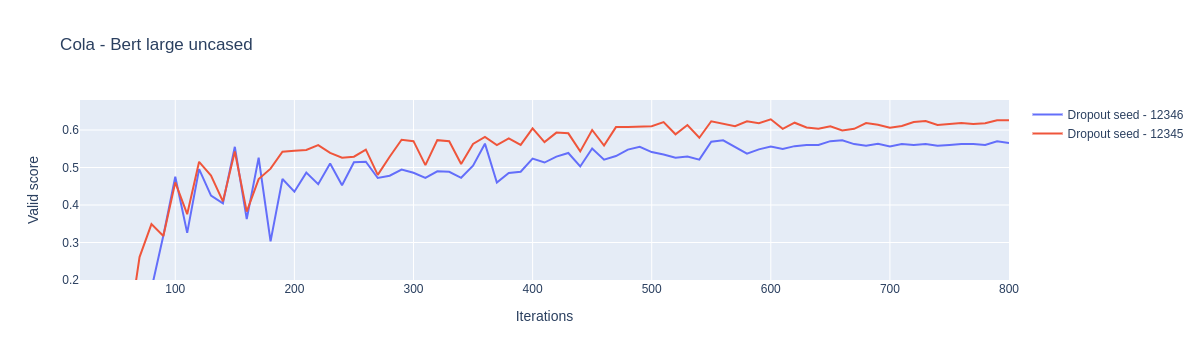
Unstable training is the phenomenon in which training large transformer models with trivial changes such as changing the random seed drastically changes the performance of the model. Here is a screenshot of finetuning the CoLA dataset from GLUE tasks with two different random seeds applied only to the dropout of the transformer model.
Installation
pip install stabilizer
Techniques currently implemented in this library
- Reinitialization
- Layerwise Learning Rate Decay
Reinitialization
Reinitialize the last n layers of the transformer encoder. This technique works well because we reinitialize the task specific parameters that the pretrained models have learnt specific to the pretraining task.
from stabilizer.reinitialize import reinit_autoencoder_model
from transformers import AutoModel

transformer = AutoModel.from_pretrained(
    pretrained_model_name_or_path="bert-base-uncased",
    hidden_dropout_prob=0.1,
    attention_probs_dropout_prob=0.1,
)
transformer.encoder = reinit_autoencoder_model(
    transformer.encoder, reinit_num_layers=1
)
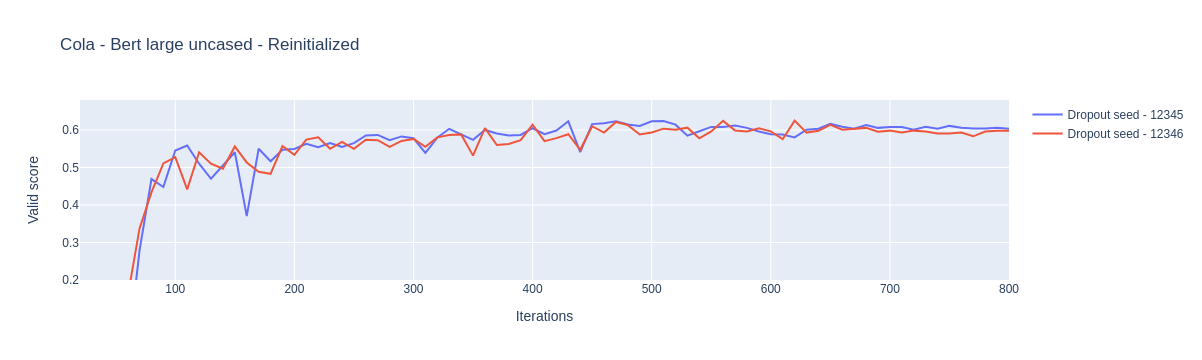
Here is the result of the same model but reinitialized last 4 layers applied on the CoLA dataset. You can see that the model has converged to almost the same performance with reinitialization.
Layerwise Learning Rate Decay
Apply layerwise learning rate to the transformer layers. Starting from the task specific layer every layer before it gets an exponentially decreasing learning rate.
from stabilizer.llrd import get_optimizer_parameters_with_llrd
from stabilizer.model import PoolerClassifier

from transformers import AdamW, AutoModel


    transformer = AutoModel.from_pretrained(
        pretrained_model_name_or_path=config["pretrained_model_name_or_path"],
        hidden_dropout_prob=config["dropout_prob"],
        attention_probs_dropout_prob=config["dropout_prob"],
    )

    model = PoolerClassifier(
        transformer=transformer,
        transformer_output_size=transformer.config.hidden_size,
        transformer_output_dropout_prob=config["dropout_prob"],
        num_classes=config["num_classes"],
        task_specific_layer_seed=config["layer_initialization_seed"],
    )

    model_parameters = get_optimizer_parameters_with_llrd(
        model=model,
        peak_lr=config["lr"],
        multiplicative_factor=config["multiplicative_factor"],
    )
    optimizer = AdamW(params=model_parameters, lr=config["lr"])
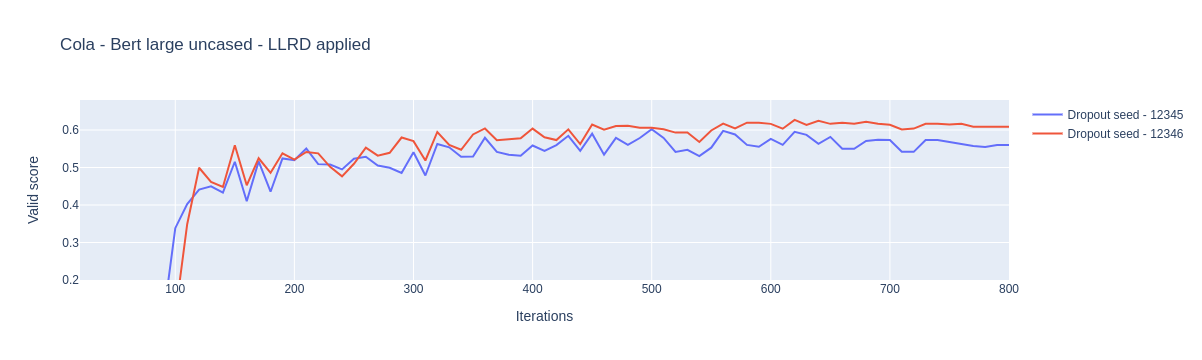
Here is the result of the same model but with LLRD applied on the CoLA dataset. Here you can see that the model has diverged quite a lot by applying LLRD. Therefore as we discussed earlier their is no universal remedy yet but some techniques work well on some datasets
1 maintainer

Release files for stabilizer 1.0.2
For a detailed explanation of source distributions (sdists) and built distributions (wheels), please see the package formats documentation.
Source distribution (sdist)
| File | Size | Uploaded | |
|---|---|---|---|
| stabilizer-1.0.2.tar.gz | 6.0 kB | Details |
Built distribution (wheel)
| File | Interpreter | ABI | Platform | Reset |
|---|---|---|---|---|
| stabilizer-1.0.2-py3-none-any.whl | Python 3 | none | any | Details |
Total release size: 15.7 kB
Release files / stabilizer-1.0.2.tar.gz
| Download URL | stabilizer-1.0.2.tar.gz |
|---|---|
| Size | 6.0 kB |
| Tags | Source |
|
SHA-256 checksum How to use checksums |
91cae36bfff7b7e9ff921f28d455fb84be0c258fe670951eeac6fa55895ea065
|
|
BLAKE2b-256 checksum How to use checksums |
6f51d601bf31cdf5072bea92826e563ab38cc23775dcce94d588a2b09e106b19
|
| Upload date | |
|
Uploaded using Trusted Publishing? What is trusted publishing? |
No |
| Uploaded via |
twine/3.4.2 importlib_metadata/4.8.1 pkginfo/1.7.1 requests/2.26.0 requests-toolbelt/0.9.1 tqdm/4.62.2 CPython/3.8.11
|
Release files / stabilizer-1.0.2-py3-none-any.whl
| Download URL | stabilizer-1.0.2-py3-none-any.whl |
|---|---|
| Size | 9.7 kB |
| Tags | Python 3 |
|
SHA-256 checksum How to use checksums |
6f1a67c66a01c3c5d8bf1efc98f89534032c16351cc703b26b891bca245a9983
|
|
BLAKE2b-256 checksum How to use checksums |
459ae65f2e3b7a634dd6a805beb489978efece60e36ecc69f1577cbecedd9eef
|
| Upload date | |
|
Uploaded using Trusted Publishing? What is trusted publishing? |
No |
| Uploaded via |
twine/3.4.2 importlib_metadata/4.8.1 pkginfo/1.7.1 requests/2.26.0 requests-toolbelt/0.9.1 tqdm/4.62.2 CPython/3.8.11
|














