
stl-reader


stl-reader is a Python library for rapidly reading binary and ASCII STL files. It wraps a nanobind interface to the fast STL library provided by libstl. Thanks @aki5!
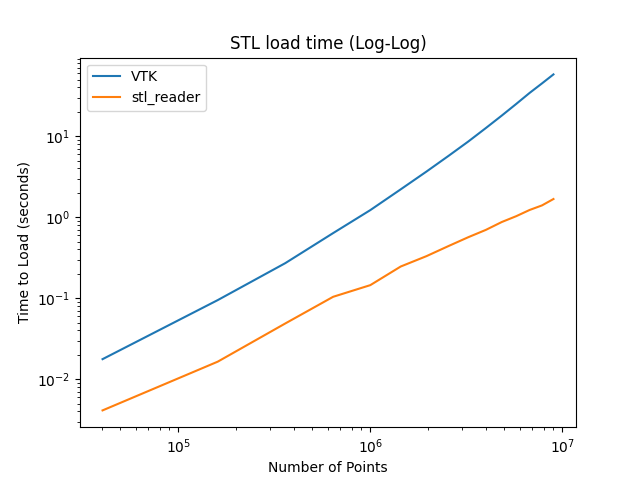
The main advantage of stl-reader over other STL reading libraries is its performance. It is particularly well-suited for large files, mainly due to its efficient use of hashing when merging points. This results in a 5-35x speedup over VTK for files containing between 4,000 and 9,000,000 points.
See the benchmarks below for more details.
Installation
The recommended way to install stl-reader is via PyPI:
pip install stl-readerYou can also clone the repository and install it from source:
git clone https://github.com/pyvista/stl-reader.git
cd stl-reader
pip install .
Usage
Load in the vertices and indices of a STL file directly as a NumPy array:
>>> import stl_reader
>>> vertices, indices = stl_reader.read("example.stl")
>>> vertices
array([[-0.01671113,  0.5450843 , -0.8382146 ],
       [ 0.01671113,  0.5450843 , -0.8382146 ],
       [ 0.        ,  0.52573115, -0.8506509 ],
       ...,
       [ 0.5952229 , -0.57455426,  0.56178033],
       [ 0.56178033, -0.5952229 ,  0.57455426],
       [ 0.57455426, -0.56178033,  0.5952229 ]], dtype=float32)
>>> indices
array([[      0,       1,       2],
       [      1,       3,       4],
       [      4,       5,       2],
       ...,
       [9005998, 9005988, 9005999],
       [9005999, 9005996, 9005995],
       [9005998, 9005999, 9005995]], dtype=uint32)
In this example, vertices is a 2D NumPy array where each row represents a vertex and the three columns represent the X, Y, and Z coordinates, respectively. indices is a 1D NumPy array representing the triangles from the STL file.
Alternatively, you can load in the STL file as a PyVista PolyData:
>>> import stl_reader
>>> mesh = stl_reader.read_as_mesh('example.stl')
>>> mesh
PolyData (0x7f43063ec700)
  N Cells:    1280000
  N Points:   641601
  N Strips:   0
  X Bounds:   -5.000e-01, 5.000e-01
  Y Bounds:   -5.000e-01, 5.000e-01
  Z Bounds:   -5.551e-17, 5.551e-17
  N Arrays:   0
Benchmark
The main reason behind writing yet another STL file reader for Python is to leverage the performant libstl library.
Here are some timings from reading in a 1,000,000 point binary STL file:
Library |
Time (seconds) |
|---|---|
stl-reader |
0.174 |
numpy-stl |
0.201 (see note) |
PyVista (VTK) |
1.663 |
meshio |
4.451 |
Note numpy-stl does not merge duplicate vertices.
Comparison with VTK
Here’s an additional benchmark comparing VTK with stl-reader:
import numpy as np
import time
import pyvista as pv
import matplotlib.pyplot as plt
import stl_reader

times = []
filename = 'tmp.stl'
for res in range(50, 800, 50):
    mesh = pv.Plane(i_resolution=res, j_resolution=res).triangulate().subdivide(2)
    mesh.save(filename)

    tstart = time.time()
    out_pv = pv.read(filename)
    vtk_time = time.time() - tstart

    tstart = time.time()
    out_stl = stl_reader.read(filename)
    stl_reader_time =  time.time() - tstart

    times.append([mesh.n_points, vtk_time, stl_reader_time])
    print(times[-1])


times = np.array(times)
plt.figure(1)
plt.title('STL load time')
plt.plot(times[:, 0], times[:, 1], label='VTK')
plt.plot(times[:, 0], times[:, 2], label='stl_reader')
plt.xlabel('Number of Points')
plt.ylabel('Time to Load (seconds)')
plt.legend()

plt.figure(2)
plt.title('STL load time (Log-Log)')
plt.loglog(times[:, 0], times[:, 1], label='VTK')
plt.loglog(times[:, 0], times[:, 2], label='stl_reader')
plt.xlabel('Number of Points')
plt.ylabel('Time to Load (seconds)')
plt.legend()
plt.show()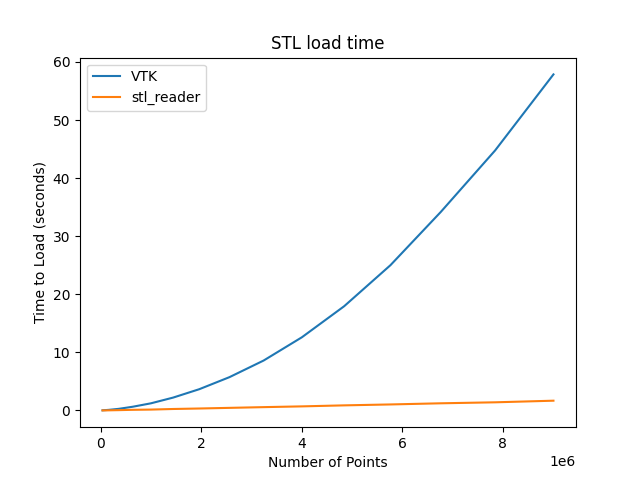
Read in ASCII Meshes
The stl-reader also supports ASCII files and is around 2.4 times faster than VTK at reading ASCII files.
import time
import stl_reader
import pyvista as pv
import numpy as np

# create and save a ASCII file
n = 1000
mesh = pv.Plane(i_resolution=n, j_resolution=n).triangulate()
mesh.save("/tmp/tmp-ascii.stl", binary=False)

# stl reader
tstart = time.time()
mesh = stl_reader.read_as_mesh("/tmp/tmp-ascii.stl")
print("stl-reader    ", time.time() - tstart)

tstart = time.time()
pv_mesh = pv.read("/tmp/tmp-ascii.stl")
print("pyvista reader", time.time() - tstart)

# verify meshes are identical
assert np.allclose(mesh.points, pv_mesh.points)

# approximate time to read in the 1M point file:
# stl-reader     0.80303955078125
# pyvista reader 1.916085958480835
License and Acknowledgments
This project relies on libstl for reading in and merging the vertices of a STL file. Wherever code is reused, the original MIT License is mentioned.
The work in this repository is also licensed under the MIT License.
Support
If you are having issues, please feel free to raise an Issue.
1 maintainer

Metadata
1 maintainer
Release files for stl-reader 0.2.3
For a detailed explanation of source distributions (sdists) and built distributions (wheels), please see the package formats documentation.
Source distribution (sdist)
| File | Size | Uploaded | |
|---|---|---|---|
| stl-reader-0.2.3.tar.gz | 13.8 kB | Details |
Built distributions (wheels)
Total release size: 1.0 MB
Release files / stl-reader-0.2.3.tar.gz
| Download URL | stl-reader-0.2.3.tar.gz |
|---|---|
| Size | 13.8 kB |
| Tags | Source |
|
SHA-256 checksum How to use checksums |
729a90b3e57a85e05cff5da056970c692b71d2d58edd5a6e0ff9409cb35631dd
|
|
BLAKE2b-256 checksum How to use checksums |
7323e81ae8b096f7c875da85888badef26fdc660afbee1304e4244f16c0f8360
|
| Upload date | |
|
Uploaded using Trusted Publishing? What is trusted publishing? |
No |
| Uploaded via |
twine/5.1.1 CPython/3.12.7
|
Release files / stl_reader-0.2.3-cp313-cp313-win_amd64.whl
| Download URL | stl_reader-0.2.3-cp313-cp313-win_amd64.whl |
|---|---|
| Size | 47.0 kB |
| Tags | CPython 3.13 Windows x86-64 |
|
SHA-256 checksum How to use checksums |
663216b8d3c3e0ec7176ff9d4e861d1e07ae92a422f498eb9293994eae8b61da
|
|
BLAKE2b-256 checksum How to use checksums |
f8719a60bd4917928eded628ac4bf65899c7af6da04954284656d4989cef5b5f
|
| Upload date | |
|
Uploaded using Trusted Publishing? What is trusted publishing? |
No |
| Uploaded via |
twine/5.1.1 CPython/3.12.7
|
Release files / stl_reader-0.2.3-cp313-cp313-manylinux_2_17_x86_64.manylinux2014_x86_64.whl
| Download URL | stl_reader-0.2.3-cp313-cp313-manylinux_2_17_x86_64.manylinux2014_x86_64.whl |
|---|---|
| Size | 66.0 kB |
| Tags | CPython 3.13 Linux glibc 2.17+ x86-64 |
|
SHA-256 checksum How to use checksums |
6700a0f24fe5dfb2a43c772ed88e4031d07079d4e88708560208060a952e3806
|
|
BLAKE2b-256 checksum How to use checksums |
3cb2c1e5ed886563a8fcca9c7060ae655488ff591cc4630daa9d63a0cbe70595
|
| Upload date | |
|
Uploaded using Trusted Publishing? What is trusted publishing? |
No |
| Uploaded via |
twine/5.1.1 CPython/3.12.7
|
Release files / stl_reader-0.2.3-cp313-cp313-macosx_11_0_arm64.whl
| Download URL | stl_reader-0.2.3-cp313-cp313-macosx_11_0_arm64.whl |
|---|---|
| Size | 41.5 kB |
| Tags | CPython 3.13 macOS 11.0+ ARM64 |
|
SHA-256 checksum How to use checksums |
f0a071cd1e27b06863b72c8e707af41c031f6ae871bc0d98fdde4b940c6d8c2f
|
|
BLAKE2b-256 checksum How to use checksums |
40d7b4e9466426c41ecdd4153ffa461e48351a73d179fb878f4670d16b89d537
|
| Upload date | |
|
Uploaded using Trusted Publishing? What is trusted publishing? |
No |
| Uploaded via |
twine/5.1.1 CPython/3.12.7
|
Release files / stl_reader-0.2.3-cp313-cp313-macosx_10_14_x86_64.whl
| Download URL | stl_reader-0.2.3-cp313-cp313-macosx_10_14_x86_64.whl |
|---|---|
| Size | 44.1 kB |
| Tags | CPython 3.13 macOS 10.14+ x86-64 |
|
SHA-256 checksum How to use checksums |
5bf81d071d5b5cf6b61eafc90dc0d3876ede243347bb45146fe17da7d7632489
|
|
BLAKE2b-256 checksum How to use checksums |
72dd7ac56ab093b50c62b28f12e2fd2a33314867f8fa35954f8b2426dc3e75e5
|
| Upload date | |
|
Uploaded using Trusted Publishing? What is trusted publishing? |
No |
| Uploaded via |
twine/5.1.1 CPython/3.12.7
|
Release files / stl_reader-0.2.3-cp312-cp312-win_amd64.whl
| Download URL | stl_reader-0.2.3-cp312-cp312-win_amd64.whl |
|---|---|
| Size | 47.0 kB |
| Tags | CPython 3.12 Windows x86-64 |
|
SHA-256 checksum How to use checksums |
5b78344775b0b7cdda6f97cf56ee599f5352e7b8bb7ef4f42862d16d4bd3bd03
|
|
BLAKE2b-256 checksum How to use checksums |
5ec77d34a73b0c8aa0f9a25ba6afa66f5ff7399554dc134976f5e968f0d62b7f
|
| Upload date | |
|
Uploaded using Trusted Publishing? What is trusted publishing? |
No |
| Uploaded via |
twine/5.1.1 CPython/3.12.7
|
Release files / stl_reader-0.2.3-cp312-cp312-manylinux_2_17_x86_64.manylinux2014_x86_64.whl
| Download URL | stl_reader-0.2.3-cp312-cp312-manylinux_2_17_x86_64.manylinux2014_x86_64.whl |
|---|---|
| Size | 66.0 kB |
| Tags | CPython 3.12 Linux glibc 2.17+ x86-64 |
|
SHA-256 checksum How to use checksums |
0943fdf41e19a7a822f25b6723a7fdee55539a71f1b49a652e1042dd5ca8d5ff
|
|
BLAKE2b-256 checksum How to use checksums |
fb8dfcd5a7164d1023b4ccb286296e07e4750541f5bfda7e6bd689d78d0a3fd3
|
| Upload date | |
|
Uploaded using Trusted Publishing? What is trusted publishing? |
No |
| Uploaded via |
twine/5.1.1 CPython/3.12.7
|
Release files / stl_reader-0.2.3-cp312-cp312-macosx_11_0_arm64.whl
| Download URL | stl_reader-0.2.3-cp312-cp312-macosx_11_0_arm64.whl |
|---|---|
| Size | 41.5 kB |
| Tags | CPython 3.12 macOS 11.0+ ARM64 |
|
SHA-256 checksum How to use checksums |
5552e15a309f9ec7c3c3e15915a549b220aeb5d9de32de744c6cbdeb7a265ba0
|
|
BLAKE2b-256 checksum How to use checksums |
80f384eaed093dce08a3b3e87d88c68b384498199726a44083fbe258d41ae12f
|
| Upload date | |
|
Uploaded using Trusted Publishing? What is trusted publishing? |
No |
| Uploaded via |
twine/5.1.1 CPython/3.12.7
|
Release files / stl_reader-0.2.3-cp312-cp312-macosx_10_14_x86_64.whl
| Download URL | stl_reader-0.2.3-cp312-cp312-macosx_10_14_x86_64.whl |
|---|---|
| Size | 44.1 kB |
| Tags | CPython 3.12 macOS 10.14+ x86-64 |
|
SHA-256 checksum How to use checksums |
ce0b3e58bd92a0773f6f0a22a837bcef11cec8117f7bd387bce616dba3066a25
|
|
BLAKE2b-256 checksum How to use checksums |
fdb19cc98927146f97e2f8e80a3c07727e503266a0c3902975a0e8f4ea48003d
|
| Upload date | |
|
Uploaded using Trusted Publishing? What is trusted publishing? |
No |
| Uploaded via |
twine/5.1.1 CPython/3.12.7
|
Release files / stl_reader-0.2.3-cp311-cp311-win_amd64.whl
| Download URL | stl_reader-0.2.3-cp311-cp311-win_amd64.whl |
|---|---|
| Size | 48.4 kB |
| Tags | CPython 3.11 Windows x86-64 |
|
SHA-256 checksum How to use checksums |
a80f22508ceeceb59f405ae828e6436c559b5f9033907132b3d7e21dcd3b1072
|
|
BLAKE2b-256 checksum How to use checksums |
751491001fb85afb739ab6bb05e9376986d5cadda7f596ff7080cb080d73b06f
|
| Upload date | |
|
Uploaded using Trusted Publishing? What is trusted publishing? |
No |
| Uploaded via |
twine/5.1.1 CPython/3.12.7
|
Release files / stl_reader-0.2.3-cp311-cp311-manylinux_2_17_x86_64.manylinux2014_x86_64.whl
| Download URL | stl_reader-0.2.3-cp311-cp311-manylinux_2_17_x86_64.manylinux2014_x86_64.whl |
|---|---|
| Size | 69.0 kB |
| Tags | CPython 3.11 Linux glibc 2.17+ x86-64 |
|
SHA-256 checksum How to use checksums |
e8b70453fe1533fcdd55118115c35ca6ad0edc07ab6f1f9657078a936a538532
|
|
BLAKE2b-256 checksum How to use checksums |
215f258c821bfffcf3b31ddb2789e06cce8ea34187a4b20b862a50db9080d75f
|
| Upload date | |
|
Uploaded using Trusted Publishing? What is trusted publishing? |
No |
| Uploaded via |
twine/5.1.1 CPython/3.12.7
|
Release files / stl_reader-0.2.3-cp311-cp311-macosx_11_0_arm64.whl
| Download URL | stl_reader-0.2.3-cp311-cp311-macosx_11_0_arm64.whl |
|---|---|
| Size | 43.1 kB |
| Tags | CPython 3.11 macOS 11.0+ ARM64 |
|
SHA-256 checksum How to use checksums |
86c07bd22a1097ef158785a8162e5f8df8cfb497bf5405dd90a60005acedbb08
|
|
BLAKE2b-256 checksum How to use checksums |
bac3c27fc24ef5aa63b0c659e5f80f41f469710e521f15add96a0f6cdde17e27
|
| Upload date | |
|
Uploaded using Trusted Publishing? What is trusted publishing? |
No |
| Uploaded via |
twine/5.1.1 CPython/3.12.7
|
Release files / stl_reader-0.2.3-cp311-cp311-macosx_10_14_x86_64.whl
| Download URL | stl_reader-0.2.3-cp311-cp311-macosx_10_14_x86_64.whl |
|---|---|
| Size | 45.6 kB |
| Tags | CPython 3.11 macOS 10.14+ x86-64 |
|
SHA-256 checksum How to use checksums |
4218e22d79b8e655940f6f621b99452b18b8a38faad3c946c0d5fb20cd6e60fa
|
|
BLAKE2b-256 checksum How to use checksums |
51d4f9416d6f21a805b2dd83e6269a6b59aecd288e30f70866493e8dd13107f3
|
| Upload date | |
|
Uploaded using Trusted Publishing? What is trusted publishing? |
No |
| Uploaded via |
twine/5.1.1 CPython/3.12.7
|
Release files / stl_reader-0.2.3-cp310-cp310-win_amd64.whl
| Download URL | stl_reader-0.2.3-cp310-cp310-win_amd64.whl |
|---|---|
| Size | 48.5 kB |
| Tags | CPython 3.10 Windows x86-64 |
|
SHA-256 checksum How to use checksums |
43fad40c6a385787e5a67577387431e8f4f757f497c59e88204f88ff5e6e52f2
|
|
BLAKE2b-256 checksum How to use checksums |
dfe8734612b89f759731a3ca79ea0ed502651a5675dfde28ee7a0f552fb5d2d5
|
| Upload date | |
|
Uploaded using Trusted Publishing? What is trusted publishing? |
No |
| Uploaded via |
twine/5.1.1 CPython/3.12.7
|
Release files / stl_reader-0.2.3-cp310-cp310-manylinux_2_17_x86_64.manylinux2014_x86_64.whl
| Download URL | stl_reader-0.2.3-cp310-cp310-manylinux_2_17_x86_64.manylinux2014_x86_64.whl |
|---|---|
| Size | 69.2 kB |
| Tags | CPython 3.10 Linux glibc 2.17+ x86-64 |
|
SHA-256 checksum How to use checksums |
9b1d9834ab9f47ef5b0b312205e3de9befd85cb1ec8cd436afb7cbe60a8f2fa7
|
|
BLAKE2b-256 checksum How to use checksums |
ad9e098c232fee65efc4b75d5c5f61daf7bb4d0972d199f9db44bb2147bed8ed
|
| Upload date | |
|
Uploaded using Trusted Publishing? What is trusted publishing? |
No |
| Uploaded via |
twine/5.1.1 CPython/3.12.7
|
Release files / stl_reader-0.2.3-cp310-cp310-macosx_11_0_arm64.whl
| Download URL | stl_reader-0.2.3-cp310-cp310-macosx_11_0_arm64.whl |
|---|---|
| Size | 43.2 kB |
| Tags | CPython 3.10 macOS 11.0+ ARM64 |
|
SHA-256 checksum How to use checksums |
a90b9b349eaff555ddc34eea1b691850981f578f9dd8b36bf8f72eb4ca01232c
|
|
BLAKE2b-256 checksum How to use checksums |
631c65134758cce6c49dd0429c04d7d776f47191f460c377bacc86648e6a39af
|
| Upload date | |
|
Uploaded using Trusted Publishing? What is trusted publishing? |
No |
| Uploaded via |
twine/5.1.1 CPython/3.12.7
|
Release files / stl_reader-0.2.3-cp310-cp310-macosx_10_14_x86_64.whl
| Download URL | stl_reader-0.2.3-cp310-cp310-macosx_10_14_x86_64.whl |
|---|---|
| Size | 45.8 kB |
| Tags | CPython 3.10 macOS 10.14+ x86-64 |
|
SHA-256 checksum How to use checksums |
f3c563c8c1f83341b096a800fbfeda253ae5a53694b54c16e1542cec02a5c013
|
|
BLAKE2b-256 checksum How to use checksums |
624dae559a9d8207313009a9b85bad378a6e31831404660a0a57bd78ef45fc8c
|
| Upload date | |
|
Uploaded using Trusted Publishing? What is trusted publishing? |
No |
| Uploaded via |
twine/5.1.1 CPython/3.12.7
|
Release files / stl_reader-0.2.3-cp39-cp39-win_amd64.whl
| Download URL | stl_reader-0.2.3-cp39-cp39-win_amd64.whl |
|---|---|
| Size | 48.9 kB |
| Tags | CPython 3.9 Windows x86-64 |
|
SHA-256 checksum How to use checksums |
f4a7b3d7a7209b41320cf40e39454b309b1e047b3545ba5ff9b9b3543f202f9f
|
|
BLAKE2b-256 checksum How to use checksums |
7c028f957cae71c96607dff1a2380a4111fa3e24717f9245b382d2034493c924
|
| Upload date | |
|
Uploaded using Trusted Publishing? What is trusted publishing? |
No |
| Uploaded via |
twine/5.1.1 CPython/3.12.7
|
Release files / stl_reader-0.2.3-cp39-cp39-manylinux_2_17_x86_64.manylinux2014_x86_64.whl
| Download URL | stl_reader-0.2.3-cp39-cp39-manylinux_2_17_x86_64.manylinux2014_x86_64.whl |
|---|---|
| Size | 69.3 kB |
| Tags | CPython 3.9 Linux glibc 2.17+ x86-64 |
|
SHA-256 checksum How to use checksums |
82e8b0734e9760395f1c46537f6db7aa451c1093128659bc242401620015b030
|
|
BLAKE2b-256 checksum How to use checksums |
9e457461ff8b65d91352fc1e9be4a7b45bd9d3acc15f469f35b26e131878b3fd
|
| Upload date | |
|
Uploaded using Trusted Publishing? What is trusted publishing? |
No |
| Uploaded via |
twine/5.1.1 CPython/3.12.7
|
Release files / stl_reader-0.2.3-cp39-cp39-macosx_11_0_arm64.whl
| Download URL | stl_reader-0.2.3-cp39-cp39-macosx_11_0_arm64.whl |
|---|---|
| Size | 43.3 kB |
| Tags | CPython 3.9 macOS 11.0+ ARM64 |
|
SHA-256 checksum How to use checksums |
0189d0d0089f77a77053899a546f91ea0c79867fc518f03d9c51346bdc77abef
|
|
BLAKE2b-256 checksum How to use checksums |
f6b4df3902d0a0c7b3a8bf53e5e8084ff0b983bfccb91d6363931eb32ab46e6b
|
| Upload date | |
|
Uploaded using Trusted Publishing? What is trusted publishing? |
No |
| Uploaded via |
twine/5.1.1 CPython/3.12.7
|
Release files / stl_reader-0.2.3-cp39-cp39-macosx_10_14_x86_64.whl
| Download URL | stl_reader-0.2.3-cp39-cp39-macosx_10_14_x86_64.whl |
|---|---|
| Size | 45.9 kB |
| Tags | CPython 3.9 macOS 10.14+ x86-64 |
|
SHA-256 checksum How to use checksums |
81806721a6afcb2ed6e8e9e9eb302b3703830d6e5486afadd1e2ea051e903200
|
|
BLAKE2b-256 checksum How to use checksums |
6dee6fd42b2e448fbb0a99cab781b24af91845c6e12cfc1a059654c76a39b5bc
|
| Upload date | |
|
Uploaded using Trusted Publishing? What is trusted publishing? |
No |
| Uploaded via |
twine/5.1.1 CPython/3.12.7
|














