
streamlit-ext


A small handy extension for streamlit, keep your widget values in url, and share it with your friends.
Use widget from stramlit-ext just as streamlit and pass a unique key to it!
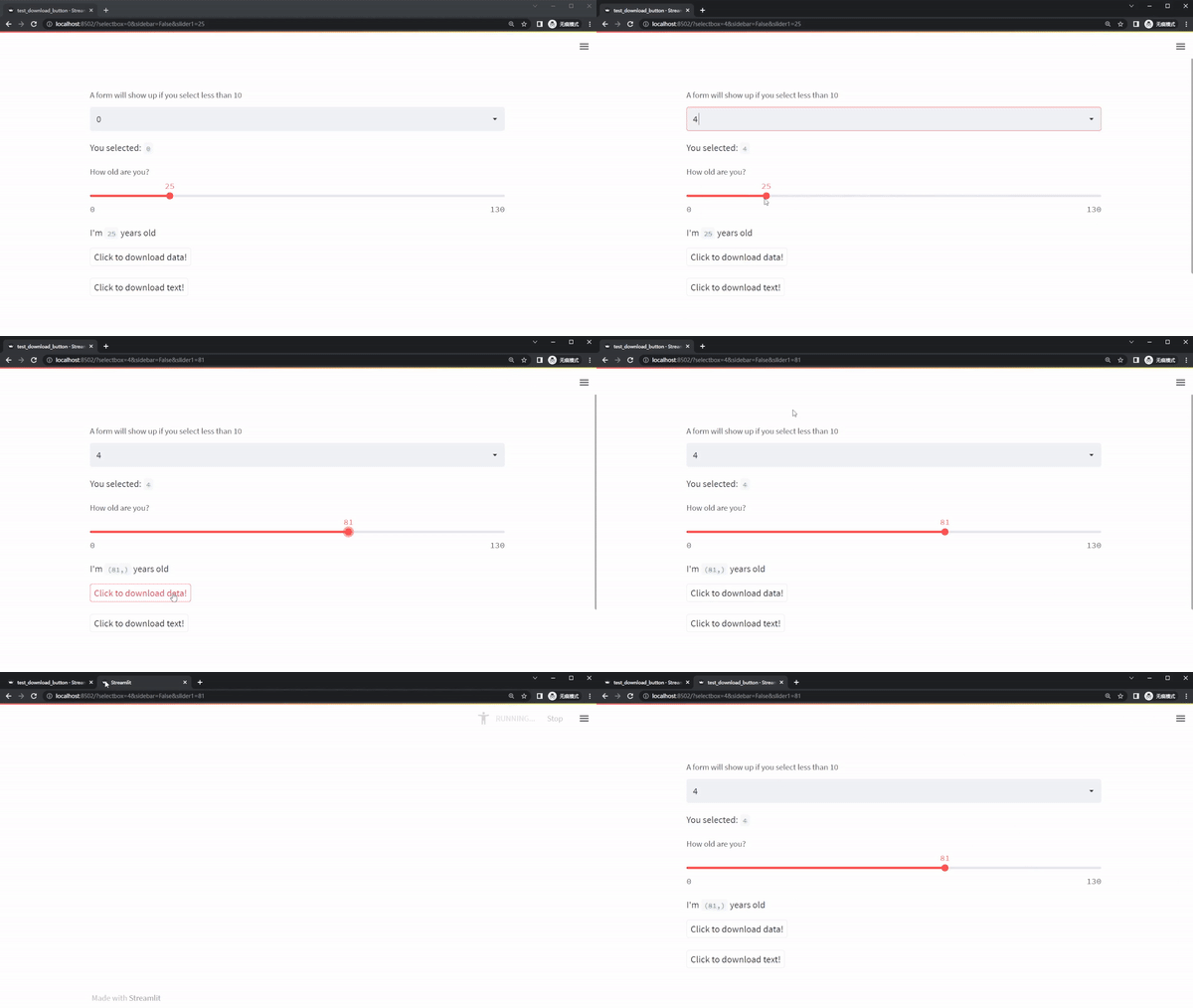
import numpy as np
import pandas as pd

import streamlit as st
import streamlit_ext as ste

df = pd.DataFrame(np.random.rand(10, 5))


option = ste.selectbox(
    "A form will show up if you select less than 10",
    range(100),
    key="selectbox",
)

st.write("You selected:", option)

age = ste.slider("How old are you?", 0, 130, 25, key="slider1")
st.write("I'm ", age, "years old")

ste.download_button("Click to download data!", df, "YOUR_DF.xlsx")
ste.download_button("Click to download text!", b"text content", "YOUR_STRING.txt")
installation
pip install streamlit-ext
Usage
sync widgets' value with urls
When widgets value changes, the url synced and if you open the url in new tab, every value keeped.
Just import widgets from streamlit_ext, and give a specific key argument to it!
import streamlit as st
import streamlit_ext as ste

from datetime import time, datetime, date

option = ste.selectbox(
    "How would you like to be contacted?",
    range(100),
    key="selectbox",
)

st.write("You selected:", option)

d = ste.date_input("When's your birthday", date(2019, 7, 6), key="date_input")
st.write("Your birthday is:", d)

t = ste.time_input("Set an alarm for", time(8, 45), key="time_input")
st.write("Alarm is set for", t)
Download button which won't cause rerun
import streamlit as st
import streamlit_ext as ste

st.title('streamlit-ext')

ste.set_page_width("60em")

ste.download_button("Download", "Hello World".encode(), "hello.txt")
Set page width
import streamlit as st
import streamlit_ext as ste

st.title('streamlit-ext')

ste.set_page_width("60em")

st.write("a quick fox jump..."*100)
1 maintainer

Metadata
1 maintainer
Release files for streamlit-ext 0.1.19
For a detailed explanation of source distributions (sdists) and built distributions (wheels), please see the package formats documentation.
Source distribution (sdist)
| File | Size | Uploaded | |
|---|---|---|---|
| streamlit_ext-0.1.19.tar.gz | 283.1 kB | Details |
Built distribution (wheel)
| File | Interpreter | ABI | Platform | Reset |
|---|---|---|---|---|
| streamlit_ext-0.1.19-py3-none-any.whl | Python 3 | none | any | Details |
Total release size: 294.8 kB
Release files / streamlit_ext-0.1.19.tar.gz
| Download URL | streamlit_ext-0.1.19.tar.gz |
|---|---|
| Size | 283.1 kB |
| Tags | Source |
|
SHA-256 checksum How to use checksums |
af49b5947cff53060559684e472db8f90fe8139e27aa8a42d032248fccc4e9e6
|
|
BLAKE2b-256 checksum How to use checksums |
ed0c68bddc2843dcae507be5b9dfc0efe789ea113336f0bc78f44dead0a86245
|
| Upload date | |
|
Uploaded using Trusted Publishing? What is trusted publishing? |
No |
| Uploaded via |
twine/6.1.0 CPython/3.12.9
|
Release files / streamlit_ext-0.1.19-py3-none-any.whl
| Download URL | streamlit_ext-0.1.19-py3-none-any.whl |
|---|---|
| Size | 11.8 kB |
| Tags | Python 3 |
|
SHA-256 checksum How to use checksums |
2d55cebfa7d5bb35067f7d1b362e94f1bc8a892151efc2eca99252e83af96cf2
|
|
BLAKE2b-256 checksum How to use checksums |
2c4061feb5351992cbbb71923f1448c73f5ba1c2226fc57519d51002b7f887e2
|
| Upload date | |
|
Uploaded using Trusted Publishing? What is trusted publishing? |
No |
| Uploaded via |
twine/6.1.0 CPython/3.12.9
|














