
string-color
string-color is just another python module for coloring strings in print statements.
Installation
$ pip install string-color
Python Module Usage
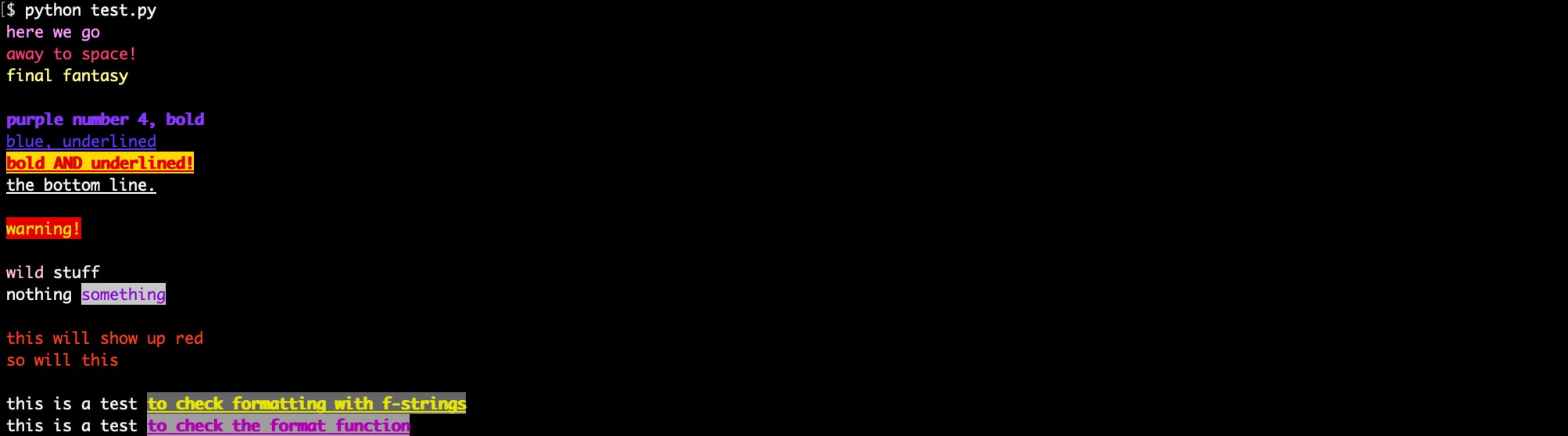
from stringcolor import *

# a few examples without background colors.
# for color names see CLI usage below.
print(cs("here we go", "orchid"))
print(cs("away to space!", "DeepPink3"))
print(cs("final fantasy", "#ffff87"))
print()

# bold and underline also available.
print(cs("purple number 4, bold", "purple4").bold())
print(cs("blue, underlined", "blue").underline())
print(bold("bold AND underlined!").underline().cs("red", "gold"))
print(underline("the bottom line."))
print()

# yellow text with a red background.
# color names, hex values, and ansi numbers will work.
print(cs("warning!", "yellow", "#ff0000"))
print()

# concat
print(cs("wild", "pink")+" stuff")
print("nothing "+cs("something", "DarkViolet2", "lightgrey6"))
print()

# use any working rgb or hex values.
# it will find the closest color available.
print(cs("this will show up red", "#ff0009"))
print(cs("so will this", "rgb(254, 0, 1)"))
print()

# use with format and f-strings
print(f"this is a test {cs('to check formatting with f-strings', 'yellow', 'grey').bold().underline()}")
print("this is a test {}".format(cs('to check the format function', 'purple', 'lightgrey11').bold().underline()))
CLI Usage
usage: string-color [-h] [-x] [-r] [-t] [--hsl] [-a] [-i] [-v] [color]

just another mod for printing strings in color.

positional arguments:
  color          show info for a specific color:
                 $ string-color red
                 $ string-color '#ffff87'
                 $ string-color *grey* # wildcards acceptable
                 $ string-color '#E16A7F' # any hex not found will return the closest match

optional arguments:
  -h, --help     show this help message and exit
  -x, --hex      show hex values
  -r, --rgb      show rgb values
  -t, --term     show term numbers
  --hsl          show hsl values
  -a, --alpha    sort by name
  -i, --inverse  show inverse colors
  -v, --version  show program's version number and exit
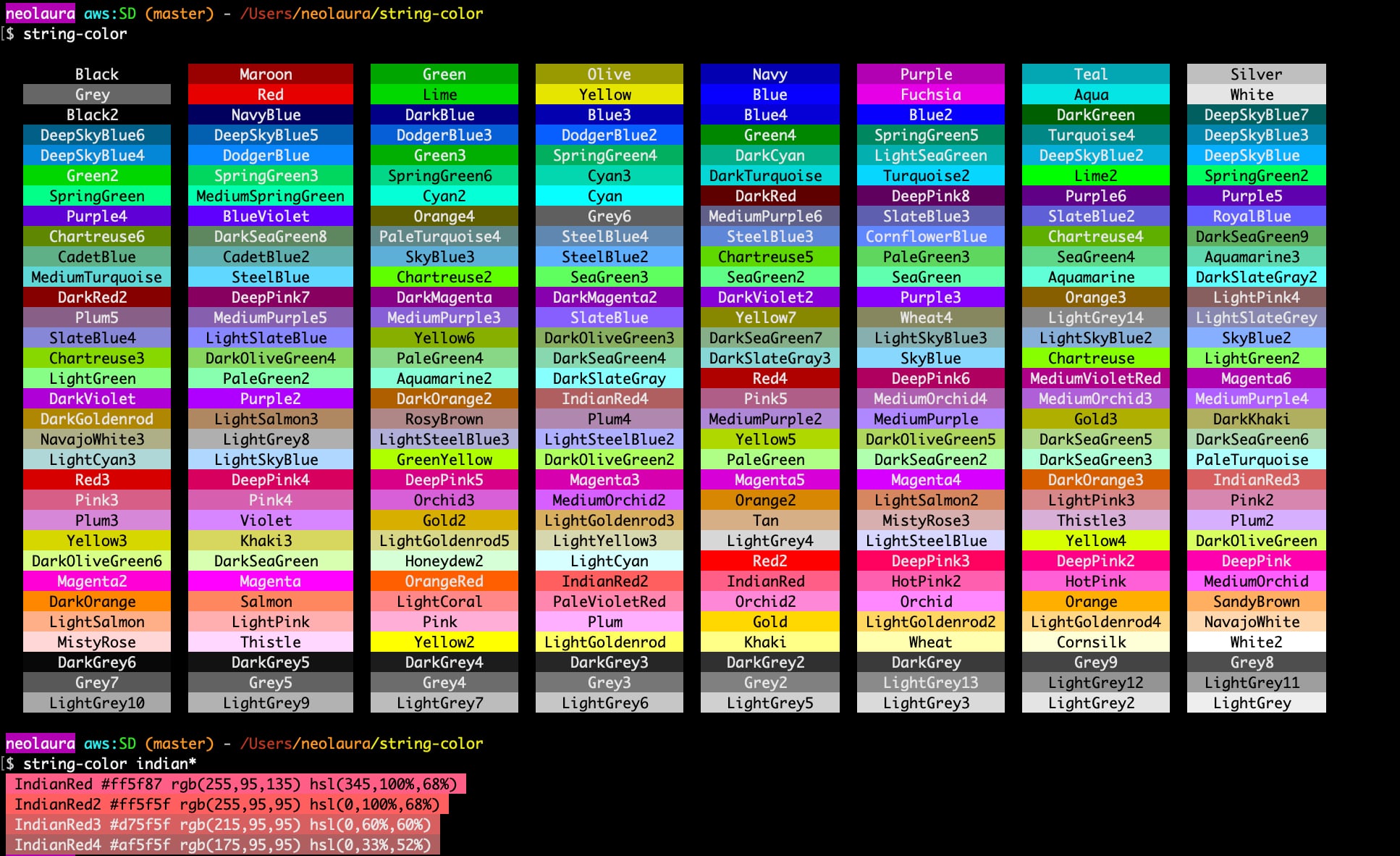
$ string-color
display a list of all 256 colors
$ string-color yellow
show color info for the color yellow
$ string-color "#ff0000"
show color info for the hex value #ff0000
$ string-color *grey*
show all colors with "grey" in the name. also works with "grey*" and "*grey"
1 maintainer

Metadata
1 maintainer
Release files for string-color 1.3.0
For a detailed explanation of source distributions (sdists) and built distributions (wheels), please see the package formats documentation.
Source distribution (sdist)
| File | Size | Uploaded | Provenance | |
|---|---|---|---|---|
| string_color-1.3.0.tar.gz | 11.8 kB | Without provenance | Details |
Built distribution (wheel)
| File | Interpreter | ABI | Platform | Reset |
|---|---|---|---|---|
| string_color-1.3.0-py3-none-any.whl | Python 3 | none | any | Details |
Total release size: 24.2 kB
Release files / string_color-1.3.0.tar.gz
| Download URL | string_color-1.3.0.tar.gz |
|---|---|
| Size | 11.8 kB |
| Tags | Source |
|
SHA-256 checksum How to use checksums |
007f15c33ef178c9f3d6e55cb812cab4b7ab63df931e06b2e60afd36e3b77ca0
|
|
BLAKE2b-256 checksum How to use checksums |
19f542d5d4b87930bf0d67806f270e10e79ac8e6c651796df1921ea15bf5f828
|
| Upload date | |
|
Uploaded using Trusted Publishing? What is trusted publishing? |
No |
| Uploaded via |
twine/6.1.0 CPython/3.11.3
|
Release files / string_color-1.3.0-py3-none-any.whl
| Download URL | string_color-1.3.0-py3-none-any.whl |
|---|---|
| Size | 12.4 kB |
| Tags | Python 3 |
|
SHA-256 checksum How to use checksums |
cf16bbf0b2e4d11789570799f6827cf7f946b94dee5ec1016605561715942742
|
|
BLAKE2b-256 checksum How to use checksums |
c3597b7c77303c7003667d4ebea8a96bd2e08d17b6c1a16e807bf92edb3a645f
|
| Upload date | |
|
Uploaded using Trusted Publishing? What is trusted publishing? |
No |
| Uploaded via |
twine/6.1.0 CPython/3.11.3
|
Security for string-color 1.3.0
Provenance
Provenance describes where a file came from. On PyPI, provenance is shared via attestations, which provide a verifiable record of the build or publishing details. View details, limitations and caveats.
No provenance found
None of the files in this release were uploaded with provenance metadata.
A note on package security
PyPI is a repository for distributing packages, not a service for auditing them. While third-party security researchers and our staff do their best to detect and remove malicious packages, PyPI cannot guarantee the quality, security or suitability of any given package.














