
svs4onnx
A very simple tool to swap connections between output and input variables in an ONNX graph. Simple Variable Switch for ONNX.
https://github.com/PINTO0309/simple-onnx-processing-tools




1. Setup
1-1. HostPC
### option
$ echo export PATH="~/.local/bin:$PATH" >> ~/.bashrc \
&& source ~/.bashrc

### run
$ pip install -U onnx \
&& python3 -m pip install -U onnx_graphsurgeon --index-url https://pypi.ngc.nvidia.com \
&& pip install -U svs4onnx
1-2. Docker
https://github.com/PINTO0309/simple-onnx-processing-tools#docker
2. CLI Usage
$ svs4onnx -h

usage:
    svs4onnx [-h]
    -if INPUT_ONNX_FILE_PATH
    -fovn FROM_OUTPUT_VARIABLE_NAME
    -tivn TO_INPUT_VARIABLE_NAME
    -of OUTPUT_ONNX_FILE_PATH
    [-n]

optional arguments:
  -h, --help
        show this help message and exit.

  -if INPUT_ONNX_FILE_PATH, --input_onnx_file_path INPUT_ONNX_FILE_PATH
        Input onnx file path.

  -fovn FROM_OUTPUT_VARIABLE_NAME, --from_output_variable_name FROM_OUTPUT_VARIABLE_NAME
        Output variable name of the connection change source.
        e.g.
        --from_output_variable_name "output1"

  -tivn TO_INPUT_VARIABLE_NAME, --to_input_variable_name TO_INPUT_VARIABLE_NAME
        Input variable name of connection change destination.
        e.g.
        --to_input_variable_name "input1"

  -of OUTPUT_ONNX_FILE_PATH, --output_onnx_file_path OUTPUT_ONNX_FILE_PATH
        Output onnx file path.

  -n, --non_verbose
        Do not show all information logs. Only error logs are displayed.
3. In-script Usage
>>> from svs4onnx import variable_switch
>>> help(variable_switch)

Help on function variable_switch in module svs4onnx.onnx_model_variable_switch:

variable_switch(
    from_output_variable_name: str,
    to_input_variable_name: str,
    input_onnx_file_path: Union[str, NoneType] = '',
    onnx_graph: Union[onnx.onnx_ml_pb2.ModelProto, NoneType] = None,
    output_onnx_file_path: Union[str, NoneType] = '',
    non_verbose: Union[bool, NoneType] = False,
) -> onnx.onnx_ml_pb2.ModelProto

    Parameters
    ----------
    from_output_variable_name: str
        Output variable name of the connection change source.
        e.g.
        output_op_names = "output1"

    to_input_variable_name: str
        Input variable name of connection change destination.
        e.g.
        output_op_names = "input1"

    input_onnx_file_path: Optional[str]
        Input onnx file path.
        Either input_onnx_file_path or onnx_graph must be specified.
        Default: ''

    onnx_graph: Optional[onnx.ModelProto]
        onnx.ModelProto.
        Either input_onnx_file_path or onnx_graph must be specified.
        onnx_graph If specified, ignore input_onnx_file_path and process onnx_graph.

    output_onnx_file_path: Optional[str]
        Output onnx file path. If not specified, no ONNX file is output.
        Default: ''

    non_verbose: Optional[bool]
        Do not show all information logs. Only error logs are displayed.
        Default: False

    Returns
    -------
    variable_switched_graph: onnx.ModelProto
        onnx.ModelProto with variable switched
4. CLI Execution
$ svs4onnx \
--input_onnx_file_path movenet_multipose_lightning_192x256_nopost_tmp1.onnx \
--from_output_variable_name "cast1_output" \
--to_input_variable_name "StatefulPartitionedCall/strided_slice_21" \
--output_onnx_file_path movenet_multipose_lightning_192x256_nopost_tmp2.onnx
5. In-script Execution
from svs4onnx import variable_switch

onnx_graph = variable_switch(
    from_output_variable_name="cast1_output",
    to_input_variable_name="StatefulPartitionedCall/strided_slice_21",
    input_onnx_file_path="movenet_multipose_lightning_192x256_nopost_tmp1.onnx",
    output_onnx_file_path="movenet_multipose_lightning_192x256_nopost_tmp2.onnx",
)
6. Sample
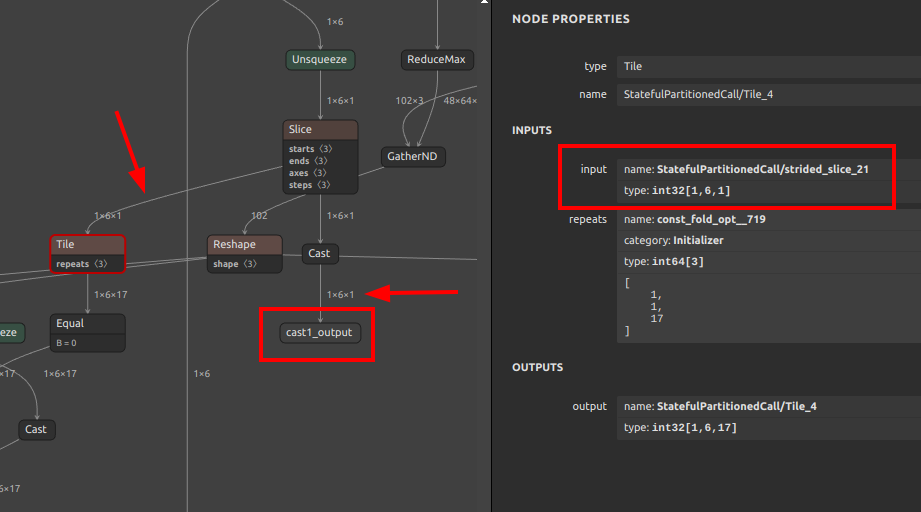
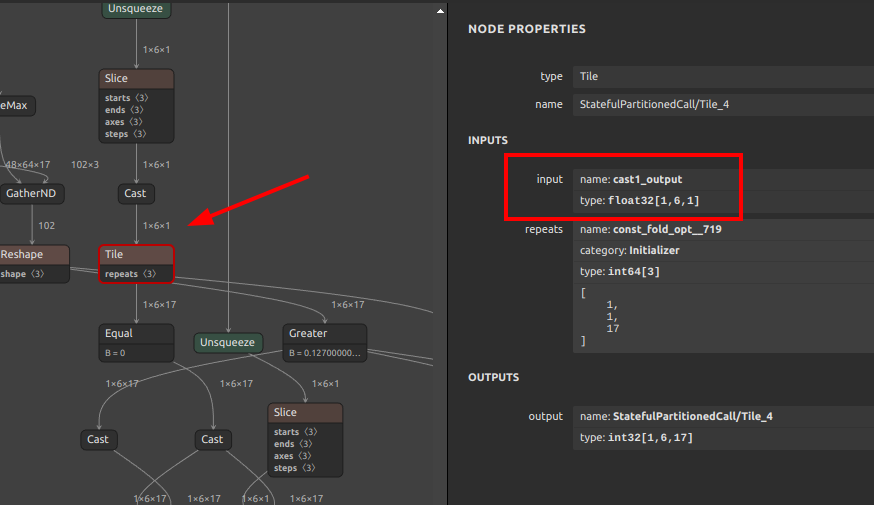
$ svs4onnx \
--input_onnx_file_path movenet_multipose_lightning_192x256_nopost_tmp1.onnx \
--from_output_variable_name "cast1_output" \
--to_input_variable_name "StatefulPartitionedCall/strided_slice_21" \
--output_onnx_file_path movenet_multipose_lightning_192x256_nopost_tmp2.onnx
Before
After
7. Reference
- https://github.com/onnx/onnx/blob/main/docs/Operators.md
- https://docs.nvidia.com/deeplearning/tensorrt/onnx-graphsurgeon/docs/index.html
- https://github.com/NVIDIA/TensorRT/tree/main/tools/onnx-graphsurgeon
- https://github.com/PINTO0309/simple-onnx-processing-tools
- https://github.com/PINTO0309/PINTO_model_zoo
8. Issues
https://github.com/PINTO0309/simple-onnx-processing-tools/issues
1 maintainer

Download files
Download the file for your platform. If you're not sure which to choose, learn more about installing packages.
Source Distribution
svs4onnx-1.0.0.tar.gz
(5.6 kB
view details)
Built Distribution
Filter files by name, interpreter, ABI, and platform.
If you're not sure about the file name format, learn more about wheel file names.
Copy a direct link to the current filters
File details
Details for the file svs4onnx-1.0.0.tar.gz.
File metadata
- Download URL: svs4onnx-1.0.0.tar.gz
- Upload date:
- Size: 5.6 kB
- Tags: Source
- Uploaded using Trusted Publishing? No
- Uploaded via:
twine/4.0.1 CPython/3.9.14
File hashes
| Algorithm | Hash digest | |
|---|---|---|
| SHA256 |
62f771a5b85b4f03bd06e116c0b16c454ba2e15333ace8afc434df2718a3ee10
|
|
| MD5 |
6ff0f3b6c87199cc979b481ac6907779
|
|
| BLAKE2b-256 |
5d5815784d52fcdffbdebe32899a7856195430434e3740aeb22d01c877e276c5
|
File details
Details for the file svs4onnx-1.0.0-py3-none-any.whl.
File metadata
- Download URL: svs4onnx-1.0.0-py3-none-any.whl
- Upload date:
- Size: 6.3 kB
- Tags: Python 3
- Uploaded using Trusted Publishing? No
- Uploaded via:
twine/4.0.1 CPython/3.9.14
File hashes
| Algorithm | Hash digest | |
|---|---|---|
| SHA256 |
55cb7138866ca9a64931cc80068c6a1e0e7dce14ea8d27b125e0fa220282e05b
|
|
| MD5 |
5b3c4be9d4350370f4b88c6e76bf3075
|
|
| BLAKE2b-256 |
bcb54b32c0151c0846b32bab8218223c0f1776ab5ecf263abdf350e237b32d1f
|













