
Turn private notes into local knowledge packs and synthesized wikis
Verified details
These details have been verified by PyPIProject links
GitHub Statistics
Maintainers

Project description
Synto





Turn your raw notes into a self-improving, interlinked wiki — powered by a local LLM.
You drop Markdown notes in a folder. Synto reads them with a local LLM, extracts the concepts they contain, and writes one cross-linked article per concept. Every note you add makes the wiki richer. Every article stays on your machine unless you decide otherwise.
After setup (~5 minutes) you have: a structured wiki built from your notes, a queryable knowledge base that works without embeddings or a vector database, and an agent-ready pack that Claude, Cursor, or any file-aware AI can install and reason over.
[!NOTE] Synto succeeds obsidian-llm-wiki-local (608 ★, 9k+ downloads) — same proven local pipeline, redesigned for distributable knowledge packs.
The idea
Andrej Karpathy described it as the LLM Wiki: a personal knowledge base where the model doesn't just store what you tell it — it synthesizes, cross-references, and keeps everything current. You add raw material; it does the bookkeeping.
The key insight: treat your notes as source material, not as the final artifact. A raw note is a claim about the world. A wiki article is the compiled, cross-linked explanation of a concept derived from many notes. The LLM does the compilation step.
You write raw notes  →  LLM extracts concepts  →  Wiki articles grow  →  Agent-ready pack
      raw/                    (automatic)              wiki/                   pack/
  quantum.md           "Qubit", "Superposition"     Qubit.md
  ml-basics.md         "Neural Net", "SGD"          Superposition.md ←── [[wikilinks]]
  physics.md           "Qubit"  ← same concept      Neural_Network.md
                              │
                     Duplicates merge, not multiply.
                     One article per concept, fed by all relevant notes.
Unlike a chatbot that forgets, the wiki persists and compounds. Every note you add and every draft you review makes it smarter.
How it works
Four stages. Two LLM tiers.
┌────────────────────────────────────────────────────────────────────────┐
│  Stage 1: Import  Stage 2: Ingest  Stage 3: Compile  Stage 4: Export  │
│                                                                        │
│  synto add ─────┐                                                      │
│  (PDF/md/txt)   ├─ raw/*.md ──────► wiki/.drafts/ ──────► pack/       │
│  .synto/sources/┘  fast model       heavy model      agent-ready      │
│                    (4B params)      (14B+ params)     directory        │
│                                                                        │
│  archives:         extracts:        writes:           produces:       │
│  · original file   · concepts       · one article     · INDEX.json    │
│  · segments        · summaries        per concept     · AGENTS.md     │
│  · source type     · relationships  · cross-linked    · CLAUDE.md     │
│                    · language         [[wikilinks]]   · articles/     │
│                                     · source-type                     │
│                                       prompt                          │
└────────────────────────────────────────────────────────────────────────┘
Why two LLM tiers? Analysis is pattern-matching — a 4B model running locally can extract "this note is about Qubit, Superposition, and Entanglement" reliably and fast. Writing a coherent, cross-linked article requires more reasoning — a 14B+ model does this well. Splitting the work keeps the pipeline cheap and fast on consumer hardware.
Your vault layout after synto init:
~/my-wiki/
  raw/              ← drop your notes here (Synto never modifies these)
  wiki/             ← published articles (Obsidian-compatible Markdown)
    .drafts/        ← LLM-generated articles waiting for your review
    sources/        ← per-note source summary pages
    queries/        ← saved Q&A sessions
    synthesis/      ← synthesized answers published as wiki pages
  .synto/
    state.db        ← SQLite: note lifecycle, concept registry, metrics
    sources/        ← originals archived via synto add (PDF, md, txt)
  synto.toml        ← vault config (provider, models, pipeline settings)
  pack/             ← agent-ready export (created by synto pack export)
Key mechanisms
Incremental compilation. Change one note — only the articles derived from that note recompile. A vault with 200 notes doesn't restart from scratch on every run.
Rejection feedback loop. Reject a draft and explain why. The reason is stored and injected into the LLM prompt the next time that concept compiles, so the model can address it. Five rejections without an approval auto-blocks the concept until you re-enable it.
synto reject wiki/.drafts/Qubit.md --feedback "Too abstract, needs a hardware analogy"
# next compile: prompt includes your feedback → better draft
Confidence scores. Each compiled draft gets a confidence score (0–1). Approve selectively or set a threshold — drafts below it stay in .drafts/ for manual review.
synto approve --min-confidence 0.8 # hold back uncertain drafts
Hand-edit protection. Edit a published article in Obsidian or any editor. Synto tracks a SHA-256 content hash and detects your change on the next run — your edits are never overwritten by a recompile.
No embeddings, no vector database. synto query routes questions to relevant articles using INDEX.json. It works on any machine without a GPU, FAISS, or Chroma.
Source-type analysis. Imported documents carry a type — notes, textbook, paper,
spec, api_docs, web_article, corp_docs, transcript, or unknown_text. During ingest
analysis the fast model receives a matching system prompt: a paper prompt extracts
abstract/methods/results structure; an api_docs prompt preserves parameter names; a
textbook prompt follows chapter/definition flow. If --type is omitted, Synto infers it
from the file extension.
Use cases
Architectural reference from a textbook
Dobryakov took Tanenbaum's Distributed Systems, compiled it into a cross-linked wiki, and installed it into Claude/Cursor. Instead of generic suggestions, the AI started reasoning from established distributed systems principles — recommending consistent hashing and two-phase commit instead of "use a shared database." Any technical book, spec, or documentation set becomes a live context layer for your AI tools.
Karpathy's LLM Wiki
Andrej Karpathy's neural-network series is 20 hours of dense, high-quality material. Compile the transcripts and blog posts into a Synto pack and the content becomes queryable: any agent in your project can explain backpropagation, walk through the attention mechanism, or cite a specific lecture — from the source, not from model weights.
Your own research notes
Works today with Markdown. Drop notes in raw/, run synto run, and get a cross-linked wiki exported as an agent-ready pack. Expose it via synto serve as a local MCP server, or ship the pack directory for any file-aware agent to use.
Features
Incremental compiles. Each concept gets its own article. When you change a source note, only the articles tied to that note recompile — not the whole vault.
Rejection feedback. Reject a draft and attach a reason. The next compile of that concept includes your feedback in the prompt. Five rejections without an approval auto-blocks the concept until you run synto unblock.
Hand-edit protection. Edit any published article directly. Synto tracks a content hash — if the file changed since last compile, it won't overwrite your work.
Interactive review. synto review opens a terminal UI per draft: read the article, approve, reject with feedback, launch your editor, or diff against the previous version. Full control over what enters your wiki.
File watcher. synto watch runs in the background and processes anything you drop into raw/ automatically. Ingest and compile happen while you keep writing.
Query and synthesize. synto query "what is X?" answers from your published wiki without embeddings or a vector database. Add --synthesize to save the answer as a permanent wiki page with source citations and hand-edit protection.
Pack export. synto pack export --target agents produces a portable directory any file-aware agent can read: articles, INDEX.json for fast concept lookup, source provenance, and agent-readable entry points.
MCP server. synto serve exposes your wiki as a local MCP server with three tools: list_articles, read_article, and find_concept. Wire it into Claude Code, Cursor, or any MCP-compatible client in one command.
Self-maintenance. synto maintain repairs broken wikilinks and creates stubs for missing targets. synto lint reports orphans, stale articles, and missing frontmatter.
A/B model comparison. synto compare runs your query set against two different models in isolated copies of your vault so you can evaluate a model switch without touching anything live.
Quality evaluation. synto eval scores your wiki offline: concept coverage, citation support, link resolution, INDEX.json validity. Run it before a pack export or in CI.
Diagnostics. synto doctor checks your configuration, provider connectivity, and vault integrity — start here when something isn't working.
Multi-language. Each note's language is auto-detected at ingest. Articles are written in that language. No hard-coded word lists or language config required.
Git-aware. Every automatic operation commits with a [synto] prefix. synto undo reverts the last N auto-commits. Raw notes are never modified.
Source import. synto add imports PDFs, Markdown, and text files as tracked source
documents. PDFs are segmented into heading-aware chunks, archived under .synto/sources/,
and written back as canonical raw/*.md notes for the normal ingest flow. Pick the right
type for your document to get the matching ingest-analysis prompt:
| Type | Use for |
|---|---|
notes |
Your own notes, meeting minutes, personal writing |
textbook |
Educational material with chapters and exercises |
paper |
Academic papers (abstract / methods / results) |
spec |
Technical specifications, RFCs, standards |
api_docs |
API references, SDK docs, OpenAPI specs |
web_article |
Blog posts, news articles, web clips |
corp_docs |
Internal wikis, runbooks, design documents |
transcript |
Video/audio transcripts, interview notes |
unknown_text |
Fallback when text doesn't fit a richer source type |
Compile lineage. Every compiled article records which source notes and compile run it
came from. synto trace article <name> prints the full history: timestamp, model,
contributing sources.
LLM response cache. Identical prompts reuse cached responses from a local SQLite
table instead of hitting the model. synto maintain --clear-cache flushes it;
--older-than N prunes entries older than N days.
Pack extension flag. synto add --extend-pack NAME is reserved for future pack-scoped
imports. In v0.2.0 it is intentionally a safe no-op and does not mutate synto.toml.
Install
Requires Python 3.11+ and an LLM provider (Ollama recommended for local use).
pip install synto
# or
uv tool install synto
For MCP server support:
pip install "synto[mcp]"
Quick start
1. Pull models
# Install Ollama: https://ollama.com/download
ollama pull gemma4:e4b      # fast model — analysis and concept extraction
ollama pull qwen2.5:14b     # heavy model — article writing
Minimal setup: pull only
gemma4:e4band assign it to both fast and heavy in the wizard below. Enough to get started.
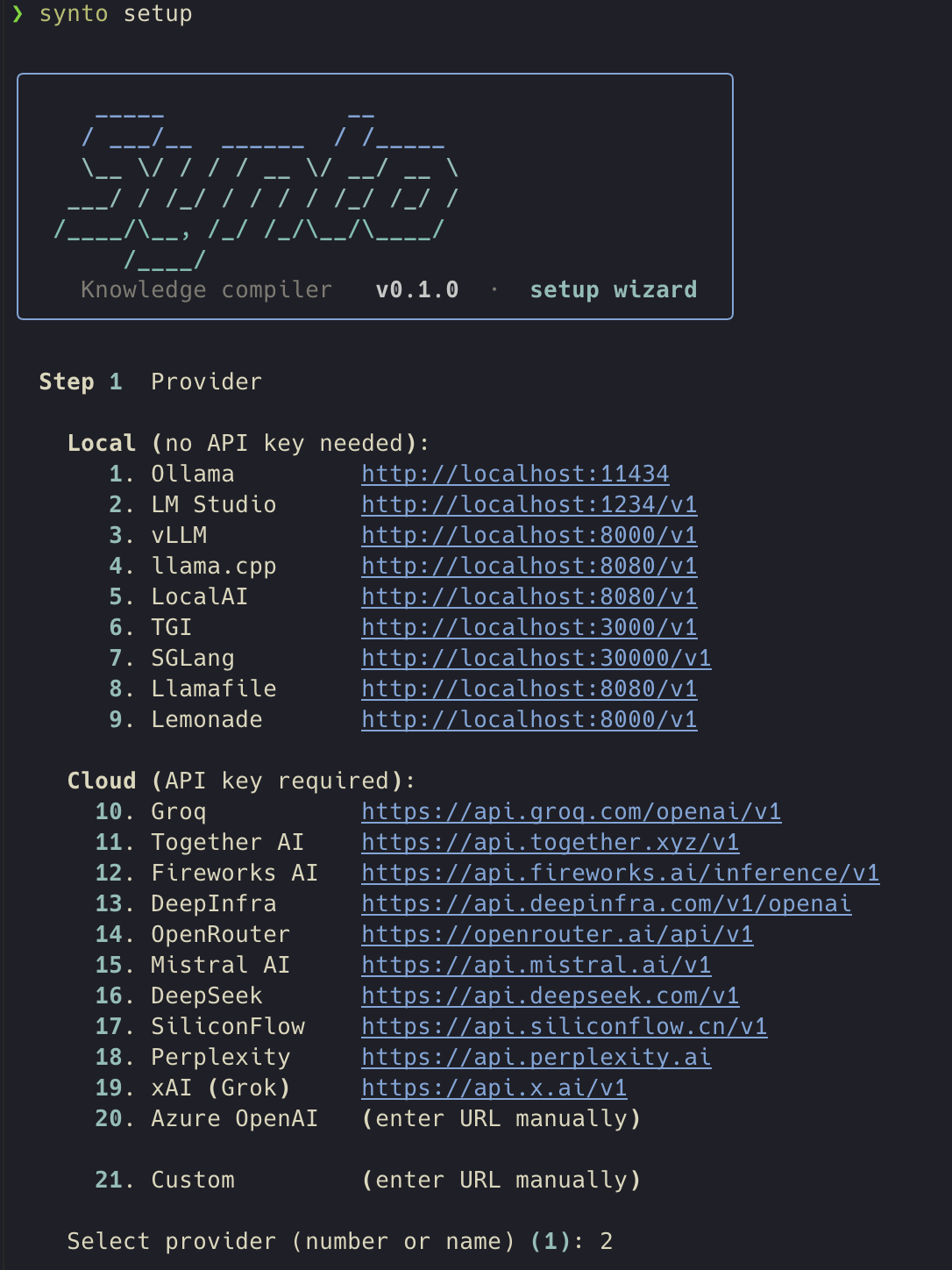
2. Run the setup wizard
synto setup
An interactive wizard selects your provider, configures the endpoint, picks models, and optionally sets a default vault. Takes about 30 seconds.
╭──────────────────────────────────────────────╮
│         synto  ·  setup                      │
╰──────────────────────────────────────────────╯

  Step 1  Provider

    Local (no API key needed):
      1. Ollama         http://localhost:11434  [default]
      2. LM Studio      http://localhost:1234/v1
      3. vLLM           http://localhost:8000/v1
      ...
    Cloud (API key required):
      9. Groq           https://api.groq.com/openai/v1
     10. Together AI    https://api.together.xyz/v1
      ...

    Select provider [1]: _

  Step 2  Fast model  (analysis · 3–8B recommended)
    1  gemma4:e4b    2  phi4-mini    3  other
    Select [1]: _

  Step 3  Heavy model  (writing · 14B+ recommended)
    1  qwen2.5:14b   2  same as fast   3  other
    Select [1]: _
Settings are saved to ~/.config/synto/config.toml. API keys are stored only in this user-private file, never inside your vault.
3. Create a vault
synto init ~/my-wiki
Creates the folder structure and a synto.toml pre-filled with your wizard settings.
4. Add notes and sources
Drop any .md files into ~/my-wiki/raw/. Web clips, book notes, meeting notes, transcripts — anything.
~/my-wiki/raw/
  quantum-computing.md
  ml-fundamentals.md
  distributed-systems-chapter3.md
To import a PDF or other structured document:
synto add paper.pdf --type paper --vault ~/my-wiki
synto add textbook_chapter.pdf --type textbook --vault ~/my-wiki
synto add api-reference.md --type api_docs --vault ~/my-wiki
Use --type to select the matching ingest-analysis prompt (see the table in Features).
If omitted, the type is inferred from the file extension.
synto add --force re-imports an existing source in place. --extend-pack is reserved for
future pack integration and currently reports a safe no-op.
5. Run the pipeline
synto run --vault ~/my-wiki
Ingest + compile. Drafts appear in wiki/.drafts/. Then review and publish:
synto review --vault ~/my-wiki          # inspect each draft: approve / reject / edit
# or
synto approve --all --vault ~/my-wiki   # publish everything at once
One-command flow (skip review):
synto run --auto-approve --vault ~/my-wiki
Set-it-and-forget-it (auto-process every time you save a note):
synto watch --vault ~/my-wiki
Query your wiki once articles are published:
synto query "what is consistent hashing?" --vault ~/my-wiki
synto query "explain backpropagation" --vault ~/my-wiki --synthesize
Expose as MCP server (Claude Code, Cursor, any MCP client):
synto serve --vault ~/my-wiki
Provider support
| Local (offline, no API key) | Cloud (API key required) |
|---|---|
| Ollama | Groq |
| LM Studio | Together AI |
| vLLM | Fireworks AI |
| llama.cpp | DeepInfra |
| LocalAI | OpenRouter |
| TGI | Mistral AI |
| SGLang | DeepSeek |
| Llamafile | SiliconFlow |
| Lemonade | Perplexity |
| xAI (Grok) | |
| Azure OpenAI | |
| Custom OpenAI-compatible |
Any OpenAI-compatible endpoint works. Use synto setup to configure interactively, or edit ~/.config/synto/config.toml directly.
What ships now
- Full ingest → compile → approve pipeline; supports Markdown notes and Obsidian vaults
synto pack export --target agents— portable knowledge pack withINDEX.jsonand agent metadatasynto serve— read-only MCP server (list_articles,read_article,find_concept)synto query— index-routed Q&A with optional synthesis towiki/synthesis/synto review— interactive draft review: approve, reject, edit, or diff before publishingsynto watch— file watcher: auto-ingest and compile on every savesynto maintain— wiki health check, stub creation, orphan cleanupsynto eval— offline structural evaluation (coverage, citation support, link resolution)synto compare— A/B model comparison without touching your vaultsynto doctor— configuration and connectivity diagnostics- Multi-language: notes are ingested and compiled in their source language
- 20+ LLM providers supported via OpenAI-compatible API
synto add SOURCE— import PDF, Markdown, or text files as tracked source documents; PDFs are segmented automatically into heading-aware chunks and written back as canonical raw notes- Source-type prompts: built-in templates for
notes,textbook,paper,spec,api_docs,web_article,corp_docs,transcript, plusunknown_textfallback, select the optimal ingest strategy per document type - Compile lineage: every article records its source notes and compile run;
synto trace article <name>shows the full history - LLM response cache: identical prompts reuse cached responses;
synto maintain --clear-cachemanages it
What's in a pack
pack/
  articles/           one Markdown file per concept
  index/
    INDEX.json        machine-readable index with stable article IDs
  agent/
    manifest.json     capabilities and pack metadata
    concepts.json     concept registry with aliases
    sources.json      source provenance
  AGENTS.md           agent-readable entrypoint and usage guide
  CLAUDE.md           Claude Code context file
Any file-aware agent can read the articles directly. INDEX.json enables fast concept lookup without a database. synto serve exposes list_articles, read_article, and find_concept as MCP tools.
Data & Privacy
- Local by default. Ollama and LM Studio process all content on your machine — notes never leave it.
- Cloud providers. If you configure a cloud provider, note content and wiki text are sent to that service. Review their privacy policy before use.
- No remote analytics. Synto does not send usage data anywhere. Local runtime and cost metrics stay in your vault database.
- Pack exports. Exported packs include raw notes, sources, wiki articles, queries, and synthesis by default. Review your vault before sharing a pack.
- API keys. Stored in
~/.config/synto/config.toml(user-owned, not inside the vault). Never commit that file.
Requirements
- Python 3.11+
- An LLM provider: Ollama (local), LM Studio, or any OpenAI-compatible endpoint
Minimum recommended: a 4B model for ingest (e.g. Gemma 4 gemma4:e4b) and a 14B+ model for compilation (e.g. Qwen 2.5 14B qwen2.5:14b). This is the ground-floor setup for quality output — works offline on 16 GB RAM. A single 4B model for both stages works if you're just getting started.
Migrate from obsidian-llm-wiki-local
Existing obsidian-llm-wiki-local vaults must be migrated first. Run migrate-olw to convert the vault layout:
synto migrate-olw --vault ~/my-old-vault
Copies wiki.toml → synto.toml and .olw/ → .synto/. Notes and articles are untouched. Old files are preserved — delete them once you've verified everything works.
Project details
Verified details
These details have been verified by PyPIProject links
GitHub Statistics
Maintainers
Release history Release notifications | RSS feed


Download files
Download the file for your platform. If you're not sure which to choose, learn more about installing packages.
Source Distribution
Built Distribution
Filter files by name, interpreter, ABI, and platform.
If you're not sure about the file name format, learn more about wheel file names.
Copy a direct link to the current filters
File details
Details for the file synto-0.2.0.tar.gz.
File metadata
- Download URL: synto-0.2.0.tar.gz
- Upload date:
- Size: 672.0 kB
- Tags: Source
- Uploaded using Trusted Publishing? Yes
- Uploaded via: twine/6.1.0 CPython/3.13.12
File hashes
| Algorithm | Hash digest | |
|---|---|---|
| SHA256 |
dd8150f3673d7f8792ce186d97109ebc8469b095c8200f50acad196a55969852
|
|
| MD5 |
b14b6d9baada94e43cdc53fe8c6263c6
|
|
| BLAKE2b-256 |
5600c42d957e01b3e5e1af80fdd0c7625982d87e989cfc377654149f75e3902d
|
Provenance
The following attestation bundles were made for synto-0.2.0.tar.gz:
Publisher:
release.yml on kytmanov/synto
-
Statement:
-
Statement type:
https://in-toto.io/Statement/v1 -
Predicate type:
https://docs.pypi.org/attestations/publish/v1 -
Subject name:
synto-0.2.0.tar.gz -
Subject digest:
dd8150f3673d7f8792ce186d97109ebc8469b095c8200f50acad196a55969852 - Sigstore transparency entry: 1574492616
- Sigstore integration time:
-
Permalink:
kytmanov/synto@6bbbd90f8df94a29b8c80283dea9e7691309a012 -
Branch / Tag:
refs/tags/v0.2.0 - Owner: https://github.com/kytmanov
-
Access:
public
-
Token Issuer:
https://token.actions.githubusercontent.com -
Runner Environment:
github-hosted -
Publication workflow:
release.yml@6bbbd90f8df94a29b8c80283dea9e7691309a012 -
Trigger Event:
push
-
Statement type:
File details
Details for the file synto-0.2.0-py3-none-any.whl.
File metadata
- Download URL: synto-0.2.0-py3-none-any.whl
- Upload date:
- Size: 197.8 kB
- Tags: Python 3
- Uploaded using Trusted Publishing? Yes
- Uploaded via: twine/6.1.0 CPython/3.13.12
File hashes
| Algorithm | Hash digest | |
|---|---|---|
| SHA256 |
bb7b7a41a046fcef36d1ee7b8c96332e9364e0d15ee79103352451e7b509301d
|
|
| MD5 |
83ea28b21978269d34f25da7c427a0f3
|
|
| BLAKE2b-256 |
3111384e2d909c326b1e37f5dcddf2df63d5fd5eb21e8e513a3967e039c8c535
|
Provenance
The following attestation bundles were made for synto-0.2.0-py3-none-any.whl:
Publisher:
release.yml on kytmanov/synto
-
Statement:
-
Statement type:
https://in-toto.io/Statement/v1 -
Predicate type:
https://docs.pypi.org/attestations/publish/v1 -
Subject name:
synto-0.2.0-py3-none-any.whl -
Subject digest:
bb7b7a41a046fcef36d1ee7b8c96332e9364e0d15ee79103352451e7b509301d - Sigstore transparency entry: 1574492636
- Sigstore integration time:
-
Permalink:
kytmanov/synto@6bbbd90f8df94a29b8c80283dea9e7691309a012 -
Branch / Tag:
refs/tags/v0.2.0 - Owner: https://github.com/kytmanov
-
Access:
public
-
Token Issuer:
https://token.actions.githubusercontent.com -
Runner Environment:
github-hosted -
Publication workflow:
release.yml@6bbbd90f8df94a29b8c80283dea9e7691309a012 -
Trigger Event:
push
-
Statement type:






