
Tanto
Overview
To monitor the servers with Shinken, Nagios or Icinga, system administrators usually configure active checks of the monitored servers. It means the monitoring system must have a direct network access to the monitored server.
With Tanto, this model is reverted, it does passive checks of your monitored servers. You don’t need to open an access from your monitoring system to the monitored servers.
The main use case of this tool is to monitor distant servers in a complex network where you can’t connect directly for security reasons, typically with a large client. You need only to open NSCA or HTTP(S) port from the monitored server to the monitoring system.
Moreover, if you don’t have a monitoring server, Tanto has a standalone mode. You will receive alerts via e-mail directly.
Technical details
The behaviour of this tool is simple:
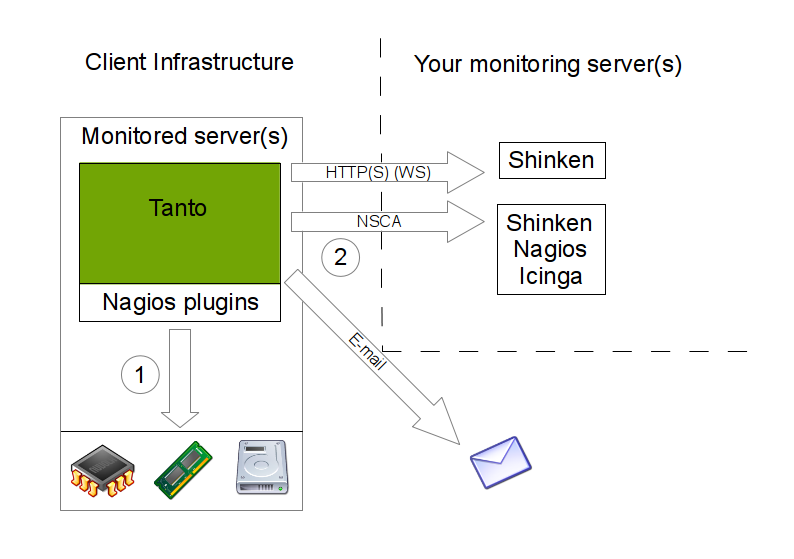
The program is started by cron.
It retrieves monitoring data (1) from nagios-plugins.
Finally, it pushes the data (2) via NSCA (Shinken, Nagios, Icinga), HTTP(S) (Shinken) to the monitoring server or via SMTP.
(WS-Shinken only) If the connexion between the monitored server and the monitoring system is broken, data is kept in a cache file, to be re-send the next run.
Warning: WS-Shinken support isn’t finished.
How to install ?
You install as you wish, via sources, pip or Debian package. If you use another distribution, you can use the Python package or contribute to publish a package for your distribution.
Debian
We provide a Debian package source in the debian/ folder.
Python package
pip install tanto
Usage
Default config files location: /etc/tanto/
Default cron file location: /etc/cron.d/
Configure the nagios plugins you want to use in inputs/nagios_plugins.cfg:
Define the nagios plugins path with the path option in [default_settings] section.
The name of each section is the nagios plugin command.
Each setting is a CLI option of the nagios plugin.
Adapt the checks frequency in: /etc/cron.d/tanto.
Standalone mode
Configure e-mail notifications in outputs/email.cfg.
With a monitoring server
CLI options
Launch: tanto –help You can override the location of each config file with a CLI parameter.
Debug
By default, it uses cron syslog and console for the logs. You can customize this behaviour in logging.ini: http://docs.python.org/library/logging.config.html#configuration-file-format
Support
Community support is provided via Github: https://github.com/Eyepea/tanto/issues
You must provide the error log with your issue.
If you need professional support, please contact Eyepea: http://www.eyepea.eu/
For general questions or contributions, you can contact me via my Github acccount: https://github.com/GMLudo
Special thanks
The Shinken community in general, and Jean Gabès in particular for his help and support.
Release History
1.1 (2014-05-12)
Add e-mail notifications for simple infrastructures without a monitoring server.
Move config files in input/ and output/ to be easier to understand.
Reduce command line arguments for config files.
1.0 (2014-05-06)
Change nagios_plugins.cfg syntax to give directly the command line to launch.
Add servers list parameter in nagios_plugins.cfg to define the servers list that must receive configuration.
Logging improvements
Rename eyepea_monitoring_agent to Tanto, a short blade in the same family as Shinken.
0.9 (2012-08-14)
First public release.
1 maintainer

Metadata
1 maintainer
Release files for tanto 1.1
For a detailed explanation of source distributions (sdists) and built distributions (wheels), please see the package formats documentation.
Source distribution (sdist)
| File | Size | Uploaded | Provenance | Actions |
|---|---|---|---|---|
| tanto-1.1.tar.gz | 26.1 kB | Without provenance | Details for tanto-1.1.tar.gz |
Release files / tanto-1.1.tar.gz
| Download URL | tanto-1.1.tar.gz |
|---|---|
| Size | 26.1 kB |
| Tags | Source |
|
SHA-256 checksum How to use checksums |
c999fe241eaf9dcd402c2fb34ba0cb4f3ba6d8fe9b5f42f384d950072722c919
|
|
BLAKE2b-256 checksum How to use checksums |
66e929b47a6f26c5257d569ae5fd1c20f740ce914b3dff097dfb79fda0876871
|
| Upload date | |
|
Uploaded using Trusted Publishing? What is trusted publishing? |
No |
Security for tanto 1.1
Provenance
Provenance describes where a file came from. On PyPI, provenance is shared via attestations, which provide a verifiable record of the build or publishing details. View details, limitations and caveats.
No provenance found
None of the files in this release were uploaded with provenance metadata.
A note on package security
PyPI is a repository for distributing packages, not a service for auditing them. While third-party security researchers and our staff do their best to detect and remove malicious packages, PyPI cannot guarantee the quality, security or suitability of any given package.
To learn more about protecting yourself from malicious actors, visit our package security documentation.













