
README Tasks Collector




Read The Docs
You can find the documentation including generated API docs at https://tasks-collector.readthedocs.io/en/latest/
Background
The purpose with this project was to address the headache of collecting and organizing the tasks are/have worked with. These tasks spread across different platforms such as Outlook, Jira, Trello and other platforms and felt like I had to structure and store these into a database and being able to create some charts based on this.
Requirements
At this moment this application has yet only been tested from MacOS High Sierra and above. Some parts of the application related to Outlook (trough AppleScript) and CopyQ only available to MacOS.
Introduction
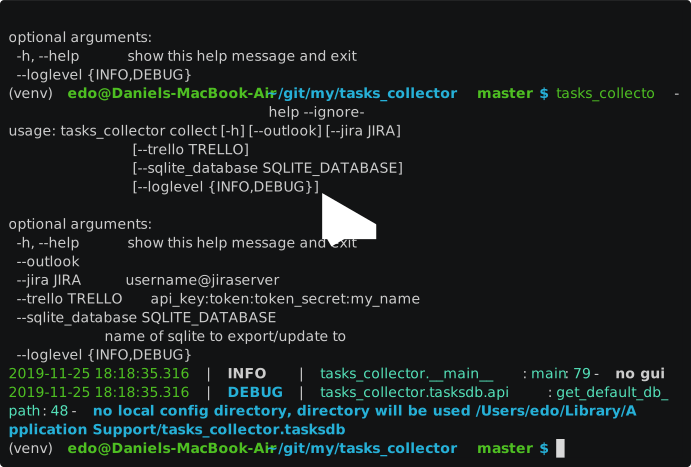
This below is a brief run through how one could use this tool from your terminal and how you can use this package in your own Python applications.
Installation
bash-4.4$ python -m venv venv
bash-4.4$ source venv/bin/activate
(venv) bash-4.4$ pip install tasks-collector
Usage graphical interface
The default entry-point for this application is GUI (based on the great module Gooey) to simplify building a window presenting all options.
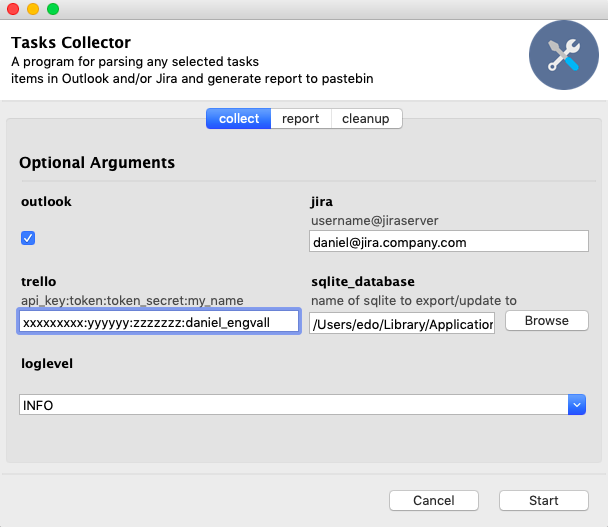
Usage command-line
To use command-line you need always supply the --ignore-gooey flag do disable GUI (graphical interface) In general you only need to pass the sqlite database where you'd like to store it together with the flag depending which source to use
$ tasks_collector collect --help --ignore-gooey
usage: tasks_collector collect [-h] [--outlook] [--jira JIRA]
                               [--trello TRELLO]
                               [--sqlite_database SQLITE_DATABASE]
                               [--loglevel {INFO,DEBUG}]

optional arguments:
  -h, --help            show this help message and exit
  --outlook
  --jira JIRA           username@jiraserver
  --trello TRELLO       api_key:token:token_secret:my_name
  --sqlite_database SQLITE_DATABASE
                        name of sqlite to export/update to
  --loglevel {INFO,DEBUG}
Collect
Outlook
When passing --outlook argument you just need to make sure you've selected all Outlook-tasks including those completed. While using Outlook you can add the following naming convention of Outlooks "Categories"
(client1)
(client2)
(client3)
...
for giving you possibility to assign clients associated with task.
{project1}
{project2}
{project3}
...
for assigning the task specific project.
Jira
The script will use the username@jiraserver supplied to detect all tasks that are assigned to you and collect their most recent details into the database. Name of the board will become the representation of "client"
Trello
The script will use an argument structured as 'api-key:token:token_secret:my_name' You will get api-key, token and token secret from https://trello.com/app-key The my_name is the name as your logged in user has, this is to be able to identify "your" tasks amongst others in boards. The board name will be the representation of "client"
Credentials
Currently use keyring to allow you to store credentials locally not being exposed. First time you run it will prompt you for password.
Report
Install CopyQ according to https://hluk.github.io/CopyQ/ if you like to be able to export your report to your clipboard using the --copyq flag. But you can also get the graph when using the --show
$ tasks_collector report --help --ignore-gooey
2019-11-25 18:46:09.199 | INFO     | tasks_collector.__main__:main:79 - no gui
2019-11-25 18:46:09.200 | DEBUG    | tasks_collector.tasksdb.api:get_default_db_path:48 - no local config directory, directory will be used /Users/edo/Library/Application Support/tasks_collector.tasksdb
usage: tasks_collector report [-h] [--days number_of_days_in_past]
                              [--sqlite_database SQLITE_DATABASE] [--copyq]
                              [--show]
                              [--default_client name of default client]
                              [--loglevel {INFO,DEBUG}]

optional arguments:
  -h, --help            show this help message and exit
  --days number_of_days_in_past
                        Number of days to cover in the report
  --sqlite_database SQLITE_DATABASE
                        name of sqlite to export/update to
  --copyq               paste output as MIME to pastebin, good for sending by
                        e-mail
  --show                show gantt image
  --default_client name of default client
  --loglevel {INFO,DEBUG}
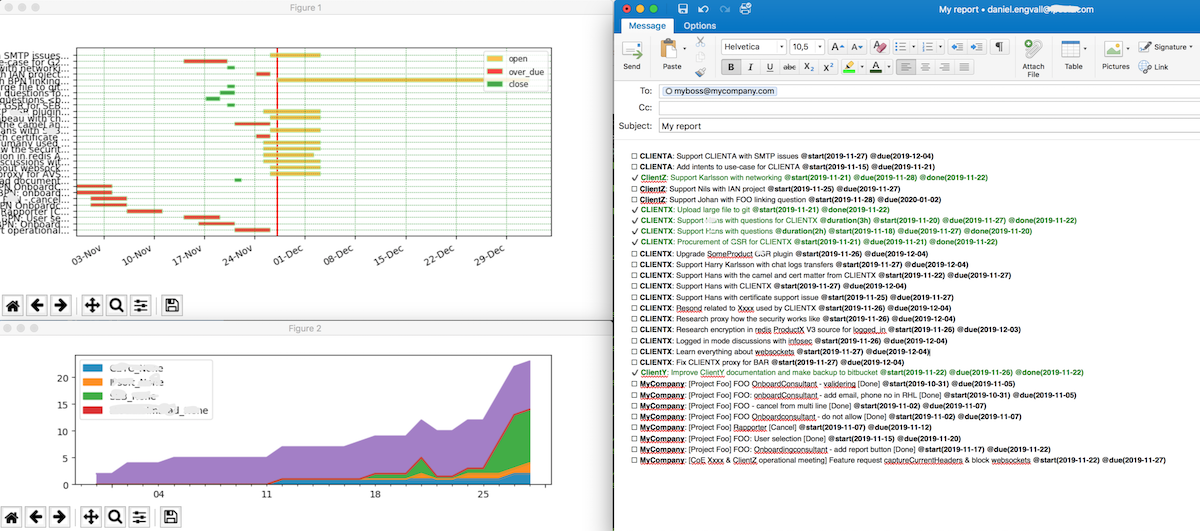
A sample of the output after pasting into e.g. a email for you manager might look like this
Cleanup
This is useful if for example ownership changes of tickets in Jira end you'd like to close them in your report.
$ tasks_collector cleanup --help --ignore-gooey
usage: tasks_collector cleanup [-h] [--before DAYS]
                               [--sqlite_database SQLITE_DATABASE]
                               [--loglevel {INFO,DEBUG}]

optional arguments:
  -h, --help            show this help message and exit
  --before DAYS         tickets before this number of days back to be closed
  --sqlite_database SQLITE_DATABASE
                        name of sqlite to export/update to
  --loglevel {INFO,DEBUG}
Create sphinx documentation
To create documentation in docs/build/html
$ cd docs
$ sphinx-apidoc -o build/ ../tasks_collector
$ make html
Test the code with coverage
Thanks to tox this has been automated so all that you need to run "tox" from projects root directory e.g.
$ tox
...
py3.8.0 run-test: commands[0] | pytest --cov=tasks_collector tests/
...........................                                                                                                                                                                                                            [100%]
---------- coverage: platform darwin, python 3.8.0-final-0 -----------
Name                                             Stmts   Miss  Cover
--------------------------------------------------------------------
tasks_collector/__init__.py                          1      0   100%
tasks_collector/reportgenerator/__init__.py          0      0   100%
tasks_collector/reportgenerator/api.py             234    117    50%
tasks_collector/tasksconverter/__init__.py           0      0   100%
tasks_collector/tasksconverter/api.py              100      6    94%
tasks_collector/tasksdb/__init__.py                  0      0   100%
tasks_collector/tasksdb/api.py                      80      8    90%
tasks_collector/tasksscraper/__init__.py             0      0   100%
tasks_collector/tasksscraper/jirascraper.py         17      3    82%
tasks_collector/tasksscraper/outlookscraper.py      43      1    98%
tasks_collector/tasksscraper/trelloscraper.py       37     13    65%
--------------------------------------------------------------------
TOTAL                                              512    148    71%

29 passed, 4 warnings in 17.32s
______________________________________________________________________________________________________________________________________________________________________________ summary ______________________________________________________________________________________________________________________________________________________________________________
  py3.8.0: commands succeeded
  congratulations :)
API documentation
Could be found at https://tasks-collector.readthedocs.io
Troubleshooting
I get the following message when I run tasks_collector in GUI (not --ignore-gooey) mode
This program needs access to the screen. Please run with a
Framework build of python, and only when you are logged in
on the main display of your Mac.
Reasons for this happening on MacOS is that your built of Python3 does not include "framework" (e.g. when you installed through homebrew) rather than from https://www.python.org/downloads/mac-osx/
One way around this if you'd be using pyenv (one of my favourites) found at https://github.com/pyenv/pyenv is to install Python using the following
env PYTHON_CONFIGURE_OPTS="--enable-framework=$(pyenv root)/versions/3.8.0 CC=clang --enable-unicode --with-threads" pyenv install 3.8.0 -v
Contact
You can easiest contact me by my email daniel@engvalls.eu or my linked-in profile https://www.linkedin.com/in/danielengvall/
1 maintainer

Metadata
1 maintainer
Release files for tasks-collector 0.9.7
For a detailed explanation of source distributions (sdists) and built distributions (wheels), please see the package formats documentation.
Source distribution (sdist)
| File | Size | Uploaded | |
|---|---|---|---|
| tasks_collector-0.9.7.tar.gz | 24.6 kB | Details |
Built distribution (wheel)
| File | Interpreter | ABI | Platform | Reset |
|---|---|---|---|---|
| tasks_collector-0.9.7-py3-none-any.whl | Python 3 | none | any | Details |
Total release size: 50.9 kB
Release files / tasks_collector-0.9.7.tar.gz
| Download URL | tasks_collector-0.9.7.tar.gz |
|---|---|
| Size | 24.6 kB |
| Tags | Source |
|
SHA-256 checksum How to use checksums |
2ce8d34fd7150b56baa8b2c34c11603ce40cb55f6cff8e821fe4d39bd57299ee
|
|
BLAKE2b-256 checksum How to use checksums |
17e04ff89f9d9d067709c2d73f1f17d8d20f3716619cc8afc9cc453a5e1d5a56
|
| Upload date | |
|
Uploaded using Trusted Publishing? What is trusted publishing? |
No |
| Uploaded via |
twine/3.2.0 pkginfo/1.5.0.1 requests/2.24.0 setuptools/47.1.0 requests-toolbelt/0.9.1 tqdm/4.50.2 CPython/3.8.5
|
Release files / tasks_collector-0.9.7-py3-none-any.whl
| Download URL | tasks_collector-0.9.7-py3-none-any.whl |
|---|---|
| Size | 26.3 kB |
| Tags | Python 3 |
|
SHA-256 checksum How to use checksums |
ab3777c8987b80ea65ef2d98d228dc48e08cbdc232db236c31acbd9f4581b7bf
|
|
BLAKE2b-256 checksum How to use checksums |
35e5b1a7359bd19f35275545413724a93aae022b77ac0003d4caa00844dd49f0
|
| Upload date | |
|
Uploaded using Trusted Publishing? What is trusted publishing? |
No |
| Uploaded via |
twine/3.2.0 pkginfo/1.5.0.1 requests/2.24.0 setuptools/47.1.0 requests-toolbelt/0.9.1 tqdm/4.50.2 CPython/3.8.5
|














