
Creating Telegram Bots Made Simple

Project description
teleasy 2.0.2
Creating Telegram Bots Made Simple
Table of contents
Example
from teleasy import TelegramBot, UpdateInfo

bot = TelegramBot(<YOUR_TOKEN>)

@bot.on_normal_message
def on_normal_message(chat: ChatInstance):
    chat.print(f"hello {chat.first_name}")

@bot.on_command("/input")
def input_example(chat: ChatInstance):
    color = chat.input("what's your favorite color?")
    chat.print(f"Your favorite color is {color}")

bot.start()
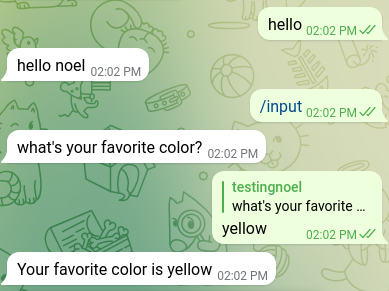
See Examples-Folder for more
Setup
pip install teleasy
pip3 install teleasy
python3 -m pip install teleasy
# Now, you can import the relevant Classes using
from teleasy import TelegramBot, UpdateInfo

# or just do
import teleasy
# and access the classes from the 'teleasy' object directly
see Installation Help (Wiki) for more Help
Introduction
# first import the relevant classes
from teleasy import TelegramBot, ChatInstance

# create bot object using your token as parameter
bot = TelegramBot(<YOUR_TOKEN>)

# let's define our first message handler that will respond
# to all messages with "Hello, World!"

@bot.on_normal_message
# tell the bot to use the following function
# when encountering normal messages
def normal_message_handler(chat: ChatInstance):
    # every handler will be passed a custom ChatInstance
    # this object contains information about the message
    # and may be used to get user input
    chat.print("Hello World!")

# handlers are run in parallel using multithreading to enable
# very easy handling of user input

# now we need to start the bot
bot.start()

# and it's ready to go! Feel free to copy this code and try it out

command handlers
# we can also define command handlers:

@bot.on_command("/help") # optional "/" in front of command name
def help_command_handler(chat: ChatInstance):
    chat.print("Welcome to the Help-Function")

user input
# each telegram message handler will be given its own thread to operate in
# this allows us to get user input very easily by doing so:

@bot.on_command("dialogue")
def dialogue_command_handler(chat: ChatInstance):
    # the chat.input method works like the built-in 'input()' method in python
    color = chat.input("What's your favorite color?")
    food = chat.input("What's your favorite food?")
    chat.print(f"color: {color}\nfood: {food}")

Status
Project is IN PROGRESS
License
This project is licensed under the terms of the MIT license.
Release history Release notifications | RSS feed


Download files
Download the file for your platform. If you're not sure which to choose, learn more about installing packages.
Source Distribution
teleasy-2.0.2.tar.gz
(18.8 kB
view details)
File details
Details for the file teleasy-2.0.2.tar.gz.
File metadata
- Download URL: teleasy-2.0.2.tar.gz
- Upload date:
- Size: 18.8 kB
- Tags: Source
- Uploaded using Trusted Publishing? No
- Uploaded via: twine/1.15.0 pkginfo/1.8.3 requests/2.27.1 setuptools/44.1.1 requests-toolbelt/0.9.1 tqdm/4.64.1 CPython/2.7.17
File hashes
| Algorithm | Hash digest | |
|---|---|---|
| SHA256 |
c4afd71c6d89775099ad2f3f2e5d9f8c851d86ff8747e08e3b169354aa75c075
|
|
| MD5 |
c0d91ffe523512c19f41d42ebb83aadb
|
|
| BLAKE2b-256 |
18b3b5c590f9fbbcd611c9475466e99fbf339925fabad14a817fd11c4f68787e
|






