
Ternary Diagram









This package makes it easier for you to draw beautiful ternary diagram without pymatgen.
Meaningly, only need numpy>=1.20 and matplotlib.
What you will be able to do with this package
- Create beautiful contour maps easily
- Creating a scatter plot
- Draw tie lines
- Automatically format chemical composition using subscripts
- Most of the matplotlib options are available
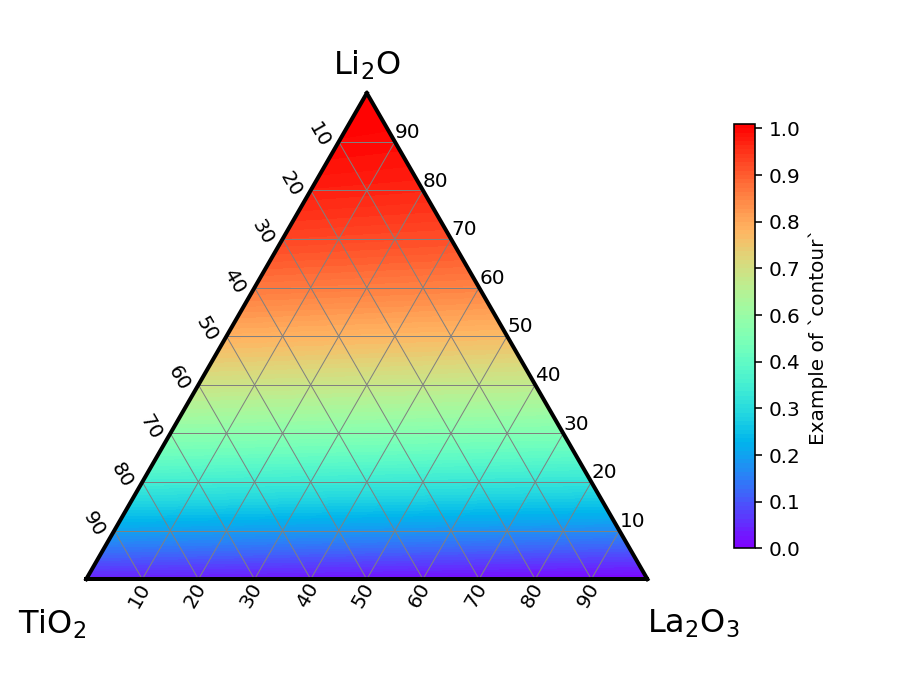
How to install
PyPI
pip install ternary-diagram
PyPI project is here.
Anaconda
conda install -c conda-forge ternary-diagram
Anaconda (conda-forge) package site is here.
Usage
See Examples and the documentation.
Examples
An easy example is here.
import matplotlib.pyplot as plt
from ternary_diagram import TernaryDiagram

# You can set `ax` to select which axes to draw. If not, the current axes will be used.
td = TernaryDiagram(["Li2O", "La2O3", "TiO2"])

# scatter
td.scatter(vector=[[1, 1, 1], [1, 2, 3]], z=[0, 1])
# You can set some options in `plt.scatter` like `marker`, `c` etc.
td.scatter(vector=[[2, 1, 3], [3, 2, 1]], marker="s", c="#022c5e", s=30)

# line plot
# You can set some options in `plt.plot` like `lw`, `c`, and so on.
td.plot([[1, 1, 1], [1, 2, 3]], color="black")

# save figure
td.fig.savefig("figure.png", dpi=144)
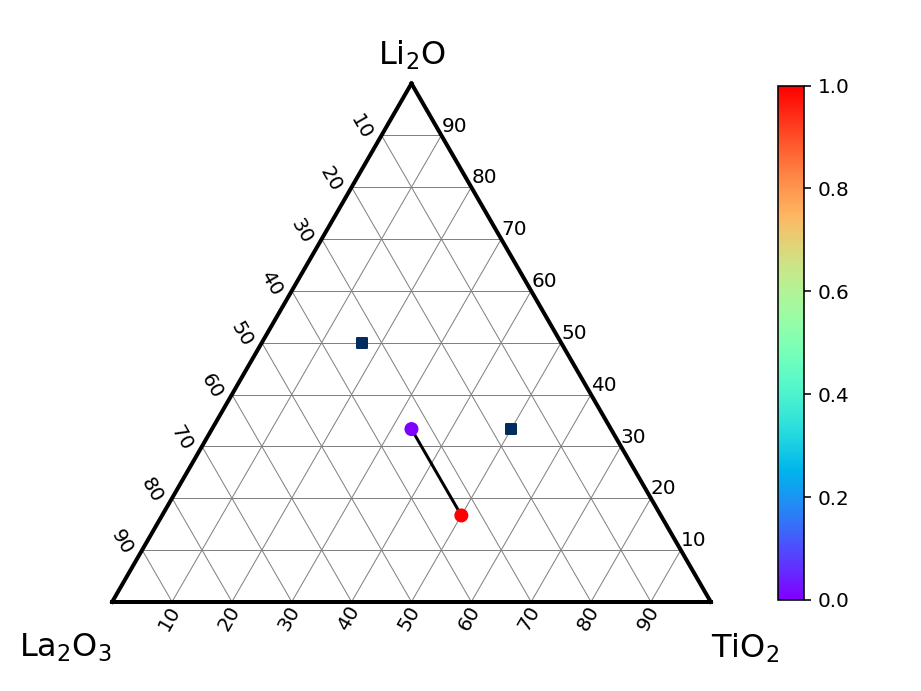
It can be written like this.
# The background color is sometimes transparent in jupyter notebooks, so set facecolor 'white'.
fig, ax = plt.subplots(facecolor="w")

# You can set `ax` to select which axes to draw. If not, the current axes will be used.
td = TernaryDiagram(["Li2O", "La2O3", "TiO2"], ax=ax)

# scatter
td.scatter(vector=[[1, 1, 1], [1, 2, 3]], z=[0, 1])
# You can set some options in `plt.scatter` like `marker`, `c` etc.
td.scatter(vector=[[2, 1, 3], [3, 2, 1]], marker="s", c="#022c5e", s=30)

# line plot
# You can set some options in `plt.plot` like `lw`, `c`, and so on.
td.plot([[1, 1, 1], [1, 2, 3]], color="black")

# save figure
fig.savefig("figure.png", dpi=144)
It means that you can draw multiple figures in one figure object.
See also the example folder.
Histories
v3.1.0
- Delete
.utils._BasePlotter.get_x_y(we should access directly). - Resolve #10 (Create
fillargument inTernaryDiagram.contour). - Resolve #11 (Create
auto_latex_notationargument inTernaryDiagram). - Update documentation.
- Update docstrings and typings.
LICENSE
See LICENSE.
MIT Licence
Copyright (c) 2021 yu9824
1 maintainer

Metadata
1 maintainer
Release files for ternary-diagram 3.2.1
For a detailed explanation of source distributions (sdists) and built distributions (wheels), please see the package formats documentation.
Source distribution (sdist)
| File | Size | Uploaded | Provenance | |
|---|---|---|---|---|
| ternary_diagram-3.2.1.tar.gz | 13.3 kB | With provenance | Details |
Built distribution (wheel)
| File | Interpreter | ABI | Platform | Reset |
|---|---|---|---|---|
| ternary_diagram-3.2.1-py3-none-any.whl | Python 3 | none | any | Details |
Total release size: 25.2 kB
Release files / ternary_diagram-3.2.1.tar.gz
| Download URL | ternary_diagram-3.2.1.tar.gz |
|---|---|
| Size | 13.3 kB |
| Tags | Source |
|
SHA-256 checksum How to use checksums |
9c58793619dd84a08c3d5c2aea08c91b53c6766d515edbc34d4b728518e1f331
|
|
BLAKE2b-256 checksum How to use checksums |
64208d0a232834dc10726a998892c012536943b053ac8117dd190b92d0bb400e
|
| Upload date | |
|
Uploaded using Trusted Publishing? What is trusted publishing? |
Yes |
| Uploaded via |
twine/6.1.0 CPython/3.12.8
|
Provenance
Provenance describes where a file came from. On PyPI, provenance is shared via attestations, which provide a verifiable record of the build or publishing details. View details, limitations and caveats.


PyPI Publish Attestation
PyPI verified that this artifact, at this checksum, originated from the publisher listed below.
Signed by GitHub Actions, verified by PyPI on Feb 17, 2025.
Transparency logRelease files / ternary_diagram-3.2.1-py3-none-any.whl
| Download URL | ternary_diagram-3.2.1-py3-none-any.whl |
|---|---|
| Size | 11.9 kB |
| Tags | Python 3 |
|
SHA-256 checksum How to use checksums |
4572fa89e728e52da0251e8926963fefc8e65aee249c868c7f4b7f0a2fb655d7
|
|
BLAKE2b-256 checksum How to use checksums |
39f582753829978ab67a3b2f65af2b6cf2ce20034d9d3b8935a2380cf3385957
|
| Upload date | |
|
Uploaded using Trusted Publishing? What is trusted publishing? |
Yes |
| Uploaded via |
twine/6.1.0 CPython/3.12.8
|
Provenance
Provenance describes where a file came from. On PyPI, provenance is shared via attestations, which provide a verifiable record of the build or publishing details. View details, limitations and caveats.
PyPI Publish Attestation
PyPI verified that this artifact, at this checksum, originated from the publisher listed below.
Signed by GitHub Actions, verified by PyPI on Feb 17, 2025.
Transparency logSecurity for ternary-diagram 3.2.1
Provenance
Provenance describes where a file came from. On PyPI, provenance is shared via attestations, which provide a verifiable record of the build or publishing details. View details, limitations and caveats.
Full provenance
All 2 files in this release have been uploaded with provenance metadata.
Attestation for ternary_diagram-3.2.1.tar.gz
PyPI Publish Attestation
PyPI verified that this artifact, at this checksum, originated from the publisher listed below.
Signed by GitHub Actions, verified by PyPI on Feb 17, 2025.
Transparency logA note on package security
PyPI is a repository for distributing packages, not a service for auditing them. While third-party security researchers and our staff do their best to detect and remove malicious packages, PyPI cannot guarantee the quality, security or suitability of any given package.














