
TextDirectory




TextDirectory allows you to combine multiple text files into one aggregated file. TextDirectory also supports matching files for certain criteria and applying transformations to the aggregated text.
TextDirectory can be used as a mere tool (via the CLI) and as a Python library.
Of course, everything TextDirectory does could be achieved in bash or PowerShell. However, there are certain use cases (e.g., when used as a library) in which it might be useful.
- Free software: MIT license
- Documentation: https://textdirectory.readthedocs.io
Features
- Aggregating multiple text files
- Filtering documents/texts based on various parameters such as length, content, and random sampling
- Filtering and transforming text files
- Transforming the aggregated text (e.g., transforming the text to lowercase)
| Version | Filters | Transformations |
|---|---|---|
| 0.1.0 | filter_by_max_chars(n int); filter_by_min_chars(n int); filter_by_max_tokens(n int); filter_by_min_tokens(n int); filter_by_contains(str); filter_by_not_contains(str); filter_by_random_sampling(n int; replace=False) | transformation_lowercase |
| 0.1.1 | filter_by_chars_outliers(n sigmas int) | transformation_remove_nl |
| 0.1.2 | filter_by_filename_contains(contains str) | transformation_usas_en_semtag; transformation_uppercase; transformation_postag(spacy_model str) |
| 0.1.3 | filter_by_similar_documents(reference_file str; threshold float) | transformation_remove_non_ascii; transformation_remove_non_alphanumerical |
| 0.2.0 | filter_by_max_filesize(max_kb int); filter_by_min_filesize(min_kb int) | transformation_to_leetspeak; transformation_crude_spellchecker(language model str) |
| 0.2.1 | None | transformation_remove_stopwords(stopwords_source str; stopwords str [en]; spacy_model str; custom_stopwords str); transformation_remove_htmltags |
| 0.3.0 | None | transformation_remove_weird_tokens(spaCy model; remove_double_space=False); transformation_lemmatize(spaCy model) |
| 0.3.2 | None | transformation_expand_english_contractions |
| 0.3.3 | filter_by_filenames(filenames list); filter_by_filename_not_contains(not_contains str) | transformation_eebop4_to_plaintext; transformation_replace_digits(replacement_character str); transformation_ftfy |
| 0.3.4 | filter_by_type_token_ratio(min_ttr float; max_ttr float) | transformation_replace_string(replace str; replace_with str) |
| 0.4.0 | None (modernization release) | None (modernization release) |
Installation
Install TextDirectory via pip:
pip install textdirectory
The spaCy-based transformations (transformation_postag, transformation_lemmatize,
transformation_remove_stopwords, transformation_remove_weird_tokens) are optional. To use them, install the
nlp extra and download a spaCy model:
pip install 'textdirectory[nlp]'
python -m spacy download en_core_web_sm
Quickstart
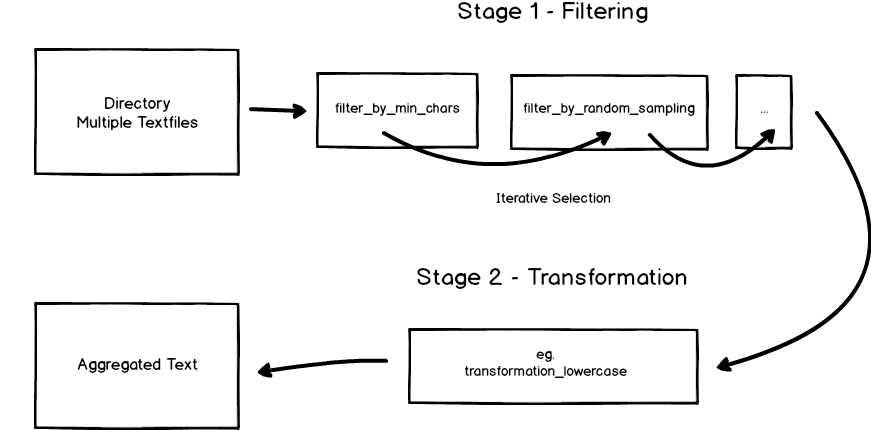
TextDirectory, as exemplified below, works with a two-stage model. After loading in your data (directory) you can, by applying filters, iteratively select the files you want to process. In a second step you can perform transformations on the text before finally aggregating it to either a file or memory.
As a Command-Line Tool
TextDirectory comes equipped with a CLI (textdirectory, also available as python -m textdirectory).
The syntax for both the filters and transformations works similarly. They are chained by adding slashes (/) and
parameters are passed via commas (,): filter_by_min_tokens,5/filter_by_random_sampling,2.
Example 1: A Very Simple Aggregation
textdirectory --directory testdata --output_file aggregated.txt
This will take all files (.txt) in testdata and then aggregates the files into a file called aggregated.txt.
You could also use '*' as a wildcard for filetype if you need to include all files and not just .txt:
textdirectory --directory testdata --output_file aggregated.txt --filetype *
Example 2: Applying Filters and Transformations
In this example, we want to filter the files based on their token count, perform a random sampling and finally transform all text to lowercase:
textdirectory --directory testdata --output_file aggregated.txt --filters filter_by_min_tokens,5/filter_by_random_sampling,2 --transformations transformation_lowercase
After passing two filters (filter_by_min_tokens and filter_by_random_sampling) we've applied the transformation_lowercase transformation.
The resulting file will contain the content of two files that each have at least five tokens.
The same transformation can also be staged multiple times. For example, we could stage two simple string replacements like this:
textdirectory --directory testdata --output_file aggregated.txt --transformations transformation_replace_string,lorem,x/transformation_replace_string,ipsum,y
If the --output_file is missing, the CLI will output the aggregated text to the console. In this scenario, there is
no progress bar visible (can be controlled using --disable_tqdm True/False).
As a Python Library
In order to demonstrate TextDirectory as a Python library, we'll recreate the second example from above:
import textdirectory

td = textdirectory.TextDirectory(directory='testdata')
td.load_files(recursive=False, filetype='txt', sort=True)
td.filter_by_min_tokens(5)
td.filter_by_random_sampling(2)
td.stage_transformation(['transformation_lowercase'])
td.aggregate_to_file('aggregated.txt')
If we don't have special requirements, we can also call
td = textdirectory.TextDirectory(directory='testdata', autoload=True) to skip manually calling load_files.
If we wanted to keep working with the actual aggregated text, we could have called text = td.aggregate_to_memory()
instead of aggregate_to_file.
import textdirectory

td = textdirectory.TextDirectory(directory='testdata', autoload=True)
td.get_text(0)
Sometimes we might want to get the actual text of a given file. This can be achieved as seen above. The get_text
method will return the transformed text if it is available. Otherwise, it will simply read the file and return the
text.
Every applied filter will create a state (i.e., a checkpoint). If we want to go back to a previous state, we can
print all states by calling td.print_saved_states(). Previous states can then be loaded by calling
td.load_aggregation_state(state=0).
It's also possible to pass arguments to the individual transformations. In order to do this (at the moment) you have to adhere to the correct order of arguments:
# def transformation_remove_stopwords(text, stopwords_source='internal', stopwords='en', spacy_model='en_core_web_sm', custom_stopwords=None, *args)
td.stage_transformation(['transformation_remove_stopwords', 'internal', 'en', 'en_core_web_sm', 'dolor'])
In the above example, we are adding additional custom stopwords to the transformer.
You also might not always want to aggregate texts into one file in many cases but filter and transform them:
import textdirectory

td = textdirectory.TextDirectory(directory='input')
td.load_files()

td.filter_by_max_chars(480)
td.stage_transformation(['transformation_to_leetspeak'])

td.transform_to_files('output')
In the example above, we are loading all files in input. After filtering and transforming, the modified files will
be written to output.
In addition, there are a few simple examples in the repository for you to look at.
Special Transformations
transformation_crude_spellchecker
This is a very crude spellchecker implemented following Peter Norvig's excellent tutorial. It's really more of an experiment and not production ready in any sense of the word.
transformation_eebop4_to_plaintext
This is a highly specific transformation that will extract the plain text from an EEBO-TCP P4 corpus file. Both the header as well as all XML tags will be removed during this transformation.
transformation_ftfy
This transformation simply applies ftfy.fix_text to the text.
It is highly recommended to use ftfy as a first transformation if you are working
with messy Unicode text.
Notes for Developers
The project uses uv for development:
uv sync --group dev --extra nlp
uv pip install https://github.com/explosion/spacy-models/releases/download/en_core_web_sm-3.8.0/en_core_web_sm-3.8.0-py3-none-any.whl

# Later syncs: use --inexact, otherwise the spaCy model is removed again
uv sync --inexact --group dev --extra nlp

uv run pytest              # run the test suite (network tests excluded by default)
uv run pytest -m network   # run the tests that hit live external services
uv run ruff check src tests
uv run mypy
See CONTRIBUTING.md for the full development guide and the releasing documentation for how releases are built and published.
Behavior
We are not holding the actual texts in memory. This leads to much more disk read activity (and time inefficiency),
but saves memory. Of course, this is not the case when using aggregate_to_memory.
transformation_usas_en_semtag relies on the web version of
Paul Rayson's USAS Tagger. This transformation uploads the full text of every
processed file to a third-party server operated by Lancaster University. Do not use it with confidential, personal,
or licensed data. Don't use this transformation for large amounts of text, give credit, and consider using their
commercial product Wmatrix.
If you are working with a lot of files, it might be wise to use load_files(fast=True, skip_checkpoint=True).
This will load files much quicker but skip collecting metadata. Filters that need that metadata (character and
token counts) will then raise a ValueError.
Credits
This package was originally based on the audreyr/cookiecutter-pypackage cookiecutter template.
1 maintainer

Download files
Download the file for your platform. If you're not sure which to choose, learn more about installing packages.
Source Distribution
Built Distribution
Filter files by name, interpreter, ABI, and platform.
If you're not sure about the file name format, learn more about wheel file names.
Copy a direct link to the current filters
File details
Details for the file textdirectory-0.4.1.tar.gz.
File metadata
- Download URL: textdirectory-0.4.1.tar.gz
- Upload date:
- Size: 6.2 MB
- Tags: Source
- Uploaded using Trusted Publishing? Yes
- Uploaded via:
twine/6.1.0 CPython/3.13.14
File hashes
| Algorithm | Hash digest | |
|---|---|---|
| SHA256 |
fdcc6d879c31ace387653f718858aaea53f60c45cae830bfd3cc7c8fff6254da
|
|
| MD5 |
3e88bd9a4a33abc93fcd0b9ea3f1034f
|
|
| BLAKE2b-256 |
381a8346ab646cdee5aa6926df0b0d04483c32166c33169b43ab60a54abec3a9
|
Provenance
The following attestation bundles were made for textdirectory-0.4.1.tar.gz:
Publisher:
release.yml on IngoKl/textdirectory
-
Statement:
-
Statement type:
https://in-toto.io/Statement/v1 -
Predicate type:
https://docs.pypi.org/attestations/publish/v1 -
Subject name:
textdirectory-0.4.1.tar.gz -
Subject digest:
fdcc6d879c31ace387653f718858aaea53f60c45cae830bfd3cc7c8fff6254da - Sigstore transparency entry: 2254728299
- Sigstore integration time:
-
Permalink:
IngoKl/textdirectory@ef0ce8747ab36e67fab0e4d559156382491d5fbb -
Branch / Tag:
refs/tags/v0.4.1 - Owner: https://github.com/IngoKl
-
Access:
public
-
Token Issuer:
https://token.actions.githubusercontent.com -
Runner Environment:
github-hosted -
Publication workflow:
release.yml@ef0ce8747ab36e67fab0e4d559156382491d5fbb -
Trigger Event:
push
-
Statement type:
File details
Details for the file textdirectory-0.4.1-py3-none-any.whl.
File metadata
- Download URL: textdirectory-0.4.1-py3-none-any.whl
- Upload date:
- Size: 6.2 MB
- Tags: Python 3
- Uploaded using Trusted Publishing? Yes
- Uploaded via:
twine/6.1.0 CPython/3.13.14
File hashes
| Algorithm | Hash digest | |
|---|---|---|
| SHA256 |
0aa361722fc0ed327e7c4f7219a7b651ccb5fdcc6538ffed76884f8ad204300c
|
|
| MD5 |
bbfc3a5b44a372d9d2efef20874e85ee
|
|
| BLAKE2b-256 |
1163a361186d11cc9a2747f395f5bbc0ec71079a6ce34ada511be6818a447f2c
|
Provenance
The following attestation bundles were made for textdirectory-0.4.1-py3-none-any.whl:
Publisher:
release.yml on IngoKl/textdirectory
-
Statement:
-
Statement type:
https://in-toto.io/Statement/v1 -
Predicate type:
https://docs.pypi.org/attestations/publish/v1 -
Subject name:
textdirectory-0.4.1-py3-none-any.whl -
Subject digest:
0aa361722fc0ed327e7c4f7219a7b651ccb5fdcc6538ffed76884f8ad204300c - Sigstore transparency entry: 2254728417
- Sigstore integration time:
-
Permalink:
IngoKl/textdirectory@ef0ce8747ab36e67fab0e4d559156382491d5fbb -
Branch / Tag:
refs/tags/v0.4.1 - Owner: https://github.com/IngoKl
-
Access:
public
-
Token Issuer:
https://token.actions.githubusercontent.com -
Runner Environment:
github-hosted -
Publication workflow:
release.yml@ef0ce8747ab36e67fab0e4d559156382491d5fbb -
Trigger Event:
push
-
Statement type:














