
TextShot



Take a screenshot and copy its text content to the clipboard. Works on Windows, macOS, and most modern Linux distros.
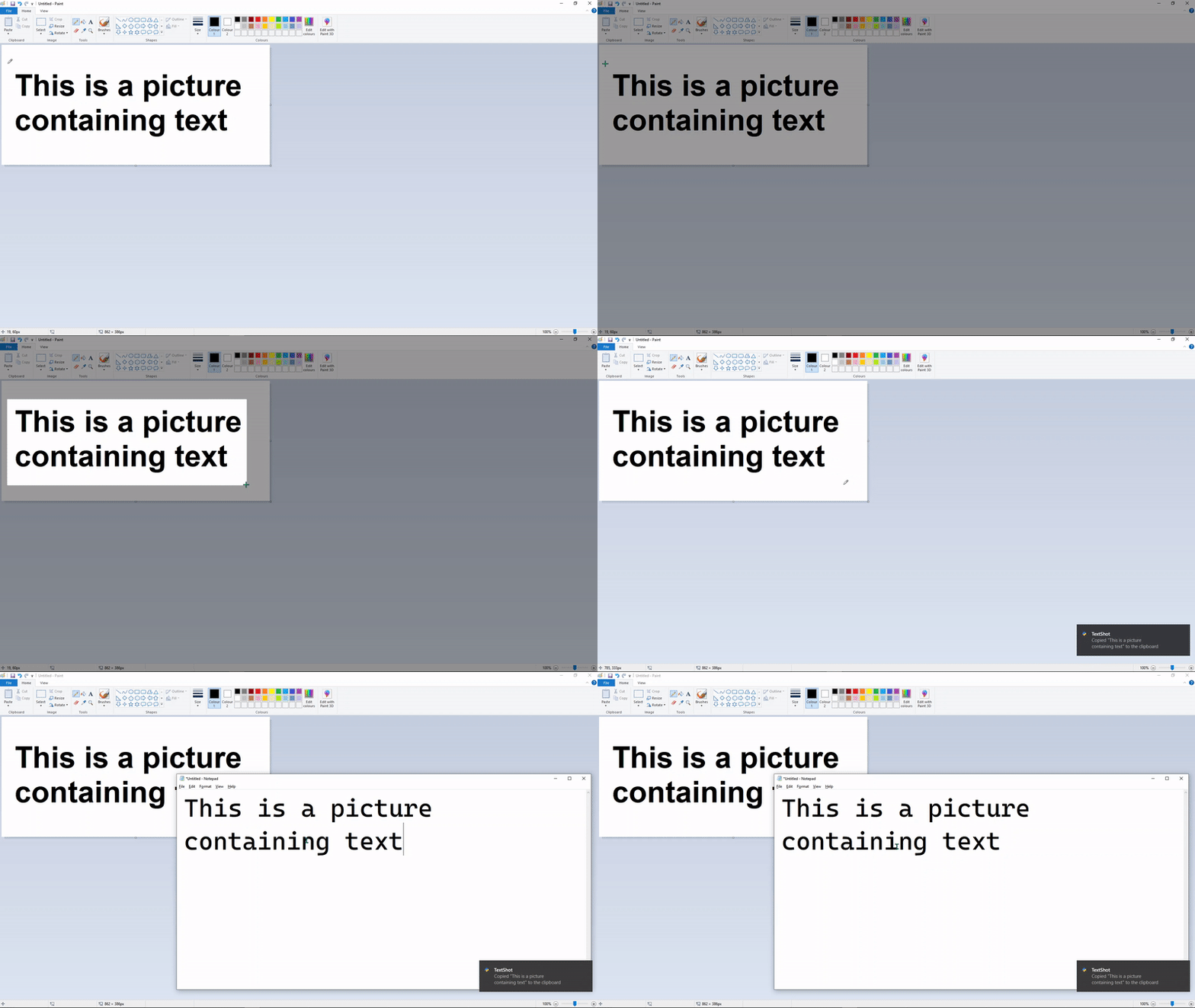
Use
textshot -h prints the available command line options:
usage: textshot [-h] [-i INTERVAL] [langs]

Take a screenshot and copy its text content to the clipboard.

positional arguments:
langs                 languages passed to tesseract, eg. "eng+fra" (default: eng)

optional arguments:
-h, --help            show this help message and exit
-i INTERVAL, --interval INTERVAL
                        select a screen region then take textshots every INTERVAL milliseconds
Examples
-
Basic usage:
textshotopens an overlay where a rectangle can be drawn around the text to be copied. -
Alternate languages:
textshot eng+fraspecifies use of English as the primary language and French as the secondary language. Make sure that the appropriate data files for Tesseract are installed for other languages. A list of all supported languages can be found here. -
Continuously copy text content:
textshot --interval 200draw a rectangle at a screen region then copy text from it every 200ms.
Hotkeys
It is recommended to attach a global hotkey to this tool, so you can run it without opening a console and typing in the command.
On Windows, one can accomplish this by using an AutoHotkey script; textshot.ahk contains a sample AHK script that can be used.
On Ubuntu, open the Keyboard Settings, which shows you all the Gnome shortcuts. At the bottom there is a + button to add your own shortcuts. Click it and set the command to textshot. In case you are using a virtual environment, the textshot path above should point to the environment's textshot.
The process on other operating systems can be found by searching how to run a shell command with a keyboard shortcut.
Installation
Prerequisites
- Install Google's Tesseract OCR Engine, and ensure that
tesseractcan be reached from the command line by adding the directory to your system path.
Installation with pip
$ pip install textshot
$ textshot
You may wish to use a virtual environment if the dependencies conflict with others on your machine.
Installation from source
- Clone this repository...
git clone https://github.com/ianzhao05/textshot.git - ...and
cdinto it:cd textshot - Run
pip install .(for development, you may install withpip install -e .which will allow you to test your modifications without reinstall) - You may now run
textshot
From repository
@rigred has added this to the AUR, so Arch Linux users can install the package textshot-git with their AUR helper. For example, yay -S textshot-git. This may not be up to date, so if you encounter issues, use the normal installation method above.
Troubleshooting
macOS
You may need to give permission to capture the screen. You can do so by going to System Preferences > Security & Privacy > Privacy > Screen Recording, then checking the box for Terminal/iTerm.
Linux
If the text shows up correctly in the notification, but you cannot paste it, install xclip (e.g. with sudo apt install xclip).
1 maintainer

Metadata
1 maintainer
Release files for textshot 0.1.2
For a detailed explanation of source distributions (sdists) and built distributions (wheels), please see the package formats documentation.
Source distribution (sdist)
| File | Size | Uploaded | |
|---|---|---|---|
| textshot-0.1.2.tar.gz | 9.7 kB | Details |
Built distribution (wheel)
| File | Interpreter | ABI | Platform | Reset |
|---|---|---|---|---|
| textshot-0.1.2-py3-none-any.whl | Python 3 | none | any | Details |
Total release size: 17.4 kB
Release files / textshot-0.1.2.tar.gz
| Download URL | textshot-0.1.2.tar.gz |
|---|---|
| Size | 9.7 kB |
| Tags | Source |
|
SHA-256 checksum How to use checksums |
87032779614611c5cbcf392bbcaacf8b50a34be43f9cedc5c203946545ff692f
|
|
BLAKE2b-256 checksum How to use checksums |
b64e323003cf150556d9251421ea79295acae9ddedcf713e6685d215c65148de
|
| Upload date | |
|
Uploaded using Trusted Publishing? What is trusted publishing? |
No |
| Uploaded via |
twine/4.0.2 CPython/3.10.10
|
Release files / textshot-0.1.2-py3-none-any.whl
| Download URL | textshot-0.1.2-py3-none-any.whl |
|---|---|
| Size | 7.7 kB |
| Tags | Python 3 |
|
SHA-256 checksum How to use checksums |
fe3fa7525638b09520e6960d10c71d886f130903bddc2547438484090d9f7adc
|
|
BLAKE2b-256 checksum How to use checksums |
0addfd9cc469ee9a5b4cbc59a71d08a43c8aa2f9662b5c5bb8b3b2ffeb26ee71
|
| Upload date | |
|
Uploaded using Trusted Publishing? What is trusted publishing? |
No |
| Uploaded via |
twine/4.0.2 CPython/3.10.10
|














